Solved The default security settings of the "Default Folder".

AnotherIdiot

New member
Local time
7:34 PM
Messages
3
(windows 7) I accidentally messed up the security settings in the "Default Folder" (a shortcut?) of the Users folder.
I removed administrators permissions , that caused my pc to be unable to restore to previous restore point correctly. However, I was able to re-add the admin permission and everything now is fine.
Yet I need help here.
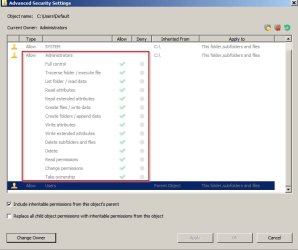
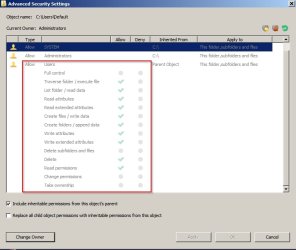
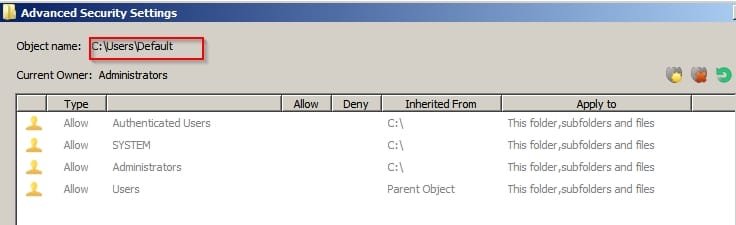
1 could anyone post screenshots of the default "default folder" security settings? I need to set it back to the default one even though now it works fine.
2 why the hell is that folder NOT HIDDEN? Are yours not hidden as well? Of course the option to hide all system file is checked on my pc. The only reason I messed with that folder is because I thought it was just a normal folder and not a system folder. Anyway to get it back to be invisible?
Thanks for helps in advanced. And I don't want to go to Microsoft supports because they always give robotic replies with no helps at all.
 
Last edited:

My Computer My Computer

Computer type
PC/Desktop
OS
I am using 3 computers each of them have different OS. Basically windows 7 and windows 10
What I've got is as follows:

Default1.jpg

Default2.jpg

Default3.jpg

Default4.jpg

Default5.jpg
 

My Computer My Computer

Computer type
Laptop
Computer Manufacturer/Model Number
ASUS
OS
Microsoft Windows 7 Home Premium 64-bit 7601 Multiprocessor Free Service Pack 1
CPU
AMD C-60 APU with Radeon(tm) HD Graphics
Motherboard
ASUSTeK COMPUTER INC. X501U
Memory
4.00 GB
Graphics Card(s)
AMD Radeon HD 6290 Graphics
Sound Card
(1) AMD High Definition Audio Device (2) Realtek High Defi
Screen Resolution
1366 x 768 x 32 bits (4294967296 colors) @ 60 Hz
Hard Drives
Hitachi HTS545050A7E380 SATA Disk Device
Antivirus
Comodo CIS & FW, SecureAplus App Whitelisting, Threatfire
Browser
Cyberfox 64bit, Opera 64bit, Airfox
Other Info
Spy-The-Spy, HitmanPro.Alert, Norton Connect Safe, MJRegWatcher, BitDefender TrafficLight, Voodoo Shield, Zemana AntiMalware
Hi,

I accidentally messed up the security settings in the "Default Folder" (a shortcut?) of the Users folder.
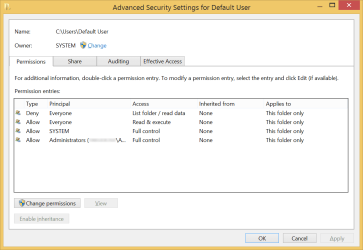
Here's the security settings for the "C:\Users\Default User" junction, if that's what you're referring to.

DefaultUserPerms.png

The security settings for this particular junction are identical for both Windows 7 and 8 installs. N.B., due to a bug in Windows 7's Explorer, the Access column in each of the Allow entries will display as "Special" in Windows 7.

why the hell is that folder NOT HIDDEN? Are yours not hidden as well?
Whether we're talking about "C:\Users\Default" or "C:\Users\Default User", either way, both items are supposed to be marked Hidden. The junction is further marked with the System attribute.


I've attached a quick click-fix solution for repairing the security settings for "C:\Users\Default User". Along with the NTFS permissions, the owner, protection state, and the file attributes of "C:\Users\Default User" will be restored to a fresh-install standard state.
 

Attachments

My Computer My Computer

Computer type
PC/Desktop
OS
Windows 10, Windows 8.1 Pro, Windows 7 Professional, OS X El Capitan
Thanks guys. I will try that later."C:\Users\Default" is marked as hidden, which is fine. "C:\Users\Default User" is not marked as hidden and is not marked with the system attribute. It used to be marked with the system attribute. Probably because I was curious long time ago and tried to open that folder that's how it's messed up. I will try the bat file later.
Thanks guys.
 
Last edited:

My Computer My Computer

Computer type
PC/Desktop
OS
I am using 3 computers each of them have different OS. Basically windows 7 and windows 10
Thank you Callender for your reply.
Thank you Pyprohly, the bat file works. It fixed the folder and set it back to be invisible and marked with the System attribute. Thank you very much.

I tried the window repair tools before I came here. It couldn't even find the problem. So, thanks again.
 

My Computer My Computer

Computer type
PC/Desktop
OS
I am using 3 computers each of them have different OS. Basically windows 7 and windows 10
Back
Top