The device cannot be used for ReadyBoost.

armyswat

New member
Local time
3:47 AM
Messages
5
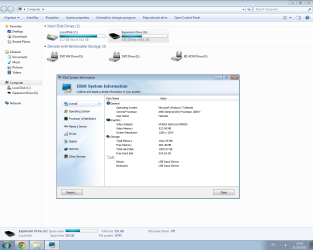
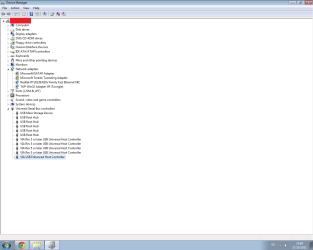
Hello I don't know which usb version I have. I upload a pic and you will see in your self I have no idea which usb I have and aslo I got 1000 gb hard disk and I wana turn ready boost on and it says me The Device cannot be used for ReadyBoost.

What should I do? I have no idea I got also 2gb usb and it doesn't work too it says the same...

I searched 4 hours for a Guide or some thing that will solve this problem and found also in this forum but they didn't help me, I read a lot and It didn't help, I need more info how to fix it and how to check if I have usb 2.0 ... And what should I do to make ready boost work?

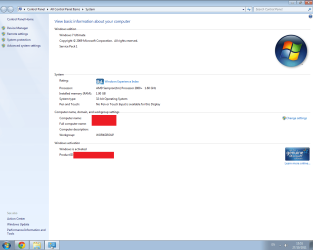
Here are some pics and info:
 

Attachments
  • My pc performance.png
    My pc performance.png
    46.4 KB · Views: 415
  • Overall system info.png
    Overall system info.png
    73.5 KB · Views: 401
  • This device cannot be used for ReadyBoost.png
    This device cannot be used for ReadyBoost.png
    40.2 KB · Views: 458
  • Which usb do I have..png
    Which usb do I have..png
    24.7 KB · Views: 340

My Computer

OS
Windows 7 Ultimate 32bit SP1
Memory
1GB Ram
Graphics Card(s)
Nvidia 8400 GeForce
Screen Resolution
1280 x 1024
Keyboard
Logitech
Mouse
Logitech
Internet Speed
5mb
The device you chose for Ready Boost appears to be a 1000 GB disk drive.
The message is correct. You cannot use that drive.
You can't use disk drives for Ready Boost. They're too slow.

That's the whole point of having Ready Boost: You avoid slow disk access by caching data on a faster medium (a flash drive).

Anyway, there's a better solution. You have on 1 GB of RAM in this system. That's readlly not adequate for Windows 7. Even 2 GB is marginal. Can your system accept 4 GB of RAM? If so, skip Ready Boost. Get more memory. Lots more.
 

My Computer

OS
Win 7
Armyswat,
Please purchase a ready boost verified usb drive or sd card if you have a fast reader. Today you can find 8gb usb drive for peanuts. Configure all or at least half of it's capacity and let the system learn over a week and you will see a modest improvement. When funds allow start researching the maximum ram of your system and take advantage of falling ram prices to add the best speed upgrade to your system. keep in mind with W7 32bit your ram is held to 4gb max and you'll only see 3.2-3.5 of that and all the ram sticks are best to be matched pairs ! Consider a 64bit OS upgrade if you use ram intensive programs like photoshop and the like.
 

My Computer

Computer type
PC/Desktop
Computer Manufacturer/Model Number
A blend of brains, brawn and dumb luck.
OS
Windows 7 Ultimate 64
CPU
i7 3770k OC'd 4.6 @ 1.17v, also FX 8120 & i5 miniITX
Motherboard
MSI P67A-GD80 b3
Memory
32 gb G.Skill Sniper DDR3 10-12-12-31 @ 2133
Graphics Card(s)
XFX Radeon 7870 2GB DDR5
Sound Card
Sound Blaster Z Series Card
Monitor(s) Displays
(2) LG LED 23" 1920 x 1080 2ms Monitors via mini d-port
Screen Resolution
1680 X 1050 p
Hard Drives
Samsung 256 gb 830 SSD sata III
(1) 1 tb WD Black
(2) 1 tb Hitachi deskmates/sata II
(2) 1 tb WD green/sata II
(2) 3 tb Seagate Barracuda
(1) 120 gb OCZ Vertex SS
(1) Drobo 5N w/5 Seagate 3tb
PSU
EVGA modular 1000G2 80% gold rating & APC 1200 RS
Case
CoolerMaster Storm Styker
Cooling
7 case fans 140mm & 120mm, NZXT Kraken X60
Keyboard
(2) Logitech Illuminated Keyboards (1) usb (1) wireless
Mouse
Logitech G700 & T-BC21 - nano nx for the laptop
Internet Speed
Basic 120mbps down
Antivirus
Trend Micro Titanium Max Security & Malwarebytes Premium
Browser
Chrome and IE 10
Other Info
5 Noctua case fans + 3 Noctua in p/p on NZXT cooler
Integrated hot swap drive bays for 2.5" Drives
(2) Lite-on dvd/cd/Blu Ray optical 22X
Integrated fan controller and led on/off
HP Officejet Pro 8630 all-n-one
Hot-swappable 3.5" hard drive bay
Netgear Nighthawk router
Asus USB 3 & sata 6 PCIe card
Vantec IDE to sata adptr./Ultra sata adptr
Lenovo L420 i5 lappy with m sata
Drobo 5N advanced NAS
The device you chose for Ready Boost appears to be a 1000 GB disk drive.
The message is correct. You cannot use that drive.
You can't use disk drives for Ready Boost. They're too slow.

That's the whole point of having Ready Boost: You avoid slow disk access by caching data on a faster medium (a flash drive).

Anyway, there's a better solution. You have on 1 GB of RAM in this system. That's readlly not adequate for Windows 7. Even 2 GB is marginal. Can your system accept 4 GB of RAM? If so, skip Ready Boost. Get more memory. Lots more.

Dude I wana buy ram for my computer how much money does it cost? I have little bit money I'm only 17 and no job I'm still studing in school, I have like 55 dollar man... Can I buy 4gb ram with 50 dollar? But I can't buy through internet I will buy in a shop near my house because I don't have vista or paypal and my parents won't buy never never some thing in the internet for me, only in a shop near my house but I gotta find a job in my self but I can't work cuz I'm studing...
 

My Computer

OS
Windows 7 Ultimate 32bit SP1
Memory
1GB Ram
Graphics Card(s)
Nvidia 8400 GeForce
Screen Resolution
1280 x 1024
Keyboard
Logitech
Mouse
Logitech
Internet Speed
5mb
Hey dude I got another USB with 2gb space... but it's not very good, I've tried it before and It's was bugged or some thing but little bit so I tried to use Ready Boost on that device and I can't too... What to do man??

Here is a pic:
 

Attachments

  • USB 2GB Ready Boost.png
    USB 2GB Ready Boost.png
    40.5 KB · Views: 201

My Computer

OS
Windows 7 Ultimate 32bit SP1
Memory
1GB Ram
Graphics Card(s)
Nvidia 8400 GeForce
Screen Resolution
1280 x 1024
Keyboard
Logitech
Mouse
Logitech
Internet Speed
5mb
It's not easy finding out if the usb drives are going to work as many that will aren't advertised as readyboost certified will work and some that are readyboost certified won't. The good news is they are dirt cheap these days and if you have access to a good computer store near you can ask them which drives they sell will work.......like this one:
Patriot PEF8GRUSB Xporter Rage USB Flash Drive - 8GB, USB 2.0 at TigerDirect
 

My Computer

Computer type
PC/Desktop
Computer Manufacturer/Model Number
A blend of brains, brawn and dumb luck.
OS
Windows 7 Ultimate 64
CPU
i7 3770k OC'd 4.6 @ 1.17v, also FX 8120 & i5 miniITX
Motherboard
MSI P67A-GD80 b3
Memory
32 gb G.Skill Sniper DDR3 10-12-12-31 @ 2133
Graphics Card(s)
XFX Radeon 7870 2GB DDR5
Sound Card
Sound Blaster Z Series Card
Monitor(s) Displays
(2) LG LED 23" 1920 x 1080 2ms Monitors via mini d-port
Screen Resolution
1680 X 1050 p
Hard Drives
Samsung 256 gb 830 SSD sata III
(1) 1 tb WD Black
(2) 1 tb Hitachi deskmates/sata II
(2) 1 tb WD green/sata II
(2) 3 tb Seagate Barracuda
(1) 120 gb OCZ Vertex SS
(1) Drobo 5N w/5 Seagate 3tb
PSU
EVGA modular 1000G2 80% gold rating & APC 1200 RS
Case
CoolerMaster Storm Styker
Cooling
7 case fans 140mm & 120mm, NZXT Kraken X60
Keyboard
(2) Logitech Illuminated Keyboards (1) usb (1) wireless
Mouse
Logitech G700 & T-BC21 - nano nx for the laptop
Internet Speed
Basic 120mbps down
Antivirus
Trend Micro Titanium Max Security & Malwarebytes Premium
Browser
Chrome and IE 10
Other Info
5 Noctua case fans + 3 Noctua in p/p on NZXT cooler
Integrated hot swap drive bays for 2.5" Drives
(2) Lite-on dvd/cd/Blu Ray optical 22X
Integrated fan controller and led on/off
HP Officejet Pro 8630 all-n-one
Hot-swappable 3.5" hard drive bay
Netgear Nighthawk router
Asus USB 3 & sata 6 PCIe card
Vantec IDE to sata adptr./Ultra sata adptr
Lenovo L420 i5 lappy with m sata
Drobo 5N advanced NAS
Hey dude if I buy from the internet, it will add me 8 gb ram? I wana buy this from the internet, i need to make vista first for my self..
 

My Computer

OS
Windows 7 Ultimate 32bit SP1
Memory
1GB Ram
Graphics Card(s)
Nvidia 8400 GeForce
Screen Resolution
1280 x 1024
Keyboard
Logitech
Mouse
Logitech
Internet Speed
5mb
Note that there is a ReadyBoost event log that can tell you why a device can't be used, although I would always agree that adding more RAM is preferable to using ReadyBoost - it's just that adding more RAM isn't always possible.
 

My Computer

Computer type
PC/Desktop
Computer Manufacturer/Model Number
Custom
OS
Windows 10 Pro x64
CPU
Intel Core i7 4790K @ 4.5GHz
Motherboard
Asus Maximus Hero VII
Memory
32GB DDR3
Graphics Card(s)
Nvidia GeForce GTX970
Sound Card
Realtek HD Audio
Screen Resolution
1920x1200
Hard Drives
1x Samsung 250GB SSD
4x WD RE 2TB (RAIDZ)
PSU
Corsair AX760i
Case
Fractal Design Define R4
Cooling
Noctua NH-D15
Back
Top