the latest windows update cannot be removed

Hi rick33,

Now you have my computer potentially working.
I used F12 to set it to start from the DVD.
Put in the recovery DVD's.
Seems to be reading them so far.

But what do i do about the battery I removed? Just put it back in? Is it dud?

So is it still installing Win 7?
Yes, you can put the battery back in.
What do you mean DVD's and reading them?
 

My Computer My Computer

Computer type
Laptop
Computer Manufacturer/Model Number
Fujitsu LIFEBOOK
OS
Win 7 HP SP1 64-bit Vista HB SP2 32-bit Linux Mint 18.3
CPU
Intel(R) Pentium(R) CPU P6200 @ 2.13GHz
Motherboard
FUJITSU FJNBB06
Memory
4.00 GB
Graphics Card(s)
Intel(R) Graphics Media Accelerator HD
Sound Card
[1] Realtek High Definition Audio [2] Intel(R) Display Audio
Screen Resolution
1366 x 768 x 32 bits (4294967296 colors) @ 59 Hz
Hard Drives
TOSHIBA MK5076GSX
Antivirus
AVG FREE
"So is it still installing Win 7?"
it should be installing whatever was there before. probably not with SP1

thanks

PS replacement battery available from a non Toshiba brand
 

My Computer My Computer

Computer type
PC/Desktop
Computer Manufacturer/Model Number
toshiba
OS
windows 7 home premium /64
Other Info
Just an old laptop. Satellite L675 019
Hi rick33,

"So is it still installing Win 7?"
It should be installing whatever was there before. probably not with SP1

thanks

PS replacement battery available from a non Toshiba brand

Rick33, AGAIN, please use the QUOTE button when responding!

If it is re-installing fom the DVD you made then it HAS SP1 because the ISO included SP1! The install you are performing is a clean install and will therefore delete everything previously there and replace it with a clean fresh install of Win 7 SP1!

You probably DON'T need a replacement battery. You can test out the battery when you have finished installing Win 7 by removing the power lead!
 

My Computer My Computer

Computer type
Laptop
Computer Manufacturer/Model Number
Fujitsu LIFEBOOK
OS
Win 7 HP SP1 64-bit Vista HB SP2 32-bit Linux Mint 18.3
CPU
Intel(R) Pentium(R) CPU P6200 @ 2.13GHz
Motherboard
FUJITSU FJNBB06
Memory
4.00 GB
Graphics Card(s)
Intel(R) Graphics Media Accelerator HD
Sound Card
[1] Realtek High Definition Audio [2] Intel(R) Display Audio
Screen Resolution
1366 x 768 x 32 bits (4294967296 colors) @ 59 Hz
Hard Drives
TOSHIBA MK5076GSX
Antivirus
AVG FREE
Well I am typing this on the formerly dud T-17 Laptop. THANK YOU

i had made recovery disks in 2017. that is what i used.

now i probably need to download all the updates from 2010!
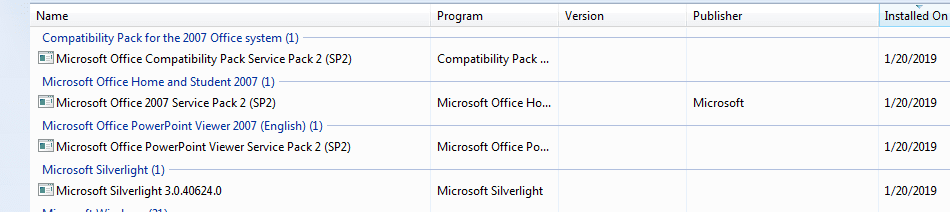
does not look like i even have SP1 although strangely I found this...
thanks
 

Attachments

  • T-17 win updates.PNG
    T-17 win updates.PNG
    11 KB · Views: 0

My Computer My Computer

Computer type
PC/Desktop
Computer Manufacturer/Model Number
toshiba
OS
windows 7 home premium /64
Other Info
Just an old laptop. Satellite L675 019
Hi rick33,

Well I am typing this on the formerly dud T-17 Laptop. THANK YOU.
:what:

I had made recovery disks in 2017. That is what I used.

So we have all wasted our time on this then trying to get you a fresh clean Win 7 SP1 install!

Now I probably need to download all the updates from 2010!

Who knows!

Does not look like I even have SP1 although strangely I found this...

Who knows!
 

My Computer My Computer

Computer type
Laptop
Computer Manufacturer/Model Number
Fujitsu LIFEBOOK
OS
Win 7 HP SP1 64-bit Vista HB SP2 32-bit Linux Mint 18.3
CPU
Intel(R) Pentium(R) CPU P6200 @ 2.13GHz
Motherboard
FUJITSU FJNBB06
Memory
4.00 GB
Graphics Card(s)
Intel(R) Graphics Media Accelerator HD
Sound Card
[1] Realtek High Definition Audio [2] Intel(R) Display Audio
Screen Resolution
1366 x 768 x 32 bits (4294967296 colors) @ 59 Hz
Hard Drives
TOSHIBA MK5076GSX
Antivirus
AVG FREE
i vaguely remember a post about something that installed all the updates without the ones that have to be removed.
also will the SP1 disk we made update this computer to SP1?
I think i need SP1 to get other softwares to work.

thanks


UPDATE ran winupdate and it is installing the SP1
 

My Computer My Computer

Computer type
PC/Desktop
Computer Manufacturer/Model Number
toshiba
OS
windows 7 home premium /64
Other Info
Just an old laptop. Satellite L675 019
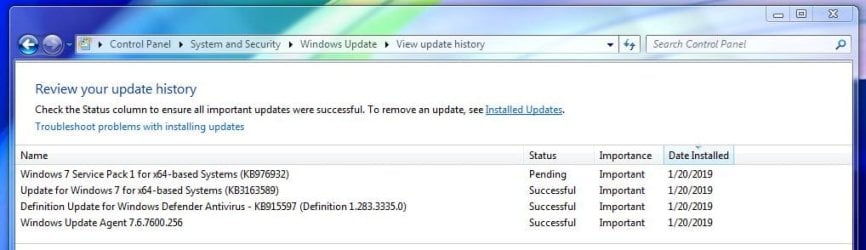
so far this is all it found
and 2 others snuck in
 

Attachments

  • windowsupdate today.JPG
    windowsupdate today.JPG
    49.7 KB · Views: 0
  • windows snuck in.JPG
    windows snuck in.JPG
    15.3 KB · Views: 0

My Computer My Computer

Computer type
PC/Desktop
Computer Manufacturer/Model Number
toshiba
OS
windows 7 home premium /64
Other Info
Just an old laptop. Satellite L675 019
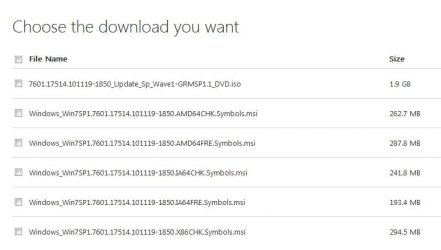
How is a user supposed to know which one to download?
thanks
 

Attachments

  • some sp1 files.JPG
    some sp1 files.JPG
    34.8 KB · Views: 0

My Computer My Computer

Computer type
PC/Desktop
Computer Manufacturer/Model Number
toshiba
OS
windows 7 home premium /64
Other Info
Just an old laptop. Satellite L675 019
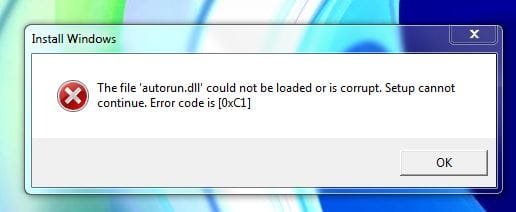
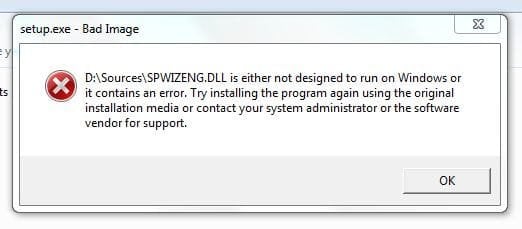
re the SP1 disk - help!!! thanks
(internet was off)
PLEASE dont give up now- we are so close to fixing this
 

Attachments

  • bad sp1  disk 2.JPG
    bad sp1 disk 2.JPG
    20.3 KB · Views: 6
  • bad sp1 disk.JPG
    bad sp1 disk.JPG
    22.3 KB · Views: 6

My Computer My Computer

Computer type
PC/Desktop
Computer Manufacturer/Model Number
toshiba
OS
windows 7 home premium /64
Other Info
Just an old laptop. Satellite L675 019
thanks all
now have SP1
 

My Computer My Computer

Computer type
PC/Desktop
Computer Manufacturer/Model Number
toshiba
OS
windows 7 home premium /64
Other Info
Just an old laptop. Satellite L675 019
Back
Top