Stumann666
New member
- Local time
- 3:42 AM
- Messages
- 2
The program can't start because [FONT="]MSVCP100[/FONT]. [FONT="]dll[/FONT] is [FONT="]missing[/FONT] from your computer.
The program can't start because [FONT="]MSVCP140[/FONT]. [FONT="]dll[/FONT] is [FONT="]missing[/FONT] from your computer.
I get these two error messages with two different programs.
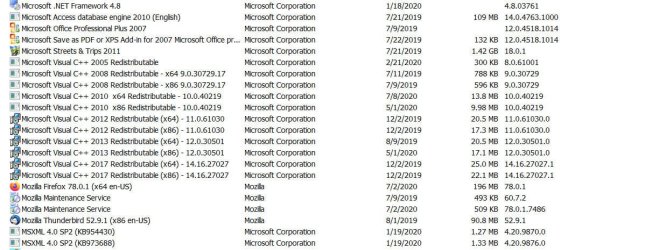
I have deleted and reinstalled Microsoft Visual C++ 2010 (this one should contain [FONT="]MSVCP100[/FONT]. [FONT="]dll.[/FONT][FONT="])[/FONT], I downloaded it from MicroSoft, no change.
I have tried to install Microsoft Visual C++ 2015 (this one should contain [FONT="]MSVCP140[/FONT]. [FONT="]dll.[/FONT][FONT="])[/FONT][FONT="]I get an error message that says it's already installed, but it's not in the list of installed programs. [/FONT]
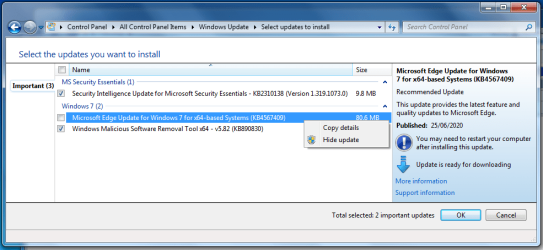
[FONT="]This all started about a week ago when I suddenly was surprised I had a copy of MicroSoft Edge installed on my PC. I think I happened with an automatic update from Windows, but I'm not sure. I immediately removed it. I thought there were no more updates for Win7, but I could be wrong. I now have automatic updates turned off. I'm at a loss as to where to go from here. I hate to think I have to reinstall Windows 7. Does anyone know what else I could try?[/FONT]
The program can't start because [FONT="]MSVCP140[/FONT]. [FONT="]dll[/FONT] is [FONT="]missing[/FONT] from your computer.
I get these two error messages with two different programs.
I have deleted and reinstalled Microsoft Visual C++ 2010 (this one should contain [FONT="]MSVCP100[/FONT]. [FONT="]dll.[/FONT][FONT="])[/FONT], I downloaded it from MicroSoft, no change.
I have tried to install Microsoft Visual C++ 2015 (this one should contain [FONT="]MSVCP140[/FONT]. [FONT="]dll.[/FONT][FONT="])[/FONT][FONT="]I get an error message that says it's already installed, but it's not in the list of installed programs. [/FONT]
[FONT="]This all started about a week ago when I suddenly was surprised I had a copy of MicroSoft Edge installed on my PC. I think I happened with an automatic update from Windows, but I'm not sure. I immediately removed it. I thought there were no more updates for Win7, but I could be wrong. I now have automatic updates turned off. I'm at a loss as to where to go from here. I hate to think I have to reinstall Windows 7. Does anyone know what else I could try?[/FONT]
My Computer
At a glance
Windows 7 Home Premium 64bitAMD Phenom II X4 3.4ghz16.0 gbNVidia GT-710
- Computer type
- PC/Desktop
- Computer Manufacturer/Model Number
- Custom Build Asus Motherboard
- OS
- Windows 7 Home Premium 64bit
- CPU
- AMD Phenom II X4 3.4ghz
- Motherboard
- Asus
- Memory
- 16.0 gb
- Graphics Card(s)
- NVidia GT-710
- Hard Drives
- (2) 1 Tb each
- Antivirus
- AVG
- Browser
- Firefox