The system time has changed - Kernel-General Event ID 1

Cyber Coach

New member
Member
Local time
2:48 AM
Messages
49
Having an issue with by Windows 7 Ultimate - 64 Bit. All maintenance applied except for May updates.

It looks like every time my machine awakens from sleep I get and informational event generated in by Systems logs. The source is Kernel-General with and Event Id 1

The details are "The system time has changed to xxxxxxxx from yyyyyyyy

One example logged at 8:09am DST, The system time has changed to 2019-05-29T12:09:33.5000000Z from 2019-05-29T02:29:50.854422100Z

Some go forward, some go backwards.

I setting time to time.windows.com The correct timezone is selected.

Last night by system was schedule to run a backup with Macrium at 2:00am to a NAS. It didn't BSOD but something went wrong and system restarted. The first event on awaking was this time change. Then it tries to fall asleep.

Should the time in the events logs be my local time or is this GMT?
 

My Computer

Computer type
PC/Desktop
Computer Manufacturer/Model Number
Custom Build
OS
Windows 7 Ulitimate 64bit
CPU
i7-2600k
Motherboard
Asus P8P67 DEluxe Rev 3.1
Memory
16GB
Graphics Card(s)
Sapphire RX460 4GB
Sound Card
Creative Sound Blaster Audigy 2 ZS Platinum Pro
Monitor(s) Displays
Samsunfg BX2431, Acer x223W
Hard Drives
Samsung Solid State for OS,
Western Digital Black 1TB in Raid 1,
Western Digital Black 500GB
PSU
Corsair Gold 850AX
Case
Corsair Obsidian 800D
Cooling
Noctua NH-D14
Keyboard
das Keyboard MX Brown
Mouse
Logitech M510
Internet Speed
100Mb +
Antivirus
Norton Internet Security
Browser
All
All time clocks are based on GMT time.
Windows (time.windows.com) get the GMT time and modifies regarding the time zone and local DST.

I can see that you have a i7-2600k so it was probably built in 2011 (8 years old). Did you ever changed the CMOS battery (CR2032)?
Download HWiNFO Portable. It doesn't need to install.
Unzip, and run HWiNFO64.exe
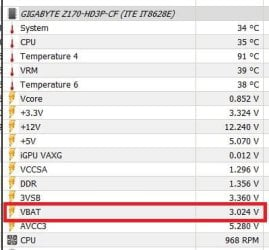
Under sensors (right column) you will see VBAT (should be a little higher than 3 V)
 

My Computers

System One System Two

  • Computer type
    PC/Desktop
    Computer Manufacturer/Model Number
    custom build
    OS
    Windows 7 HP 64
    CPU
    i5 6600K - 800MHz to 4200MHz
    Motherboard
    GA-Z170-HD3P
    Memory
    4+4G GSkill DDR4 3000
    Graphics Card(s)
    IG - Intel 530
    Monitor(s) Displays
    Samsung 226BW
    Screen Resolution
    1680x1050
    Hard Drives
    (1) -1 SM951 – 128GB M.2 AHCI PCIe SSD drive for Windows 7 and Lubuntu
    (2) -1 WD SATA 3 - 1T for Data
    (3) -1 WD SATA 3 - 1T for backup
    PSU
    Thermaltake 450W TR2 gold
    Keyboard
    Old and good Chicony mechanical keyboard
    Mouse
    Logitech mX performance - 9 buttons (had to disable some)
    Internet Speed
    500Mb/s
    Browser
    Firefox 64
    Other Info
    TinyWall firewall
  • Computer type
    Laptop
    System Manufacturer/Model Number
    Asus Q550LF
    OS
    Windows 7 Pro
    CPU
    i7-4500U 800MHz to 3.0GHz
    Motherboard
    Asus Q550LF
    Memory
    (4+4)G DDR3 1600
    Graphics Card(s)
    IG intel 4400 + NVIDIA GeForce GT 745M
    Sound Card
    Realtek
    Monitor(s) Displays
    LG Display LP156WF4-SPH1
    Screen Resolution
    1920 x 1080
    Hard Drives
    BX500 120G SSD for Windows and programs +
    1T HDD for data
    Internet Speed
    500 Mb/s
    Browser
    Firefox
    Other Info
    TinyWall firewall
Thanks I will do that. Simple way to check.

I will mention I went to NAS and checked it's time. It was off. I set for right timezone and time updated correctly on NAS.
 

My Computer

Computer type
PC/Desktop
Computer Manufacturer/Model Number
Custom Build
OS
Windows 7 Ulitimate 64bit
CPU
i7-2600k
Motherboard
Asus P8P67 DEluxe Rev 3.1
Memory
16GB
Graphics Card(s)
Sapphire RX460 4GB
Sound Card
Creative Sound Blaster Audigy 2 ZS Platinum Pro
Monitor(s) Displays
Samsunfg BX2431, Acer x223W
Hard Drives
Samsung Solid State for OS,
Western Digital Black 1TB in Raid 1,
Western Digital Black 500GB
PSU
Corsair Gold 850AX
Case
Corsair Obsidian 800D
Cooling
Noctua NH-D14
Keyboard
das Keyboard MX Brown
Mouse
Logitech M510
Internet Speed
100Mb +
Antivirus
Norton Internet Security
Browser
All
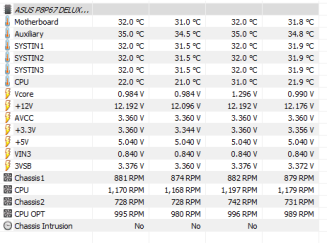
So I ran. I assume this VBAT would be under ASUS MB sensors. Not listed. Scanned list several times.

Have to go out. Will check back later. Still can't find VBAT in entire list.
 

My Computer

Computer type
PC/Desktop
Computer Manufacturer/Model Number
Custom Build
OS
Windows 7 Ulitimate 64bit
CPU
i7-2600k
Motherboard
Asus P8P67 DEluxe Rev 3.1
Memory
16GB
Graphics Card(s)
Sapphire RX460 4GB
Sound Card
Creative Sound Blaster Audigy 2 ZS Platinum Pro
Monitor(s) Displays
Samsunfg BX2431, Acer x223W
Hard Drives
Samsung Solid State for OS,
Western Digital Black 1TB in Raid 1,
Western Digital Black 500GB
PSU
Corsair Gold 850AX
Case
Corsair Obsidian 800D
Cooling
Noctua NH-D14
Keyboard
das Keyboard MX Brown
Mouse
Logitech M510
Internet Speed
100Mb +
Antivirus
Norton Internet Security
Browser
All
On top, under Monitoring you have a thermometer (Sensors). Once you click on it it will open a sensors window.
On the right, in yellow, you will see the VBAT.
 

Attachments

  • VSensors.JPG
    VSensors.JPG
    54.5 KB · Views: 18

My Computers

System One System Two

  • Computer type
    PC/Desktop
    Computer Manufacturer/Model Number
    custom build
    OS
    Windows 7 HP 64
    CPU
    i5 6600K - 800MHz to 4200MHz
    Motherboard
    GA-Z170-HD3P
    Memory
    4+4G GSkill DDR4 3000
    Graphics Card(s)
    IG - Intel 530
    Monitor(s) Displays
    Samsung 226BW
    Screen Resolution
    1680x1050
    Hard Drives
    (1) -1 SM951 – 128GB M.2 AHCI PCIe SSD drive for Windows 7 and Lubuntu
    (2) -1 WD SATA 3 - 1T for Data
    (3) -1 WD SATA 3 - 1T for backup
    PSU
    Thermaltake 450W TR2 gold
    Keyboard
    Old and good Chicony mechanical keyboard
    Mouse
    Logitech mX performance - 9 buttons (had to disable some)
    Internet Speed
    500Mb/s
    Browser
    Firefox 64
    Other Info
    TinyWall firewall
  • Computer type
    Laptop
    System Manufacturer/Model Number
    Asus Q550LF
    OS
    Windows 7 Pro
    CPU
    i7-4500U 800MHz to 3.0GHz
    Motherboard
    Asus Q550LF
    Memory
    (4+4)G DDR3 1600
    Graphics Card(s)
    IG intel 4400 + NVIDIA GeForce GT 745M
    Sound Card
    Realtek
    Monitor(s) Displays
    LG Display LP156WF4-SPH1
    Screen Resolution
    1920 x 1080
    Hard Drives
    BX500 120G SSD for Windows and programs +
    1T HDD for data
    Internet Speed
    500 Mb/s
    Browser
    Firefox
    Other Info
    TinyWall firewall
Must be motherboard based sensors. I thought you meant motherboard.


Booted to BIOS. Time is off a couple of seconds so not a BIOS time issue.
 

Attachments

  • 2019-06-01_17h52_40.png
    2019-06-01_17h52_40.png
    18.5 KB · Views: 15

My Computer

Computer type
PC/Desktop
Computer Manufacturer/Model Number
Custom Build
OS
Windows 7 Ulitimate 64bit
CPU
i7-2600k
Motherboard
Asus P8P67 DEluxe Rev 3.1
Memory
16GB
Graphics Card(s)
Sapphire RX460 4GB
Sound Card
Creative Sound Blaster Audigy 2 ZS Platinum Pro
Monitor(s) Displays
Samsunfg BX2431, Acer x223W
Hard Drives
Samsung Solid State for OS,
Western Digital Black 1TB in Raid 1,
Western Digital Black 500GB
PSU
Corsair Gold 850AX
Case
Corsair Obsidian 800D
Cooling
Noctua NH-D14
Keyboard
das Keyboard MX Brown
Mouse
Logitech M510
Internet Speed
100Mb +
Antivirus
Norton Internet Security
Browser
All
I will have to do a deeper dive. I wondering if me waking system is causing system time to be updated and while I said I saw events where it went backwards can I find recent examples.

So I left are 12:49pm my time and I started computer at 17:40. If I look at the most recent time change that is roughly what log has only it is four hours ahead, so I shut down around 16:50:01 and awoke 21:40 and this event is the system time being updated.

So this is just clock adjusting to time slept. My windows 10 system does not report this way. Time is changed but only a minute in any event and they both went to sleep together.

So likely my Win 7 has issue unless others see the time catching up in there event logs.
 

My Computer

Computer type
PC/Desktop
Computer Manufacturer/Model Number
Custom Build
OS
Windows 7 Ulitimate 64bit
CPU
i7-2600k
Motherboard
Asus P8P67 DEluxe Rev 3.1
Memory
16GB
Graphics Card(s)
Sapphire RX460 4GB
Sound Card
Creative Sound Blaster Audigy 2 ZS Platinum Pro
Monitor(s) Displays
Samsunfg BX2431, Acer x223W
Hard Drives
Samsung Solid State for OS,
Western Digital Black 1TB in Raid 1,
Western Digital Black 500GB
PSU
Corsair Gold 850AX
Case
Corsair Obsidian 800D
Cooling
Noctua NH-D14
Keyboard
das Keyboard MX Brown
Mouse
Logitech M510
Internet Speed
100Mb +
Antivirus
Norton Internet Security
Browser
All
At the end of the day, shutdown the computer.
Next morning, before entering windows, enter BIOS and check the time and date. If it's wrong, your computer needs a new CR2032 coin battery. If the NAS is also old, it probably needs a new battery too.
 

My Computers

System One System Two

  • Computer type
    PC/Desktop
    Computer Manufacturer/Model Number
    custom build
    OS
    Windows 7 HP 64
    CPU
    i5 6600K - 800MHz to 4200MHz
    Motherboard
    GA-Z170-HD3P
    Memory
    4+4G GSkill DDR4 3000
    Graphics Card(s)
    IG - Intel 530
    Monitor(s) Displays
    Samsung 226BW
    Screen Resolution
    1680x1050
    Hard Drives
    (1) -1 SM951 – 128GB M.2 AHCI PCIe SSD drive for Windows 7 and Lubuntu
    (2) -1 WD SATA 3 - 1T for Data
    (3) -1 WD SATA 3 - 1T for backup
    PSU
    Thermaltake 450W TR2 gold
    Keyboard
    Old and good Chicony mechanical keyboard
    Mouse
    Logitech mX performance - 9 buttons (had to disable some)
    Internet Speed
    500Mb/s
    Browser
    Firefox 64
    Other Info
    TinyWall firewall
  • Computer type
    Laptop
    System Manufacturer/Model Number
    Asus Q550LF
    OS
    Windows 7 Pro
    CPU
    i7-4500U 800MHz to 3.0GHz
    Motherboard
    Asus Q550LF
    Memory
    (4+4)G DDR3 1600
    Graphics Card(s)
    IG intel 4400 + NVIDIA GeForce GT 745M
    Sound Card
    Realtek
    Monitor(s) Displays
    LG Display LP156WF4-SPH1
    Screen Resolution
    1920 x 1080
    Hard Drives
    BX500 120G SSD for Windows and programs +
    1T HDD for data
    Internet Speed
    500 Mb/s
    Browser
    Firefox
    Other Info
    TinyWall firewall
Okay, I'll give it a try. The battery has been replaced, can't remember when. Bought a couple yesterday. NAS is four months old.
 

My Computer

Computer type
PC/Desktop
Computer Manufacturer/Model Number
Custom Build
OS
Windows 7 Ulitimate 64bit
CPU
i7-2600k
Motherboard
Asus P8P67 DEluxe Rev 3.1
Memory
16GB
Graphics Card(s)
Sapphire RX460 4GB
Sound Card
Creative Sound Blaster Audigy 2 ZS Platinum Pro
Monitor(s) Displays
Samsunfg BX2431, Acer x223W
Hard Drives
Samsung Solid State for OS,
Western Digital Black 1TB in Raid 1,
Western Digital Black 500GB
PSU
Corsair Gold 850AX
Case
Corsair Obsidian 800D
Cooling
Noctua NH-D14
Keyboard
das Keyboard MX Brown
Mouse
Logitech M510
Internet Speed
100Mb +
Antivirus
Norton Internet Security
Browser
All
So it is not battery. Shut off at 9:00 pm yesterday. Started computer up and went straight to BIOS. Time is being kept very accurately.

Of note there was not major time event in log, which makes sense as the OS was shutdown.

Interesting that during sleep, not hibernation, sleep, the OS pauses time and then catches up on the next awakening.
 

My Computer

Computer type
PC/Desktop
Computer Manufacturer/Model Number
Custom Build
OS
Windows 7 Ulitimate 64bit
CPU
i7-2600k
Motherboard
Asus P8P67 DEluxe Rev 3.1
Memory
16GB
Graphics Card(s)
Sapphire RX460 4GB
Sound Card
Creative Sound Blaster Audigy 2 ZS Platinum Pro
Monitor(s) Displays
Samsunfg BX2431, Acer x223W
Hard Drives
Samsung Solid State for OS,
Western Digital Black 1TB in Raid 1,
Western Digital Black 500GB
PSU
Corsair Gold 850AX
Case
Corsair Obsidian 800D
Cooling
Noctua NH-D14
Keyboard
das Keyboard MX Brown
Mouse
Logitech M510
Internet Speed
100Mb +
Antivirus
Norton Internet Security
Browser
All
Back
Top