"The system time is different from your local standard time"-Not Fixed
Trying to setup a new Netgear NightHawk DST.
With file explorer open confirming that I could see my wife's files and she mine, although I could see her's she couldn't see mine. I launched windows network diagnostics--troubleshooter.
It came back with Problems found: "The system time is different from your local standard time" "view detailed information" was a link with an extension I couldn't open and if I did, it would likely be unintelligible to me.
However, I'm VERY interested in the error as it relates to another problem I'm having. I've read a few posts that refer to such an error as the reason desktop Outlook 2010/with the new and improved Outlook.com drops connections/doesn't sync properly when Outlook.com is not setup as Exchange (preferred, 1st choice) but as a IMAP.
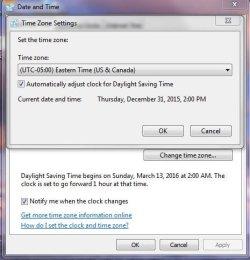
If the computer time in the lower right of the screen is the correct time (matched against my computer) what is the error specifically referring to? Is there some deep dark 'other time' that is screwed up in her machine?
Trying to setup a new Netgear NightHawk DST.
With file explorer open confirming that I could see my wife's files and she mine, although I could see her's she couldn't see mine. I launched windows network diagnostics--troubleshooter.
It came back with Problems found: "The system time is different from your local standard time" "view detailed information" was a link with an extension I couldn't open and if I did, it would likely be unintelligible to me.
However, I'm VERY interested in the error as it relates to another problem I'm having. I've read a few posts that refer to such an error as the reason desktop Outlook 2010/with the new and improved Outlook.com drops connections/doesn't sync properly when Outlook.com is not setup as Exchange (preferred, 1st choice) but as a IMAP.
If the computer time in the lower right of the screen is the correct time (matched against my computer) what is the error specifically referring to? Is there some deep dark 'other time' that is screwed up in her machine?
My Computer
At a glance
Windows 7 & Windows 10
- Computer type
- PC/Desktop
- OS
- Windows 7 & Windows 10