
The Trust relationship between the workstation and Domain Failed -Win7

Tried that link, but not relevant to what I have happening here.

Also set the Machine Password Maximum Age to 999 using GPO
Since then it was quiet, but surely enough we've had another 10 fail today...

Surely I can't be the only experiencing this...

Maybe you should try looking through the ten other TechNet threads with the exact same title. They are to the right side of screen on the page I posted.

Hopefully one of those threads has some solutions for this problem. ;)
 

My Computer My Computer

At a glance

Windows 7 Ult, Windows 8.1 Pro,Q9650-4.275GHz, E8600 4.5GHz, E6750-3.8GHzG.Skill PC2 9600 1200Mhz 5 5 5 15 2TGTX480
Computer type
PC/Desktop
Computer Manufacturer/Model Number
Home built
OS
Windows 7 Ult, Windows 8.1 Pro,
CPU
Q9650-4.275GHz, E8600 4.5GHz, E6750-3.8GHz
Motherboard
Evga 780i FTW
Memory
G.Skill PC2 9600 1200Mhz 5 5 5 15 2T
Graphics Card(s)
GTX480
Sound Card
Asus Xonar D2
Monitor(s) Displays
HannsG
Screen Resolution
1680X1050
Hard Drives
GSkill Phoenix Pro 120GB SSD
PSU
ThermalTake Toughpower 1000Watt modular
Case
ThermalTake XaserV
Cooling
Xigmatek S1283
Keyboard
Logitech G15
Mouse
Logitech G9
Internet Speed
T1
I have had the same problem with my network and have found the issue to be the naming of the machines. You cannot have machines named the same in DHCP otherwise it will give you a "broken trust relationship" error. Try to unjoin one of the computers from the Domain then rename it locally on the machine. Then join it back to the domain. This should solve the issue.
 

My Computer My Computer

At a glance

Windows 7 Professional 32bit
OS
Windows 7 Professional 32bit
I have had the same problem with my network and have found the issue to be the naming of the machines. You cannot have machines named the same in DHCP otherwise it will give you a "broken trust relationship" error. Try to unjoin one of the computers from the Domain then rename it locally on the machine. Then join it back to the domain. This should solve the issue.

All PCs are individually named in the "Asset Tag" field in the BIOS. The PCs are named using a script within Sysprep which pulls the name from the Bios and renames the PC. After a reboot, another script then joins the PC to the Domain using the newly named PC.

DHCP is purely used to get IP, the names of the PCs and are grabbed locally from the PC Bios Asset Tag (which are all uniquely named by us)

Any other suggestions?
 

My Computer My Computer

At a glance

7
OS
7
The Trust relationship between the workstation and Domain Failed
This is the message i receive trying to log on to my work computer - has there been any solution discovered to unlock this so a user can access their c drive.
 

My Computer My Computer

At a glance

64
OS
64
The Trust relationship between the workstation and Domain Failed
This is the message i receive trying to log on to my work computer - has there been any solution discovered to unlock this so a user can access their c drive.

There are many causes for this problem. You need to use the link below to determine which of the many solutions apply in your particular case. There is no one size fits all solution for this problem.

The trust relationship between this workstation and the primary domain failed
 

My Computer My Computer

At a glance

Windows 7 Ult, Windows 8.1 Pro,Q9650-4.275GHz, E8600 4.5GHz, E6750-3.8GHzG.Skill PC2 9600 1200Mhz 5 5 5 15 2TGTX480
Computer type
PC/Desktop
Computer Manufacturer/Model Number
Home built
OS
Windows 7 Ult, Windows 8.1 Pro,
CPU
Q9650-4.275GHz, E8600 4.5GHz, E6750-3.8GHz
Motherboard
Evga 780i FTW
Memory
G.Skill PC2 9600 1200Mhz 5 5 5 15 2T
Graphics Card(s)
GTX480
Sound Card
Asus Xonar D2
Monitor(s) Displays
HannsG
Screen Resolution
1680X1050
Hard Drives
GSkill Phoenix Pro 120GB SSD
PSU
ThermalTake Toughpower 1000Watt modular
Case
ThermalTake XaserV
Cooling
Xigmatek S1283
Keyboard
Logitech G15
Mouse
Logitech G9
Internet Speed
T1
Wow! I do not envy the posters in this thread who are dealing with dozens of these trust failures at once! Then again, I’m sure their technical knowledge far exceeds my own, so to me, one workstation feels like 100. :) Just this week I experienced the dreaded error “The trustrelationship between this workstation and the primary domain failed.” The error started not long after I performed a System Restore on this workstation, so I believe I reset the client’s local secret to the previous password shortly after it had requested a new one from the domain controller. Now I am unable to log on using the domain user account associated with this machine.
The client is on a small network with less than a dozen other computers (there are no issues with two computer objects with the same name). There is only one server on the network. No other workstations are affected. The two machines involved are listed below:

Client: Dell OptiPlex 580
Manufacture Date: 12/29/2010
Operating System: Windows 7 Professional, Service Pack 1
System Type: 64-bit Operating System
Processor: 2x AMD Phenom II X2 B55 Processor
Network Adapter: Broadcom NetXtreme 57xx Gigabit Controller

Domain Controller: Dell PowerEdge T300
Manufacture Date: 12/19/2008
Operating System: Windows Small Business Server 2008, Service Pack 2
System Type: 64-bit Operating System
Processor: 4x Intel Xeon CPU X3363 Processor
Network Adapters: Broadcom NetXtreme 57xx Gigabit Controller

I do not wish to leave the domain and rejoin. I don’t want to spend my time remapping drives, reconfiguring settings, trying to get the new user account just like the old one, etc. I tried resetting the computer object’s password from the ADUC console, but to no avail. I have read many articles about using the netdom.exe command to fix the trust and would like to give it a try. The link below is one of many netdom.exe articles I’ve read.

http://www.networknet.nl/apps/wp/archives/1938

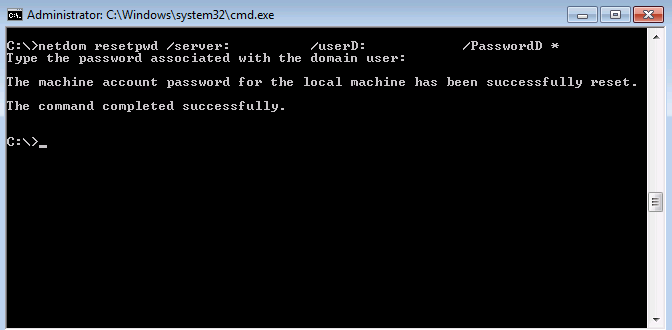
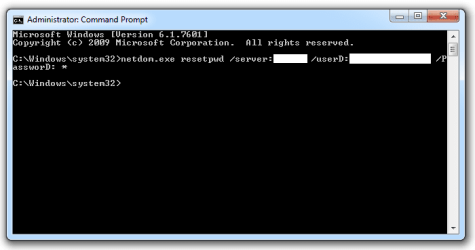
While it provides some good insight (particularly tips on where the netdom utilities should be stored. However, it has a screenshot using slightly different syntax than the other articles I’ve read, so I’m not sure which to use. Here are two different command lines I’ve seen:

00015s.jpg


netdom.exe-resetpwd.png


No surprises here, but this N00b is totally confused. I’m not sure if I should try:

this…
netdom.exe resetpwd /s:{SERVER} /ud:{DOMAIN\USER} /pd:*
or…
netdom.exe resetpwd /server: {SERVER} /userD: {DOMAIN\USER} /PassworD:*

Any tips or help you might have would be greatly appreciated. Oh, one more thing. This will really make me look dumb, but here goes; am I correct to assume that the password I’ll be asked to enter at the end is the user’s login password?

Thanks!

JMT83
 

My Computer My Computer

At a glance

Windows 7 Pro x642x AMD Phenom II X2 B55 Processor4GB (2x2GB)ATI Raedeon HD 3450
Computer Manufacturer/Model Number
Dell Optiplex 580
OS
Windows 7 Pro x64
CPU
2x AMD Phenom II X2 B55 Processor
Memory
4GB (2x2GB)
Graphics Card(s)
ATI Raedeon HD 3450
Sound Card
Realtek High Definition Audio
Monitor(s) Displays
Dell Generic PnP
Hard Drives
250 GB Western Digital SATA
Hmmmm, I have tried both versions of the command I posted above, but neither seem to be doing anything. I am not prompted for password when I try them out. Any clues as to what I'm doing wrong?
 

Attachments

  • netdom.png
    netdom.png
    7.2 KB · Views: 14

My Computer My Computer

At a glance

Windows 7 Pro x642x AMD Phenom II X2 B55 Processor4GB (2x2GB)ATI Raedeon HD 3450
Computer Manufacturer/Model Number
Dell Optiplex 580
OS
Windows 7 Pro x64
CPU
2x AMD Phenom II X2 B55 Processor
Memory
4GB (2x2GB)
Graphics Card(s)
ATI Raedeon HD 3450
Sound Card
Realtek High Definition Audio
Monitor(s) Displays
Dell Generic PnP
Hard Drives
250 GB Western Digital SATA
NETDOM worked, sort of.

I could not understand why I couldn't get NETDOM to execute in the Command Prompt, so I uninstalled/reinstalled RSAT. This time, I was able to get NETDOM.exe to run, but I was not successful in resetting the password. This is what I saw:

Microsoft Windows [Version 6.1.7601]
Copyright (c) 2009 Microsoft Corporation. All rights reserved.

C:\Windows\system32>netdom.exe resetpwd /s:server /ud:domain\user /pd:*
Type the password associated with the domain user:

The machine account password for the local machine could not be reset.

The network path was not found.

The command failed to complete successfully.

Now I know that there's a great possibility that the reason this didn't work is because I do not have the PC on the local network like it usually is. I took it home with me and attempted this while establishing a VPN connection to the domain controller. I thought it might work since I can login fine while off the network, but I get the same Trust error message when trying to login while connected to the VPN.

I'm heading off to return this PC to the office, where I hope it will be able to successfully reestablish the trust.
 

My Computer My Computer

At a glance

Windows 7 Pro x642x AMD Phenom II X2 B55 Processor4GB (2x2GB)ATI Raedeon HD 3450
Computer Manufacturer/Model Number
Dell Optiplex 580
OS
Windows 7 Pro x64
CPU
2x AMD Phenom II X2 B55 Processor
Memory
4GB (2x2GB)
Graphics Card(s)
ATI Raedeon HD 3450
Sound Card
Realtek High Definition Audio
Monitor(s) Displays
Dell Generic PnP
Hard Drives
250 GB Western Digital SATA
Great success!

Got it! It turns out I could not run the command while using VPN from another site. After bringing the PC back and physically connecting to the network, the password was reset successfully and after rebooting, I was able to login just fine! :D

I could not understand why I couldn't get NETDOM to execute in the Command Prompt, so I uninstalled/reinstalled RSAT. This time, I was able to get NETDOM.exe to run, but I was not successful in resetting the password. This is what I saw:

Microsoft Windows [Version 6.1.7601]
Copyright (c) 2009 Microsoft Corporation. All rights reserved.

C:\Windows\system32>netdom.exe resetpwd /s:server /ud:domain\user /pd:*
Type the password associated with the domain user:

The machine account password for the local machine could not be reset.

The network path was not found.

The command failed to complete successfully.

Now I know that there's a great possibility that the reason this didn't work is because I do not have the PC on the local network like it usually is. I took it home with me and attempted this while establishing a VPN connection to the domain controller. I thought it might work since I can login fine while off the network, but I get the same Trust error message when trying to login while connected to the VPN.

I'm heading off to return this PC to the office, where I hope it will be able to successfully reestablish the trust.
 

My Computer My Computer

At a glance

Windows 7 Pro x642x AMD Phenom II X2 B55 Processor4GB (2x2GB)ATI Raedeon HD 3450
Computer Manufacturer/Model Number
Dell Optiplex 580
OS
Windows 7 Pro x64
CPU
2x AMD Phenom II X2 B55 Processor
Memory
4GB (2x2GB)
Graphics Card(s)
ATI Raedeon HD 3450
Sound Card
Realtek High Definition Audio
Monitor(s) Displays
Dell Generic PnP
Hard Drives
250 GB Western Digital SATA
has any one tried the powershell equivalent of the netdom ?


> Test-ComputerSecureChannel -repair

Also does reseting the computer account alone from aduc resolves this issue?

The other method of unjoining a domain and rejoining a domain is very lengthy and time consuming process..
 
Last edited:

My Computer My Computer

At a glance

Windows 7 Ultimate x64E65508GB DDR2
Computer type
PC/Desktop
Computer Manufacturer/Model Number
Dell 755
OS
Windows 7 Ultimate x64
CPU
E6550
Motherboard
Stock Q35 Chipset Based
Memory
8GB DDR2
Hard Drives
1TB
Keyboard
Microsoft Comfort 2000
Mouse
Microsoft
Antivirus
None
Browser
FireFox
Back
Top