The Windows media center(Live TV) doesn't recognize the new location.

Thebeholder

Banned
Local time
8:23 AM
Messages
116
Location
Hadramawt
Hi everyone!

I wish that someone could help me with stuff.

Although I moved all folders (hidden and unhidden) of the public user account from its default location 'Drivesystem\users\public' to another one via registry, I noticed Whenever I run the windows Media center. Then, I click on 'Live TV setup' as the picture below shows , Media center create only this folder Recorded TV, in the old original location, which is "Drivesystem'\Users\public\'.

However, whatever I did with Media center, I didn't see that the old path 'Drivesystem\Users\public\' is created. Only the problem while clicking on 'live TV setup' as this picture below shows

The Recorded TV folder should have been created in the new location(E:\users\public' as long as I have moved all of its folders.

These pictures shows the steps I did::

trecognisethenewlocatio.png


Old default location:
trecognisethenewlocatio.png


New location:

trecognisethenewlocatio.png


Modified the registry:
trecognisethenewlocatio.png


Should I reinstall the Windows media center again in order to recognize the new location?

It would be highly appreciated if you could help me with problem.

NB: I have moved the public folder from its default location via this article:::
 

My Computer My Computer

At a glance

Windows Ultimate x86, SP1Intel(R) core(TM)i5-2410M CPU @ 2.30GHz6GBATI Radeon HD 6770M
Computer type
Laptop
Computer Manufacturer/Model Number
HP Pavilion dv6 Notbook PC
OS
Windows Ultimate x86, SP1
CPU
Intel(R) core(TM)i5-2410M CPU @ 2.30GHz
Motherboard
Hewlett -Packard, model: 1657 10.1C
Memory
6GB
Graphics Card(s)
ATI Radeon HD 6770M
Hard Drives
TOSHIBA MK7559GXP(700GB)
Antivirus
NORTON Internet Security
Browser
MS IE, FireFox and Google Chrome
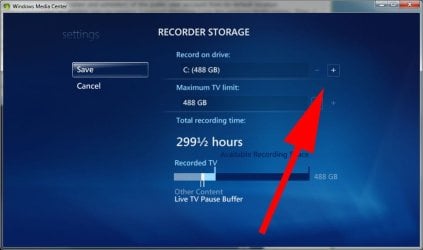
Why go in the registry to change WMC record location? Go settings - TV - recorder - recorder storage, and click as per attachment to change location

mediacenter.jpg
 

My Computer My Computer

At a glance

Windows 7 pro x64 SP1Intel i7-2600k o/c to 4.6GHz8GB Mushkin 1866MHzNvidia GTX 750 Ti 2GB
Computer type
PC/Desktop
Computer Manufacturer/Model Number
self build
OS
Windows 7 pro x64 SP1
CPU
Intel i7-2600k o/c to 4.6GHz
Motherboard
MSI Z68-GD80
Memory
8GB Mushkin 1866MHz
Graphics Card(s)
Nvidia GTX 750 Ti 2GB
Sound Card
integrated
Monitor(s) Displays
Liyama ProLite 27"
Screen Resolution
1920*1080 px
Hard Drives
Seagate 2TB
PSU
Coolermaster GX 750W
Case
Antec 300 case + 5 fans
Cooling
Dark Rock Pro
Internet Speed
62Mbit down 18Mbit up
Antivirus
MSE
Browser
Firefox
Other Info
Blackgold BGT3650 Quad HD TV card. Also have various 3770 + 4770K render boxes.
Thank you very much indeed for your kind reply.

I really moved all the user accounts(newly, default, and public user accounts) to another location as it shown in the third screenshot at the post of mine. I really would rather have all my personal stuff to be saved in another partition other than Drivesystem.

But what I quite surprised about that I didn't face any problem after moving all these users accounts, except when I click on 'live TV setup', so I see that only in this case that 'Recorded TV' folder is created in the old original location, which is "Drivesystem'\Users\public\'.

However whatever I did else I didn't see the old original location, which is "Drivesystem'\Users\public\' created. Even if I have opened a file and then saved it in the public account, I saw that the file saved in the new location.


I hope you understand me.
I would respectfully like you to let me know what the problem is.

Did you read the article of moving public user account, did you? Is it correct?

By the way, I don't have any satellite card connected to my computer. However, I only want to examine that all my personal datas of all user accounts are saved in the new location.
 
Last edited:

My Computer My Computer

At a glance

Windows Ultimate x86, SP1Intel(R) core(TM)i5-2410M CPU @ 2.30GHz6GBATI Radeon HD 6770M
Computer type
Laptop
Computer Manufacturer/Model Number
HP Pavilion dv6 Notbook PC
OS
Windows Ultimate x86, SP1
CPU
Intel(R) core(TM)i5-2410M CPU @ 2.30GHz
Motherboard
Hewlett -Packard, model: 1657 10.1C
Memory
6GB
Graphics Card(s)
ATI Radeon HD 6770M
Hard Drives
TOSHIBA MK7559GXP(700GB)
Antivirus
NORTON Internet Security
Browser
MS IE, FireFox and Google Chrome
Sorry I didn't read the article.

However re the title of your post WMC doesn't etc, how is the app gonna know where to put the recorded tv if you don't tell it? On one of my pcs I changed the WMC record default as per screenshot to the E:\ drive and and a folder called Recorded TV appeared on that HDD. The library on the C:\ drive ie C:\users\public\libraries\recordedtvlibrary points to that location. Do you want to change the library location or the WMC file location (this question applies to all your files)?

Libraries and folders are different. A library can refer to several locations. I like to keep movies, rec TV etc on a separate drive to Windows. If the library that points to the files is on the C:\ drive, so be it. Libraries confused me a bit when they first appeared . . .
 

My Computer My Computer

At a glance

Windows 7 pro x64 SP1Intel i7-2600k o/c to 4.6GHz8GB Mushkin 1866MHzNvidia GTX 750 Ti 2GB
Computer type
PC/Desktop
Computer Manufacturer/Model Number
self build
OS
Windows 7 pro x64 SP1
CPU
Intel i7-2600k o/c to 4.6GHz
Motherboard
MSI Z68-GD80
Memory
8GB Mushkin 1866MHz
Graphics Card(s)
Nvidia GTX 750 Ti 2GB
Sound Card
integrated
Monitor(s) Displays
Liyama ProLite 27"
Screen Resolution
1920*1080 px
Hard Drives
Seagate 2TB
PSU
Coolermaster GX 750W
Case
Antec 300 case + 5 fans
Cooling
Dark Rock Pro
Internet Speed
62Mbit down 18Mbit up
Antivirus
MSE
Browser
Firefox
Other Info
Blackgold BGT3650 Quad HD TV card. Also have various 3770 + 4770K render boxes.
Sorry I didn't read the article.

However re the title of your post WMC doesn't etc, how is the app gonna know where to put the recorded tv if you don't tell it? .

Thank you so much indeed,

But why WMC know where the other categories(Vedioes, pictures and music) of all users moved to the other locations and only didn't know Record TV.

Also, first time I run the WMC after reinstalling a clean installiaton of windows, I noticed that WMC created this folder "TempRec" as shown in this screenshot; however, all the others folders was created with preparing desktop of the user I have chosen while seting up the windows.
As a result, it maybe that WMC shold not run untill the public users be moved in order for this folder 'TempRec' is created in the new location because if WMC run before moved public account, then this folder will be created in the default location 'SystemDrive\users\". As a result, WMC will still keep in its memory that the default location as long as it run while public user is still in the default locaton.

windowsmediacentercreat.PNG
 

My Computer My Computer

At a glance

Windows Ultimate x86, SP1Intel(R) core(TM)i5-2410M CPU @ 2.30GHz6GBATI Radeon HD 6770M
Computer type
Laptop
Computer Manufacturer/Model Number
HP Pavilion dv6 Notbook PC
OS
Windows Ultimate x86, SP1
CPU
Intel(R) core(TM)i5-2410M CPU @ 2.30GHz
Motherboard
Hewlett -Packard, model: 1657 10.1C
Memory
6GB
Graphics Card(s)
ATI Radeon HD 6770M
Hard Drives
TOSHIBA MK7559GXP(700GB)
Antivirus
NORTON Internet Security
Browser
MS IE, FireFox and Google Chrome
Why go in the registry to change WMC record location? Go settings - TV - recorder - recorder storage, and click as per attachment to change location

View attachment 263192

I am respectfully requesting you to answer me.

Unfortunately, I didn't find such a way to change the path of WMC location inside WMC.
Finally:: There is not any path such as
Seetings\ TV\Recorder\Recorder storage


As you see in this picture:

howtowatchtv.png


By the way, I don't have a satellite card connected to my laptop, nor TV tuner to watch the TV on my laptop. So do you think path you mentioned did't show me because there isn't a satellite care connected to my laptop.

1- should I need to have a satellite card and TV tuner to watch the TV on my laptop computer?

2-Should I need to have a satellite care and internet to watch the TV on my laptop?
 

My Computer My Computer

At a glance

Windows Ultimate x86, SP1Intel(R) core(TM)i5-2410M CPU @ 2.30GHz6GBATI Radeon HD 6770M
Computer type
Laptop
Computer Manufacturer/Model Number
HP Pavilion dv6 Notbook PC
OS
Windows Ultimate x86, SP1
CPU
Intel(R) core(TM)i5-2410M CPU @ 2.30GHz
Motherboard
Hewlett -Packard, model: 1657 10.1C
Memory
6GB
Graphics Card(s)
ATI Radeon HD 6770M
Hard Drives
TOSHIBA MK7559GXP(700GB)
Antivirus
NORTON Internet Security
Browser
MS IE, FireFox and Google Chrome
To watch live TV on WMC you need a tuner card installed, hooked up to the rooftop aerial, satellite dish or cable connection. For a laptop, most people use a USB tuner (still needs aerial feed). During TV setup, you need the internet to download settings for your location. The EPG (program guide) is also downloaded via the net, although this info is often included in the video stream. The exact method of acquiring the EPG data varies by country.

You can often watch live or catch up TV via the company's website. In the UK, several stations can be watched in this way, but as above, this varies by region.
 

My Computer My Computer

At a glance

Windows 7 pro x64 SP1Intel i7-2600k o/c to 4.6GHz8GB Mushkin 1866MHzNvidia GTX 750 Ti 2GB
Computer type
PC/Desktop
Computer Manufacturer/Model Number
self build
OS
Windows 7 pro x64 SP1
CPU
Intel i7-2600k o/c to 4.6GHz
Motherboard
MSI Z68-GD80
Memory
8GB Mushkin 1866MHz
Graphics Card(s)
Nvidia GTX 750 Ti 2GB
Sound Card
integrated
Monitor(s) Displays
Liyama ProLite 27"
Screen Resolution
1920*1080 px
Hard Drives
Seagate 2TB
PSU
Coolermaster GX 750W
Case
Antec 300 case + 5 fans
Cooling
Dark Rock Pro
Internet Speed
62Mbit down 18Mbit up
Antivirus
MSE
Browser
Firefox
Other Info
Blackgold BGT3650 Quad HD TV card. Also have various 3770 + 4770K render boxes.
Thanks a lot,

Do you think the path you mentioned didn't show me because there wasn't a satellite card connected to my laptop.
I know a satellite card, whose brand is called 'SKYStar'(HD), of which one end can be connected to a USB on my laptop and the other end will be connected to the satellite dish.


However, I really have never ever heard about tuner. Even when I have tried translating this word I find no equivalent in Arabic.what is TV tuner?

Whenever I have run WMC, then I clicked on "Live TV setup", I watched this message showed me.
capturehak.png


So could you kindly be a little bit more detailed about this?
 

My Computer My Computer

At a glance

Windows Ultimate x86, SP1Intel(R) core(TM)i5-2410M CPU @ 2.30GHz6GBATI Radeon HD 6770M
Computer type
Laptop
Computer Manufacturer/Model Number
HP Pavilion dv6 Notbook PC
OS
Windows Ultimate x86, SP1
CPU
Intel(R) core(TM)i5-2410M CPU @ 2.30GHz
Motherboard
Hewlett -Packard, model: 1657 10.1C
Memory
6GB
Graphics Card(s)
ATI Radeon HD 6770M
Hard Drives
TOSHIBA MK7559GXP(700GB)
Antivirus
NORTON Internet Security
Browser
MS IE, FireFox and Google Chrome
Tuner is the generic term for any hardware that decodes a TV signal to give video + audio on the computer. The satellite card you mention sounds like what I would call a tuner. Tuning refers to selecting the station - like turning the dial on a radio to pick a program.

I think you are correct about TV features not showing up in WMC when no tuner present.

Watch TV in Windows Media Center

TV tuner card - Wikipedia, the free encyclopedia

edit - any tuner you use needs to be installed (install drivers from the supplied CD). This can often be done via Windows update. Windows 7 already has a lot of drivers for common hardware, so sometimes its just a case of 'plug and play'.
 

My Computer My Computer

At a glance

Windows 7 pro x64 SP1Intel i7-2600k o/c to 4.6GHz8GB Mushkin 1866MHzNvidia GTX 750 Ti 2GB
Computer type
PC/Desktop
Computer Manufacturer/Model Number
self build
OS
Windows 7 pro x64 SP1
CPU
Intel i7-2600k o/c to 4.6GHz
Motherboard
MSI Z68-GD80
Memory
8GB Mushkin 1866MHz
Graphics Card(s)
Nvidia GTX 750 Ti 2GB
Sound Card
integrated
Monitor(s) Displays
Liyama ProLite 27"
Screen Resolution
1920*1080 px
Hard Drives
Seagate 2TB
PSU
Coolermaster GX 750W
Case
Antec 300 case + 5 fans
Cooling
Dark Rock Pro
Internet Speed
62Mbit down 18Mbit up
Antivirus
MSE
Browser
Firefox
Other Info
Blackgold BGT3650 Quad HD TV card. Also have various 3770 + 4770K render boxes.
I found only this Satellite card whose some details shown below is available in my country::

Skystar USB[Techisat]
External
Digital television (HDTV)

I googled it, but I didn't find any. All the pictures of TV tuner cards in Wikipedia whose link you provided were not similar to what I found in my country
 

My Computer My Computer

At a glance

Windows Ultimate x86, SP1Intel(R) core(TM)i5-2410M CPU @ 2.30GHz6GBATI Radeon HD 6770M
Computer type
Laptop
Computer Manufacturer/Model Number
HP Pavilion dv6 Notbook PC
OS
Windows Ultimate x86, SP1
CPU
Intel(R) core(TM)i5-2410M CPU @ 2.30GHz
Motherboard
Hewlett -Packard, model: 1657 10.1C
Memory
6GB
Graphics Card(s)
ATI Radeon HD 6770M
Hard Drives
TOSHIBA MK7559GXP(700GB)
Antivirus
NORTON Internet Security
Browser
MS IE, FireFox and Google Chrome
I only have experience of terrestrial TV, not satellite, but before you spend any cash on a tuner you should check that the tuner is compatible with the type of satellite service broadcasting in your area. You might try posting a message in a specialist WMC forum such as Green Button eg 'Wanted - external usb satellite tuner for country XYZ'.

TheGreenButton

the Wiki link was just for general tuner info, since you seemed a bit unsure about what a tuner was.
 

My Computer My Computer

At a glance

Windows 7 pro x64 SP1Intel i7-2600k o/c to 4.6GHz8GB Mushkin 1866MHzNvidia GTX 750 Ti 2GB
Computer type
PC/Desktop
Computer Manufacturer/Model Number
self build
OS
Windows 7 pro x64 SP1
CPU
Intel i7-2600k o/c to 4.6GHz
Motherboard
MSI Z68-GD80
Memory
8GB Mushkin 1866MHz
Graphics Card(s)
Nvidia GTX 750 Ti 2GB
Sound Card
integrated
Monitor(s) Displays
Liyama ProLite 27"
Screen Resolution
1920*1080 px
Hard Drives
Seagate 2TB
PSU
Coolermaster GX 750W
Case
Antec 300 case + 5 fans
Cooling
Dark Rock Pro
Internet Speed
62Mbit down 18Mbit up
Antivirus
MSE
Browser
Firefox
Other Info
Blackgold BGT3650 Quad HD TV card. Also have various 3770 + 4770K render boxes.
Why go in the registry to change WMC record location? Go settings - TV - recorder - recorder storage, and click as per attachment to change location

View attachment 263192


I really have tried this without having any tuner card connected to my laptop, so I finally found that whenever clicking on 'Live TV Setup', WMC recognizes the new location.
So it would be greatly appreciated if you could take some time out to pass through what is being written below.

-----------------------------------------------------------------------------------------------

If you want WMC to recognizes the new location whenever click on 'Live TV Setup', You must never run WMC until changing the public user account's profile folder after doing a clean install of a windows.


The problem is that when you change the public user account's profile folder from the default location(%SystemDrive%\Users\Public) into another partition, for example 'D:\users\Public\', Windows Media center still only creates 'TempRec' folder inside old default location "%SystemDrive% Users \public \Recorded TV' whenever I run WMC, then click on 'Live TV Setup'. However, whatever else I did, the changes be saved in the new location, for example, "D:\users\Public\"
The solution of this problem is as follows, if I was not wrong. I have applied this and it has sucesseed with me.

Nevertheless, I hope someone else confirms this for me:
These the steps I have come out to:
1- after finshing the clean install, you must never run Windows Medai Center while logging in with the exsiting user account which you created during instaling Windows untill change both user profil folder of this user and the public user account's profile folder.
2- You must log in with another admin user account. Then while logging in, you must change the other exsiting user account's profile folder and the public user account's profile folder to another partition other than OS partition with caring of hidden folders.
3- You must now log in with the user account you changed and then run the WMC now. After that, click on ' Live TV Setup'. So you will be seeing that 'TempRec' folder' will be created inside the new location, for instance, "D:\users\Public\ Recorded TV\".
4- As long as the TempRec folder is exising, Whenver you click on 'Live TV Setup', you will not see any changes happening. However, If you delete this folder, then reclick on 'live TV Setup', the folder will be recreated.


I really have tried many times. But nevertheless, I am not quite sure whether the problem was solved:

1- Because I only have moved the pulic user's profile folder ot another partition other OS partition before I never run WMC.
So the solution will be only 'You must never run WMC until you change the public account's profile to another partition other default location because if you run WMC befor changing public account's profile folder, then WMC will still remember default location even if you change it.
2- Or because changed both the existing user account which I created during installing Windows and user account's profile folder before running WMC.

However, when I first run WMC before changing public user account's profile fodler. Then, I click on 'Lvie TV setup', I saw that 'TempRec' folder creates in the old default location "%SystemDrive% Users \public \Recorded TV'. Also, when I changed the public user account's profile fodler to new location, WMC still creates 'TempRec' folder in the old default location "%SystemDrive% Users \public \Recorded TV', although all the puclic user account folder(Music,pictur, vedio) became recognised in the new locations, excpit only clicking on 'Live TV Setup' gives rise to recreate 'TempRec' folder' inside the old location. Even if I have completely deleted the the path 'Users\public\Recorded TV\TempRec' folder from old location, the clicking on 'live TV Setup' again causes to only recreate 'Users\public\Recorded TV\TempRec' and so on.
Also, when I delete 'TempRec' folder. Then I logged in with another user account still existing in the default location. After that, I run "WMC" and clicking on "Live TV setup', I noticed that 'TempRec' recreated in the new location.
As result, I would be quite sure that the public user account's porifle fodler must be changed before running WMC in order for WMC only memorises and is still looking for its information in the new location and forgets the old default location


But the most strange is WMC shouldn't have worked properly after moving your public user's profileee folder since it will still looking for its information in the public user profile folder's original 'Recorded TV' folder location which of course no longer exists. However, instead of working improperly, it recreates 'TempRec' in the public user profile folder's original 'Recorded TV' folder location whenever I clicked on 'Live TV Setup'
 

My Computer My Computer

At a glance

Windows Ultimate x86, SP1Intel(R) core(TM)i5-2410M CPU @ 2.30GHz6GBATI Radeon HD 6770M
Computer type
Laptop
Computer Manufacturer/Model Number
HP Pavilion dv6 Notbook PC
OS
Windows Ultimate x86, SP1
CPU
Intel(R) core(TM)i5-2410M CPU @ 2.30GHz
Motherboard
Hewlett -Packard, model: 1657 10.1C
Memory
6GB
Graphics Card(s)
ATI Radeon HD 6770M
Hard Drives
TOSHIBA MK7559GXP(700GB)
Antivirus
NORTON Internet Security
Browser
MS IE, FireFox and Google Chrome
I'm still unsure what you are trying to achieve but let me explain a couple of things about the temp rec folder.

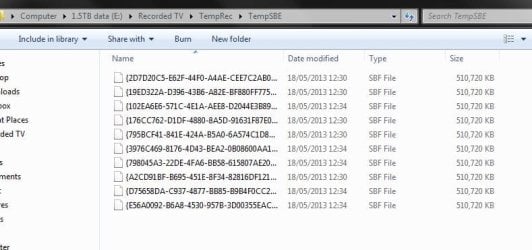
When you watch live TV, WMC saves what you are watching in the temp rec folder. You can usually rewind up to 30 minutes or pause then play and that function uses these files. The temp rec files are only visible when 'hide system files' is unchecked in control panel folder options. The temp rec files are deleted when the pc is restarted, so although 30 mins on HD can be a few GB, this is not using HDD space up because the files are not permanent. These files only remain on the HDD if you turn off the pc using power or reset buttons (eg if the machine has locked up).

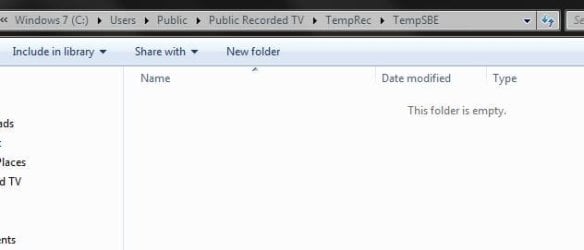
I have a large library of saved TV programs so I moved the save location from my C system drive to my E drive using the method I described in a previous post. Although I still have a public recorded TV folder on my C drive, the folder is empty. When I watch TV, temp rec files are created in the Recorded TV folder on my E drive. I just did a test see attached jpgs.

I'm not sure if any of this applies if you don't have a tuner installed. The usual route is install tuner, do live TV setup, edit program guide, change recording defaults (if required).

temp rec on E drive

temp rec.JPG

original temp rec

orig temp rec.JPG
 

My Computer My Computer

At a glance

Windows 7 pro x64 SP1Intel i7-2600k o/c to 4.6GHz8GB Mushkin 1866MHzNvidia GTX 750 Ti 2GB
Computer type
PC/Desktop
Computer Manufacturer/Model Number
self build
OS
Windows 7 pro x64 SP1
CPU
Intel i7-2600k o/c to 4.6GHz
Motherboard
MSI Z68-GD80
Memory
8GB Mushkin 1866MHz
Graphics Card(s)
Nvidia GTX 750 Ti 2GB
Sound Card
integrated
Monitor(s) Displays
Liyama ProLite 27"
Screen Resolution
1920*1080 px
Hard Drives
Seagate 2TB
PSU
Coolermaster GX 750W
Case
Antec 300 case + 5 fans
Cooling
Dark Rock Pro
Internet Speed
62Mbit down 18Mbit up
Antivirus
MSE
Browser
Firefox
Other Info
Blackgold BGT3650 Quad HD TV card. Also have various 3770 + 4770K render boxes.
Back
Top