Theme Changing Issue

Pootang97

New member
Local time
6:47 PM
Messages
8
So, I've just downloaded a new theme, and I've put it in the themes folder and done everything that I would do with any other theme (which usually works, this is the first time it's not worked), but it's just sent me back to the default Windows 7 Aero theme. Anyone know how to make it so I can use this theme?
 

My Computer

OS
Windows 7 Home Premium 64 Bit

My Computer

Computer Manufacturer/Model Number
BIOSTAR Nvida N61PB-M2S
OS
Windows 8 Xtream SP1 x64
CPU
AMD Sempron LE-1250 2.20GHz
Motherboard
MCP6P M2+ Biostar nVIDIA 6150
Memory
DDR2 PC2-5300
Graphics Card(s)
GeForce 8400 GS. NVIDIA GeForce 8 series
Sound Card
N/A
Monitor(s) Displays
Acer X193HQ 19inch Lcd Monitor-Grade A1 A1/ET.LEF0
Screen Resolution
1366x768 Landscape
Hard Drives
MAXTOR S TM3160813AS SCSI Disk Device , 160G
Case
Crab Need New 1
Keyboard
Standard
Mouse
Standard
Internet Speed
Motorola Surf Board , Running Haxoware Custom MAC's
Other Info
This is a new build , needs a little more ram i think.
Yeah all my files are patched, also, I'm using UXStyle, which allows me to use 3rd Party themes without patching, and it's worked with all of my other themes which require patched files.
 

My Computer

OS
Windows 7 Home Premium 64 Bit
Then all i can think of is the theme may not be for your build of windows , some themes require certain builds as they where designed on that pacific build.
 

My Computer

Computer Manufacturer/Model Number
BIOSTAR Nvida N61PB-M2S
OS
Windows 8 Xtream SP1 x64
CPU
AMD Sempron LE-1250 2.20GHz
Motherboard
MCP6P M2+ Biostar nVIDIA 6150
Memory
DDR2 PC2-5300
Graphics Card(s)
GeForce 8400 GS. NVIDIA GeForce 8 series
Sound Card
N/A
Monitor(s) Displays
Acer X193HQ 19inch Lcd Monitor-Grade A1 A1/ET.LEF0
Screen Resolution
1366x768 Landscape
Hard Drives
MAXTOR S TM3160813AS SCSI Disk Device , 160G
Case
Crab Need New 1
Keyboard
Standard
Mouse
Standard
Internet Speed
Motorola Surf Board , Running Haxoware Custom MAC's
Other Info
This is a new build , needs a little more ram i think.
I was told that by other people too, but my friend running the same build as me is using the same theme.
 

My Computer

OS
Windows 7 Home Premium 64 Bit
What is your OS build and what theme are you trying to run ???
 

My Computer

Computer Manufacturer/Model Number
BIOSTAR Nvida N61PB-M2S
OS
Windows 8 Xtream SP1 x64
CPU
AMD Sempron LE-1250 2.20GHz
Motherboard
MCP6P M2+ Biostar nVIDIA 6150
Memory
DDR2 PC2-5300
Graphics Card(s)
GeForce 8400 GS. NVIDIA GeForce 8 series
Sound Card
N/A
Monitor(s) Displays
Acer X193HQ 19inch Lcd Monitor-Grade A1 A1/ET.LEF0
Screen Resolution
1366x768 Landscape
Hard Drives
MAXTOR S TM3160813AS SCSI Disk Device , 160G
Case
Crab Need New 1
Keyboard
Standard
Mouse
Standard
Internet Speed
Motorola Surf Board , Running Haxoware Custom MAC's
Other Info
This is a new build , needs a little more ram i think.
You need to go back to the link you just gave me and read the additional info provided the theme has several stages you need to do before it runs.

Hmmm downloading now i will test it .....
 

My Computer

Computer Manufacturer/Model Number
BIOSTAR Nvida N61PB-M2S
OS
Windows 8 Xtream SP1 x64
CPU
AMD Sempron LE-1250 2.20GHz
Motherboard
MCP6P M2+ Biostar nVIDIA 6150
Memory
DDR2 PC2-5300
Graphics Card(s)
GeForce 8400 GS. NVIDIA GeForce 8 series
Sound Card
N/A
Monitor(s) Displays
Acer X193HQ 19inch Lcd Monitor-Grade A1 A1/ET.LEF0
Screen Resolution
1366x768 Landscape
Hard Drives
MAXTOR S TM3160813AS SCSI Disk Device , 160G
Case
Crab Need New 1
Keyboard
Standard
Mouse
Standard
Internet Speed
Motorola Surf Board , Running Haxoware Custom MAC's
Other Info
This is a new build , needs a little more ram i think.
I've tried everything it's said earlier, and I've tried every method of installation there is. I'm left with the UXStyle method (Which works for skins that include the same instructions that Radiance does). Idk, I guess I'll just have to find a different theme.
 

My Computer

OS
Windows 7 Home Premium 64 Bit

My Computer

Computer Manufacturer/Model Number
BIOSTAR Nvida N61PB-M2S
OS
Windows 8 Xtream SP1 x64
CPU
AMD Sempron LE-1250 2.20GHz
Motherboard
MCP6P M2+ Biostar nVIDIA 6150
Memory
DDR2 PC2-5300
Graphics Card(s)
GeForce 8400 GS. NVIDIA GeForce 8 series
Sound Card
N/A
Monitor(s) Displays
Acer X193HQ 19inch Lcd Monitor-Grade A1 A1/ET.LEF0
Screen Resolution
1366x768 Landscape
Hard Drives
MAXTOR S TM3160813AS SCSI Disk Device , 160G
Case
Crab Need New 1
Keyboard
Standard
Mouse
Standard
Internet Speed
Motorola Surf Board , Running Haxoware Custom MAC's
Other Info
This is a new build , needs a little more ram i think.
Switch to the default aero theme and then do the following.

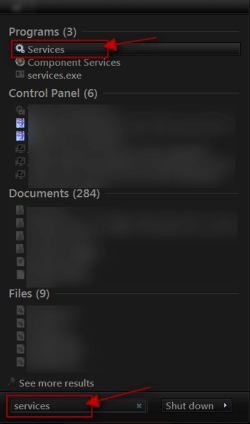
Click on the Start Button type in Services In the search box and then click on Services
1.png

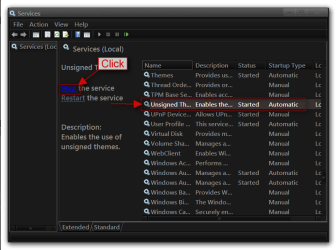
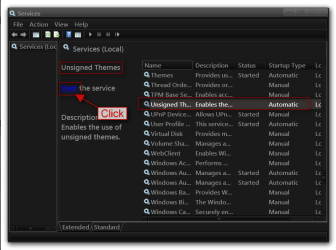
Scroll down until you see unsigned themes select it in click on the Stop text and let it stop after that click on Start text and see if that works. Your screen may blink when you do this.
4.pngstop.PNG
5.pngstart.png


Jerry
 

My Computer

Computer type
Laptop
Computer Manufacturer/Model Number
Sager NP9170
OS
Win 7 Pro x64 / Win 10 Pro
CPU
Intel(R) Core(TM) i7-3630QM CPU @ 2.40GHz
Motherboard
CLEVO P170EM
Memory
12 GB
Graphics Card(s)
(1) Intel(R) HD Graphics 4000 (2) NVIDIA GeForce GTX 675M
Sound Card
(1) Realtek High Definition Audio (2) Intel(R) Display Aud
Monitor(s) Displays
17.3
Screen Resolution
1920x1080
Hard Drives
(1) Samsung 860 EVO 500GB(OS) (1) Samsung 860 EVO 500GB(Data)
Keyboard
Backlite
Antivirus
MSE, Malwarebytes Pro
Browser
Firefox
Other Info
DESKTOP: Custom-built.
OS: Win 10 Pro x64.
CASE: Rosewill R5.
CPU: Intel I5 4670K CPU @ 3.40GHz.
CPU COOLER: Cool Master Hyper 212 EVO.
MOTHERBOARD: Asus Z87-A.
MEMORY: Kingston HyperX 2x4 GB.
GPU: Nvidia Geforce 650 TI.
PSU: Corsair TX750.
DRIVES: (1) Samsung 840 120 GB SSD (2) Western Digital blue 500 GB 7200 RPM.
Back
Top