
You are using an out of date browser. It may not display this or other websites correctly.
You should upgrade or use an alternative browser.
You should upgrade or use an alternative browser.
Solved theme doesnt start
- Thread starter groknet
- Start date

After you have manually started your custom theme it will appear in personalization as an unsaved theme, see fig 1. Right click on the unsaved theme and click the Save theme dialog, Fig 2, then enter a name for your theme in the Save as dialog box, Fig 3 and click save.
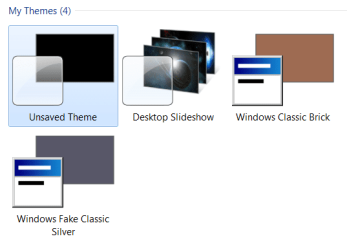
Fig 1
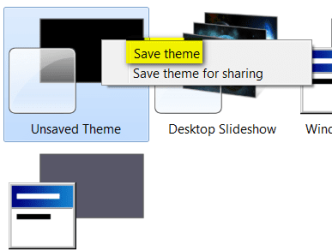
Fig 2
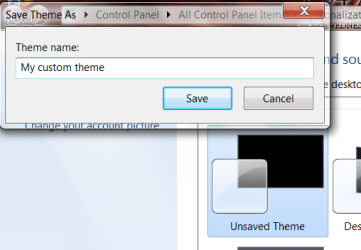
Fig 3
Note: anytime that you make further changes to an existing theme the above steps will have to be repeated.
Also check to see if your custom theme is saved to C:\Windows\Resources\Themes.
Also How to Change or Save a Windows 7 Theme
Fig 1
Fig 2
Fig 3
Note: anytime that you make further changes to an existing theme the above steps will have to be repeated.
Also check to see if your custom theme is saved to C:\Windows\Resources\Themes.
Also How to Change or Save a Windows 7 Theme
My Computer
- Computer type
- PC/Desktop
- Computer Manufacturer/Model Number
- My own abomination, I call it the Money Pit
- OS
- Windows 10 Pro x 2/Windows 11 Home
- CPU
- Intel i7 2600K @ 3.40 GHz
- Motherboard
- ASUS Sabertooth P67
- Memory
- Corsair Vengeance 16GB DDR3 1600MHz CL8 Dual Channel Kit
- Graphics Card(s)
- EVGA GeForce RTX 3080 XC3 ULTRA GAMING 10GB GDDR6X
- Sound Card
- Onboard Realtek or Nvidia High Definition Audio (HDMI)
- Monitor(s) Displays
- Samsung JS7000 50" SUHD TV or Samsung 27" FHD 60Hz 8ms GTG V
- Screen Resolution
- 1920 x 1080
- Hard Drives
- 1 x Samsung 870 EVO 250 GB SSD (Windows 10 Pro), 1 x Samsung 850 EVO 250 GB SSD (Windows 10 Pro)
- PSU
- Corsair AX860 - 860W Modular Power Supply
- Case
- Phanteks Enthoo Luxe Full Tower Case - Black
- Cooling
- CORSAIR Hydro Series H150i PRO RGB 360mm Liquid CPU Cooler
- Keyboard
- Logitech K830 Illuminated Living-Room Keyboard
- Mouse
- Logitech MX Anywhere 2S Wireless Mouse
- Internet Speed
- 100 Mbps
- Antivirus
- ESET Internet Security
- Browser
- Latest Version Of Firefox & Microsoft Edge Chromium Stable
- Other Info
- LG Super Multi Blue Internal Blu-ray Disk Rewriter - BH10LS30
6x2 HDMI Switcher (6 inputs, 2 outputs) so I can send the output of my Cable Box, Roku, or any my 4 computers to either my TV or Monitor separately or simultaneously.
Hello
Tx.
Hm i have made 2 themes and saved but none of them show up in
C:\Windows\Resources\Themes\.
Thats strange - i just make a them and save and i can use it if i
start it but its not in the themesdraver.
Tx.
Hm i have made 2 themes and saved but none of them show up in
C:\Windows\Resources\Themes\.
Thats strange - i just make a them and save and i can use it if i
start it but its not in the themesdraver.
My Computer
- OS
- win 7 home 32

Attachments


Last edited:
My Computer
- Computer type
- PC/Desktop
- Computer Manufacturer/Model Number
- My own abomination, I call it the Money Pit
- OS
- Windows 10 Pro x 2/Windows 11 Home
- CPU
- Intel i7 2600K @ 3.40 GHz
- Motherboard
- ASUS Sabertooth P67
- Memory
- Corsair Vengeance 16GB DDR3 1600MHz CL8 Dual Channel Kit
- Graphics Card(s)
- EVGA GeForce RTX 3080 XC3 ULTRA GAMING 10GB GDDR6X
- Sound Card
- Onboard Realtek or Nvidia High Definition Audio (HDMI)
- Monitor(s) Displays
- Samsung JS7000 50" SUHD TV or Samsung 27" FHD 60Hz 8ms GTG V
- Screen Resolution
- 1920 x 1080
- Hard Drives
- 1 x Samsung 870 EVO 250 GB SSD (Windows 10 Pro), 1 x Samsung 850 EVO 250 GB SSD (Windows 10 Pro)
- PSU
- Corsair AX860 - 860W Modular Power Supply
- Case
- Phanteks Enthoo Luxe Full Tower Case - Black
- Cooling
- CORSAIR Hydro Series H150i PRO RGB 360mm Liquid CPU Cooler
- Keyboard
- Logitech K830 Illuminated Living-Room Keyboard
- Mouse
- Logitech MX Anywhere 2S Wireless Mouse
- Internet Speed
- 100 Mbps
- Antivirus
- ESET Internet Security
- Browser
- Latest Version Of Firefox & Microsoft Edge Chromium Stable
- Other Info
- LG Super Multi Blue Internal Blu-ray Disk Rewriter - BH10LS30
6x2 HDMI Switcher (6 inputs, 2 outputs) so I can send the output of my Cable Box, Roku, or any my 4 computers to either my TV or Monitor separately or simultaneously.
Yes all looks the same in my computer....
If your issue is solved please click on the red triangle and type Solved in the dialogue box so the admins and mods can mark as solved.

My Computer
- Computer type
- PC/Desktop
- Computer Manufacturer/Model Number
- My own abomination, I call it the Money Pit
- OS
- Windows 10 Pro x 2/Windows 11 Home
- CPU
- Intel i7 2600K @ 3.40 GHz
- Motherboard
- ASUS Sabertooth P67
- Memory
- Corsair Vengeance 16GB DDR3 1600MHz CL8 Dual Channel Kit
- Graphics Card(s)
- EVGA GeForce RTX 3080 XC3 ULTRA GAMING 10GB GDDR6X
- Sound Card
- Onboard Realtek or Nvidia High Definition Audio (HDMI)
- Monitor(s) Displays
- Samsung JS7000 50" SUHD TV or Samsung 27" FHD 60Hz 8ms GTG V
- Screen Resolution
- 1920 x 1080
- Hard Drives
- 1 x Samsung 870 EVO 250 GB SSD (Windows 10 Pro), 1 x Samsung 850 EVO 250 GB SSD (Windows 10 Pro)
- PSU
- Corsair AX860 - 860W Modular Power Supply
- Case
- Phanteks Enthoo Luxe Full Tower Case - Black
- Cooling
- CORSAIR Hydro Series H150i PRO RGB 360mm Liquid CPU Cooler
- Keyboard
- Logitech K830 Illuminated Living-Room Keyboard
- Mouse
- Logitech MX Anywhere 2S Wireless Mouse
- Internet Speed
- 100 Mbps
- Antivirus
- ESET Internet Security
- Browser
- Latest Version Of Firefox & Microsoft Edge Chromium Stable
- Other Info
- LG Super Multi Blue Internal Blu-ray Disk Rewriter - BH10LS30
6x2 HDMI Switcher (6 inputs, 2 outputs) so I can send the output of my Cable Box, Roku, or any my 4 computers to either my TV or Monitor separately or simultaneously.