
czarmurphy
New member
- Local time
- 6:05 PM
- Messages
- 14
I have a problem. I have Windows 7 Ultimate 64 bit, and I cannot access my Aero Themes. I can click on them, but the window header bars remain in the style of Windows Basic -- they're not rounded buttons, but the ugly square ones! I also cannot change the color of the windows. I can edit the supposed color values, but the changes that should go into effect don't do anything.
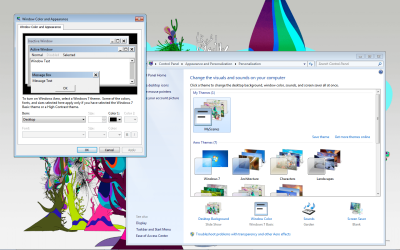
I have no Window Color and Appearance menu like my Windows 7 Pro desktop does (which allows access to a useful Color Mixer that I am trying to access) -- instead I receive a pop out. Some people have reported receiving pop outs as well, but their pop outs give access to change Themes, whereas mine do not.
I have posted a screenshot to illustrate my predicament.
In a possibly unrelated incident, I have noticed that my Alt+Tab context menu does not display window previews, but simply the icons associated with the programs. This might be solvable through another method.
Thank you for all your help!
EDIT: I have made a little progress. I have navigated to my Performance Options menu and, after comparing it to my desktop's Performance Options menu, have discovered that I am missing five or so checkboxes, including Aero Peek and Desktop Composition. Does this help any? Do I even have Aero on my Ultimate laptop?
I have no Window Color and Appearance menu like my Windows 7 Pro desktop does (which allows access to a useful Color Mixer that I am trying to access) -- instead I receive a pop out. Some people have reported receiving pop outs as well, but their pop outs give access to change Themes, whereas mine do not.
I have posted a screenshot to illustrate my predicament.
In a possibly unrelated incident, I have noticed that my Alt+Tab context menu does not display window previews, but simply the icons associated with the programs. This might be solvable through another method.
Thank you for all your help!
EDIT: I have made a little progress. I have navigated to my Performance Options menu and, after comparing it to my desktop's Performance Options menu, have discovered that I am missing five or so checkboxes, including Aero Peek and Desktop Composition. Does this help any? Do I even have Aero on my Ultimate laptop?
Attachments
My Computer
- OS
- Windows 7 Pro 64bit
- CPU
- i5 750
- Motherboard
- Asus P7P55D-E Pro
- Memory
- 4 GB Ripjaw
- Graphics Card(s)
- Palit GTX 460
- Monitor(s) Displays
- Asus VH236
- Hard Drives
- Samsung Spinpoint 1TB 7200RPM
- PSU
- XFX 750W BE
- Case
- Antec 900
- Cooling
- Cooler Master Hyper 212+