Theme wallpaper does not apply

rerice

New member
I have successfully applied several non Windows themes which work fine.
The problem is with those themes ie: Red Fushion, and Steel Fushion, which have
multiple wallpapers.

These apply and are active in Personalize but the wallpaper does not change
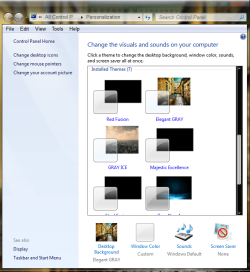
with the theme. The wallpaper also shows up as black square in the Personalize screen, and the wallpaper remains whatever was previously applied.

Thanks for your help
Richard
 

My Computer

Computer Manufacturer/Model Number
Dell DXP061
OS
windows 7 RTM
CPU
Intel core 2 6400 @2.13GHz
Motherboard
Dell ??
Memory
2 Gig.
Graphics Card(s)
NVIDIA GeForce 7300 GT
Sound Card
High Definition Audio Device - Microsoft
Monitor(s) Displays
Dell LCD
Screen Resolution
1280 x 1024 75 hertz
Hard Drives
WDC WD2500JS-75NCB3 ATA Device

WDC WD5000AAKS-65YGA0 ATA Device
Keyboard
Logitech Cordless
Mouse
Logitech Cordless
Internet Speed
760k
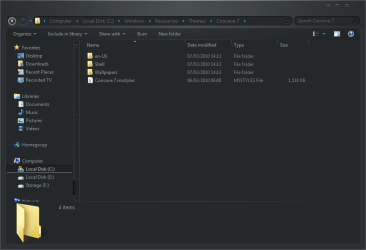
For a theme to use certain wallpapers it must have a folder in the theme directory, like in the image below. Check to see if you have wallpapers in that folder other wise create one and put some wallpapers in it!!

*Notice the theme directory: C:\Windows\Resources\Themes\your_theme*
 

Attachments

  • theme_wallpaper.PNG
    theme_wallpaper.PNG
    90.9 KB · Views: 340

My Computer

Computer type
PC/Desktop
Computer Manufacturer/Model Number
Self Build
OS
MS Windows 7 Professional 64-bit SP1
CPU
AMD FX(tm)-6100 Six-Core Processor Socket AM3+ (942)
Motherboard
ASUSTeK COMPUTER INC. SABERTOOTH 990FX (AM3r2)
Memory
8.00 GB Dual-Channel DDR3 @ 802MHz (11-11-11-36) 1.5Volts
Graphics Card(s)
NVIDIA GeForce GTX 560 Ti
Sound Card
Onboard Realtek HD
Monitor(s) Displays
shimian (1920x1080@60Hz)
Screen Resolution
1920*1080
Hard Drives
OCZ-AGIL ITY3 SATA Disk Device 120GB
PSU
Corsair TX 750
Case
Corsair
Cooling
WaterCooled
Keyboard
Microsoft Wired
Mouse
Logitech USB Optical TiltWheel Mouse
Internet Speed
Realtek PCIe GBE Family Controller 20MB*1MB
Antivirus
Avast
Browser
Firefox
Other Info
150GB Internal Hard Drive for Backing Up Important Files -
Hauppauge Nova-DT Dual DVB-T Tuner Device (+IR) -
USB PC Camera with Mic (SN9C105)
Thanks, Anthony

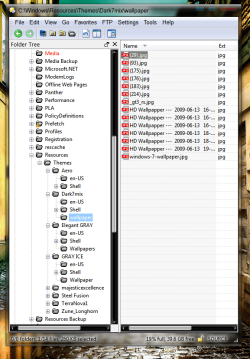
Please check the attached image. The theme " Dark7Mix " Does not display its multiple wallpapers while
" Grey Ice " ( which has only one wallpaper ) displays the wallpaper correctly.

This is true for all the installed themes. Changing the wallpaper from multiple to one does not help.

Thanks,
Richard
 

Attachments

  • Capture.PNG
    Capture.PNG
    324 KB · Views: 50
  • Capture2.PNG
    Capture2.PNG
    108.8 KB · Views: 70
  • Capture3.PNG
    Capture3.PNG
    261.1 KB · Views: 39

My Computer

Computer Manufacturer/Model Number
Dell DXP061
OS
windows 7 RTM
CPU
Intel core 2 6400 @2.13GHz
Motherboard
Dell ??
Memory
2 Gig.
Graphics Card(s)
NVIDIA GeForce 7300 GT
Sound Card
High Definition Audio Device - Microsoft
Monitor(s) Displays
Dell LCD
Screen Resolution
1280 x 1024 75 hertz
Hard Drives
WDC WD2500JS-75NCB3 ATA Device

WDC WD5000AAKS-65YGA0 ATA Device
Keyboard
Logitech Cordless
Mouse
Logitech Cordless
Internet Speed
760k
FYI

I was able to cure this problem by doing a Repair Install.

Some themes still did not apply the wallpaper correctly. To fix this I used the
" Desktop Background " key to assign the wallpaper to the " Unsaved Theme " than saved the new theme using the name of the original theme.

Not as neat as it should be but is a good workaround.

Hope this helps someone.
Richard
 

My Computer

Computer Manufacturer/Model Number
Dell DXP061
OS
windows 7 RTM
CPU
Intel core 2 6400 @2.13GHz
Motherboard
Dell ??
Memory
2 Gig.
Graphics Card(s)
NVIDIA GeForce 7300 GT
Sound Card
High Definition Audio Device - Microsoft
Monitor(s) Displays
Dell LCD
Screen Resolution
1280 x 1024 75 hertz
Hard Drives
WDC WD2500JS-75NCB3 ATA Device

WDC WD5000AAKS-65YGA0 ATA Device
Keyboard
Logitech Cordless
Mouse
Logitech Cordless
Internet Speed
760k
Back
Top