Themes for All Users?

niagara94

New member
Local time
9:26 PM
Messages
21
Hi - I am wondering how I can make the themes that show up in my personalization screen, under My Themes, show up for all the other users on the computer. I don't want to individually change each theme, I have too many (in the hundreds) to do that. Rather, I want the themes to be a shared folder where when I add a theme in my personalization screen it will show up on the other user's personalization screen automatically without having to do anything. Any help would be greatly appreciated. Thanks.
 

My Computer

OS
Windows 7
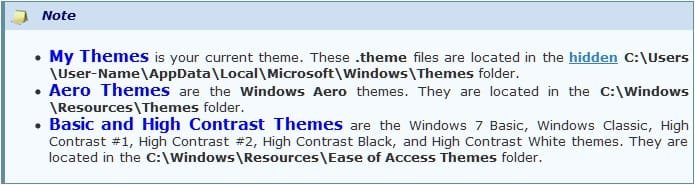
I have used a snip listed below from the tutorial - Theme - Change or Save that lists the locations of where your themes are stored . Navigate to the locations of your saved themes and copy & paste your saved themes to each of the other users folder located at C:\Users\User-Name\AppData\Local\Microsoft\Windows\Themes folder. Each user may then have to navigate to their user folder containing the new themes (location in bold print above) clicking on each theme once to enable it in Personalization if not already shown in Personalization.

Make sure you have show Hidden folders enabled and also if you have Themes that require theme patchers or third party tools to function they may not work properly since the other users are using a non administrator account

Theme.jpg
 

My Computer

Computer type
PC/Desktop
Computer Manufacturer/Model Number
My own abomination, I call it the Money Pit
OS
Windows 10 Pro x 2/Windows 11 Home
CPU
Intel i7 2600K @ 3.40 GHz
Motherboard
ASUS Sabertooth P67
Memory
Corsair Vengeance 16GB DDR3 1600MHz CL8 Dual Channel Kit
Graphics Card(s)
EVGA GeForce RTX 3080 XC3 ULTRA GAMING 10GB GDDR6X
Sound Card
Onboard Realtek or Nvidia High Definition Audio (HDMI)
Monitor(s) Displays
Samsung JS7000 50" SUHD TV or Samsung 27" FHD 60Hz 8ms GTG V
Screen Resolution
1920 x 1080
Hard Drives
1 x Samsung 870 EVO 250 GB SSD (Windows 10 Pro), 1 x Samsung 850 EVO 250 GB SSD (Windows 10 Pro)
PSU
Corsair AX860 - 860W Modular Power Supply
Case
Phanteks Enthoo Luxe Full Tower Case - Black
Cooling
CORSAIR Hydro Series H150i PRO RGB 360mm Liquid CPU Cooler
Keyboard
Logitech K830 Illuminated Living-Room Keyboard
Mouse
Logitech MX Anywhere 2S Wireless Mouse
Internet Speed
100 Mbps
Antivirus
ESET Internet Security
Browser
Latest Version Of Firefox & Microsoft Edge Chromium Stable
Other Info
LG Super Multi Blue Internal Blu-ray Disk Rewriter - BH10LS30
6x2 HDMI Switcher (6 inputs, 2 outputs) so I can send the output of my Cable Box, Roku, or any my 4 computers to either my TV or Monitor separately or simultaneously.
Hi - Thank you for your reply. The themes are something that I will frequently add to so I was wondering if there was a way to automatically have the changes I make to my C:\Users\User-Name\AppData\Local\Microsoft\Windows\Themes folder to be made to that same folder for the other user on the computer. Basically a way to share theme folders. Is that possible?
 

My Computer

OS
Windows 7
Hi - Thank you for your reply. The themes are something that I will frequently add to so I was wondering if there was a way to automatically have the changes I make to my C:\Users\User-Name\AppData\Local\Microsoft\Windows\Themes folder to be made to that same folder for the other user on the computer. Basically a way to share theme folders. Is that possible?

That would be the best/fastest option of which I did not think of. Other members with more experience should be able to give you a definitive answer. I had only thought of one possible solution when posting.
 

My Computer

Computer type
PC/Desktop
Computer Manufacturer/Model Number
My own abomination, I call it the Money Pit
OS
Windows 10 Pro x 2/Windows 11 Home
CPU
Intel i7 2600K @ 3.40 GHz
Motherboard
ASUS Sabertooth P67
Memory
Corsair Vengeance 16GB DDR3 1600MHz CL8 Dual Channel Kit
Graphics Card(s)
EVGA GeForce RTX 3080 XC3 ULTRA GAMING 10GB GDDR6X
Sound Card
Onboard Realtek or Nvidia High Definition Audio (HDMI)
Monitor(s) Displays
Samsung JS7000 50" SUHD TV or Samsung 27" FHD 60Hz 8ms GTG V
Screen Resolution
1920 x 1080
Hard Drives
1 x Samsung 870 EVO 250 GB SSD (Windows 10 Pro), 1 x Samsung 850 EVO 250 GB SSD (Windows 10 Pro)
PSU
Corsair AX860 - 860W Modular Power Supply
Case
Phanteks Enthoo Luxe Full Tower Case - Black
Cooling
CORSAIR Hydro Series H150i PRO RGB 360mm Liquid CPU Cooler
Keyboard
Logitech K830 Illuminated Living-Room Keyboard
Mouse
Logitech MX Anywhere 2S Wireless Mouse
Internet Speed
100 Mbps
Antivirus
ESET Internet Security
Browser
Latest Version Of Firefox & Microsoft Edge Chromium Stable
Other Info
LG Super Multi Blue Internal Blu-ray Disk Rewriter - BH10LS30
6x2 HDMI Switcher (6 inputs, 2 outputs) so I can send the output of my Cable Box, Roku, or any my 4 computers to either my TV or Monitor separately or simultaneously.
Hi - Thanks for your reply. Any idea how to share a folder between one user folder and another?
 

My Computer

OS
Windows 7
Back
Top