
There is a problem with the interface in Windows 7.

xcyper33

New member
Local time
4:59 PM
Messages
16
Everytime I drag an object the icons/windows don't move with my cursor. It's been a problem that has been annoying me ever since I reinstalled my Windows 7. I have a screenshot so you guys can see my problem.

4q4ztl.png
 
Last edited by a moderator:

My Computer

Computer Manufacturer/Model Number
Customized
OS
Windows 7
CPU
Intel (R) Dual CPU E2200 2.20 GHz
Motherboard
Gigabyte P35-DS3L
Memory
2048MB
Graphics Card(s)
MSI G-Force 8800GT 512MB
Monitor(s) Displays
Samsung, 1368 x 766
Hard Drives
500GB HD,60GB HD
Case
Antec 900
I'm not sure what the problem is. Are you referring to the fact it is dragging the box instead of the entire Paint window?
 

My Computer

OS
Windows 7 Ultimate x64 SP1
CPU
Intel Core i7-2600
Motherboard
Gigabyte GA-P67A-UD3P-B3
Memory
12 GB Patriot Extreme DDR3-1333
Graphics Card(s)
Nvidia GTX 470
Monitor(s) Displays
Dell UltraSharp 2209WA
Hard Drives
OCZ Agility3 240 GB, WD5001AALS, WD7501AALS
PSU
OCZ ModStream 700W
Case
CoolerMaster HAF 912 Advanced
Cooling
CoolerMaster Hyper 212 Plus
I think what he means is that there is a gap between the mouse pointer and the icon being dragged, although it isn't obvious in the image. Normally the icon being dragged is immediatly behind the mouse pointer.

Maybe he can clarify that?
 

My Computer

Computer type
PC/Desktop
Computer Manufacturer/Model Number
Golden Mk. I.4
OS
Windows 10 Pro x64 ; Xubuntu x64
CPU
Intel i7 860 @ 2.80 GHz O/C'ed to 4.0GHz
Motherboard
Gigabyte P55A-UD3R Rev.1. Award BIOS F13
Memory
16GB Corsair Vengance DDR3 @ 661 MHz Dual Channel (9-9-9-24)
Graphics Card(s)
EVGA NVidia GTX 560 1024MB
Sound Card
Realtek Integrated
Monitor(s) Displays
Dual Samsung SyncMaster 2494HS
Screen Resolution
1920*1080 and 1920*1080
Hard Drives
1*Samsung 840 EVO 120GB SSD;
1*OCZ Vertex 2 60GB SSD;
2*Samsung F3 SpinPoint 1TB in RAID0;
1*Samsung F1 SpinPoint 1TB;
2*Western Digital 1TB External USB 3.0
1*Western Digital 500GB External USB 3.0
1*Seagate 500GB External USB 2.0
PSU
Thermaltake ToughPower QFan 750W
Case
Thermaltake Element S VK60001W2Z
Cooling
Corsair H60 Water Cooling, 2*230mm and 2*80mm case fans
Keyboard
Logitech G110
Mouse
Logitech MX518
Look at the picture. See when I drag a window the window's boder follows the cursor not the window itself. It's been bugging me for a while.
 

My Computer

Computer Manufacturer/Model Number
Customized
OS
Windows 7
CPU
Intel (R) Dual CPU E2200 2.20 GHz
Motherboard
Gigabyte P35-DS3L
Memory
2048MB
Graphics Card(s)
MSI G-Force 8800GT 512MB
Monitor(s) Displays
Samsung, 1368 x 766
Hard Drives
500GB HD,60GB HD
Case
Antec 900
Perhaps he means how to arrange icons as in Windows XP!
 

My Computer

Computer type
PC/Desktop
OS
Microsoft Windows 7 Home Premium 64-bit 7601 Multiprocessor Free Service Pack 1
CPU
Intel(R) Core(TM) i7-3770 CPU @ 3.40GHz
Motherboard
ASUSTeK COMPUTER INC. P8H77-M
Memory
8.00 GB
Graphics Card(s)
Intel(R) HD Graphics 4000
Sound Card
On Board
Monitor(s) Displays
Dell 24"
Screen Resolution
1920 x 1080
Hard Drives
(1) INTEL SSDSC2CT180A3 ATA Device (2) ST500DM002-1BD142 ATA Device (3) WDC WD3200AAKS-75L9A0 ATA Device (4) Generic- Compact Flash USB Device (5) Generic- MS/MS-Pro USB Device (6) Generic- SD/MMC USB Device (7) Generic- SM/xD-Picture USB
PSU
500w Corsair
Case
Cooler Master
Cooling
3 Fans
Keyboard
Logitech MK300
Mouse
Logitech WOM
Internet Speed
75Mb
Antivirus
Norton 360
Browser
Firefox, Opera, IE
This is fairly simple to sort.

Click :orb: and type View advanced system settings into the search box and press enter/return. Provide administrative credentials at the prompt. Under Performance click on Settings... Ensure that Show window contents while dragging is checked, as shown here. Click OK twice to close the dialogue panels. If the change does not take place straightaway, log off and back on again or restart your machine.
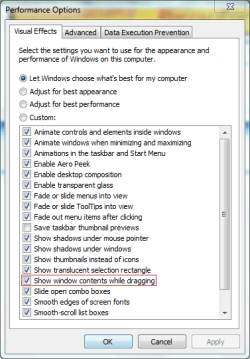
Capture.PNG
 

My Computer

Computer type
PC/Desktop
Computer Manufacturer/Model Number
Dwarf Dwf/11/2012 r09/2013
OS
Windows 8.1 Pro RTM x64
CPU
Intel Core-i5-3570K 4-core @ 3.4GHz (Ivy Bridge) (OC 4.4GHz)
Motherboard
ASRock Z77 Extreme4-M
Memory
4 x 4GB DDR3-1600 Corsair Vengeance CMZ8GX3M2A1600C9B (16GB)
Graphics Card(s)
MSI GeForce GTX770 Gaming OC 2GB
Sound Card
Realtek High Definition on board solution (ALC 898)
Monitor(s) Displays
ViewSonic VA1912w Widescreen (VGA)
Screen Resolution
1440x900
Hard Drives
OCZ Agility 3 SSD 120GB SATA III x2 (RAID 0)
Samsung HD501LJ 500GB SATA II x2
Hitachi HDS721010CLA332 1TB SATA II
Iomega 1.5TB Ext USB 2.0
WD 2.0TB Ext USB 3.0
PSU
XFX Pro Series 850W Semi-Modular
Case
Gigabyte IF233
Cooling
1 x 120mm Front Inlet 1 x 120mm Rear Exhaust
Keyboard
Microsoft Comfort Curve Keyboard 3000 (USB)
Mouse
Microsoft Comfort Mouse 3000 for Business (USB)
Internet Speed
NetGear DG834Gv3 ADSL Modem/Router (Ethernet) ~4.0 Mb/s (O2)
Antivirus
Avast! 8.0.1497
Browser
IE 11
Other Info
Optical Drive: HL-DT-ST BD-RE BH10LS30 SATA Bluray
Lexmark S305 Printer/Scanner/Copier (USB)
WEI Score: 8.1/8.1/8.5/8.5/8.25
Asus Eee PC 1011PX Netbook (Windows 7 x86 Starter)
Ok. When I CLICK AND HOLD a window and drag it to places, THE ENTIRE WINDOW Does NOT follow, only the border. Look at the picture, the border itself is being dragged and the ORIGINAL window stays at its current position. Maybe that pic is confusing because the window has MS Paint. Don't focus on the MS Paint, focus on the window it is in.
 

My Computer

Computer Manufacturer/Model Number
Customized
OS
Windows 7
CPU
Intel (R) Dual CPU E2200 2.20 GHz
Motherboard
Gigabyte P35-DS3L
Memory
2048MB
Graphics Card(s)
MSI G-Force 8800GT 512MB
Monitor(s) Displays
Samsung, 1368 x 766
Hard Drives
500GB HD,60GB HD
Case
Antec 900
Look at the picture. See when I drag a window the window's boder follows the cursor not the window itself. It's been bugging me for a while.

I think this is what is confusing us. When you say "drag a window" I'm not sure what you mean. If you mean that when you put your mouse over an ICON then the transparent border shows up. Then when you drag the icon the border doesn't show whilst dragging. This is quite normal. It looks to me by your screenshot that you have either auto arrange or snap to grip or both chosen for your desktop icons. Is this so?
 

My Computer

Computer type
PC/Desktop
OS
Microsoft Windows 7 Home Premium 64-bit 7601 Multiprocessor Free Service Pack 1
CPU
Intel(R) Core(TM) i7-3770 CPU @ 3.40GHz
Motherboard
ASUSTeK COMPUTER INC. P8H77-M
Memory
8.00 GB
Graphics Card(s)
Intel(R) HD Graphics 4000
Sound Card
On Board
Monitor(s) Displays
Dell 24"
Screen Resolution
1920 x 1080
Hard Drives
(1) INTEL SSDSC2CT180A3 ATA Device (2) ST500DM002-1BD142 ATA Device (3) WDC WD3200AAKS-75L9A0 ATA Device (4) Generic- Compact Flash USB Device (5) Generic- MS/MS-Pro USB Device (6) Generic- SD/MMC USB Device (7) Generic- SM/xD-Picture USB
PSU
500w Corsair
Case
Cooler Master
Cooling
3 Fans
Keyboard
Logitech MK300
Mouse
Logitech WOM
Internet Speed
75Mb
Antivirus
Norton 360
Browser
Firefox, Opera, IE
Dwarf has it right with the show window contents. If you can't enable that, you might have Aero off, or might be missing the latest video drivers.
 

My Computer

OS
Windows 7 Ultimate x64 SP1
CPU
Intel Core i7-2600
Motherboard
Gigabyte GA-P67A-UD3P-B3
Memory
12 GB Patriot Extreme DDR3-1333
Graphics Card(s)
Nvidia GTX 470
Monitor(s) Displays
Dell UltraSharp 2209WA
Hard Drives
OCZ Agility3 240 GB, WD5001AALS, WD7501AALS
PSU
OCZ ModStream 700W
Case
CoolerMaster HAF 912 Advanced
Cooling
CoolerMaster Hyper 212 Plus
This is fairly simple to sort.

Click :orb: and type View advanced system settings into the search box and press enter/return. Provide administrative credentials at the prompt. Under Performance click on Settings... Ensure that Show window contents while dragging is checked, as shown here. Click OK twice to close the dialogue panels. If the change does not take place straightaway, log off and back on again or restart your machine.

View attachment 129079

This should do it. Might be the registry isn't updating for some reason. Try the attached file below and double click and add it to the registry.
 

Attachments

My Computer

Computer Manufacturer/Model Number
HCL
OS
Winbdows 7 ultimate x64 | Ubuntu 12.04 x64 LTS
CPU
Core 2 Duo e7400 @ 2.90GHz
Motherboard
Gigabyte G31M-ES2L
Memory
3GB DDR2
Graphics Card(s)
Asus Nvidia GTX 560Ti 1GB
Sound Card
On-board
Monitor(s) Displays
HCL eZeeBee 18.5" LCD
Screen Resolution
1366x768 @ 60Hz
Hard Drives
Western Digital 320GB
PSU
Corsair CX500 V2 500W
Cooling
Stock
Keyboard
Stock
Mouse
Stock
Internet Speed
15-25kBps D/L | 10kBps U/L | Hey Don't laugh
RE

177 dayss.... -______________-

okay so this will probably help with anyone with the border dragging problem these kids were talking about...

the dwarf guy is actually right.

I had the same problem and i did what he said

Click and type View advanced system settings into the search box and press enter/return. Provide administrative credentials at the prompt. Under Performance click on Settings... Ensure that Show window contents while dragging is checked, as shown here. Click OK twice to close the dialogue panels. If the change does not take place straightaway, log off and back on again or restart your machine.

but window contents when dragging was on..

so i turned it off, clicked apply, OK, OK.

then i went back to the same place and turned it on again..

apply, OK, OK.

and then its fixed ;)
 

My Computer

OS
windows 7 Home Premium 64bit.
You're welcome, mrsteaze and welcome to Windows 7 Forums :party:

Sometimes the setting shown is correct, but the associated behaviour is not. In these cases, toggling the setting should get them back in sync again.
 

My Computer

Computer type
PC/Desktop
Computer Manufacturer/Model Number
Dwarf Dwf/11/2012 r09/2013
OS
Windows 8.1 Pro RTM x64
CPU
Intel Core-i5-3570K 4-core @ 3.4GHz (Ivy Bridge) (OC 4.4GHz)
Motherboard
ASRock Z77 Extreme4-M
Memory
4 x 4GB DDR3-1600 Corsair Vengeance CMZ8GX3M2A1600C9B (16GB)
Graphics Card(s)
MSI GeForce GTX770 Gaming OC 2GB
Sound Card
Realtek High Definition on board solution (ALC 898)
Monitor(s) Displays
ViewSonic VA1912w Widescreen (VGA)
Screen Resolution
1440x900
Hard Drives
OCZ Agility 3 SSD 120GB SATA III x2 (RAID 0)
Samsung HD501LJ 500GB SATA II x2
Hitachi HDS721010CLA332 1TB SATA II
Iomega 1.5TB Ext USB 2.0
WD 2.0TB Ext USB 3.0
PSU
XFX Pro Series 850W Semi-Modular
Case
Gigabyte IF233
Cooling
1 x 120mm Front Inlet 1 x 120mm Rear Exhaust
Keyboard
Microsoft Comfort Curve Keyboard 3000 (USB)
Mouse
Microsoft Comfort Mouse 3000 for Business (USB)
Internet Speed
NetGear DG834Gv3 ADSL Modem/Router (Ethernet) ~4.0 Mb/s (O2)
Antivirus
Avast! 8.0.1497
Browser
IE 11
Other Info
Optical Drive: HL-DT-ST BD-RE BH10LS30 SATA Bluray
Lexmark S305 Printer/Scanner/Copier (USB)
WEI Score: 8.1/8.1/8.5/8.5/8.25
Asus Eee PC 1011PX Netbook (Windows 7 x86 Starter)
Back
Top