"There is not enough free memory to run this program" fix help

Justhelpme

New member
Local time
12:30 PM
Messages
13
"There is not enough free memory to run this program" fix help

Hi, my computer has been very annoying lately. It all started yesterday.
My computer had a no sound icon. I simply restarted it thinking that it
would solve the issue. However, it all got worse from there. When my
computer came back I found that not only did it still have no sound but
also that I apparently had a “limited” internet connection. So I went to
open my control panel to see if any software was added onto my computer
without my knowledge and it wouldn't open saying that “there is not
enough memory to run this program. Exit one or more programs and
try again”. So I disregarded it for a while and started to look into my
audio. When I had my curser on the audio tab, it said the audio service
is not running. When I opened the troubleshooter, it said “an unexpected
error has occurred, the troubleshooting wizard cannot continue”
(error code 0x8007000e) So I thought it could be some sort of virus
. So I opened my virus protection software to check my computer only
for it to tell me immediately that there was an unexpected problem
with the scan and that I needed to run it again. I tried this for three
times but it still didn't work. I also can’t access computer by opening
it through the start window. I have to open a folder on my desktop
and open it through a setting on the side for my computer (it doesn't
even allow me to make new folders anymore). But despite those
errors I can open and play the game Sims 4 (without audio of course)
and browse the internet (how I sent this reply for help).It won’t let
me use restore points because of the not enough memory error.
I have no idea what I can do at this point to fix this error. I know
that I in fact have a ton of memory to work with (approximately
660 gigs) and I’m working with 8 gigs of ram… I’m not what some
would call a computer genius so I need all the help I can get here :confused:.
 

My Computer

Computer type
Laptop
Computer Manufacturer/Model Number
Dell
OS
Windows 7 64 bit
CPU
Intel Core i5-4510U 1.7 GHz (Intel Core i5)
Antivirus
McAfee LiveSafe - internet security
Browser
Google Chrome

My Computer

Computer type
PC/Desktop
Computer Manufacturer/Model Number
Home made Desktop
OS
Windows 10 Pro. 64/ version 1709 Windows 7 Pro/64
CPU
Intel i7-6800K @ 4.3
Motherboard
ASUS X-99 Deluxe II
Memory
Corsair Platinum 16 gig @2400
Graphics Card(s)
EVGA GTX 1070 OC
Monitor(s) Displays
Asus 27" LED LCD/VE278Q
Screen Resolution
1920-1080 or 1280-720 HDMI
Hard Drives
INTEL SSD 730-240 Gb Sata 3.0/
PSU
EVGA Platium 1200W
Case
Phanteks Luxe Tempered Glass 8 fans/ one radiator
Cooling
XSPC/ Water Cooled CPU
Keyboard
Das 4 Professional
Mouse
Logitech M705/MX Anywhere 2-S
Internet Speed
100 mbits
Antivirus
Microsoft Security Essentials/ Malwarebytes Premium 3.0/ SAS
Browser
I.E. 11 default/Firefox/ ISP Time Warner Cable/Spectrum
Other Info
LG BluRay Burner/
Sound system-KLipsch-THX/
Icy Dock ssd Hot Swap bays.
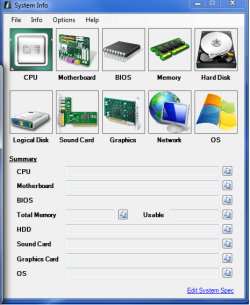
I tried using the application in the link but when I used it, the results came back as completely blank... even when i turned the settings to automatic....
 

Attachments

  • Untitled.png
    Untitled.png
    114.7 KB · Views: 23

My Computer

Computer type
Laptop
Computer Manufacturer/Model Number
Dell
OS
Windows 7 64 bit
CPU
Intel Core i5-4510U 1.7 GHz (Intel Core i5)
Antivirus
McAfee LiveSafe - internet security
Browser
Google Chrome

My Computer

Computer type
PC/Desktop
Computer Manufacturer/Model Number
Home made Desktop
OS
Windows 10 Pro. 64/ version 1709 Windows 7 Pro/64
CPU
Intel i7-6800K @ 4.3
Motherboard
ASUS X-99 Deluxe II
Memory
Corsair Platinum 16 gig @2400
Graphics Card(s)
EVGA GTX 1070 OC
Monitor(s) Displays
Asus 27" LED LCD/VE278Q
Screen Resolution
1920-1080 or 1280-720 HDMI
Hard Drives
INTEL SSD 730-240 Gb Sata 3.0/
PSU
EVGA Platium 1200W
Case
Phanteks Luxe Tempered Glass 8 fans/ one radiator
Cooling
XSPC/ Water Cooled CPU
Keyboard
Das 4 Professional
Mouse
Logitech M705/MX Anywhere 2-S
Internet Speed
100 mbits
Antivirus
Microsoft Security Essentials/ Malwarebytes Premium 3.0/ SAS
Browser
I.E. 11 default/Firefox/ ISP Time Warner Cable/Spectrum
Other Info
LG BluRay Burner/
Sound system-KLipsch-THX/
Icy Dock ssd Hot Swap bays.
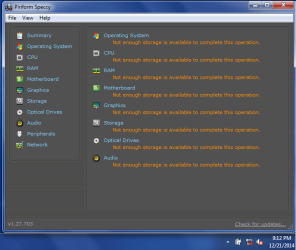
Unfortunately, this tutorial does not work either, giving me a bunch of "not enough storage is available to complete the operation"....
 

Attachments

  • Untitled.png
    Untitled.png
    82.8 KB · Views: 19

My Computer

Computer type
Laptop
Computer Manufacturer/Model Number
Dell
OS
Windows 7 64 bit
CPU
Intel Core i5-4510U 1.7 GHz (Intel Core i5)
Antivirus
McAfee LiveSafe - internet security
Browser
Google Chrome
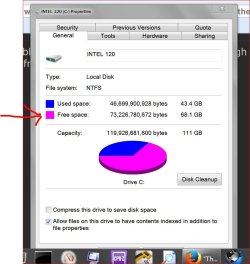
That probable means you (C) partition is full. Not enough free space.
How much free space do you have?

free space.JPG
 

My Computer

Computer type
PC/Desktop
Computer Manufacturer/Model Number
Home made Desktop
OS
Windows 10 Pro. 64/ version 1709 Windows 7 Pro/64
CPU
Intel i7-6800K @ 4.3
Motherboard
ASUS X-99 Deluxe II
Memory
Corsair Platinum 16 gig @2400
Graphics Card(s)
EVGA GTX 1070 OC
Monitor(s) Displays
Asus 27" LED LCD/VE278Q
Screen Resolution
1920-1080 or 1280-720 HDMI
Hard Drives
INTEL SSD 730-240 Gb Sata 3.0/
PSU
EVGA Platium 1200W
Case
Phanteks Luxe Tempered Glass 8 fans/ one radiator
Cooling
XSPC/ Water Cooled CPU
Keyboard
Das 4 Professional
Mouse
Logitech M705/MX Anywhere 2-S
Internet Speed
100 mbits
Antivirus
Microsoft Security Essentials/ Malwarebytes Premium 3.0/ SAS
Browser
I.E. 11 default/Firefox/ ISP Time Warner Cable/Spectrum
Other Info
LG BluRay Burner/
Sound system-KLipsch-THX/
Icy Dock ssd Hot Swap bays.
According to the properties, I have 660 GB of space left... so i doubt that it has really to do with space...
 

Attachments

  • Untitled.png
    Untitled.png
    48 KB · Views: 19

My Computer

Computer type
Laptop
Computer Manufacturer/Model Number
Dell
OS
Windows 7 64 bit
CPU
Intel Core i5-4510U 1.7 GHz (Intel Core i5)
Antivirus
McAfee LiveSafe - internet security
Browser
Google Chrome
Hi and welcome to SevenForums,
Use Clean boot,
http://www.sevenforums.com/tutorials/179159-troubleshoot-application-conflicts-performing-clean-startup.html
Click Start and type in the search box,
msconfig
Click on the suggestion on top or hit the Enter key,
Go to the Startup section and take some screen shots for a complete list,
Go to the Services section and on the bottom left Check the box to Hide All Microsoft services,
Repeat the screen shots,
See the links above my signature on how to take and upload screen shots here,
Cheers.
 

My Computer

Computer type
PC/Desktop
Computer Manufacturer/Model Number
Custom assembled by me :}
OS
Win-7-Pro64bit 7-H-Prem-64bit
CPU
i7-5930K 2nd i9-9940x both water blocked VRM's too
Motherboard
ASUS SABERTOOTH X99 2nd ASUS x299 Apex
Memory
Trident-z 3200C14 2nd Trident-z 3600C16
Graphics Card(s)
EVGA 1080ti ftw3 2nd Titan Xp both water blocked
Sound Card
Built-in Realtek
Monitor(s) Displays
1-AOC G2460PG 24"G-Sync 144Hz/ 2nd 1-ASUS VG248QE 24" 144Hz
Screen Resolution
1920 x 1080 144Hz
Hard Drives
2-Samsung M.2 Evo & Evo Plus
2-Samsung 850 EVO 500GB SSD's/ 3-2.5 W.D. Black 1tb-&3-1tb/3-3.5 WD Black 1tb hdd's
PSU
EVGA SuperNOVA 1000-P2 2nd 1200-P2
Case
2-Corsair Obsidian Series 450D Black ATX Mid Tower
Cooling
Custom water loops
Keyboard
Logitech G710+/ 2nd Logitech G910
Mouse
2-RedDragon M901 Perdition 16400 dpi Gaming mouse = wired
Internet Speed
Comcast Ping 19ms 89.31mbps download speed 6.12mbps upload
Antivirus
Malwarebytes Pro/ Superantispyware Pro
Browser
FireFox & Pale moon
Other Info
2nd ASUS X299 Apex/Intel i9-9940x with Custom water loop/7H-Prem-x64/Corsair 450D case/Ram Trident-z 3600C16 4x8gb / Samsung970Evo plus 500gb SSD/Dual ssd EZ swap evo/PSU EVGA SuperNova 1200w-P2 80+Platinum/GPU Titan Xp /8-ML-140 on push-pull on 2-280GTX rads

My Computer

Computer type
PC/Desktop
Computer Manufacturer/Model Number
Home made Desktop
OS
Windows 10 Pro. 64/ version 1709 Windows 7 Pro/64
CPU
Intel i7-6800K @ 4.3
Motherboard
ASUS X-99 Deluxe II
Memory
Corsair Platinum 16 gig @2400
Graphics Card(s)
EVGA GTX 1070 OC
Monitor(s) Displays
Asus 27" LED LCD/VE278Q
Screen Resolution
1920-1080 or 1280-720 HDMI
Hard Drives
INTEL SSD 730-240 Gb Sata 3.0/
PSU
EVGA Platium 1200W
Case
Phanteks Luxe Tempered Glass 8 fans/ one radiator
Cooling
XSPC/ Water Cooled CPU
Keyboard
Das 4 Professional
Mouse
Logitech M705/MX Anywhere 2-S
Internet Speed
100 mbits
Antivirus
Microsoft Security Essentials/ Malwarebytes Premium 3.0/ SAS
Browser
I.E. 11 default/Firefox/ ISP Time Warner Cable/Spectrum
Other Info
LG BluRay Burner/
Sound system-KLipsch-THX/
Icy Dock ssd Hot Swap bays.
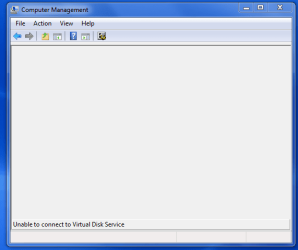
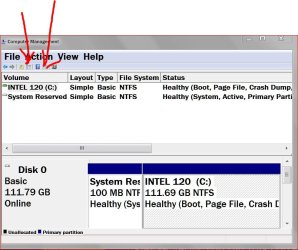
When I use the disk management tool, it doesn't bring up anything and says unable to connect virtual disk service.

~Thrash Zone, I may have forgot to mention it, but I have already tried clean booting it... it didn't work unfortunately...
 

Attachments

  • Untitled.png
    Untitled.png
    47.5 KB · Views: 18

My Computer

Computer type
Laptop
Computer Manufacturer/Model Number
Dell
OS
Windows 7 64 bit
CPU
Intel Core i5-4510U 1.7 GHz (Intel Core i5)
Antivirus
McAfee LiveSafe - internet security
Browser
Google Chrome

My Computer

Computer type
PC/Desktop
Computer Manufacturer/Model Number
Home made Desktop
OS
Windows 10 Pro. 64/ version 1709 Windows 7 Pro/64
CPU
Intel i7-6800K @ 4.3
Motherboard
ASUS X-99 Deluxe II
Memory
Corsair Platinum 16 gig @2400
Graphics Card(s)
EVGA GTX 1070 OC
Monitor(s) Displays
Asus 27" LED LCD/VE278Q
Screen Resolution
1920-1080 or 1280-720 HDMI
Hard Drives
INTEL SSD 730-240 Gb Sata 3.0/
PSU
EVGA Platium 1200W
Case
Phanteks Luxe Tempered Glass 8 fans/ one radiator
Cooling
XSPC/ Water Cooled CPU
Keyboard
Das 4 Professional
Mouse
Logitech M705/MX Anywhere 2-S
Internet Speed
100 mbits
Antivirus
Microsoft Security Essentials/ Malwarebytes Premium 3.0/ SAS
Browser
I.E. 11 default/Firefox/ ISP Time Warner Cable/Spectrum
Other Info
LG BluRay Burner/
Sound system-KLipsch-THX/
Icy Dock ssd Hot Swap bays.
It is Windows & professional, I got it from the Dell Website. If this information helps, what I got from F2 when I started my computer, it said that it was an Inspiron 5748

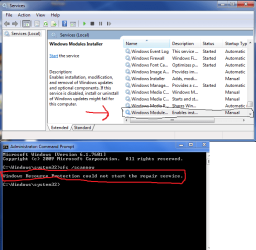
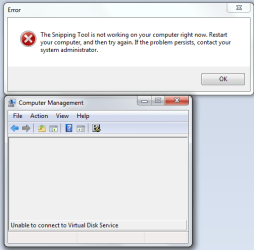
As for the repair, again it just didn't seem to work. Also, again I tried to use the disk management tool but Still nothing shows up even when I press the two tabs shown and the Snipping tool wont work, regardless if I restart my computer...
 

Attachments

  • Untitled.png
    Untitled.png
    101.5 KB · Views: 1
  • Untitled.png2.png
    Untitled.png2.png
    39.3 KB · Views: 11

My Computer

Computer type
Laptop
Computer Manufacturer/Model Number
Dell
OS
Windows 7 64 bit
CPU
Intel Core i5-4510U 1.7 GHz (Intel Core i5)
Antivirus
McAfee LiveSafe - internet security
Browser
Google Chrome
I don't understand. After posting all those pictures you are telling me the snippit tool isn't working. Well reboot and try it again.

I didn't know you could buy Windows 7 from a Dell Website.

If that doesn't work the only other thing I can think of is a Repair Install.

By Brink:

http://www.sevenforums.com/tutorials/3413-repair-install.html
 

My Computer

Computer type
PC/Desktop
Computer Manufacturer/Model Number
Home made Desktop
OS
Windows 10 Pro. 64/ version 1709 Windows 7 Pro/64
CPU
Intel i7-6800K @ 4.3
Motherboard
ASUS X-99 Deluxe II
Memory
Corsair Platinum 16 gig @2400
Graphics Card(s)
EVGA GTX 1070 OC
Monitor(s) Displays
Asus 27" LED LCD/VE278Q
Screen Resolution
1920-1080 or 1280-720 HDMI
Hard Drives
INTEL SSD 730-240 Gb Sata 3.0/
PSU
EVGA Platium 1200W
Case
Phanteks Luxe Tempered Glass 8 fans/ one radiator
Cooling
XSPC/ Water Cooled CPU
Keyboard
Das 4 Professional
Mouse
Logitech M705/MX Anywhere 2-S
Internet Speed
100 mbits
Antivirus
Microsoft Security Essentials/ Malwarebytes Premium 3.0/ SAS
Browser
I.E. 11 default/Firefox/ ISP Time Warner Cable/Spectrum
Other Info
LG BluRay Burner/
Sound system-KLipsch-THX/
Icy Dock ssd Hot Swap bays.
oh, sorry I bought the computer from the dell website and it came with Windows 7 professional, as for the snipping tool, I already restarted and it just wont work, so the best I can come up with is print screens...

But I will check right now about the repair install

And thanks for sticking with me on this, not too many people would do that for pathetic people like me
 

My Computer

Computer type
Laptop
Computer Manufacturer/Model Number
Dell
OS
Windows 7 64 bit
CPU
Intel Core i5-4510U 1.7 GHz (Intel Core i5)
Antivirus
McAfee LiveSafe - internet security
Browser
Google Chrome
When many normal things in Windows 7 don't work it would take forever to tackle them one at a time. If you don't have a complete back up to go to and sfc /scannow doesn't help in my opinion a Repair Install is the next thing to do.

Read the Tutorial a couple of times. If possible when you do the Repair Install have the Tutorial on another computer so you can follow along step at a time.
In the last couple of months I have use that tutorial 2 times and both went well.

Just to help my curiosity; have you been using suggestion from the Black Viper site?
 

My Computer

Computer type
PC/Desktop
Computer Manufacturer/Model Number
Home made Desktop
OS
Windows 10 Pro. 64/ version 1709 Windows 7 Pro/64
CPU
Intel i7-6800K @ 4.3
Motherboard
ASUS X-99 Deluxe II
Memory
Corsair Platinum 16 gig @2400
Graphics Card(s)
EVGA GTX 1070 OC
Monitor(s) Displays
Asus 27" LED LCD/VE278Q
Screen Resolution
1920-1080 or 1280-720 HDMI
Hard Drives
INTEL SSD 730-240 Gb Sata 3.0/
PSU
EVGA Platium 1200W
Case
Phanteks Luxe Tempered Glass 8 fans/ one radiator
Cooling
XSPC/ Water Cooled CPU
Keyboard
Das 4 Professional
Mouse
Logitech M705/MX Anywhere 2-S
Internet Speed
100 mbits
Antivirus
Microsoft Security Essentials/ Malwarebytes Premium 3.0/ SAS
Browser
I.E. 11 default/Firefox/ ISP Time Warner Cable/Spectrum
Other Info
LG BluRay Burner/
Sound system-KLipsch-THX/
Icy Dock ssd Hot Swap bays.
No, I haven't used the black Viper Site, I just have been All over the net and decided that after 2 days of cycling through possible solutions that didn't work that I would ask a professional.:)
 

My Computer

Computer type
Laptop
Computer Manufacturer/Model Number
Dell
OS
Windows 7 64 bit
CPU
Intel Core i5-4510U 1.7 GHz (Intel Core i5)
Antivirus
McAfee LiveSafe - internet security
Browser
Google Chrome
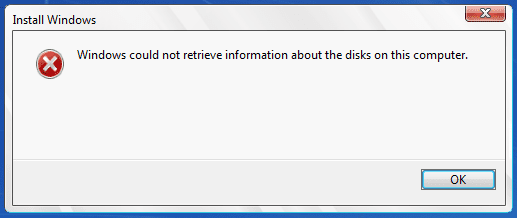
This may seem a little annoying, but I used and followed the repair install link you gave me but right after I pushed the button for step 8 It gives me the issue in the picture below... Is that a normal occurrence and i simply misread a step or does it just mean that there is no way to do this?

Also I found a similar problem in the forums that seems to have solve the issue for the people that had it.
(www.sevenforums.com/bsod-help-support/146402-error-there-not-enough-free-memory-run-program.html)

They say in the forum posts that it has to do with the System and Users not having more or less unrestricted access to the registry hive "HKEY_CLASSES_ROOT\
Do you think that this could fix my problem as well? Because it would save alot of used data if it was possible...
 

Attachments

  • Untitled.png
    Untitled.png
    26.6 KB · Views: 9

My Computer

Computer type
Laptop
Computer Manufacturer/Model Number
Dell
OS
Windows 7 64 bit
CPU
Intel Core i5-4510U 1.7 GHz (Intel Core i5)
Antivirus
McAfee LiveSafe - internet security
Browser
Google Chrome
Ouch Mcafee live safe :shock:
Showing the services = Non Microsoft services and startup items might give us a better idea of what is loading,
I doubt clean boot would work with Mcafee around :/
How does safe mode with networking work ?
 

My Computer

Computer type
PC/Desktop
Computer Manufacturer/Model Number
Custom assembled by me :}
OS
Win-7-Pro64bit 7-H-Prem-64bit
CPU
i7-5930K 2nd i9-9940x both water blocked VRM's too
Motherboard
ASUS SABERTOOTH X99 2nd ASUS x299 Apex
Memory
Trident-z 3200C14 2nd Trident-z 3600C16
Graphics Card(s)
EVGA 1080ti ftw3 2nd Titan Xp both water blocked
Sound Card
Built-in Realtek
Monitor(s) Displays
1-AOC G2460PG 24"G-Sync 144Hz/ 2nd 1-ASUS VG248QE 24" 144Hz
Screen Resolution
1920 x 1080 144Hz
Hard Drives
2-Samsung M.2 Evo & Evo Plus
2-Samsung 850 EVO 500GB SSD's/ 3-2.5 W.D. Black 1tb-&3-1tb/3-3.5 WD Black 1tb hdd's
PSU
EVGA SuperNOVA 1000-P2 2nd 1200-P2
Case
2-Corsair Obsidian Series 450D Black ATX Mid Tower
Cooling
Custom water loops
Keyboard
Logitech G710+/ 2nd Logitech G910
Mouse
2-RedDragon M901 Perdition 16400 dpi Gaming mouse = wired
Internet Speed
Comcast Ping 19ms 89.31mbps download speed 6.12mbps upload
Antivirus
Malwarebytes Pro/ Superantispyware Pro
Browser
FireFox & Pale moon
Other Info
2nd ASUS X299 Apex/Intel i9-9940x with Custom water loop/7H-Prem-x64/Corsair 450D case/Ram Trident-z 3600C16 4x8gb / Samsung970Evo plus 500gb SSD/Dual ssd EZ swap evo/PSU EVGA SuperNova 1200w-P2 80+Platinum/GPU Titan Xp /8-ML-140 on push-pull on 2-280GTX rads
To make sure I understand.

When you tick on the Install Now button in step #8 you don't get the picture shown in step #9?

You just might have something there ThrashZone.
McAfee just might be stopping access to the disk when in Windows 7.

I would suggest removing McAfee using their online tool and start the tutorial over.
I do not recommend using McAfee when your fixed. Install MSE.
 

My Computer

Computer type
PC/Desktop
Computer Manufacturer/Model Number
Home made Desktop
OS
Windows 10 Pro. 64/ version 1709 Windows 7 Pro/64
CPU
Intel i7-6800K @ 4.3
Motherboard
ASUS X-99 Deluxe II
Memory
Corsair Platinum 16 gig @2400
Graphics Card(s)
EVGA GTX 1070 OC
Monitor(s) Displays
Asus 27" LED LCD/VE278Q
Screen Resolution
1920-1080 or 1280-720 HDMI
Hard Drives
INTEL SSD 730-240 Gb Sata 3.0/
PSU
EVGA Platium 1200W
Case
Phanteks Luxe Tempered Glass 8 fans/ one radiator
Cooling
XSPC/ Water Cooled CPU
Keyboard
Das 4 Professional
Mouse
Logitech M705/MX Anywhere 2-S
Internet Speed
100 mbits
Antivirus
Microsoft Security Essentials/ Malwarebytes Premium 3.0/ SAS
Browser
I.E. 11 default/Firefox/ ISP Time Warner Cable/Spectrum
Other Info
LG BluRay Burner/
Sound system-KLipsch-THX/
Icy Dock ssd Hot Swap bays.
As for trying to clean boot it from safe networking mode it doesn't really do much, I checked to make sure if there was anything that wasn't working normally would work in that mode but it pretty much was the same
- The control panel is down
- folders wont open unless you do it manually
- The audio detects no audio devices
- and for some reason the internet is limited

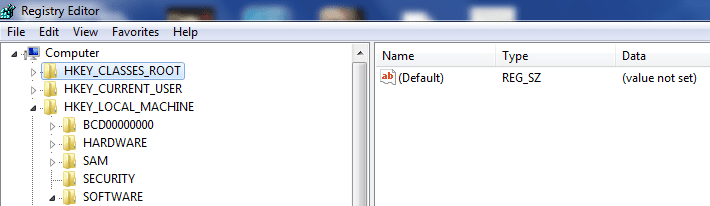
I can say that I might of found something that was useful though, I was looking in the registry to see if their was a problem their and i noticed that all the default values available said under data that their value wasn't set... I'm not sure if this is normal or not but i'm trying to give you the best understanding of this situation as possible.
 

Attachments

  • Untitled.png
    Untitled.png
    37.7 KB · Views: 1

My Computer

Computer type
Laptop
Computer Manufacturer/Model Number
Dell
OS
Windows 7 64 bit
CPU
Intel Core i5-4510U 1.7 GHz (Intel Core i5)
Antivirus
McAfee LiveSafe - internet security
Browser
Google Chrome
Back
Top