Thermal Pads for 7870 GPU

BigTabs

It's All About Money
Power User
VIP
Local time
6:19 PM
Messages
445
Location
Chester
The GPU is MSI Twin Frozr III

I want to replace the thermal pads due to they have a lot of dust on them which is causing problems with heat

I'm just lost on thermal pad thickness any help
 

My Computer My Computer

Computer type
PC/Desktop
Computer Manufacturer/Model Number
Custom Build
OS
Windows 7 64 (bit)
CPU
I7 4790K
Motherboard
Asus Maximus VII Hero
Memory
8GB
Graphics Card(s)
EVGA 770 SC ACX
Monitor(s) Displays
iiyama GB2488HSU
Screen Resolution
1920*1080
Hard Drives
1TB WESTERN DIGITAL BLACK
PSU
850 EVGA Supernova G2
Case
Carbide Series® Air 540 High Airflow ATX Cube Case
Cooling
The Black Ice® GT Stealth 240, Alphacool NexXxoS UT60 280
Keyboard
STEELSERIES APEX [RAW]
Mouse
Roccat XTD
Internet Speed
30Meg
Antivirus
Bitdefender
Browser
Google Chrome
If I understand you correctly your heat dissipate sinks under the fans are dirty (dusty). They can be cleaned without removing them with a brush and a can of air. Just remove the video card to do the cleaning.
 

My Computer My Computer

Computer type
PC/Desktop
Computer Manufacturer/Model Number
Home made Desktop
OS
Windows 10 Pro. 64/ version 1709 Windows 7 Pro/64
CPU
Intel i7-6800K @ 4.3
Motherboard
ASUS X-99 Deluxe II
Memory
Corsair Platinum 16 gig @2400
Graphics Card(s)
EVGA GTX 1070 OC
Monitor(s) Displays
Asus 27" LED LCD/VE278Q
Screen Resolution
1920-1080 or 1280-720 HDMI
Hard Drives
INTEL SSD 730-240 Gb Sata 3.0/
PSU
EVGA Platium 1200W
Case
Phanteks Luxe Tempered Glass 8 fans/ one radiator
Cooling
XSPC/ Water Cooled CPU
Keyboard
Das 4 Professional
Mouse
Logitech M705/MX Anywhere 2-S
Internet Speed
100 mbits
Antivirus
Microsoft Security Essentials/ Malwarebytes Premium 3.0/ SAS
Browser
I.E. 11 default/Firefox/ ISP Time Warner Cable/Spectrum
Other Info
LG BluRay Burner/
Sound system-KLipsch-THX/
Icy Dock ssd Hot Swap bays.
Everything else is fine but the thermal pads that are on IC Memory & VRM are dirty there is crap on them
 

My Computer My Computer

Computer type
PC/Desktop
Computer Manufacturer/Model Number
Custom Build
OS
Windows 7 64 (bit)
CPU
I7 4790K
Motherboard
Asus Maximus VII Hero
Memory
8GB
Graphics Card(s)
EVGA 770 SC ACX
Monitor(s) Displays
iiyama GB2488HSU
Screen Resolution
1920*1080
Hard Drives
1TB WESTERN DIGITAL BLACK
PSU
850 EVGA Supernova G2
Case
Carbide Series® Air 540 High Airflow ATX Cube Case
Cooling
The Black Ice® GT Stealth 240, Alphacool NexXxoS UT60 280
Keyboard
STEELSERIES APEX [RAW]
Mouse
Roccat XTD
Internet Speed
30Meg
Antivirus
Bitdefender
Browser
Google Chrome
what matters is the surface between the pad and the memory/VRM and the surface between the pad and the heat sink. The sides aren't relevant for heat dissipation.

I washed with water a lot of gum-like thermal pads to "regenerate" them and they worked fine afterwards, but I cannot guarantee that it will work for you too. Can you post some pics?
 

My Computer My Computer

Computer type
PC/Desktop
Computer Manufacturer/Model Number
custom built
OS
Win 7 Pro 64-bit 7601
CPU
AMD Phenom 9650 QuadCore, revision DR-B3
Motherboard
ASUS M4A78
Memory
5 GB yes I run 2x 2GB and 1x 1GB, different brand, spank me.
Graphics Card(s)
NVIDIA GeForce 9800 GT 512 Mb, unknown manufacturer.
Sound Card
Crappy Realtek Integrated Audio
Monitor(s) Displays
Fujitsu Siemens P19-3P
Screen Resolution
1280 x 1024 x 32 bits @ 60 Hz Oh yeah, 4:3 rocks!
Hard Drives
(1) MAXTOR S TM3320613AS SATA Disk Device (2) STM35004 18AS SATA Disk Device (3) TOSHIBA USB 2.5"-HDD
PSU
whatever, around 450w
Case
Scavenged from old company PC, 10+ years old
Cooling
CPU fan, GPU fan, case fan, nothing fancy
Keyboard
Microsoft, PS/2, white.
Mouse
Optical, logitec.
Internet Speed
effective max speeds: 70-ish kB/s down 30-ish kB/s up
Antivirus
Avira, free edition.
Browser
Firefox with FXChrome to make it look like Google Chrome :P
Other Info
Was discarded by previous owner due to "horrible performance".
Was running Win Xp from a IDE drive. Yeah. Was a pain.
SATA II drive and Win7 and it zips away! Yay!
I've seen thermal tape on evil bay in different thicknesses.
 

My Computer My Computer

Computer type
PC/Desktop
Computer Manufacturer/Model Number
Custom, Dell and Lenono LT's
OS
Win8/8.1,Win7-U64, Vista U64, uncounted Linux distor's
CPU
AMD and Intell, 9590, 8350, i5 3570k
Motherboard
CFVFZ, GA990FXA, Z77e-itx
Memory
Corsair G Skill
Graphics Card(s)
Crossfired Sapphire HD 7950 Vapor-X, ASUS R9 280X TOP
Sound Card
Realtek ALC889
Monitor(s) Displays
ViewSonic VX2770SMH 27" / ViewSonic VX2433 LCD 24"
Screen Resolution
1080i HD
Hard Drives
Samsung SSD 840 Pro
OCZ Agility 3's
OCZ Vector's
WD's Blue, red, green, Velociraptors
Seagate USB3 & Hybrid's
ASUS Blu-Ray
ASUS DVD
PSU
Corsair AX1200i, Seasonice 850 Gold
Case
Cooler Master HAF 922 & HAF 932, Lian Li Train case.
Cooling
Air, Glacer 240L expanded, custom EK loop with duel D5's
Keyboard
Microsoft SideWinder X4 USB Keyboard / Logitech 250 PS2
Mouse
Logitech G500 / MS wireless 5000
Internet Speed
Best of 5ms / 75+ dn / 12+ up More or less.
Antivirus
MS esentials-MalwareBytes
Browser
Firefox Chromebook
That's the problem thickness of the pads
 

My Computer My Computer

Computer type
PC/Desktop
Computer Manufacturer/Model Number
Custom Build
OS
Windows 7 64 (bit)
CPU
I7 4790K
Motherboard
Asus Maximus VII Hero
Memory
8GB
Graphics Card(s)
EVGA 770 SC ACX
Monitor(s) Displays
iiyama GB2488HSU
Screen Resolution
1920*1080
Hard Drives
1TB WESTERN DIGITAL BLACK
PSU
850 EVGA Supernova G2
Case
Carbide Series® Air 540 High Airflow ATX Cube Case
Cooling
The Black Ice® GT Stealth 240, Alphacool NexXxoS UT60 280
Keyboard
STEELSERIES APEX [RAW]
Mouse
Roccat XTD
Internet Speed
30Meg
Antivirus
Bitdefender
Browser
Google Chrome
That's the problem thickness of the pads

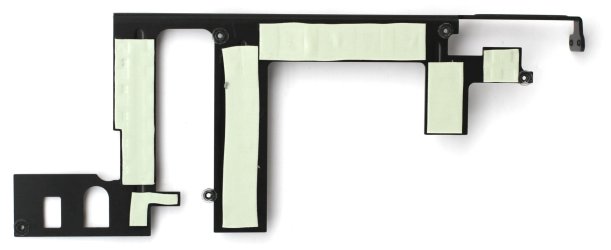
Does your thermal pads looking a bit like the attached pic?

If so, check the thickness and measure size, just with a meter.

You can find different size of thickness, 0,5mm, 1mm & 1,5mm.

I'll go for 1mm thick and those pads are soft and could not hurt when pressed on the Vram's. And i'll not use sided adhesive pads, just the common ones
Please note: This thermal pad can be compressed to half of its original height!

1) There seems to be set of 2 or 4 thermal pads, sized 120mm x 20mm that you could use scissors to cut the right size for you, if needed.

2)There 's 5W/mk type or 7W/mk type, and seems the 5W/mk is the most common.

Here's a LINK
 

Attachments

  • IMG0035724_1.jpg
    IMG0035724_1.jpg
    65.7 KB · Views: 9

My Computer My Computer

Computer type
PC/Desktop
Computer Manufacturer/Model Number
Custom Build
OS
Windows 7 Professional SP1 - x64 [Non-UEFI Boot]
CPU
Ivy Bridge Core i5 3570K (Delidded)
Motherboard
Asus P8Z77-V LE PLUS
Memory
G.Skill "Ares" DDR3 PC3-12800 - 1600MHz (16Gb)
Graphics Card(s)
Asus Dual-RX480-O4G
Sound Card
Creative Sound Blaster Z w/5.1 sound system
Monitor(s) Displays
Asus IPS 23"
Screen Resolution
16/9
Hard Drives
Internal:
500Go Sata 6Gb/s (x2)
500Go Sata 3Gb/s (x2)
SSD 60Go Sata 6Gb/s
PSU
In Win C 900W Series 80+ Platinum
Case
Thermaltake Chaser A71
Cooling
Custom Water Cooling Loop
Keyboard
Cooler Master QuickFire XTi
Mouse
Razer Imperator 2012 (4G)
Antivirus
MSE
Browser
IE 11.0.xxx Rtm
Other Info
"Raid0" with Intel Smart Response Technology (HDD/SSD)
That's the layout of mine
 

My Computer My Computer

Computer type
PC/Desktop
Computer Manufacturer/Model Number
Custom Build
OS
Windows 7 64 (bit)
CPU
I7 4790K
Motherboard
Asus Maximus VII Hero
Memory
8GB
Graphics Card(s)
EVGA 770 SC ACX
Monitor(s) Displays
iiyama GB2488HSU
Screen Resolution
1920*1080
Hard Drives
1TB WESTERN DIGITAL BLACK
PSU
850 EVGA Supernova G2
Case
Carbide Series® Air 540 High Airflow ATX Cube Case
Cooling
The Black Ice® GT Stealth 240, Alphacool NexXxoS UT60 280
Keyboard
STEELSERIES APEX [RAW]
Mouse
Roccat XTD
Internet Speed
30Meg
Antivirus
Bitdefender
Browser
Google Chrome
Don't think I will apply conductive thermal on that
 

My Computer My Computer

Computer type
PC/Desktop
Computer Manufacturer/Model Number
Custom Build
OS
Windows 7 64 (bit)
CPU
I7 4790K
Motherboard
Asus Maximus VII Hero
Memory
8GB
Graphics Card(s)
EVGA 770 SC ACX
Monitor(s) Displays
iiyama GB2488HSU
Screen Resolution
1920*1080
Hard Drives
1TB WESTERN DIGITAL BLACK
PSU
850 EVGA Supernova G2
Case
Carbide Series® Air 540 High Airflow ATX Cube Case
Cooling
The Black Ice® GT Stealth 240, Alphacool NexXxoS UT60 280
Keyboard
STEELSERIES APEX [RAW]
Mouse
Roccat XTD
Internet Speed
30Meg
Antivirus
Bitdefender
Browser
Google Chrome
Don't think I will apply conductive thermal on that

I've by the way replace the thermal paste of the graphics card processor a little after bought mine but it is not a good idea for the Vram's!

Those ready thermal pads are OK...i've bought some for my motherboard mosfets...they do the job well.
 

My Computer My Computer

Computer type
PC/Desktop
Computer Manufacturer/Model Number
Custom Build
OS
Windows 7 Professional SP1 - x64 [Non-UEFI Boot]
CPU
Ivy Bridge Core i5 3570K (Delidded)
Motherboard
Asus P8Z77-V LE PLUS
Memory
G.Skill "Ares" DDR3 PC3-12800 - 1600MHz (16Gb)
Graphics Card(s)
Asus Dual-RX480-O4G
Sound Card
Creative Sound Blaster Z w/5.1 sound system
Monitor(s) Displays
Asus IPS 23"
Screen Resolution
16/9
Hard Drives
Internal:
500Go Sata 6Gb/s (x2)
500Go Sata 3Gb/s (x2)
SSD 60Go Sata 6Gb/s
PSU
In Win C 900W Series 80+ Platinum
Case
Thermaltake Chaser A71
Cooling
Custom Water Cooling Loop
Keyboard
Cooler Master QuickFire XTi
Mouse
Razer Imperator 2012 (4G)
Antivirus
MSE
Browser
IE 11.0.xxx Rtm
Other Info
"Raid0" with Intel Smart Response Technology (HDD/SSD)
Are you sure those are thermal pad? Pad that remove heat? They just look like a pad for a plastic cover not a heat sink. I'm trying to understand where the word Thermal come into play with little sticky pads on a plastic cover.
Teach me something folks.

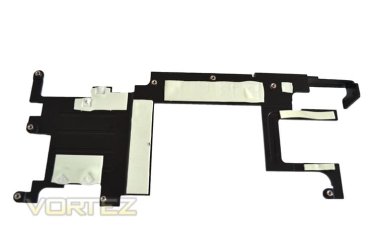
This is the heat sink and the white part in where the thermal compound goes.Take a look at this site

http://www.vortez.net/articles_pages/msi_r7870_twin_frozr_iii_review,8.html
index.php
 

My Computer My Computer

Computer type
PC/Desktop
Computer Manufacturer/Model Number
Home made Desktop
OS
Windows 10 Pro. 64/ version 1709 Windows 7 Pro/64
CPU
Intel i7-6800K @ 4.3
Motherboard
ASUS X-99 Deluxe II
Memory
Corsair Platinum 16 gig @2400
Graphics Card(s)
EVGA GTX 1070 OC
Monitor(s) Displays
Asus 27" LED LCD/VE278Q
Screen Resolution
1920-1080 or 1280-720 HDMI
Hard Drives
INTEL SSD 730-240 Gb Sata 3.0/
PSU
EVGA Platium 1200W
Case
Phanteks Luxe Tempered Glass 8 fans/ one radiator
Cooling
XSPC/ Water Cooled CPU
Keyboard
Das 4 Professional
Mouse
Logitech M705/MX Anywhere 2-S
Internet Speed
100 mbits
Antivirus
Microsoft Security Essentials/ Malwarebytes Premium 3.0/ SAS
Browser
I.E. 11 default/Firefox/ ISP Time Warner Cable/Spectrum
Other Info
LG BluRay Burner/
Sound system-KLipsch-THX/
Icy Dock ssd Hot Swap bays.
Are you sure those are thermal pad? Pad that remove heat? They just look like a pad for a plastic cover not a heat sink. I'm trying to understand where the word Thermal come into play with little sticky pads on a plastic cover.
Teach me something folks.

This is the heat sink and the white part in where the thermal compound goes.Take a look at this site

MSI HD7870 Twin Frozr III OC Review - Closer Look
index.php
@Layback Bear,

The OP did mention thermal pads because it is what he needs to change on his graphic card

From Vortez.net:
The Twin Frozr makes use of an aluminium mid-plate which serves to increase the surface area being passively cooled. The mid-plate covers the memory modules and VRM area, ensuring not only the core receives cooling but the whole of the cards components

If you look at the fourth shot, you can clearly see the thermal pads the OP mentionned that were dirt from dust and those he wants to change for new ones.

Those are sticky thermal pads made of very soft material (silicone touch feeling) and a little of fiber inside, for them not to stretch. they can be easily changed to new ones (non-conductive) and might be better quality and specially made for heat under high load.
 

Attachments

  • msi_hd7870_twin_frozr_bracket.jpg
    msi_hd7870_twin_frozr_bracket.jpg
    31.2 KB · Views: 1
Last edited:

My Computer My Computer

Computer type
PC/Desktop
Computer Manufacturer/Model Number
Custom Build
OS
Windows 7 Professional SP1 - x64 [Non-UEFI Boot]
CPU
Ivy Bridge Core i5 3570K (Delidded)
Motherboard
Asus P8Z77-V LE PLUS
Memory
G.Skill "Ares" DDR3 PC3-12800 - 1600MHz (16Gb)
Graphics Card(s)
Asus Dual-RX480-O4G
Sound Card
Creative Sound Blaster Z w/5.1 sound system
Monitor(s) Displays
Asus IPS 23"
Screen Resolution
16/9
Hard Drives
Internal:
500Go Sata 6Gb/s (x2)
500Go Sata 3Gb/s (x2)
SSD 60Go Sata 6Gb/s
PSU
In Win C 900W Series 80+ Platinum
Case
Thermaltake Chaser A71
Cooling
Custom Water Cooling Loop
Keyboard
Cooler Master QuickFire XTi
Mouse
Razer Imperator 2012 (4G)
Antivirus
MSE
Browser
IE 11.0.xxx Rtm
Other Info
"Raid0" with Intel Smart Response Technology (HDD/SSD)
I'm beginning to understand. Thank you.
I do wonder what those little pads fit against on the video card board. I do presume they fit against something hot and the tray is use to dissipate heat. Or could they be used as vibration dampers and the plate is use for air distribution over the whole card.
These are things I don't need to know. I'm just curious.
 

My Computer My Computer

Computer type
PC/Desktop
Computer Manufacturer/Model Number
Home made Desktop
OS
Windows 10 Pro. 64/ version 1709 Windows 7 Pro/64
CPU
Intel i7-6800K @ 4.3
Motherboard
ASUS X-99 Deluxe II
Memory
Corsair Platinum 16 gig @2400
Graphics Card(s)
EVGA GTX 1070 OC
Monitor(s) Displays
Asus 27" LED LCD/VE278Q
Screen Resolution
1920-1080 or 1280-720 HDMI
Hard Drives
INTEL SSD 730-240 Gb Sata 3.0/
PSU
EVGA Platium 1200W
Case
Phanteks Luxe Tempered Glass 8 fans/ one radiator
Cooling
XSPC/ Water Cooled CPU
Keyboard
Das 4 Professional
Mouse
Logitech M705/MX Anywhere 2-S
Internet Speed
100 mbits
Antivirus
Microsoft Security Essentials/ Malwarebytes Premium 3.0/ SAS
Browser
I.E. 11 default/Firefox/ ISP Time Warner Cable/Spectrum
Other Info
LG BluRay Burner/
Sound system-KLipsch-THX/
Icy Dock ssd Hot Swap bays.
Back
Top