Things you Hate about Windows Live Essentials????

Vertex

New member
Guru
Local time
11:05 PM
Messages
477
Location
Philippines
I use Windows 7 and I will enumerate my reasons to hate Windows Live Essentials:

1. I don't really like the way Microsoft allows you to install some of their software. They let you download a small setup file such as Office 2010 Beta , and running that setup file lets you download the rest of the application. So why not just let it be downloaded on a whole large file????

2. Months ago, I installed Windows Live Movie Maker and Windows Live Photo Gallery, but I soon found out that they were installed with things like Windows Sign in Assistant and Windows Live Skydrive Upload Tool which I don't need, frankly.

3. Windows Live Photo Gallery is somehow slower than Vista's Windows Photo Gallery, especially on loading image thumbnails.:sarc: Windows Live Movie Maker- what the heck, Windows Movie Maker 2.6 was much more understandable and better.

4. I wanted to remove Windows Live Movie Maker but would like to keep Windows Live Photo Gallery, but I found no way to uninstall Windows Live Movie Maker only, I had to remove the entire Windows Live Essentials but that would rid off Windows Live Photo Gallery as well. I tried to uninstall it using CCleaner and Add/Remove programs but it always fails, it simply won't do anything to uninstall it.

5. I was finally able to uninstall Windows Live Essentials with Revo Uninstaller Portable, along with the other components like the Sign in Assistant and Skydrive Upload Tool, but my God, :eek: Windows Live Essentials left behind hundreds in not a thousand registry keys, orphaned files and folders in the C: drive. Running a registry scan, revealed even more orphaned registry entries. I fixed them all but have backed up the registry with Erunt beforehand.

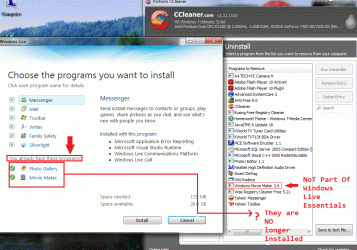
6. I wanted to reinstall Windows Live Photo Gallery, so I had to run the wlsetup-web setup file again. It says, I already have Windows Live Photo Gallery and Windows Live Movie Maker installed. What the heck?????? I thought I just removed them completely. It could only mean that there is some left over file or registry entry that is telling the setup that Windows Live Movie Maker and Windows Live Photo Gallery is still there. Now there is no way to reinstall Windows Live Photo Gallery!!!!!!:confused:

That was among the worse software experiences, I ever had....

Now has anybody seen the same???
 

My Computer

Computer Manufacturer/Model Number
Custom Built
OS
Windows 7 Ultimate 32 Bit, Windows Developer Preview, Linux Mint 9 Gnome 32 Bit
CPU
Intel Pentium Dual CPU E2180@2GHz
Motherboard
Elitegroup 671T-M3
Graphics Card(s)
NVIDIA GeForce 7200 GS
Monitor(s) Displays
AOC TFT1560 15" LCD Monitor
Screen Resolution
1024x768
Keyboard
Logitech USB Keyboard
1. They do allow you to download the entire Office beta. This is not part of Windows Live essentials.
Microsoft Office 2010 Beta Professional Plus - Free Download
2. These are free programs and they have set them up to require certain extra programs.
3. Haven't noticed this.
4 and 5. Microsoft didn't leave thousands of registry keys behind, CCcleaner and Revo did.
I have uninstalled and reinstalled but always used Programs and features and have had no problems. I don't hate anything about Windows Live Essentials plus it is free.
 

My Computer

Computer type
PC/Desktop
Computer Manufacturer/Model Number
Custom Built
OS
Windows 10 Pro x64, Windows 8.1 Pro x64, Windows 7 Ultimate x64 SP1,
CPU
INTEL i9-7920X LGA 2066
Motherboard
Gigabyte X299-WU8 F3
Memory
64 GB (4 X 16 GB) G-Skill V Series DDR4 3200 Quad Channel
Graphics Card(s)
EVGA GTX 1060 SC 3 GB
Sound Card
Realtek Onboard ALC1220
Monitor(s) Displays
2 x Samsung S27E310
Screen Resolution
1920x1080
Hard Drives
Samsung 2 x 970 EVO Plus 500 GB NVMe
1 x 6TB WD 6003FZBX SATA
1 x 6TB WD 60EFRX SATA
12 x 3TB WD 30EFRX SATA
PSU
Seasonic X-1050
Case
Thermaltake Armor+
Cooling
Corsair H80i V2 Liquid AOI Cooler
Keyboard
Logitech G510s
Mouse
Logitech MX Master 2S
Internet Speed
200 Mb/s
Antivirus
ESET NOD32 13.1
Browser
EDGE (Dev, Canary, Beta), Chrome
Other Info
ASUS RT-AC68U router
Malwarebytes 4.0.4
1. They do allow you to download the entire Office beta. This is not part of Windows Live essentials.
Microsoft Office 2010 Beta Professional Plus - Free Download
.
Yes, what I meant with no. 1 is that Windows Office 2010 Beta always comes in that small setup package in the primary download site where it is found. I have already downloaded the large setup file of Office 2010 Beta weeks ago. Thanks anyway.


4 and 5. Microsoft didn't leave thousands of registry keys behind, CCcleaner and Revo did.
I have uninstalled and reinstalled but always used Programs and features and have had no problems. I don't hate anything about Windows Live Essentials plus it is free.

That is a big mistake, CCleaner and Revo do not create registry keys that they will remove by themselves because they are still installed. How do you explain that the registry keys removed have the phrases "Windows Live" ,"Windows Live Photo Gallery" or "Windows Live Movie Maker" in them????

And how do you explain this comparable complaint I just found about Windows Live Essentials????

http://www.windowslivehelp.com/thre...8c2e5481#40e3d1e7-c657-412d-88d6-13be8c2e5481
 

My Computer

Computer Manufacturer/Model Number
Custom Built
OS
Windows 7 Ultimate 32 Bit, Windows Developer Preview, Linux Mint 9 Gnome 32 Bit
CPU
Intel Pentium Dual CPU E2180@2GHz
Motherboard
Elitegroup 671T-M3
Graphics Card(s)
NVIDIA GeForce 7200 GS
Monitor(s) Displays
AOC TFT1560 15" LCD Monitor
Screen Resolution
1024x768
Keyboard
Logitech USB Keyboard
Here is a screenshot to explain it better. You can see the list of currently installed programs using CCleaner's module. It clearly shows that Windows Live Photo Gallery and Windows Live Movie Maker are completely gone but re-running the wlsetup-web, shows that the setup still thinks that Windows Live Photo Gallery and Windows Live Movie Maker are still installed which is wrong...
 

Attachments

  • Yi.gif
    Yi.gif
    141.7 KB · Views: 62

My Computer

Computer Manufacturer/Model Number
Custom Built
OS
Windows 7 Ultimate 32 Bit, Windows Developer Preview, Linux Mint 9 Gnome 32 Bit
CPU
Intel Pentium Dual CPU E2180@2GHz
Motherboard
Elitegroup 671T-M3
Graphics Card(s)
NVIDIA GeForce 7200 GS
Monitor(s) Displays
AOC TFT1560 15" LCD Monitor
Screen Resolution
1024x768
Keyboard
Logitech USB Keyboard
Why did you do an uninstall with CCleaner? why not with just the regular uninstall?

Edit: NVM I just re-read you wanted only one of the two programs so you tried to clean it out
 

My Computer

Computer type
Laptop
Computer Manufacturer/Model Number
ASUS G60-RBBX05
OS
Win7 Home Premium 64x
CPU
Intel Core 2 Duo P7450 / 2.13 GHz (2.29 with Extreme Turbo)
Memory
4 GB PC-6400 Hyundai (2X2) at 800Mhz
Graphics Card(s)
NVIDIA GeForce GTX 260M 1GB DDR3 VRAM
Monitor(s) Displays
16" LED Backlit
Screen Resolution
1366 x 768 on laptop 1600x1050 max res on 22" external mon
Hard Drives
OCZ Agility 3 60GB SSD / 320 GB - Serial ATA-150 - 7200 rpm
PSU
6-cell Lithium ion { lasts 1.5 hours }
Case
ASUS G60 Laptop
Keyboard
Chicklet type back-lit (white light) keyboard
Mouse
Logitech G9 Laser Mouse 3200dpi and 1000 reports per minute
Internet Speed
Comcast 8.60mb/s up - 3.11mb/s down
Antivirus
MSE
Browser
Firefox
Other Info
General mid-budget gaming Comp. Low batterylife - High FrameRates - currently overheating problems :(

2nd Rig: Case: Rosewill BLACKHAWK Gaming ATX Mid Tower Computer Case

Mobo: GIGABYTE GA-990FXA-UD3
CPU: AMD FX-6200 Zambezi 3.8GHz (4.1GHz Turbo)
Heatsink: COOLER MASTER V8 CPU Cooler
RAM: Patriot Viper 3 8GB (2 x 4GB) 240-Pin DDR3 SDRAM 1866 (PC3 15000)
GPU: SAPPHIRE Radeon HD 6850 1GB 2
do you have a restore point you can revert to? if so, you could go back and uninstall the whole thing
 

My Computer

Computer type
Laptop
Computer Manufacturer/Model Number
ASUS G60-RBBX05
OS
Win7 Home Premium 64x
CPU
Intel Core 2 Duo P7450 / 2.13 GHz (2.29 with Extreme Turbo)
Memory
4 GB PC-6400 Hyundai (2X2) at 800Mhz
Graphics Card(s)
NVIDIA GeForce GTX 260M 1GB DDR3 VRAM
Monitor(s) Displays
16" LED Backlit
Screen Resolution
1366 x 768 on laptop 1600x1050 max res on 22" external mon
Hard Drives
OCZ Agility 3 60GB SSD / 320 GB - Serial ATA-150 - 7200 rpm
PSU
6-cell Lithium ion { lasts 1.5 hours }
Case
ASUS G60 Laptop
Keyboard
Chicklet type back-lit (white light) keyboard
Mouse
Logitech G9 Laser Mouse 3200dpi and 1000 reports per minute
Internet Speed
Comcast 8.60mb/s up - 3.11mb/s down
Antivirus
MSE
Browser
Firefox
Other Info
General mid-budget gaming Comp. Low batterylife - High FrameRates - currently overheating problems :(

2nd Rig: Case: Rosewill BLACKHAWK Gaming ATX Mid Tower Computer Case

Mobo: GIGABYTE GA-990FXA-UD3
CPU: AMD FX-6200 Zambezi 3.8GHz (4.1GHz Turbo)
Heatsink: COOLER MASTER V8 CPU Cooler
RAM: Patriot Viper 3 8GB (2 x 4GB) 240-Pin DDR3 SDRAM 1866 (PC3 15000)
GPU: SAPPHIRE Radeon HD 6850 1GB 2
do you have a restore point you can revert to? if so, you could go back and uninstall the whole thing
Yes, I still have a restore point that can take back Windows Live Essentials along with Photo Gallery and Movie Maker but hello, I decided to uninstall Windows Live Essentials so I can get rid off Windows Live Movie Maker in the first place so system restore will only revive that as well. And that would repeat the whole struggle to remove and clean up again.

About Photo Gallery, somebody told me that if I want to get Vista's Photo Gallery (not the Windows Live one), I may have to copy the Photo Gallery program folder from a Vista computer and paste that on my Windows 7 but there is no guarantee for that to work since it will lack certain files and registry components that came with Vista but are not available on Windows 7.

I am beginning to write off Photo Gallery as well since I have found a much better replacement called Photo! Editor 1.1 that has far wider functionality anyway.
 

My Computer

Computer Manufacturer/Model Number
Custom Built
OS
Windows 7 Ultimate 32 Bit, Windows Developer Preview, Linux Mint 9 Gnome 32 Bit
CPU
Intel Pentium Dual CPU E2180@2GHz
Motherboard
Elitegroup 671T-M3
Graphics Card(s)
NVIDIA GeForce 7200 GS
Monitor(s) Displays
AOC TFT1560 15" LCD Monitor
Screen Resolution
1024x768
Keyboard
Logitech USB Keyboard
That would be my suggestion as well, Live essentials is a suite. there are tons of free programs that do all of these things. The system restore would restore these programs back so you can uninstall them in full instead of using CCleaner.
 

My Computer

Computer type
Laptop
Computer Manufacturer/Model Number
ASUS G60-RBBX05
OS
Win7 Home Premium 64x
CPU
Intel Core 2 Duo P7450 / 2.13 GHz (2.29 with Extreme Turbo)
Memory
4 GB PC-6400 Hyundai (2X2) at 800Mhz
Graphics Card(s)
NVIDIA GeForce GTX 260M 1GB DDR3 VRAM
Monitor(s) Displays
16" LED Backlit
Screen Resolution
1366 x 768 on laptop 1600x1050 max res on 22" external mon
Hard Drives
OCZ Agility 3 60GB SSD / 320 GB - Serial ATA-150 - 7200 rpm
PSU
6-cell Lithium ion { lasts 1.5 hours }
Case
ASUS G60 Laptop
Keyboard
Chicklet type back-lit (white light) keyboard
Mouse
Logitech G9 Laser Mouse 3200dpi and 1000 reports per minute
Internet Speed
Comcast 8.60mb/s up - 3.11mb/s down
Antivirus
MSE
Browser
Firefox
Other Info
General mid-budget gaming Comp. Low batterylife - High FrameRates - currently overheating problems :(

2nd Rig: Case: Rosewill BLACKHAWK Gaming ATX Mid Tower Computer Case

Mobo: GIGABYTE GA-990FXA-UD3
CPU: AMD FX-6200 Zambezi 3.8GHz (4.1GHz Turbo)
Heatsink: COOLER MASTER V8 CPU Cooler
RAM: Patriot Viper 3 8GB (2 x 4GB) 240-Pin DDR3 SDRAM 1866 (PC3 15000)
GPU: SAPPHIRE Radeon HD 6850 1GB 2
Yes but, there has been reports of people having trouble uninstalling Windows Live Essentials in the first place. Nothing would happen if you try to remove it from Add/Remove Programs, no uninstall wizard whatsoever appears and the same thing happened when I tried to remove it with CCleaner.

I had to remove it with a far more powerful uninstall tool called Revo Uninstaller.
 

My Computer

Computer Manufacturer/Model Number
Custom Built
OS
Windows 7 Ultimate 32 Bit, Windows Developer Preview, Linux Mint 9 Gnome 32 Bit
CPU
Intel Pentium Dual CPU E2180@2GHz
Motherboard
Elitegroup 671T-M3
Graphics Card(s)
NVIDIA GeForce 7200 GS
Monitor(s) Displays
AOC TFT1560 15" LCD Monitor
Screen Resolution
1024x768
Keyboard
Logitech USB Keyboard
I wanted to remove Windows Live Movie Maker but would like to keep Windows Live Photo Gallery, but I found no way to uninstall Windows Live Movie Maker only,
The standard uninstaller gives you the option to uninstall either the one or the other or both.
 

My Computer

Computer Manufacturer/Model Number
HP, Dell, Gateway, Toshiba - 4 laptops and 2 desktops
OS
Vista, Windows7, Mint Mate, Zorin, Windows 8
CPU
from 1.6GHz Duo to i7
Monitor(s) Displays
2x HP w2207
Hard Drives
5x HDD, 7x SSD, 12x Externals
Keyboard
with trackball - no mices
Mouse
Trackball mice
Internet Speed
DSL 6000
I wanted to remove Windows Live Movie Maker but would like to keep Windows Live Photo Gallery, but I found no way to uninstall Windows Live Movie Maker only,
The standard uninstaller gives you the option to uninstall either the one or the other or both.
But the uninstaller won't even respond when I click on it :huh:
 

My Computer

Computer Manufacturer/Model Number
Custom Built
OS
Windows 7 Ultimate 32 Bit, Windows Developer Preview, Linux Mint 9 Gnome 32 Bit
CPU
Intel Pentium Dual CPU E2180@2GHz
Motherboard
Elitegroup 671T-M3
Graphics Card(s)
NVIDIA GeForce 7200 GS
Monitor(s) Displays
AOC TFT1560 15" LCD Monitor
Screen Resolution
1024x768
Keyboard
Logitech USB Keyboard
I wanted to remove Windows Live Movie Maker but would like to keep Windows Live Photo Gallery, but I found no way to uninstall Windows Live Movie Maker only,
The standard uninstaller gives you the option to uninstall either the one or the other or both.
But the uninstaller won't even respond when I click on it :huh:
Well, that is a different problem. Is that only in that particular case or is the uninstaller defunct all together. Maybe running sfc /scannow can fix it.
 

My Computer

Computer Manufacturer/Model Number
HP, Dell, Gateway, Toshiba - 4 laptops and 2 desktops
OS
Vista, Windows7, Mint Mate, Zorin, Windows 8
CPU
from 1.6GHz Duo to i7
Monitor(s) Displays
2x HP w2207
Hard Drives
5x HDD, 7x SSD, 12x Externals
Keyboard
with trackball - no mices
Mouse
Trackball mice
Internet Speed
DSL 6000
I personally use WLE alot. Here's what I think about it.

Pros:
- Windows Live Writer is a great program and I use it daily to update my blog. It's very nice to use.
- Windows Live Messenger looks nice and works alot better than it did on XP.
- Windows Live Mail is easy to access my hotmail.
- Windows Live Movie Maker is great to make slideshows

Cons:
- Windows Live Messenger is full of too many advertisements, they're everywhere!
- Windows Live Movie Maker is awful to do any serious editing, I've found a copy of Vista's movie maker to use on Windows 7. I use Vegas anyway.
- Windows Live Mail takes quite a while to load up, it's a lot easier to load Firefox or Chrome and go to mail.live.com
- Photo Gallery is a little pointless, I never use it to be honest apart from some small edits.

My favourite product is Windows Live Writer, and it's worth an install for the pack, however, I would prefer it if you could get the programs seperately and not all in one online installer.
 

My Computer

Computer Manufacturer/Model Number
N/A
OS
Windows 7 Home Premium 64bit
CPU
Intel Core i7 950 @ 3.07GHz
Motherboard
Gigabyte Technology Co., Ltd. X58-USB3 (Socket 1366)
Memory
6.00 GB Triple-Channel DDR3 @ 539MHz (7-7-7-20)
Graphics Card(s)
1280MB GeForce GTX 470 (nVidia)
Sound Card
Realtek High Definition Audio
Monitor(s) Displays
BENQ E2220HD
Screen Resolution
1920x1080 (@60HZ)
Hard Drives
Cerberus - 977GB Hitachi Hitachi HDS721010CLA332 ATA Device (SATA)
Dazapata - 977GB Hitachi Hitachi HDS721010CLA332 ATA Device (SATA)
PSU
Novatech PowerStation
Case
Novatech ATX Gaming Case
Keyboard
Microsoft Wired Keyboard 600
Mouse
Logitech MX518
Internet Speed
Up to 20mbps
The OP's rant obviously didn't pay attention to the fact that when you install Windows Live Essentials, you get to choose what what you want installed and what you do not. I have Movie Maker without Gallery, and it was because I chose to install it.

As for smaller files rather than the entire setup, well, that one is easy - not everyone needs every single file that is installed b/c some of them may already have been installed with another program / component. Rather than letting everyone download a 750 MB file, let them download a smaller file which analyzes what you *actually* need to download and then only download that.

What *I* don't like about WL Essentials is ... that it is taking way too damn long for Wave 4 to come out.
 

My Computers

System One System Two

  • Computer type
    PC/Desktop
    Computer Manufacturer/Model Number
    The Beast Model A (homebrew)
    OS
    Windows 11 21H2 Current build
    CPU
    AMD Ryzen 9 3950X
    Motherboard
    MSI MEG X570 GODLIKE
    Memory
    4 * 32 GB - Corsair Vengeance 3600 MHz
    Graphics Card(s)
    EVGA GeForce RTX 3080 Ti XC3 ULTRA GAMING (12G-P5-3955-KR)
    Sound Card
    Realtek® ALC1220 Codec
    Monitor(s) Displays
    2x Eve Spectrum ES07D03 4K Gaming Monitor (Matte) | Eve Spec
    Screen Resolution
    3x 3840 x 2160
    Hard Drives
    3x Samsung 980 Pro NVMe PCIe 4 M.2 2 TB SSD (MZ-V8P2T0B/AM) } 3x Sabrent Rocket NVMe 4.0 1 TB SSD
    PSU
    PC Power & Cooling’s Silencer Series 1050 Watt, 80 Plus Plat
    Case
    Fractal Design Define 7 XL Dark ATX Full Tower Case
    Cooling
    SteelSeries Apex Pro Wired Gaming Keyboard
    Keyboard
    SteelSeries Apex Pro
    Mouse
    Logitech MX Master 3S | MX Master 3 for business
    Internet Speed
    AT&T LightSpeed Gigabit Duplex Ftth
    Antivirus
    Windows Defender + MB 3
    Browser
    Nightly (default) + Firefox (stable),Chrome, Edge
  • Computer type
    PC/Desktop
    System Manufacturer/Model Number
    Dell Latitude E5470
    OS
    ChromeOS Flex Dev Channel (current)
    CPU
    Intel(R) Core(TM) i5-6300U CPU @ 2.40GHz, 2501 Mhz, 2 Core(s), 4 Logical Processor(s)
    Motherboard
    Dell
    Memory
    16 GB
    Graphics Card(s)
    Intel(R) HD Graphics 520
    Sound Card
    Intel(R) HD Graphics 520 + RealTek Audio
    Monitor(s) Displays
    Dell laptop display 15"
    Screen Resolution
    1920 * 1080
    Hard Drives
    Toshiba 128GB M.2 22300 drive
    INTEL Cherryville 520 Series SSDSC2CW180A 180 GB SATA III SSD
    PSU
    Dell
    Case
    Dell
    Cooling
    Dell
    Keyboard
    Dell
    Mouse
    Logitech MX Master 3S (shared w. Sys 1) | Dell TouchPad
    Internet Speed
    AT&T LightSpeed Gigabit Duplex Ftth
The OP's rant obviously didn't pay attention to the fact that when you install Windows Live Essentials, you get to choose what what you want installed and what you do not. I have Movie Maker without Gallery, and it was because I chose to install it.

As for smaller files rather than the entire setup, well, that one is easy - not everyone needs every single file that is installed b/c some of them may already have been installed with another program / component. Rather than letting everyone download a 750 MB file, let them download a smaller file which analyzes what you *actually* need to download and then only download that.

What *I* don't like about WL Essentials is ... that it is taking way too damn long for Wave 4 to come out.
Please read my entire post at the very beginning of this thread and you understand what might be and might not be wrong in my complaint. A short summary, I chose to install ONLY Photo Gallery and Movie Maker but little did I know that installing those two would install smaller components like Windows Live Sign in Assistant and Windows Live Skydrive Upload tool which is mandatory when you install any of the Live Essentials applications.

And about the wlsetup-web thing, do you think I can really use that setup on a computer with NO Internet connection since that setup downloads while it installs. Since Windows 7 did not come with Windows Photo Gallery and Movie Maker, I need those but those should still work even my PC has no Internet but how could I get these newer Photo Gallery and Movie Maker in there if I have no Internet????? If they had been on a large setup file, I would have been able to install them at any computer with or without Internet. And hey' it doesn't even let me install to another directory.

And Live Movie Maker, it sucks, it doesn't even have a timeline that I could more easily make videos, not just slideshows.
 

My Computer

Computer Manufacturer/Model Number
Custom Built
OS
Windows 7 Ultimate 32 Bit, Windows Developer Preview, Linux Mint 9 Gnome 32 Bit
CPU
Intel Pentium Dual CPU E2180@2GHz
Motherboard
Elitegroup 671T-M3
Graphics Card(s)
NVIDIA GeForce 7200 GS
Monitor(s) Displays
AOC TFT1560 15" LCD Monitor
Screen Resolution
1024x768
Keyboard
Logitech USB Keyboard
The Essentials site also allows for individual downloads of the programs listed, so you can carry that to another computer and install it.

I do agree about the SkyDrive and Sing In assistant, I didn't really care for those either, not at first - Skydrive is growing on me now though.
 

My Computers

System One System Two

  • Computer type
    PC/Desktop
    Computer Manufacturer/Model Number
    The Beast Model A (homebrew)
    OS
    Windows 11 21H2 Current build
    CPU
    AMD Ryzen 9 3950X
    Motherboard
    MSI MEG X570 GODLIKE
    Memory
    4 * 32 GB - Corsair Vengeance 3600 MHz
    Graphics Card(s)
    EVGA GeForce RTX 3080 Ti XC3 ULTRA GAMING (12G-P5-3955-KR)
    Sound Card
    Realtek® ALC1220 Codec
    Monitor(s) Displays
    2x Eve Spectrum ES07D03 4K Gaming Monitor (Matte) | Eve Spec
    Screen Resolution
    3x 3840 x 2160
    Hard Drives
    3x Samsung 980 Pro NVMe PCIe 4 M.2 2 TB SSD (MZ-V8P2T0B/AM) } 3x Sabrent Rocket NVMe 4.0 1 TB SSD
    PSU
    PC Power & Cooling’s Silencer Series 1050 Watt, 80 Plus Plat
    Case
    Fractal Design Define 7 XL Dark ATX Full Tower Case
    Cooling
    SteelSeries Apex Pro Wired Gaming Keyboard
    Keyboard
    SteelSeries Apex Pro
    Mouse
    Logitech MX Master 3S | MX Master 3 for business
    Internet Speed
    AT&T LightSpeed Gigabit Duplex Ftth
    Antivirus
    Windows Defender + MB 3
    Browser
    Nightly (default) + Firefox (stable),Chrome, Edge
  • Computer type
    PC/Desktop
    System Manufacturer/Model Number
    Dell Latitude E5470
    OS
    ChromeOS Flex Dev Channel (current)
    CPU
    Intel(R) Core(TM) i5-6300U CPU @ 2.40GHz, 2501 Mhz, 2 Core(s), 4 Logical Processor(s)
    Motherboard
    Dell
    Memory
    16 GB
    Graphics Card(s)
    Intel(R) HD Graphics 520
    Sound Card
    Intel(R) HD Graphics 520 + RealTek Audio
    Monitor(s) Displays
    Dell laptop display 15"
    Screen Resolution
    1920 * 1080
    Hard Drives
    Toshiba 128GB M.2 22300 drive
    INTEL Cherryville 520 Series SSDSC2CW180A 180 GB SATA III SSD
    PSU
    Dell
    Case
    Dell
    Cooling
    Dell
    Keyboard
    Dell
    Mouse
    Logitech MX Master 3S (shared w. Sys 1) | Dell TouchPad
    Internet Speed
    AT&T LightSpeed Gigabit Duplex Ftth
The Essentials site also allows for individual downloads of the programs listed, so you can carry that to another computer and install it.

I do agree about the SkyDrive and Sing In assistant, I didn't really care for those either, not at first - Skydrive is growing on me now though.
I have not found a link in the entire Microsoft website that I could download just one of those apps in a large setup file. If there is, could someone direct me there please???


I use Skydrive too if I am too scared on plugging my USB on a different PC but I upload documents manually there. Skydrive has helped me a lot when my USB containing my precious work was virused and I had to use Skydrive but I don't use the Skydrive Upload Tool.
 

My Computer

Computer Manufacturer/Model Number
Custom Built
OS
Windows 7 Ultimate 32 Bit, Windows Developer Preview, Linux Mint 9 Gnome 32 Bit
CPU
Intel Pentium Dual CPU E2180@2GHz
Motherboard
Elitegroup 671T-M3
Graphics Card(s)
NVIDIA GeForce 7200 GS
Monitor(s) Displays
AOC TFT1560 15" LCD Monitor
Screen Resolution
1024x768
Keyboard
Logitech USB Keyboard
I have been using Skydrive a lot. It is very conveniant to store and distribute larger folders (up to 50MB per upload). I use it e.g. to store my classes for the Computer Club or materials for tutorials on my blog. There is one little problem though - if you try to store a system file (e.g. the Fonts folder), it will refuse it. There is apparently a check for files/folders originating from an MS operating system. I had no trouble uploading those to other upload sites.
 

My Computer

Computer Manufacturer/Model Number
HP, Dell, Gateway, Toshiba - 4 laptops and 2 desktops
OS
Vista, Windows7, Mint Mate, Zorin, Windows 8
CPU
from 1.6GHz Duo to i7
Monitor(s) Displays
2x HP w2207
Hard Drives
5x HDD, 7x SSD, 12x Externals
Keyboard
with trackball - no mices
Mouse
Trackball mice
Internet Speed
DSL 6000
The Essentials site also allows for individual downloads of the programs listed, so you can carry that to another computer and install it.

I do agree about the SkyDrive and Sing In assistant, I didn't really care for those either, not at first - Skydrive is growing on me now though.
I have not found a link in the entire Microsoft website that I could download just one of those apps in a large setup file. If there is, could someone direct me there please???


I use Skydrive too if I am too scared on plugging my USB on a different PC but I upload documents manually there. Skydrive has helped me a lot when my USB containing my precious work was virused and I had to use Skydrive but I don't use the Skydrive Upload Tool.
Windows 7 features - Windows Live Essentials - Microsoft Windows

Individual application downloads.
 

My Computer

OS
Windows XP - Now Windows 7 Home Premium (64-bit).
Back
Top