Think I've messed up - help!

sevenheaven

New member
Local time
6:32 AM
Messages
5
I tried to move the My Pictures folder from drive C to drive D. I went through the start menu, right clicked on properties and moved the folder to D:\

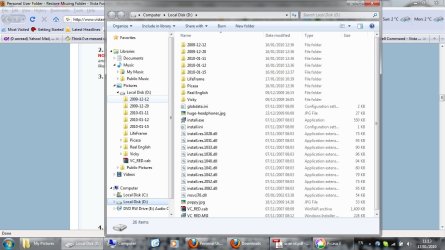
Now all my folders are in D: but not in a folder called My Pictures :( I can't find a folder called My Pictures anywhere. How do I go about correctly making a My Pictures Folder in D that I can place all my photos folders into? I am guessing that if I just create a folder and name it My Pictures it won't work properly with applications like Picasa etc, which are looking for the real My Pictures folder. Is this right? What can I do?
 

My Computer

OS
windows 7
Hello Sevenheaven,

Welcome to Seven Forums.

Don't know how you could do this through the start menu. The links I have there are for libraries and they can't be moved that I know of. I would do this from C:\\Users\username\

When you moved your pictures folder, you pointed to the D drive. That is now the new name for the pictures folder. In order to have the My Pictures folder, you need to create that folder on D and then point the move on the location tab to that folder. When it asks if you want to move everything click yes and you should be good to go.

Hope this helps.

Gary
 

My Computer

Computer Manufacturer/Model Number
Dell XPS420
OS
Vista Ult 64 bit Seven Ult RTM x64
CPU
Intel Core2 Quad Q6600 2.40 gigahertz
Memory
Crucial Ballistix 4x2GB PC2 6400
Graphics Card(s)
NVIDIA GeForce 8600 GTS 256 MB
Sound Card
Creative SB X-Fi audio
Monitor(s) Displays
HP w2207 + HPvs15
Screen Resolution
1680x1050 + 1024x768
Hard Drives
2-WD5000AAKS-500 GB
WD5000AAV-500 GB external
Keyboard
Microsoft Comfort Curve
Mouse
MX Revolution
Other Info
Wacom Intuos 2 Graphics Tablet
Experience Index=5.5

My Computer

Computer Manufacturer/Model Number
Micro-Star International/MS-7529
OS
Windows 7 Ultimate x32
CPU
DualCore Intel Pentium E2200, 2218 MHz (11 x 202)
Motherboard
MSI G31M3 V2 (MS-7529) (2 PCI, 1 PCI-E x16,2 DDR2 DIMM)
Memory
2 GB DDR2-800 DDR2 SDRAM
Graphics Card(s)
nVIDIA GeForce 9500GT 1GB
Sound Card
Realtek ALC888/1200 @ Intel 82801GB ICH7
Monitor(s) Displays
Samsung SyncMaster 2253BW (Digital) 22'' LCD
Screen Resolution
1680x1050
Hard Drives
SAMSUNG HD322IJ ATA Device (298 GB , IDE)

My Computer

Computer type
PC/Desktop
Computer Manufacturer/Model Number
Self built custom
OS
64-bit Windows 11 Pro for Workstations
CPU
Intel i7-8700K OC'd to 5 GHz
Motherboard
ASUS ROG Maximus XI Formula Z390
Memory
64 GB (4x16GB) G.SKILL TridentZ RGB DDR4 3600 MHz
Graphics Card(s)
ASUS ROG-STRIX-GTX1080TI-O11G-GAMING
Sound Card
Integrated
Monitor(s) Displays
2 x Samsung Odyssey G7 27"
Screen Resolution
2560x1440
Hard Drives
1TB Samsung 990 PRO M.2,
4TB Samsung 990 PRO PRO M.2,
TerraMaster F8 SSD Plus NAS
PSU
Seasonic Prime Titanium 850W
Case
Thermaltake Core P3
Cooling
Corsair Hydro H115i
Keyboard
Logitech wireless K800
Mouse
Logitech MX Master 4
Internet Speed
2 Gb/s Download and 100 Mb/s Upload
Antivirus
Malwarebyte Anti-Malware Premium
Browser
Google Chrome
Other Info
Logitech Z625 speaker system,
Logitech BRIO 4K Pro webcam,
HP Color LaserJet Pro MFP M477fdn,
APC SMART-UPS RT 1000 XL - SURT1000XLI,
Galaxy S23 Plus phone
I have made a little 12 minute video on how to move your folders. It includes instructions on how to create and delete a data partition. You can view it here. But you first must restore the default location as per Brink's tutorial. - I learned that the hard way too and Brink bailed me out at the time. LOL.
 

My Computer

Computer Manufacturer/Model Number
HP, Dell, Gateway, Toshiba - 4 laptops and 2 desktops
OS
Vista, Windows7, Mint Mate, Zorin, Windows 8
CPU
from 1.6GHz Duo to i7
Monitor(s) Displays
2x HP w2207
Hard Drives
5x HDD, 7x SSD, 12x Externals
Keyboard
with trackball - no mices
Mouse
Trackball mice
Internet Speed
DSL 6000
Hello SevenHeaven,

Be sure to restore the default location of your My Pictures folder first using the tutorial below, then try and move it again with the tutorial in the post above. :)

http://www.sevenforums.com/tutorials/18583-user-folders-restore-default-location.html

Thanks - I've tried to follow your tutorial, but I still can't find the folder so I can't click on the location tab. There is no folder called "My Pictures" anymore, but if I click on libraries it takes me to drive D:\ and if I save a picture it defaults to there, so it must be there somewhere?!

I also followed a tutorial about restoring deleted user folders - I typed "shell:My Pictures" and that seems ok, but there is still no folder! When I look in Libraries>Pictures it lists drive D:\, but if I right click on that I just get the properties for the whole drive. I'm attaching a screen shot because it's hard to explain without knowing all the right terminology.
 

Attachments

  • screenshot mypictures missing.jpg
    screenshot mypictures missing.jpg
    123.1 KB · Views: 33

My Computer

OS
windows 7

My Computer

Computer type
PC/Desktop
Computer Manufacturer/Model Number
Self built custom
OS
64-bit Windows 11 Pro for Workstations
CPU
Intel i7-8700K OC'd to 5 GHz
Motherboard
ASUS ROG Maximus XI Formula Z390
Memory
64 GB (4x16GB) G.SKILL TridentZ RGB DDR4 3600 MHz
Graphics Card(s)
ASUS ROG-STRIX-GTX1080TI-O11G-GAMING
Sound Card
Integrated
Monitor(s) Displays
2 x Samsung Odyssey G7 27"
Screen Resolution
2560x1440
Hard Drives
1TB Samsung 990 PRO M.2,
4TB Samsung 990 PRO PRO M.2,
TerraMaster F8 SSD Plus NAS
PSU
Seasonic Prime Titanium 850W
Case
Thermaltake Core P3
Cooling
Corsair Hydro H115i
Keyboard
Logitech wireless K800
Mouse
Logitech MX Master 4
Internet Speed
2 Gb/s Download and 100 Mb/s Upload
Antivirus
Malwarebyte Anti-Malware Premium
Browser
Google Chrome
Other Info
Logitech Z625 speaker system,
Logitech BRIO 4K Pro webcam,
HP Color LaserJet Pro MFP M477fdn,
APC SMART-UPS RT 1000 XL - SURT1000XLI,
Galaxy S23 Plus phone
OK I have followed the instructions and downloaded the .reg etc but no folder has appeared? :( I have restarted my computer 4 times but I still don't have a My Pictures folder.

The only difference is now in the libraries tab, none of my photo folders are showing anymore (as they were in the above screen shot named with dates) :(

Something which I think is new though, is a folder simply named Pictures, which is inside the library item Pictures. It's empty. Is this my new My Pictures?
 

My Computer

OS
windows 7
Ok, give this a go then: :)
  • backup anything in any one of the Pictures or My Pictures folders
  • Use OPTION TWO again to restore the default My Pictures location
  • delete all Pictures and My Pictures folders in the Start Menu, C:\Users\(user-name), and where you had tried to move it on the D: drive. (Do not delete the "Pictures" library folder though)
  • type shell:My Pictures in the Start Menu search box and press enter
  • restart the computer. May take a couple of time before the "C:\Users\(user-name)\My Pictures" folder returns.
  • Open the Pictures library, and check your included folders in it.
  • Make sure that the included My Pictures folder had the "C:\Users\(user-name)\My Pictures" path. If not, then remove it, and add the "C:\Users\(user-name)\My Pictures" as a included folder instead.
 

My Computer

Computer type
PC/Desktop
Computer Manufacturer/Model Number
Self built custom
OS
64-bit Windows 11 Pro for Workstations
CPU
Intel i7-8700K OC'd to 5 GHz
Motherboard
ASUS ROG Maximus XI Formula Z390
Memory
64 GB (4x16GB) G.SKILL TridentZ RGB DDR4 3600 MHz
Graphics Card(s)
ASUS ROG-STRIX-GTX1080TI-O11G-GAMING
Sound Card
Integrated
Monitor(s) Displays
2 x Samsung Odyssey G7 27"
Screen Resolution
2560x1440
Hard Drives
1TB Samsung 990 PRO M.2,
4TB Samsung 990 PRO PRO M.2,
TerraMaster F8 SSD Plus NAS
PSU
Seasonic Prime Titanium 850W
Case
Thermaltake Core P3
Cooling
Corsair Hydro H115i
Keyboard
Logitech wireless K800
Mouse
Logitech MX Master 4
Internet Speed
2 Gb/s Download and 100 Mb/s Upload
Antivirus
Malwarebyte Anti-Malware Premium
Browser
Google Chrome
Other Info
Logitech Z625 speaker system,
Logitech BRIO 4K Pro webcam,
HP Color LaserJet Pro MFP M477fdn,
APC SMART-UPS RT 1000 XL - SURT1000XLI,
Galaxy S23 Plus phone
Well, strangely when I booted up today, the My Pictures folder was back in the default place, so it looks like it could take up to 5 reboots for the folder to find its way home!

I followed the tutorial for changing the default location, and now have a pefectly functioning MyPictures folder in D:\

Thanks very much for all your help! You guys are the best :)
 

My Computer

OS
windows 7
You're welcome SevenHeaven. I'm happy to hear that you got it sorted out. Sometimes it takes longer to return on some systems than others for whatever reason. :)
 

My Computer

Computer type
PC/Desktop
Computer Manufacturer/Model Number
Self built custom
OS
64-bit Windows 11 Pro for Workstations
CPU
Intel i7-8700K OC'd to 5 GHz
Motherboard
ASUS ROG Maximus XI Formula Z390
Memory
64 GB (4x16GB) G.SKILL TridentZ RGB DDR4 3600 MHz
Graphics Card(s)
ASUS ROG-STRIX-GTX1080TI-O11G-GAMING
Sound Card
Integrated
Monitor(s) Displays
2 x Samsung Odyssey G7 27"
Screen Resolution
2560x1440
Hard Drives
1TB Samsung 990 PRO M.2,
4TB Samsung 990 PRO PRO M.2,
TerraMaster F8 SSD Plus NAS
PSU
Seasonic Prime Titanium 850W
Case
Thermaltake Core P3
Cooling
Corsair Hydro H115i
Keyboard
Logitech wireless K800
Mouse
Logitech MX Master 4
Internet Speed
2 Gb/s Download and 100 Mb/s Upload
Antivirus
Malwarebyte Anti-Malware Premium
Browser
Google Chrome
Other Info
Logitech Z625 speaker system,
Logitech BRIO 4K Pro webcam,
HP Color LaserJet Pro MFP M477fdn,
APC SMART-UPS RT 1000 XL - SURT1000XLI,
Galaxy S23 Plus phone
Back
Top