Think you've seen everything???

aBoppa

New member
Local time
5:05 AM
Messages
21
Just when you think you've seen everything, something crazy shows up. Hope someone has seen this before and knows how to get past it. This issue has come up on my Windows 10 system (which I can not access at the present time). This message comes up at the attempted Inital Program Load (BOOT) during an attempt to get into BIOS and comes to a quick halt. "THE COMPUTER CASE IS OPEN. PLEASE MAKE SURE THE +COMPUTER CASE IS CLOSED PROPERLY THEN PRESS CTRL + ALT + DEL TO CONTINUE. FATAL ERROR." I had just inserted a different video card and plugged in those cables I needed to. The attempt to fire this thing up did not proceed past a blank screen which lead me to take a peek at BIOS and its been downhill since then. Opening this case is a 'no-brainer' requiring only the swinging open the window on the side for access to the MB, etc. Seems like I going nowhere until I get past this Fatal Error.
 

My Computer

Computer Manufacturer/Model Number
home made
OS
Windows 7/Windows XP
CPU
Intel Core 2 Duo E7500
Motherboard
MSI 48C Platinum
Memory
4 GB DDR2
Graphics Card(s)
XFX Radeon HD4350
Sound Card
Sound Blaster Live! (incompatible)
Monitor(s) Displays
Starlogic 17"
Hard Drives
Western Digital 320GB & ACOM Data 80GB external.
Keyboard
Logitech wireless
Mouse
Logitech wireless
Internet Speed
Verion FIOs broadband
Its common on comercial pc there will be a case switch somewhere
 

My Computer

Computer type
PC/Desktop
OS
win 8 32 bit
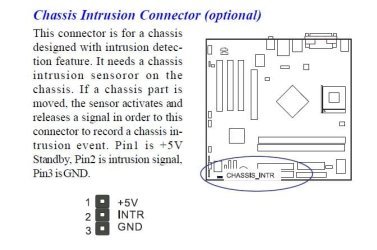
It's probably a Chassis Intrusion Switch:

CassIntr.JPG
Phredtx
 

My Computers

System One System Two

  • Computer type
    PC/Desktop
    Computer Manufacturer/Model Number
    Gateway SX2803
    OS
    Windows 7 Home Premium 64 bit Service Pack 1
    CPU
    Pentium Dual-Core E5800 @ 3.20GHz 3.20GHz
    Memory
    6.00 GB
    Graphics Card(s)
    Intel G45/G43 Express Chipset
    Monitor(s) Displays
    Dell E207WFP
    Internet Speed
    1.0 GB
  • Computer type
    PC/Desktop
    System Manufacturer/Model Number
    eMachine T3095
    OS
    XP SP3
    CPU
    AMD Athlon Clock Rate 1191MHz
    Motherboard
    C255346807
    Memory
    704 MB
    Graphics Card(s)
    NVIDIA GeoForce4 MX In GPU VMem 65344KB
    Sound Card
    nForce 6-Channel/Audio
    Monitor(s) Displays
    DELL 174FPC
    Screen Resolution
    1024 by 768
    Hard Drives
    Disk C: NTFS 70.7 GB
    Disk D: NTFS 37.25 GB
What is the make and model of the computer or if it's home built the name and model of motherboard?

It IS the chaises intrusion switch and this setting SHOULD be in BIOS. You just need to look hard enough or read the manual.
 

My Computer

Computer type
PC/Desktop
OS
Windows 7 Ultimate x64
F22 Simpilot

I used the Intel Desktop Board DB43LD as an example. It's in an old Gateway E3200.

Phredtx
 

My Computers

System One System Two

  • Computer type
    PC/Desktop
    Computer Manufacturer/Model Number
    Gateway SX2803
    OS
    Windows 7 Home Premium 64 bit Service Pack 1
    CPU
    Pentium Dual-Core E5800 @ 3.20GHz 3.20GHz
    Memory
    6.00 GB
    Graphics Card(s)
    Intel G45/G43 Express Chipset
    Monitor(s) Displays
    Dell E207WFP
    Internet Speed
    1.0 GB
  • Computer type
    PC/Desktop
    System Manufacturer/Model Number
    eMachine T3095
    OS
    XP SP3
    CPU
    AMD Athlon Clock Rate 1191MHz
    Motherboard
    C255346807
    Memory
    704 MB
    Graphics Card(s)
    NVIDIA GeoForce4 MX In GPU VMem 65344KB
    Sound Card
    nForce 6-Channel/Audio
    Monitor(s) Displays
    DELL 174FPC
    Screen Resolution
    1024 by 768
    Hard Drives
    Disk C: NTFS 70.7 GB
    Disk D: NTFS 37.25 GB
Back
Top