Solved Third BSOD today.

conceit2

New member
Local time
5:50 AM
Messages
4
Hey there,

I had my third BSOD today just some minutes ago, so I started looking for help, and found this forum. I would really appreciate it if anyone would be kind enough to help me, and take a look at the .dmp files. The pc has been doing fine since I built it, actually(though I'll have to admit this was the 4th BSOD in total).

I hope I have provided all the required information; the .html(perfmon /report) is named 3xbsod and is inside the zip.

Many thanks!

P.S.:
My pc is running with Win7x64 (System builder OEM (I built the PC myself)), and is also the original OS on this PC.

The age of the hardware/OS is 1-2 months.

---


My Computer My Computer

At a glance

Win7 x64
OS
Win7 x64
I see a possibility that your memory has damage.
The best way to check for that is to let memtest86 run overnight. We have a tutorial here on using it.
http://www.sevenforums.com/tutorials/105647-ram-test-memtest86.html
I say overnight because you need 5 to 7 passes for a reliable result (and even then it doesn't always catch everything but it's better than guessing)
 

My Computer My Computer

At a glance

Windows 7 x64Intel i7 2600kG.skill Ripjaw 16gigs @ 1866Nvidia gtx580 (evga)
Computer Manufacturer/Model Number
Insane hobo technologies. ;-)
OS
Windows 7 x64
CPU
Intel i7 2600k
Motherboard
Asrock z68 extreme 4 gen 3
Memory
G.skill Ripjaw 16gigs @ 1866
Graphics Card(s)
Nvidia gtx580 (evga)
Sound Card
Integrated HD audio + hdmi
Monitor(s) Displays
24" ASUS widescreen + 42" insignia
Screen Resolution
1080p (1920x1080)
Hard Drives
128 Samsung 830
256 Samsung 840
3 x 1tb storage drive (various)
1 western digital 1tb (eSATA)
1 Seagate 1tb (eSATA)
PSU
1 kilowatt SLI/Crossfire rated Silverstone modular
Case
NZXT Phantom + additional 220 fan
Cooling
Zalmann
Keyboard
Microsoft wireless 3000 (v2)
Mouse
MS - wireless 5000 (bluetrack)
Internet Speed
depends on if you ask me or my provider.
Other Info
The above information is provided as is, and the author assumes no responsibility for issues it may cause with your sanity or fanboyism.
Wow, thanks for the fast reaction! I'll do the test and post the results either tomorrow or the day after.
 

My Computer My Computer

At a glance

Win7 x64
OS
Win7 x64
I'm sorry for the doublepost, but i wanted to bump this:

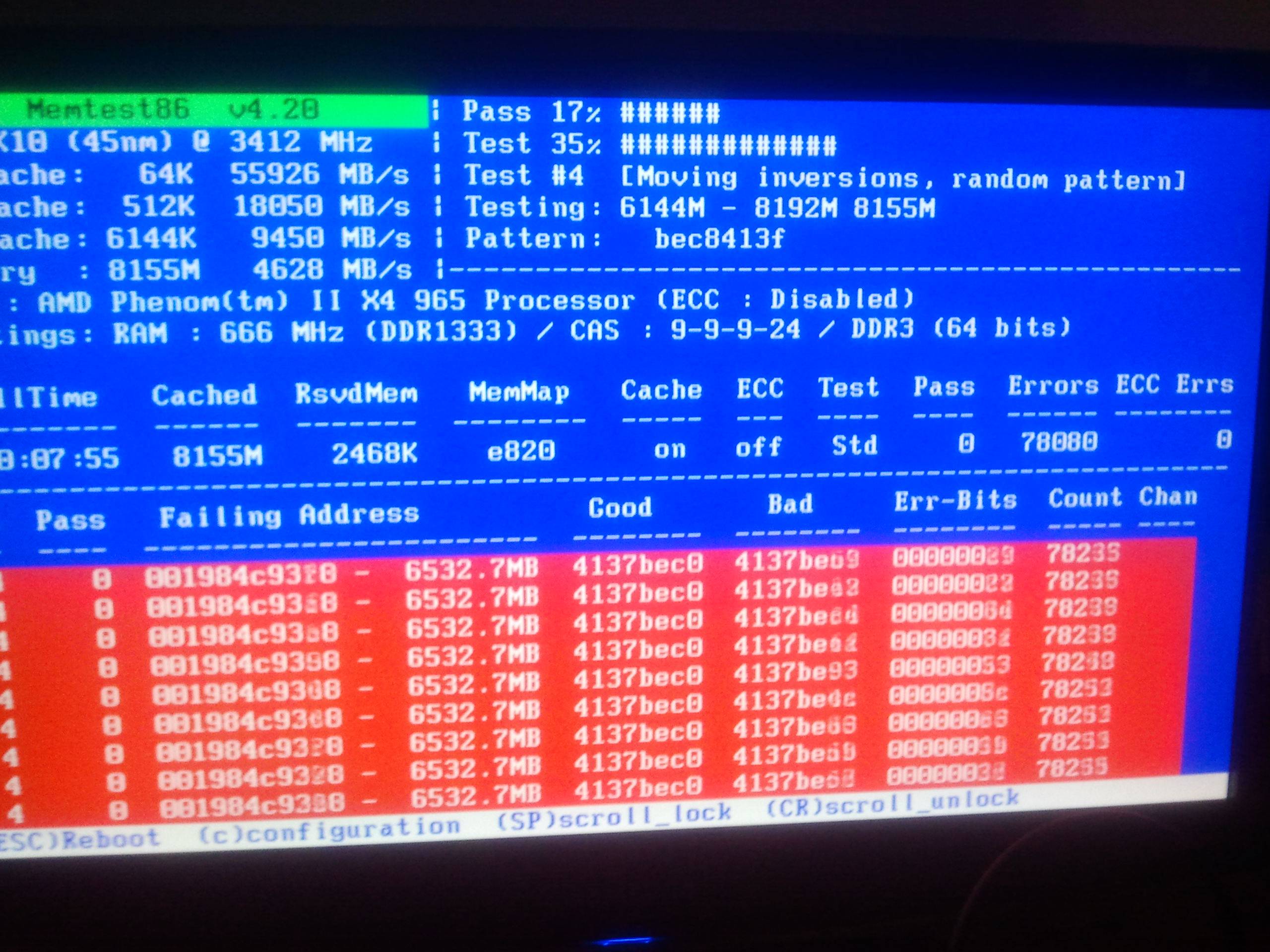
Mem is scanning atm, but i was wondering if this amount of errors is normal:

pYOSu.jpg
 

My Computer My Computer

At a glance

Win7 x64
OS
Win7 x64
lol you can stop definitely have a bad ram stick there.
If you have more than one stick you can try pulling one while testing the other to try and pick out which one has gone bad.
There's no need for you to continue running the scan though.
That's definitely bad ram if it blew up that quickly on the errors.

Seems the address on that stick is completely destroyed, doesn't look like it can read or write at all.
 

My Computer My Computer

At a glance

Windows 7 x64Intel i7 2600kG.skill Ripjaw 16gigs @ 1866Nvidia gtx580 (evga)
Computer Manufacturer/Model Number
Insane hobo technologies. ;-)
OS
Windows 7 x64
CPU
Intel i7 2600k
Motherboard
Asrock z68 extreme 4 gen 3
Memory
G.skill Ripjaw 16gigs @ 1866
Graphics Card(s)
Nvidia gtx580 (evga)
Sound Card
Integrated HD audio + hdmi
Monitor(s) Displays
24" ASUS widescreen + 42" insignia
Screen Resolution
1080p (1920x1080)
Hard Drives
128 Samsung 830
256 Samsung 840
3 x 1tb storage drive (various)
1 western digital 1tb (eSATA)
1 Seagate 1tb (eSATA)
PSU
1 kilowatt SLI/Crossfire rated Silverstone modular
Case
NZXT Phantom + additional 220 fan
Cooling
Zalmann
Keyboard
Microsoft wireless 3000 (v2)
Mouse
MS - wireless 5000 (bluetrack)
Internet Speed
depends on if you ask me or my provider.
Other Info
The above information is provided as is, and the author assumes no responsibility for issues it may cause with your sanity or fanboyism.
Well that s*cks, then... Better call the store and pray for some refunds, hehe. I'll test the sticks tomorrow then, too tired now. Also: thanks for the help so far!
P.s. I'll add a few things:
The ram in my pc was not in the list (=motherboard manual) of recomended/compatible RAM. However, I placed the sticks (2) with caution, even used anti static stuff, etc.

Most of the errors were found during test 4 and 6, with a total of ~450k errors during pass1.
 

My Computer My Computer

At a glance

Win7 x64
OS
Win7 x64
Well there is definitely a problem there, and that kind of ram error is in line with what the debugger was spitting at me, so I don't think we need to look any further.
If it's new enough to take back to the store I would insist on a replacement or even better store credit to try another brand possibly.

Anyhow the beauty of memtest86 is it takes windows out of the equation, so it's definitely not your software at that point.
 

My Computer My Computer

At a glance

Windows 7 x64Intel i7 2600kG.skill Ripjaw 16gigs @ 1866Nvidia gtx580 (evga)
Computer Manufacturer/Model Number
Insane hobo technologies. ;-)
OS
Windows 7 x64
CPU
Intel i7 2600k
Motherboard
Asrock z68 extreme 4 gen 3
Memory
G.skill Ripjaw 16gigs @ 1866
Graphics Card(s)
Nvidia gtx580 (evga)
Sound Card
Integrated HD audio + hdmi
Monitor(s) Displays
24" ASUS widescreen + 42" insignia
Screen Resolution
1080p (1920x1080)
Hard Drives
128 Samsung 830
256 Samsung 840
3 x 1tb storage drive (various)
1 western digital 1tb (eSATA)
1 Seagate 1tb (eSATA)
PSU
1 kilowatt SLI/Crossfire rated Silverstone modular
Case
NZXT Phantom + additional 220 fan
Cooling
Zalmann
Keyboard
Microsoft wireless 3000 (v2)
Mouse
MS - wireless 5000 (bluetrack)
Internet Speed
depends on if you ask me or my provider.
Other Info
The above information is provided as is, and the author assumes no responsibility for issues it may cause with your sanity or fanboyism.
Back
Top