Solved Third internal sata not shown

JIMT

New member
Member
Local time
12:26 AM
Messages
26
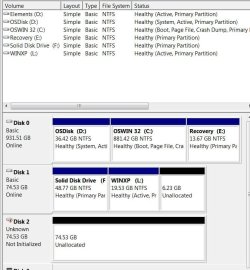
I installed a 3rd sata internal drive, from my old computer, in new Dell Win7 32bit. Windows will not recognize it. Tried rescan disc in disc manager no luck. Turned computer off and on several times no luck.
Any ideas?
Thanks
 

My Computer

OS
Windows 7 Home Premium 64bit
disc mgrCapture.JPG
I will shut down and enter BIOS. I believe that is how to do it.
 

My Computer

OS
Windows 7 Home Premium 64bit
I went into setup and the drive did not show in boot list.
 

My Computer

OS
Windows 7 Home Premium 64bit
I went into setup and the drive did not show in boot list.
As was suggested, have you checked or changed all cables... SATA (data) as well as power supply cable going to the new drive? All connectors pressed in firmly, to drive and motherboard?

Maybe just for an experiment, swap the known-working data/power cables that go to your second SATA drive, temporarily connecting them to your new third drive. Again, get into BIOS setup at boot time and see if the third drive is now visible in the HD list and/or boot sequence configuration for choosing.

Is there a BIOS setting that limits or sets the max number of active SATA connectors on the mobo?
 

My Computer

Computer type
PC/Desktop
Computer Manufacturer/Model Number
Home-built, two systems (1) and (2)
OS
Windows 7 Pro x64 (1), Win7 Pro X64 (2)
CPU
i5-3350p 3.1Ghz/6MB-cache (1); E8400 3.0Ghz/6MB-cache (2)
Motherboard
ASUS P8Z77-V Pro (1); ASUS P5Q3 (2)
Memory
8GB PC3-12800 DDR3 (1); 4GB PC3-10600 DDR3 (2)
Graphics Card(s)
ATI HD7750 (1), (see TV cards); ATI R7 250 (2)
Sound Card
Realtek ALC892 HD Audio (1); Realtek ALC1200 HD Audio (2)
Monitor(s) Displays
Eizo HD2441W LCD, Eizo S2433W (1); Eizo 24" S2433W (2)
Screen Resolution
1920x1200, 1920x1200 (1); 1920x1200 (2)
Hard Drives
(1) 1TB SATA-II (7200RPM), 2x2TB SATA-III (7200RPM), 250GB SATA-III (10000RPM) for OS; 2x2TB external USB 3.0

(2) 320GB SATA-II (7200RPM), 750GB SATA-II (7200RPM), 150GB SATA-II (10000RPM) for OS; 2TB external USB 3.0
PSU
Nesteq ECS-6001 600W (1); Nesteq ECS-5001 500W (2)
Case
Acousti-Case 360 (1) and (2)
Cooling
Noctua NH-U12P SE2 for CPU, 2x120mm case fans (1) and (2)
Keyboard
IBM PS/2 (1) and (2)
Mouse
Logitech MX Revolution wireless (1); Microsoft wired (2)
Internet Speed
100mbps down / 10mbps up
Antivirus
Microsoft Security Essentials; Malwarebyte Anti-Malware Pro
Browser
Firefox
Other Info
Ceton InfiniTV 4-tuner cablecard-enabled TV card as well as Hauppauge HVR-2250 OTA/ATSC 2-tuner TV card in (1), running under Win7 WMC
I think maybe you are right about the cable. It started to recognize the drive and then it stopped. I am going to buy a new cable and try it again.
The drive has never shown in the BIOS.
 

My Computer

OS
Windows 7 Home Premium 64bit
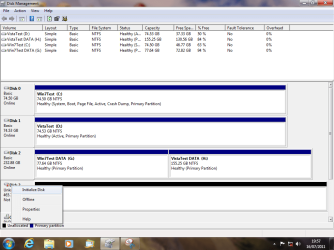
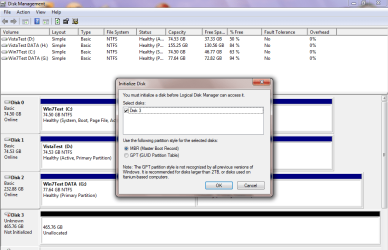
The hard drive is not initialized. When I tried to initialized it said cyclic redundancy error. The drive does not have a letter so I can not access the drive. Should I just throw away the drive?

old drive.JPG
 

My Computer

OS
Windows 7 Home Premium 64bit
When I tried to initialized before it said cyclic redundancy error. Now the initialize choice will not react to the right click.
 

My Computer

OS
Windows 7 Home Premium 64bit
When I tried to initialized before it said cyclic redundancy error. Now the initialize choice will not react to the left click on initialize
.
 

My Computer

OS
Windows 7 Home Premium 64bit
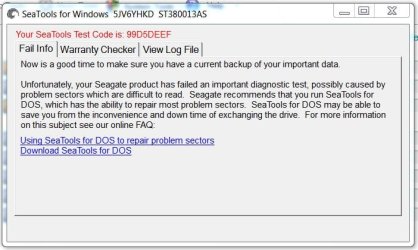
I down loaded Seagate Sea Tool and the drive failed two of the tests. I guess it time to throw it away.
Thanks for help, it a great service you provide.

sea tools.JPG
 

My Computer

OS
Windows 7 Home Premium 64bit
Did try Sea Tools for DOS?

You are welcome.
 

My Computer

OS
ME/XP/Vista/Win7
By all means run Sea Tools for DOS, long test. It will takes some hours to run. I have used it to successfully repair a Seagate drive I had.
 

My Computer

Computer type
PC/Desktop
Computer Manufacturer/Model Number
Home Built Desktop By DataTech
OS
Windows 7 Ultimate X64 SP1
CPU
Intel i5-2550K, Differing ~4.4-4.8GHz No built in GPU
Motherboard
ASUS P8Z68-V PRO/GEN3
Memory
16GB G.Skill Sniper 1866MHz @ 2133MHz 2x8GB
Graphics Card(s)
ASUS GTX650TIB-DC2OC-2GD5, (650TI Boost)
Sound Card
Onboard Realtek 5-1
Monitor(s) Displays
Samsung P2570HD
Screen Resolution
1920x1080
Hard Drives
Samsung 840 Pro 256GB SSD for OS, 500GB Seagate Constellation (Enterprise drive) for Data
PSU
Corsair HX650W
Case
Inwin Dragon Rider
Cooling
Hyper 212 EVO w/two Noctua fans, push-pull, @1300 RPM
Keyboard
E-Z Eyes, bright yellow keys with large characters
Mouse
steelseries SENSEI Laser Pro Gaming
Internet Speed
48-51Mbs Mbs down, 11 Mbs up Xfinity Cable
Antivirus
Norton Internet Security 2013
Browser
IE 10, Opera, Pale Moon if needed
Other Info
4 case fans, LG BluRay-RE, ASUS DVD-RW, Mr. Fusion power supply, 1.21 gigawatts.
Britton,
I had looked at the DOS test and concluded that I have spent too many hours on the drive and won't spend any more. Again thanks for all the time that you have helped me.
JIMT
 

My Computer

OS
Windows 7 Home Premium 64bit
Britton,
I had looked at the DOS test and concluded that I have spent too many hours on the drive and won't spend any more. Again thanks for all the time that you have helped me.
Is that a 75GB SSD drive, or an ordinary 75GB spinning hard drive, that we're discussing?

If it's an old spinning 75GB hard drive, I'd just toss it without another moment's consideration. You can buy a brand new drive that's 10-20 times as large, quieter, cooler and faster access, at $50-$150.

Your time is much more valuable. Just forget it, and buy a new modern HUGE/FAST/QUIET/COOL drive for a pittance.
 

My Computer

Computer type
PC/Desktop
Computer Manufacturer/Model Number
Home-built, two systems (1) and (2)
OS
Windows 7 Pro x64 (1), Win7 Pro X64 (2)
CPU
i5-3350p 3.1Ghz/6MB-cache (1); E8400 3.0Ghz/6MB-cache (2)
Motherboard
ASUS P8Z77-V Pro (1); ASUS P5Q3 (2)
Memory
8GB PC3-12800 DDR3 (1); 4GB PC3-10600 DDR3 (2)
Graphics Card(s)
ATI HD7750 (1), (see TV cards); ATI R7 250 (2)
Sound Card
Realtek ALC892 HD Audio (1); Realtek ALC1200 HD Audio (2)
Monitor(s) Displays
Eizo HD2441W LCD, Eizo S2433W (1); Eizo 24" S2433W (2)
Screen Resolution
1920x1200, 1920x1200 (1); 1920x1200 (2)
Hard Drives
(1) 1TB SATA-II (7200RPM), 2x2TB SATA-III (7200RPM), 250GB SATA-III (10000RPM) for OS; 2x2TB external USB 3.0

(2) 320GB SATA-II (7200RPM), 750GB SATA-II (7200RPM), 150GB SATA-II (10000RPM) for OS; 2TB external USB 3.0
PSU
Nesteq ECS-6001 600W (1); Nesteq ECS-5001 500W (2)
Case
Acousti-Case 360 (1) and (2)
Cooling
Noctua NH-U12P SE2 for CPU, 2x120mm case fans (1) and (2)
Keyboard
IBM PS/2 (1) and (2)
Mouse
Logitech MX Revolution wireless (1); Microsoft wired (2)
Internet Speed
100mbps down / 10mbps up
Antivirus
Microsoft Security Essentials; Malwarebyte Anti-Malware Pro
Browser
Firefox
Other Info
Ceton InfiniTV 4-tuner cablecard-enabled TV card as well as Hauppauge HVR-2250 OTA/ATSC 2-tuner TV card in (1), running under Win7 WMC
Back
Top