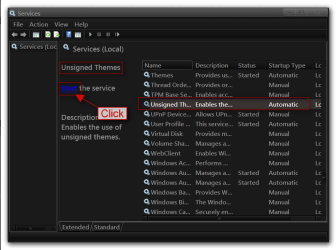
Third party themes are not being applied completely

dtoxx

New member
Local time
6:24 PM
Messages
13
I'm going nuts trying to figure this out. First, I'm running Windows 7 Ultimate SP1 64-bit on a new Asus G75VW. I've had a few systems that run the same version of Windows, and on all of them I've used the Unsigned Themes Service (UxStyle Core) to use third party themes. My problem is that on my new system the themes are being applied only partially.

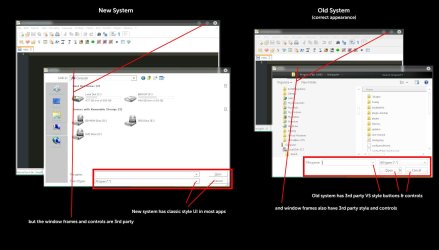
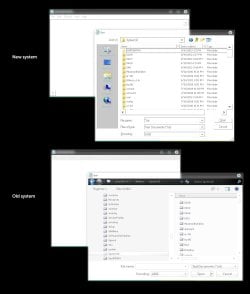
On my last system, I used UxStyle Core and it worked perfectly. The themes I used may not have been created perfectly, but I was happy. On my new system I can use 3rd party themes, but most applications (like Photoshop, Notepad++, etc.) and some Windows apps seem to be using the Win 2000 styles for parts of their UI. The best way I can illustrate this is with a screenshot, which I've attached. The Old System screenshot looks good to me, but the New System shot shows how Notepad++ is using the classic style for its open dialog. The same app on my old system (same version exactly) uses the 3rd party theme's styling (Gaia09).

I've uninstalled and reinstalled UxStyle, tried using the Universal Theme Patcher (x86 and x64), manually copied the patched system files from my old system to my new one, ran SFC /scannow to replace patched system files with the originals, etc., etc.

After completely removing UxStyle, and using non-patched system files, some apps STILL use the Win 2000 style for parts of their UI. Out of frustration, I also tried using TuneUp Utilities and WindowBlinds. But no matter what I do, the same thing is happening.

Can anyone please help?
 

Attachments
  • test.jpg
    test.jpg
    81.2 KB · Views: 37

My Computer My Computer

At a glance

Windows 7 Ultimate 64-bitCore i7 3820QM16GBNvidia Geforce GTX 660M 2GB
Computer Manufacturer/Model Number
ASUS G75VW
OS
Windows 7 Ultimate 64-bit
CPU
Core i7 3820QM
Memory
16GB
Graphics Card(s)
Nvidia Geforce GTX 660M 2GB
Screen Resolution
1920x1080
Hard Drives
2x 750GB
I do not see a difference in Notepad ++ in your screenshots.
As for Photoshop it uses its own UI so it always looks the same no matter what theme you are using.

Post a link to the theme you are using and I will check it out.

Jerry
 

My Computer My Computer

At a glance

Win 7 Pro x64 / Win 10 ProIntel(R) Core(TM) i7-3630QM CPU @ 2.40GHz12 GB(1) Intel(R) HD Graphics 4000 (2) NVIDIA GeFo...
Computer type
Laptop
Computer Manufacturer/Model Number
Sager NP9170
OS
Win 7 Pro x64 / Win 10 Pro
CPU
Intel(R) Core(TM) i7-3630QM CPU @ 2.40GHz
Motherboard
CLEVO P170EM
Memory
12 GB
Graphics Card(s)
(1) Intel(R) HD Graphics 4000 (2) NVIDIA GeForce GTX 675M
Sound Card
(1) Realtek High Definition Audio (2) Intel(R) Display Aud
Monitor(s) Displays
17.3
Screen Resolution
1920x1080
Hard Drives
(1) Samsung 860 EVO 500GB(OS) (1) Samsung 860 EVO 500GB(Data)
Keyboard
Backlite
Antivirus
MSE, Malwarebytes Pro
Browser
Firefox
Other Info
DESKTOP: Custom-built.
OS: Win 10 Pro x64.
CASE: Rosewill R5.
CPU: Intel I5 4670K CPU @ 3.40GHz.
CPU COOLER: Cool Master Hyper 212 EVO.
MOTHERBOARD: Asus Z87-A.
MEMORY: Kingston HyperX 2x4 GB.
GPU: Nvidia Geforce 650 TI.
PSU: Corsair TX750.
DRIVES: (1) Samsung 840 120 GB SSD (2) Western Digital blue 500 GB 7200 RPM.
Thanks for replying! First, here's a link to the VS:

Gaia09 VS for Seven 2 by ~jg-visuals on deviantART

Unfortunately, the issue shows up no matter what 3rd party VS I use - I've tried dozens of them.

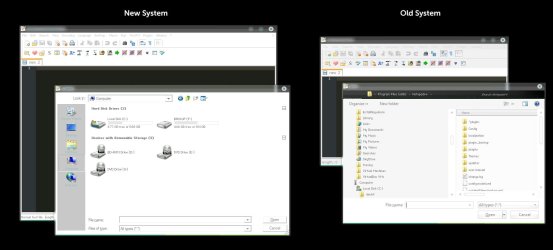
I apologize for not providing a clearer explanation in the screenshot of what I was talking about. I've attached a new shot that points out the specific UI elements I'm talking about.

I knew that the Adobe apps use their own UI, but even on my old system those same apps used 3rd party theming for buttons & controls in their open/save dialog windows. On my new system, they default to the classic theme styling.

I have a feeling that this is a problem unrelated to 3rd party themes, because if I revert the system to pre-patching and just use the standard Aero theme, the same thing happens.
 

Attachments

  • test2.jpg
    test2.jpg
    112.3 KB · Views: 19

My Computer My Computer

At a glance

Windows 7 Ultimate 64-bitCore i7 3820QM16GBNvidia Geforce GTX 660M 2GB
Computer Manufacturer/Model Number
ASUS G75VW
OS
Windows 7 Ultimate 64-bit
CPU
Core i7 3820QM
Memory
16GB
Graphics Card(s)
Nvidia Geforce GTX 660M 2GB
Screen Resolution
1920x1080
Hard Drives
2x 750GB
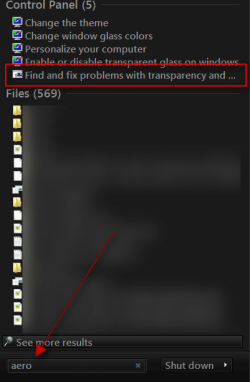
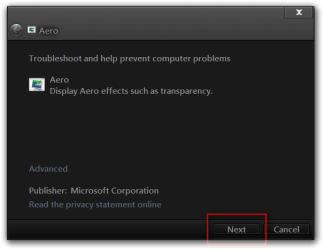
Click on start button in the search box type Aero and look for Find and fix problems with transparency and check for problems.

Jerry
s.pngAero.png
 

My Computer My Computer

At a glance

Win 7 Pro x64 / Win 10 ProIntel(R) Core(TM) i7-3630QM CPU @ 2.40GHz12 GB(1) Intel(R) HD Graphics 4000 (2) NVIDIA GeFo...
Computer type
Laptop
Computer Manufacturer/Model Number
Sager NP9170
OS
Win 7 Pro x64 / Win 10 Pro
CPU
Intel(R) Core(TM) i7-3630QM CPU @ 2.40GHz
Motherboard
CLEVO P170EM
Memory
12 GB
Graphics Card(s)
(1) Intel(R) HD Graphics 4000 (2) NVIDIA GeForce GTX 675M
Sound Card
(1) Realtek High Definition Audio (2) Intel(R) Display Aud
Monitor(s) Displays
17.3
Screen Resolution
1920x1080
Hard Drives
(1) Samsung 860 EVO 500GB(OS) (1) Samsung 860 EVO 500GB(Data)
Keyboard
Backlite
Antivirus
MSE, Malwarebytes Pro
Browser
Firefox
Other Info
DESKTOP: Custom-built.
OS: Win 10 Pro x64.
CASE: Rosewill R5.
CPU: Intel I5 4670K CPU @ 3.40GHz.
CPU COOLER: Cool Master Hyper 212 EVO.
MOTHERBOARD: Asus Z87-A.
MEMORY: Kingston HyperX 2x4 GB.
GPU: Nvidia Geforce 650 TI.
PSU: Corsair TX750.
DRIVES: (1) Samsung 840 120 GB SSD (2) Western Digital blue 500 GB 7200 RPM.
I ran the utility and it came back with zero issues. I also thought that maybe the Aero theme itself got corrupted somehow (yeah, a stretch), so I copied the one from my old system to the new one, but no luck.
 

My Computer My Computer

At a glance

Windows 7 Ultimate 64-bitCore i7 3820QM16GBNvidia Geforce GTX 660M 2GB
Computer Manufacturer/Model Number
ASUS G75VW
OS
Windows 7 Ultimate 64-bit
CPU
Core i7 3820QM
Memory
16GB
Graphics Card(s)
Nvidia Geforce GTX 660M 2GB
Screen Resolution
1920x1080
Hard Drives
2x 750GB
In your screenshot I see that the 2 Open windows are different from Notepad ++ when opening a file how is that done?

Click on the Start Button type in Services In the search box and then click on Services
1.png


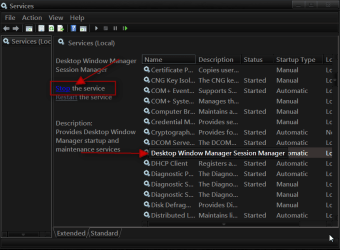
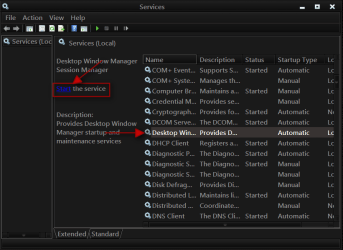
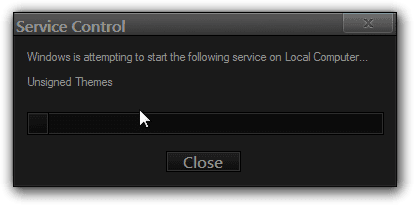
Scroll down until you see Desktop Windows Manager Sessions Manager select it in click on the Stop text and let it stop after that click on Start text and see if that works. Your screen may blink when you do this.
2.pngstop.PNG3.pngstart.png

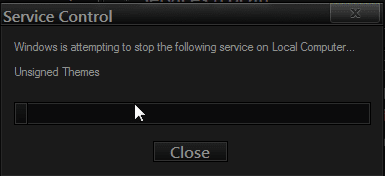
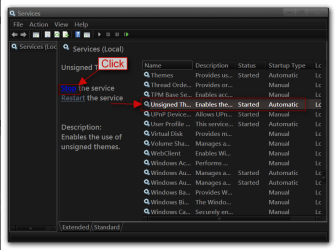
Do the same thing with unsigned themes
4.png5.png

Jerry
 

My Computer My Computer

At a glance

Win 7 Pro x64 / Win 10 ProIntel(R) Core(TM) i7-3630QM CPU @ 2.40GHz12 GB(1) Intel(R) HD Graphics 4000 (2) NVIDIA GeFo...
Computer type
Laptop
Computer Manufacturer/Model Number
Sager NP9170
OS
Win 7 Pro x64 / Win 10 Pro
CPU
Intel(R) Core(TM) i7-3630QM CPU @ 2.40GHz
Motherboard
CLEVO P170EM
Memory
12 GB
Graphics Card(s)
(1) Intel(R) HD Graphics 4000 (2) NVIDIA GeForce GTX 675M
Sound Card
(1) Realtek High Definition Audio (2) Intel(R) Display Aud
Monitor(s) Displays
17.3
Screen Resolution
1920x1080
Hard Drives
(1) Samsung 860 EVO 500GB(OS) (1) Samsung 860 EVO 500GB(Data)
Keyboard
Backlite
Antivirus
MSE, Malwarebytes Pro
Browser
Firefox
Other Info
DESKTOP: Custom-built.
OS: Win 10 Pro x64.
CASE: Rosewill R5.
CPU: Intel I5 4670K CPU @ 3.40GHz.
CPU COOLER: Cool Master Hyper 212 EVO.
MOTHERBOARD: Asus Z87-A.
MEMORY: Kingston HyperX 2x4 GB.
GPU: Nvidia Geforce 650 TI.
PSU: Corsair TX750.
DRIVES: (1) Samsung 840 120 GB SSD (2) Western Digital blue 500 GB 7200 RPM.
OK, I stopped and started the service per your instructions. No dice.

As far as the screenshot goes, they're from two different laptops. The old one is the laptop where the themes work properly.

I see what you mean about them being different, and that's part of my problem - on the old laptop, most applications would use the Windows open/save dialog with the navigation pane on the left. On my new laptop, the same apps that I have installed on the old system don't use the dialog with the navigation pane. They use this other dialog that only shows the places bar on the left.

Not to beat this thing to death, but I included another shot of the standard Windows Notepad app on both systems. It doesn't seem to be limited to 3rd party apps.
 

Attachments

  • test3.jpg
    test3.jpg
    70.5 KB · Views: 3

My Computer My Computer

At a glance

Windows 7 Ultimate 64-bitCore i7 3820QM16GBNvidia Geforce GTX 660M 2GB
Computer Manufacturer/Model Number
ASUS G75VW
OS
Windows 7 Ultimate 64-bit
CPU
Core i7 3820QM
Memory
16GB
Graphics Card(s)
Nvidia Geforce GTX 660M 2GB
Screen Resolution
1920x1080
Hard Drives
2x 750GB

My Computer My Computer

At a glance

Win 7 Pro x64 / Win 10 ProIntel(R) Core(TM) i7-3630QM CPU @ 2.40GHz12 GB(1) Intel(R) HD Graphics 4000 (2) NVIDIA GeFo...
Computer type
Laptop
Computer Manufacturer/Model Number
Sager NP9170
OS
Win 7 Pro x64 / Win 10 Pro
CPU
Intel(R) Core(TM) i7-3630QM CPU @ 2.40GHz
Motherboard
CLEVO P170EM
Memory
12 GB
Graphics Card(s)
(1) Intel(R) HD Graphics 4000 (2) NVIDIA GeForce GTX 675M
Sound Card
(1) Realtek High Definition Audio (2) Intel(R) Display Aud
Monitor(s) Displays
17.3
Screen Resolution
1920x1080
Hard Drives
(1) Samsung 860 EVO 500GB(OS) (1) Samsung 860 EVO 500GB(Data)
Keyboard
Backlite
Antivirus
MSE, Malwarebytes Pro
Browser
Firefox
Other Info
DESKTOP: Custom-built.
OS: Win 10 Pro x64.
CASE: Rosewill R5.
CPU: Intel I5 4670K CPU @ 3.40GHz.
CPU COOLER: Cool Master Hyper 212 EVO.
MOTHERBOARD: Asus Z87-A.
MEMORY: Kingston HyperX 2x4 GB.
GPU: Nvidia Geforce 650 TI.
PSU: Corsair TX750.
DRIVES: (1) Samsung 840 120 GB SSD (2) Western Digital blue 500 GB 7200 RPM.
I actually did quite a few operations. Here's the history of my attempts:

1) Ran Universal Theme Patcher (both x64 and x86)
2) Rebooted
3) Applied 3rd party theme = theme worked but the problem showed up
4) Ran UTP again and restored the patched files (x64 and x86)
5) Rebooted
6) Repeated steps 1-3 = theme worked but same problem
7) Ran SFC /scannow from elevated command prompt
8) Rebooted
9) Applied standard Aero theme = theme worked but problem persisted
10) Copied patched themeservice.dll, themeui.dll, uxtheme.dll and explorer.exe files from my old laptop to my new one (from System32 and SysWOW64) - backed up the originals first
11) Rebooted
12) Applied 3rd party theme = theme worked but problem persisted
13) Removed patched files and replaced with the original backups
14) Rebooted
15) Applied standard Aero theme = theme worked but problem persisted
16) Installed Unsigned Themes service
17) Rebooted
18) Applied 3rd party theme = theme worked, but problem still there

After that point I sought your help.
 

My Computer My Computer

At a glance

Windows 7 Ultimate 64-bitCore i7 3820QM16GBNvidia Geforce GTX 660M 2GB
Computer Manufacturer/Model Number
ASUS G75VW
OS
Windows 7 Ultimate 64-bit
CPU
Core i7 3820QM
Memory
16GB
Graphics Card(s)
Nvidia Geforce GTX 660M 2GB
Screen Resolution
1920x1080
Hard Drives
2x 750GB
All the things you have done looks like the correct actions was taken, and I am starting to run out of ideas.

If you can switch to the Windows Classic theme logoff logon then go to your theme folder and move all of the third-party custom themes(theme folders and .theme files) to a new location other than the theme folder then reboot your computer and then try to apply the default Aero theme and see what happens.

Jerry
 

My Computer My Computer

At a glance

Win 7 Pro x64 / Win 10 ProIntel(R) Core(TM) i7-3630QM CPU @ 2.40GHz12 GB(1) Intel(R) HD Graphics 4000 (2) NVIDIA GeFo...
Computer type
Laptop
Computer Manufacturer/Model Number
Sager NP9170
OS
Win 7 Pro x64 / Win 10 Pro
CPU
Intel(R) Core(TM) i7-3630QM CPU @ 2.40GHz
Motherboard
CLEVO P170EM
Memory
12 GB
Graphics Card(s)
(1) Intel(R) HD Graphics 4000 (2) NVIDIA GeForce GTX 675M
Sound Card
(1) Realtek High Definition Audio (2) Intel(R) Display Aud
Monitor(s) Displays
17.3
Screen Resolution
1920x1080
Hard Drives
(1) Samsung 860 EVO 500GB(OS) (1) Samsung 860 EVO 500GB(Data)
Keyboard
Backlite
Antivirus
MSE, Malwarebytes Pro
Browser
Firefox
Other Info
DESKTOP: Custom-built.
OS: Win 10 Pro x64.
CASE: Rosewill R5.
CPU: Intel I5 4670K CPU @ 3.40GHz.
CPU COOLER: Cool Master Hyper 212 EVO.
MOTHERBOARD: Asus Z87-A.
MEMORY: Kingston HyperX 2x4 GB.
GPU: Nvidia Geforce 650 TI.
PSU: Corsair TX750.
DRIVES: (1) Samsung 840 120 GB SSD (2) Western Digital blue 500 GB 7200 RPM.
OK, I'll try that after work tonight.

In the meantime, I made a little more progress. I discovered that I can get applications to use the 3rd party VS if I do the following:

1) Open the properties for the app
2) In the Compatibility tab, check "disable visual styles"
3) Run the app = app uses classic theme
4) Close the app
5) Open the app's properties again
6) In the Compatibility tab, UNcheck "disable visual styles"
7) Run the app = app uses 3rd party theme

Bizarre.
 

My Computer My Computer

At a glance

Windows 7 Ultimate 64-bitCore i7 3820QM16GBNvidia Geforce GTX 660M 2GB
Computer Manufacturer/Model Number
ASUS G75VW
OS
Windows 7 Ultimate 64-bit
CPU
Core i7 3820QM
Memory
16GB
Graphics Card(s)
Nvidia Geforce GTX 660M 2GB
Screen Resolution
1920x1080
Hard Drives
2x 750GB
Back
Top