this same recovery partion! I can't get rid of it.

mtbarbee

New member
Local time
11:49 PM
Messages
4
Hey folks. I started a thread last week about deleting partition "D" before or aft of installing Win7. I am having a hard time here. The install went great. Custom install on primary C drive. Left D drive because Someone said nothing to deleting it after. Well, that aint so. If you go to disc management you can't delete because it is in use. Now this is the recovery from the day that I bought computer with Vista installed. It would take me back to the day I bought it. Three years ago. It won't let me delete folders that are on there. Oh, and I can't make a new back up until I get rid of this partition. The back up keeps spinning at 27%. I just know this recovery partition is the blame. Do I have to reinstall Win7 to get to the place where it asks what drive to install and then delete "D"? What the heck? Do I have to get a partition manager software to get rid of this freaking recovery drive? Did Win7 try to put more files on there during install? I need someone who knows what they are writing about before you jump in with what you think. O.K.? I've already got some bad info here already.
 

My Computer My Computer

At a glance

windows 7AMD Athlon 64 Z2 dual core3062 gignvidia L6150 on board
Computer Manufacturer/Model Number
HP Pavillion a1710n
OS
windows 7
CPU
AMD Athlon 64 Z2 dual core
Motherboard
Asus leonite 5.0
Memory
3062 gig
Graphics Card(s)
nvidia L6150 on board
Sound Card
reltek ALC888
Monitor(s) Displays
Acer 19" LCD
PSU
350watt
Case
stock
Cooling
stock fan
Internet Speed
broadband, it varies
The one thing I can think of is that the system is using the D partition for the boot files

If you check on the disk management does it show this partition as active?

If this is the active partition thare are things that can be done to solve this :)

If you need a partition manager I can recommend the Partition Wizard software but you should not need this unless you wish to move partitions around

Partition Wizard is a Windows based FREE Partition Manager. It works as partition magic and supports Windows 2000/XP/2003/Vista/2008 server and Windows 7. FREE for Home and Business user.
 

My Computers My Computers

  • At a glance

    Windows 11 Pro x64 [Latest Release and Releas...Ryzen 9 5950X, 3.8 - 5.2 MHz64GB [2 x 32GB] DDR4 3200MHz4GB NVIDIA GEFORCE GTX 1650 Ti
    Computer type
    PC/Desktop
    Computer Manufacturer/Model Number
    ChillBlast - Custom to my design
    OS
    Windows 11 Pro x64 [Latest Release and Release Preview]
    CPU
    Ryzen 9 5950X, 3.8 - 5.2 MHz
    Motherboard
    Asus Prime X570-Pro
    Memory
    64GB [2 x 32GB] DDR4 3200MHz
    Graphics Card(s)
    4GB NVIDIA GEFORCE GTX 1650 Ti
    Sound Card
    On-board SPDIF to 5.1 System + HDMI [5.1 system]
    Monitor(s) Displays
    32" UHD 32 Bit HDR Monitor + 43" UHD 4K 32Bit HDR TV
    Screen Resolution
    2 x 3840 x 2160 @60Hz
    Hard Drives
    1TB M2 SSD OS, 500GB Fast Access SSD, 2 x 8TB Data + Various Externals from 1TB to 4TB, 10TB NAS
    PSU
    NZXT C750 80 PLUS Gold 750W Modular PSU
    Case
    Workstation Case [Matt Black]
    Cooling
    NZXT Kraken X63 280mm CPU Cooler +2x Quiet Case fans
    Keyboard
    Logitech Wireless MX Keys & K400 + others
    Mouse
    Logitech Wireless MX Master 3S
    Internet Speed
    920 MB Down 50 MB Up
    Antivirus
    BitDefender Total Security Pro
    Browser
    Chrome (always run latest Non-Beta)
    Other Info
    Also run ...
    Laptop - Quad 8GB - Windows 10 Pro x64
    Nexus 7 Android tablet x2
    Samsung 10.2" tablet
    Blackview TAB 8 4G Android Tablet c/w Keyboard
    Wacom Intuos Pro Medium Pen Pad
    Wacom Intuos Pro Small Pen Pad
    Wacom Expresskeys Remote
    Loopdeck+ Graphics Controller
    Shuttle Pro v2 Control
  • At a glance

    Windows 11 Pro x64 Latest RPIntel I7 10750H 5.0GHz32GB [2x16GB] DDR4 2933 MHznVidia GTX1650Ti 4 GB GDDR6
    Computer type
    Laptop
    System Manufacturer/Model Number
    Dell XPS 17 10750H
    OS
    Windows 11 Pro x64 Latest RP
    CPU
    Intel I7 10750H 5.0GHz
    Motherboard
    Dell XPS
    Memory
    32GB [2x16GB] DDR4 2933 MHz
    Graphics Card(s)
    nVidia GTX1650Ti 4 GB GDDR6
    Sound Card
    Stock [Realtek] 4 Speaker
    Monitor(s) Displays
    17" IPS UHD+ Infinity Edge Touchscreen
    Screen Resolution
    3840 x 2400
    Hard Drives
    2TB M2 NVMe, 4TB External + various 500GB & 1TB External NVMe (also have access to spinner HDD from
    PSU
    Stock
    Case
    Stock XPS Aluminium & Carbon Fibre
    Cooling
    Stock - Active Fan Control
    Keyboard
    Backlit + Various Logitech
    Mouse
    Stock Track Pad + Logitech MX Trackball
    Internet Speed
    72 MB Down 18MB Up
    Browser
    Chrome
    Other Info
    Also run ...
    Laptop - Quad 8GB - Windows 10 Pro x64
    Nexus 7 Android tablet x2
    10.2" tablet
    Sony Z3 Android Smartphone
    Wacom Intuos Pro Medium Pen Pad
    Wacom Intuos Pro Small Pen Pad
    Wacom Expresskeys Remote
    Loopdeck+ Graphics Controller
    Shuttle Pro v2 Control Pad
    10TB NAS
I would not delete the D partition. That is put there by the OEM of your computer. It contains the files which would enable you to put your compter settings the way they were when you bought your computer. You may never need it, but if you want to go back to the OEM because you are still under warranty, they will want to be able to set it back with the origianal settings.
 

My Computer My Computer

At a glance

Windows 10, Home Clean InstallIntel Core2 processsor Q8200(2.33Ghz 1333FSB)...6 gbATI Radeon 256MB HD3650
Computer type
PC/Desktop
Computer Manufacturer/Model Number
Dell XPS 420
OS
Windows 10, Home Clean Install
CPU
Intel Core2 processsor Q8200(2.33Ghz 1333FSB) Quad Core Tech
Motherboard
Dell
Memory
6 gb
Graphics Card(s)
ATI Radeon 256MB HD3650
Sound Card
Intergrated 7.1 Channel Audio
Monitor(s) Displays
Dell SP2009W 20"
Hard Drives
640 GB Serial ATA Hard drive
Cooling
Fan
Keyboard
Dell USB Keyboard
Mouse
Dell Premium Optical USB
Internet Speed
DSL 2.85
Installing Windows 7 wont write any files on that partition since it is exclusively reserved for the Hardware Restore of your computer.

I don't know if you've tried this already but you can delete that partiton when you perform a Custom Clean Install.

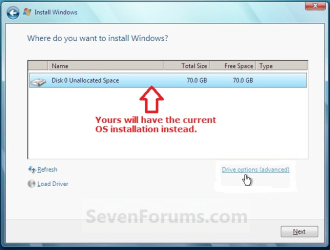
When you get to the page where you can see the partitions there is a "Drive Options (Advanced)" link on the lower right side of the installation window:

1.PNG

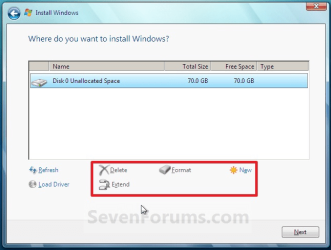
This will then give you options to "Delete", "Format", create "New" partition and "Extend" partition:

2.PNG

Just select the Hardware restore partition - delete it or format it and idealy it would merge with the entire HDD. but if you HDD already has Data you would need to format it first so that it becomes one whole partition.

You can now install Windows 7 on the complete whole partition after these steps.

hope this helps ;)
 

My Computer My Computer

At a glance

Windows 7 Ultimate 64bitIntel Core2 Quad4gb ddr2 10668800GTS
Computer Manufacturer/Model Number
Bo's "Kitchen" - Custom
OS
Windows 7 Ultimate 64bit
CPU
Intel Core2 Quad
Motherboard
i7 extreme
Memory
4gb ddr2 1066
Graphics Card(s)
8800GTS
Sound Card
Realtec
Monitor(s) Displays
Sony HD
Hard Drives
1 TB Western Digital
Cooling
Thermaltake Spin-Q Universal CPU Cooler
I remember reading about this in the Giant book I just bought for Win7.

Go to Boarders-------"Windows 7 Inside and Out" pg37

Basically you can delete it if you want to-but it sounds like a big task.
 

My Computer My Computer

At a glance

Windows7Athlon 64 dual core 46004g dual channel G- skillGeforce 7950gt
Computer Manufacturer/Model Number
Home Build--New Egg
OS
Windows7
CPU
Athlon 64 dual core 4600
Motherboard
Asus A8n32sli deluxe
Memory
4g dual channel G- skill
Graphics Card(s)
Geforce 7950gt

My Computers My Computers

  • At a glance

    7 X64i5 84002x8gb 3200mhz
    Computer type
    PC/Desktop
    OS
    7 X64
    CPU
    i5 8400
    Motherboard
    gigabyte b365m ds3h
    Memory
    2x8gb 3200mhz
    Hard Drives
    various
    PSU
    pure power 11 400w cm
    Case
    Coolermaster
    Cooling
    cryorig m9i
  • At a glance

    7x64g54008gb ddr4 2400
    Computer type
    PC/Desktop
    OS
    7x64
    CPU
    g5400
    Motherboard
    ga b365m ds3h
    Memory
    8gb ddr4 2400
    PSU
    xfx pro 450w
Yes we need to see a screenshot to know whether that recov partition holds your boot files. It can still be deleted using Partition Wizard disk, recover the space as you wish, mark Windows 7 active, boot into the Win7 installer and run Startup repair 3 times.

Some recovery partitions are not deletable using even 3rd party apps if they are EISA partitions, but require special diskpart commands to delete: Delete and Remove to Unlock EISA Hidden Recovery or Diagnostic Partition in Vista My Digital Life
 
Now I couldn't log back in because of passsword difficulties. Had to register new again. No worries. O.K. folks. Thanks for the replies. Didn't mean to sound all hasty when I published the first post, but was a little irritated. I removed the recovery partition by using easeus disc manager. All's good on that acct. And no, Richc46, I don't need the recovery because I'm not under warranty and I have all drivers backed up and I'll never take it back to the state that I bought it. I'll set it on the curb first. And Shinobi73, you are right, I could have deleted the partition by RE-INSTALLING win7 and deleting when that option came up. Who wants to go thru install again. That was the whole point of my first post last week. Should I delete it during custom install? Most folks said no. Wait till after do it thru disc mangt. Won't happen like that. The disc is in use and you can not delete it after install. You have to do like I did and use a secondary disc partitoning program. So, I'm writing this to thank all of you for your opinions. Some good. Some not so good. If this comes up in a thread again, you'll know what to tell them. It's o.k. to delete it if you don't think you'll want it. You CAN do it thru custom install. After install, you will need a secondary disc management program. Thank you and good night. Dont forget to tip the senior forum writers.
 

My Computer My Computer

At a glance

windows 7AMD Athlon 64 Z2 dual core3062 gignvidia L6150 on board
Computer Manufacturer/Model Number
HP Pavillion a1710n
OS
windows 7
CPU
AMD Athlon 64 Z2 dual core
Motherboard
Asus leonite 5.0
Memory
3062 gig
Graphics Card(s)
nvidia L6150 on board
Sound Card
reltek ALC888
Monitor(s) Displays
Acer 19" LCD
PSU
350watt
Case
stock
Cooling
stock fan
Internet Speed
broadband, it varies
Back
Top