Help Urgent I can't get Rid of StickyNote Index Location

Magnakai

New member
Member
VIP
Local time
5:35 PM
Messages
160
Hi all,

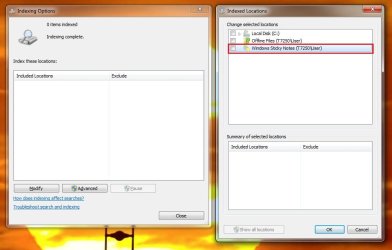
pls take a look at the image. i can't find this windows sticky note? it should not be an existing location. how do i remove it from the right screen please?
 

Attachments

  • sticky notes.jpg
    sticky notes.jpg
    49.6 KB · Views: 0

My Computer My Computer

At a glance

Windows 7 Ultimate x64
Computer type
PC/Desktop
OS
Windows 7 Ultimate x64
Hello Magnakai,

Have you rebuilt the index. Changes only come into effect after rebuilding the index.
 

My Computer My Computer

At a glance

Windows 7 x64, Vista x64, 8.1 smartphoneIntel E8400 65W 64-bitDDR2 2 x 2GB, 1GB x 2XFX Radeon HD5750
Computer type
PC/Desktop
OS
Windows 7 x64, Vista x64, 8.1 smartphone
CPU
Intel E8400 65W 64-bit
Motherboard
Gigabyte EP45-UD3LR
Memory
DDR2 2 x 2GB, 1GB x 2
Graphics Card(s)
XFX Radeon HD5750
Sound Card
AMD High Definition Audio; Realtek High Definition Audio
Monitor(s) Displays
iiyama prolite X2377HDS
Screen Resolution
1920 x 1080
Hard Drives
500GB 7200 rpm Seagate ST3500413AS 16MB, 500GB 5400 rpm Toshiba MQ02ABF050H 32MB, 200GB 7200 rpm Seagate ST3200820AS 8MB, 2TB 7200 rpm Western Digital WD20EZRX 64MB
PSU
Enermax Liberty Modular
Case
Antec P193 Midi Tower
Keyboard
Mionix ZIBAL 60
Mouse
Razer USB 2.0 Diamondback Mouse or Huion Graphics Tablet
Browser
Internet Explorer, Lunascape, Firefox, Opera, Avast Safezone
Sorry, I'll try again. The location highlighted by the red box is unchecked therefore it is unsaved as a search location.

Hope Ive answered your question.
 

My Computer My Computer

At a glance

Windows 7 x64, Vista x64, 8.1 smartphoneIntel E8400 65W 64-bitDDR2 2 x 2GB, 1GB x 2XFX Radeon HD5750
Computer type
PC/Desktop
OS
Windows 7 x64, Vista x64, 8.1 smartphone
CPU
Intel E8400 65W 64-bit
Motherboard
Gigabyte EP45-UD3LR
Memory
DDR2 2 x 2GB, 1GB x 2
Graphics Card(s)
XFX Radeon HD5750
Sound Card
AMD High Definition Audio; Realtek High Definition Audio
Monitor(s) Displays
iiyama prolite X2377HDS
Screen Resolution
1920 x 1080
Hard Drives
500GB 7200 rpm Seagate ST3500413AS 16MB, 500GB 5400 rpm Toshiba MQ02ABF050H 32MB, 200GB 7200 rpm Seagate ST3200820AS 8MB, 2TB 7200 rpm Western Digital WD20EZRX 64MB
PSU
Enermax Liberty Modular
Case
Antec P193 Midi Tower
Keyboard
Mionix ZIBAL 60
Mouse
Razer USB 2.0 Diamondback Mouse or Huion Graphics Tablet
Browser
Internet Explorer, Lunascape, Firefox, Opera, Avast Safezone
i mean if it is not saved as a search loc, then it shouldn't show up there at all.

yes but i have another pc, it only has Local C and Offline Files. How can i delete this "windows Sticky Key" off this list, whether it is is selected or not?
 

My Computer My Computer

At a glance

Windows 7 Ultimate x64
Computer type
PC/Desktop
OS
Windows 7 Ultimate x64
Do you use .snt files on the one computer, and not the other machine?

I suspect the search loc shows up because there is a .snt file saved there, therefore the search index is only providing the option of this item, or the item and its contents, being searched.

Suggest you remove any .snt file from its default storage location, and then see if the location vanishes from the Indexing Options. The default location of Sticky Notes files is "%UserProfile%\AppData\Roaming\Microsoft\Sticky Notes"

Let me know how you get on, when you are done.
 

My Computer My Computer

At a glance

Windows 7 x64, Vista x64, 8.1 smartphoneIntel E8400 65W 64-bitDDR2 2 x 2GB, 1GB x 2XFX Radeon HD5750
Computer type
PC/Desktop
OS
Windows 7 x64, Vista x64, 8.1 smartphone
CPU
Intel E8400 65W 64-bit
Motherboard
Gigabyte EP45-UD3LR
Memory
DDR2 2 x 2GB, 1GB x 2
Graphics Card(s)
XFX Radeon HD5750
Sound Card
AMD High Definition Audio; Realtek High Definition Audio
Monitor(s) Displays
iiyama prolite X2377HDS
Screen Resolution
1920 x 1080
Hard Drives
500GB 7200 rpm Seagate ST3500413AS 16MB, 500GB 5400 rpm Toshiba MQ02ABF050H 32MB, 200GB 7200 rpm Seagate ST3200820AS 8MB, 2TB 7200 rpm Western Digital WD20EZRX 64MB
PSU
Enermax Liberty Modular
Case
Antec P193 Midi Tower
Keyboard
Mionix ZIBAL 60
Mouse
Razer USB 2.0 Diamondback Mouse or Huion Graphics Tablet
Browser
Internet Explorer, Lunascape, Firefox, Opera, Avast Safezone
yes i did find an .snt file where you said! i deleted it, but same thing as above. should i have rebooted first?

also, how did u mean i used an snt file on this pc, and not on the other. could u esxplain this pls. to be honest i had no idea when i used the .snt file.
 

My Computer My Computer

At a glance

Windows 7 Ultimate x64
Computer type
PC/Desktop
OS
Windows 7 Ultimate x64
yes i did find an .snt file where you said! i deleted it, but same thing as above. should i have rebooted first?
Nah a reboot wont make the slightest difference. Remove .snt file, then rebuild the search index.
also, how did u mean i used an snt file on this pc, and not on the other. could u esxplain this pls. to be honest i had no idea when i used the .snt file.

Okay, did you use sticky notes on the one machine, but not on the other machine?
 

My Computer My Computer

At a glance

Windows 7 x64, Vista x64, 8.1 smartphoneIntel E8400 65W 64-bitDDR2 2 x 2GB, 1GB x 2XFX Radeon HD5750
Computer type
PC/Desktop
OS
Windows 7 x64, Vista x64, 8.1 smartphone
CPU
Intel E8400 65W 64-bit
Motherboard
Gigabyte EP45-UD3LR
Memory
DDR2 2 x 2GB, 1GB x 2
Graphics Card(s)
XFX Radeon HD5750
Sound Card
AMD High Definition Audio; Realtek High Definition Audio
Monitor(s) Displays
iiyama prolite X2377HDS
Screen Resolution
1920 x 1080
Hard Drives
500GB 7200 rpm Seagate ST3500413AS 16MB, 500GB 5400 rpm Toshiba MQ02ABF050H 32MB, 200GB 7200 rpm Seagate ST3200820AS 8MB, 2TB 7200 rpm Western Digital WD20EZRX 64MB
PSU
Enermax Liberty Modular
Case
Antec P193 Midi Tower
Keyboard
Mionix ZIBAL 60
Mouse
Razer USB 2.0 Diamondback Mouse or Huion Graphics Tablet
Browser
Internet Explorer, Lunascape, Firefox, Opera, Avast Safezone
Yes exactly that. yo are right. but just to test it once. i remembered that i deleted it after that. and with CCLeaner too.

Amnyway ill delete nt again and rebuild index, and get back to you
 

My Computer My Computer

At a glance

Windows 7 Ultimate x64
Computer type
PC/Desktop
OS
Windows 7 Ultimate x64
Hi Iko, i'm sry, i've reset the index, deleted the .snt file, but i still get those 3 locations.
 

My Computer My Computer

At a glance

Windows 7 Ultimate x64
Computer type
PC/Desktop
OS
Windows 7 Ultimate x64
Hi Magnakai dunno then!! Turn off Sticky Notes AND clear out Windows.edb file??

1) Turn off sticky notes by turning off Tablet PC Components in Windows Features.


2) Clear out Windows.edb by following the answer in this article:

Here's the trick:

1) Search for "Indexing Options" (under "Settings"). Open it.
2) Search "services" (or run "services.msc") and find "Windows Search". Stop the service.
3) Delete the Windows.edb file
4) Click "Modify" in the already-open "Indexing Options" panel, then click "Delete and Rebuild" for the index. You can also specify a different drive to store the index on.

Source: How to clear out the Windows.edb file in Windows 8 - Microsoft Community
 

My Computer My Computer

At a glance

Windows 7 x64, Vista x64, 8.1 smartphoneIntel E8400 65W 64-bitDDR2 2 x 2GB, 1GB x 2XFX Radeon HD5750
Computer type
PC/Desktop
OS
Windows 7 x64, Vista x64, 8.1 smartphone
CPU
Intel E8400 65W 64-bit
Motherboard
Gigabyte EP45-UD3LR
Memory
DDR2 2 x 2GB, 1GB x 2
Graphics Card(s)
XFX Radeon HD5750
Sound Card
AMD High Definition Audio; Realtek High Definition Audio
Monitor(s) Displays
iiyama prolite X2377HDS
Screen Resolution
1920 x 1080
Hard Drives
500GB 7200 rpm Seagate ST3500413AS 16MB, 500GB 5400 rpm Toshiba MQ02ABF050H 32MB, 200GB 7200 rpm Seagate ST3200820AS 8MB, 2TB 7200 rpm Western Digital WD20EZRX 64MB
PSU
Enermax Liberty Modular
Case
Antec P193 Midi Tower
Keyboard
Mionix ZIBAL 60
Mouse
Razer USB 2.0 Diamondback Mouse or Huion Graphics Tablet
Browser
Internet Explorer, Lunascape, Firefox, Opera, Avast Safezone
i have been following these instructions, even in different sequences, but after i reset and rebuild i still see those 3 items being : Local Disk, Offline files, Windows Sticky Notes.
 

My Computer My Computer

At a glance

Windows 7 Ultimate x64
Computer type
PC/Desktop
OS
Windows 7 Ultimate x64
Hi please help. I am of the impression that it is not one of the steps above that i am doing wrong.
The underlying issue has something to do with sticky notes itself : last week, i did activate it by accident once or twice in this run of windows 7. it was on desktop location. i remember i closed it almost immediately but i could have taken more actions with one before closing it.

need to know how to completely delete all sticky notes i have ever summoned. maybe including traces in registry i dunno? the problem is, i DO NOT SEE IT... i cannot find it. Sticky note. anywhere on my pc.

Please help thanks, if we work at it together, i am sure we can find the solution.

***

EDIT

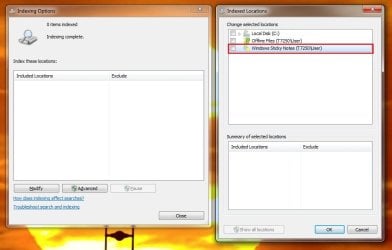
well i have done all i can for the moment, the result is still as in the picture :- those 3 entries on the right panel won't go away.
 

Attachments

  • sticky notes.jpg
    sticky notes.jpg
    49.6 KB · Views: 0
Last edited:

My Computer My Computer

At a glance

Windows 7 Ultimate x64
Computer type
PC/Desktop
OS
Windows 7 Ultimate x64
Back
Top