

Quote:
What does ThreatCHECK do?
ThreatCHECK monitors what IP addresses your computer is talking to by repeatedly running the ‘netstat’ command utility for a fixed period of time. This is a totally passive action that has no effect on communications to or from the computer.
When the time period is over, the ‘View full report’ option uploads the data to ThreatSTOP’s website where we cross correlate it with our database to find out if we know anything about the IP addresses your computer has been talking to
Note: To access full reports your email address is required. You can use a disposable email address.
If you use your personal email address expect to receive marketing emails offering to sell you their realtime ip reputation and blocking service - named ThreatStop.
The download is a single executable - no installation required. Run the executable to access the GUI:

The short test takes 15 minutes to complete. The other tests will take longer. You can specify the amount of time to test via the command line:
threatcheck.exe/t N
where N is the number of minutes.
I ran ThreatCheck for 4 minutes:

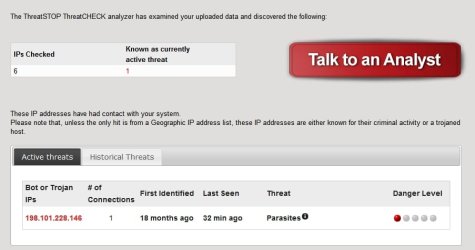
Results: (via email link)
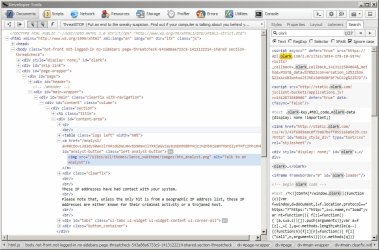
Checking the ip address results on VirusTotal:
https://www.virustotal.com/en/ip-address/198.101.228.146/information/
Ironically it resolves to olark dot com and appears to have been triggered by ThreatCheck's "Talk to an analyst" button.
Running another utility - CrowdInspect reveals the following:
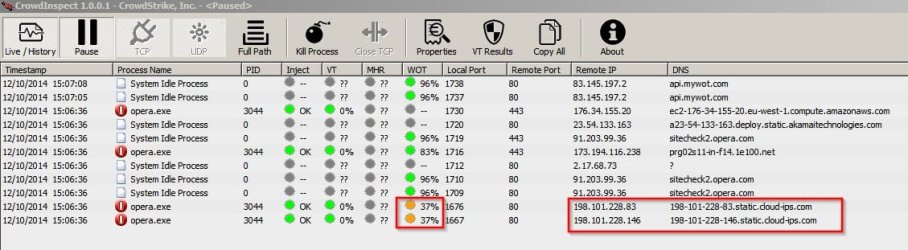
In this case it's nothing to worry about.
ThreatCheck could be a useful tool if you think you've got problems!
ThreatCheck FAQ
ThreatCheck Download
What does ThreatCHECK do?
ThreatCHECK monitors what IP addresses your computer is talking to by repeatedly running the ‘netstat’ command utility for a fixed period of time. This is a totally passive action that has no effect on communications to or from the computer.
When the time period is over, the ‘View full report’ option uploads the data to ThreatSTOP’s website where we cross correlate it with our database to find out if we know anything about the IP addresses your computer has been talking to
Note: To access full reports your email address is required. You can use a disposable email address.
If you use your personal email address expect to receive marketing emails offering to sell you their realtime ip reputation and blocking service - named ThreatStop.
The download is a single executable - no installation required. Run the executable to access the GUI:
The short test takes 15 minutes to complete. The other tests will take longer. You can specify the amount of time to test via the command line:
threatcheck.exe/t N
where N is the number of minutes.
I ran ThreatCheck for 4 minutes:
Results: (via email link)
Checking the ip address results on VirusTotal:
https://www.virustotal.com/en/ip-address/198.101.228.146/information/
Ironically it resolves to olark dot com and appears to have been triggered by ThreatCheck's "Talk to an analyst" button.
Running another utility - CrowdInspect reveals the following:
In this case it's nothing to worry about.
ThreatCheck could be a useful tool if you think you've got problems!
ThreatCheck FAQ
ThreatCheck Download
Attachments

Last edited:
My Computer
- Computer type
- Laptop
- Computer Manufacturer/Model Number
- ASUS
- OS
- Microsoft Windows 7 Home Premium 64-bit 7601 Multiprocessor Free Service Pack 1
- CPU
- AMD C-60 APU with Radeon(tm) HD Graphics
- Motherboard
- ASUSTeK COMPUTER INC. X501U
- Memory
- 4.00 GB
- Graphics Card(s)
- AMD Radeon HD 6290 Graphics
- Sound Card
- (1) AMD High Definition Audio Device (2) Realtek High Defi
- Screen Resolution
- 1366 x 768 x 32 bits (4294967296 colors) @ 60 Hz
- Hard Drives
- Hitachi HTS545050A7E380 SATA Disk Device
- Antivirus
- Comodo CIS & FW, SecureAplus App Whitelisting, Threatfire
- Browser
- Cyberfox 64bit, Opera 64bit, Airfox
- Other Info
- Spy-The-Spy, HitmanPro.Alert, Norton Connect Safe, MJRegWatcher, BitDefender TrafficLight, Voodoo Shield, Zemana AntiMalware


 and now has this problem of it being there all the time. I have advised her on a few things to do and am waiting for a reply now.
