Three monthly updates failed

sijon

New member
Local time
10:48 AM
Messages
29
I have Windows 7 Service Pack 1
The Monthly updates for Oct, Nov and Dec failed:
Oct KB4462923
Nov KB4467107
Dec KB4471318
Unfortunately I did not write down the error codes


Does this indicate that there is something wrong with my system?
Is there anything I can do to make it go better next month?


Sven Ingvar Jonsson
 

My Computer

Computer type
Laptop
Computer Manufacturer/Model Number
HP
OS
Windows 7 Home Premium 64bit
Antivirus
Avast
Browser
Firefox
All three updates had error code 8000FFF


/sijon
 

My Computer

Computer type
Laptop
Computer Manufacturer/Model Number
HP
OS
Windows 7 Home Premium 64bit
Antivirus
Avast
Browser
Firefox
Hi sijon,

The Monthly updates for Oct, Nov and Dec failed:

Oct KB4462923
Nov KB4467107
Dec KB4471318

All three updates had error code 8000FFF.

The three updates above are all Security Monthly Quality Rollups which are cumulative!
Basically, this means that the newest update KB4471318, contains ALL the previous cumulative updates. Therefore, you ONLY need to install KB4471318 [December 2018 Security Monthly Quality Rollup].

I hope this helps!
 

My Computer

Computer type
Laptop
Computer Manufacturer/Model Number
Fujitsu LIFEBOOK
OS
Win 7 HP SP1 64-bit Vista HB SP2 32-bit Linux Mint 18.3
CPU
Intel(R) Pentium(R) CPU P6200 @ 2.13GHz
Motherboard
FUJITSU FJNBB06
Memory
4.00 GB
Graphics Card(s)
Intel(R) Graphics Media Accelerator HD
Sound Card
[1] Realtek High Definition Audio [2] Intel(R) Display Audio
Screen Resolution
1366 x 768 x 32 bits (4294967296 colors) @ 59 Hz
Hard Drives
TOSHIBA MK5076GSX
Antivirus
AVG FREE
Hmmm. I thought the OP wrote that the Oct, Nov, and Dec updates would not install, so how can he install the December update?? Does he need to hide the Nov and Dec updates and install just the Oct update, then hide the Dec update and install just the Nov update, and then install the Dec update?


I ask because I'm having a similar problem...
 

My Computer

Computer type
Laptop
Computer Manufacturer/Model Number
Toshiba
OS
Windows 7 Home Premium, 64 bit
Memory
6 GB
Hard Drives
500 GB
Mouse
Wireless mouse
Browser
Firefox
Hi sijon,

Try this.

Download the KB4471318 .msu standalone file from here => 2018-12 Security Monthly Quality Rollup for Windows 7 for x64-based Systems (KB4471318) and install it using wusa.

wusa

wusa must be run from an elevated command prompt:

[1] Click Start.
[2] In the search box type cmd.
[3] Right-click the cmd icon from the search results under Programs and select Run as administrator.
[4] The elevated command prompt window will now open.

wusa - Install Update

You must use the full path of the .msu file. For example, if the .msu file is in the C:\Downloads folder, use the following command at the elevated command prompt to install the update.

wusa.exe C:\Downloads\Windows6.0-KB4471318-x64.msu /quiet [yes, there are two spaces there]. Press Enter.

The best way to do this is to Copy wusa.exe C:\Downloads\Windows6.0-KB4471318-x64.msu /quiet [yes there are two spaces there] and Paste it [you need to use the mouse right-click and paste for this as CTRL+V doesn’t work] into the elevated command prompt window and press Enter.

I hope this helps!
 
Last edited:

My Computer

Computer type
Laptop
Computer Manufacturer/Model Number
Fujitsu LIFEBOOK
OS
Win 7 HP SP1 64-bit Vista HB SP2 32-bit Linux Mint 18.3
CPU
Intel(R) Pentium(R) CPU P6200 @ 2.13GHz
Motherboard
FUJITSU FJNBB06
Memory
4.00 GB
Graphics Card(s)
Intel(R) Graphics Media Accelerator HD
Sound Card
[1] Realtek High Definition Audio [2] Intel(R) Display Audio
Screen Resolution
1366 x 768 x 32 bits (4294967296 colors) @ 59 Hz
Hard Drives
TOSHIBA MK5076GSX
Antivirus
AVG FREE
Hi skuddle,

The OP wrote that the Oct, Nov, and Dec updates would not install, so how can he install the December update?? Does he need to hide the Nov and Dec updates and install just the Oct update, then hide the Dec update and install just the Nov update, and then install the Dec update?

I ask because I'm having a similar problem...

You only need to install the latest Security Monthly Quality Rollup [KB4471318 - December 2018] because they are ALL cumulative!

So basically, the latest Security Monthly Quality Rollup includes ALL the previous Security Monthly Quality Rollup updates.

I hope this helps!
 

My Computer

Computer type
Laptop
Computer Manufacturer/Model Number
Fujitsu LIFEBOOK
OS
Win 7 HP SP1 64-bit Vista HB SP2 32-bit Linux Mint 18.3
CPU
Intel(R) Pentium(R) CPU P6200 @ 2.13GHz
Motherboard
FUJITSU FJNBB06
Memory
4.00 GB
Graphics Card(s)
Intel(R) Graphics Media Accelerator HD
Sound Card
[1] Realtek High Definition Audio [2] Intel(R) Display Audio
Screen Resolution
1366 x 768 x 32 bits (4294967296 colors) @ 59 Hz
Hard Drives
TOSHIBA MK5076GSX
Antivirus
AVG FREE
Hi Paul Black,
Thank you for the description of the update installation.
I have tried to do this, but how can I see if the installation was successful?
/sijon
 

My Computer

Computer type
Laptop
Computer Manufacturer/Model Number
HP
OS
Windows 7 Home Premium 64bit
Antivirus
Avast
Browser
Firefox
Hi sijon,

I have tried to do this, but how can I see if the installation was successful?

The wusa log can be found in the Event Viewer:

[1] Click Start.
[2] In the search box type eventvwr.msc and press Enter.
[3] On the left-hand side under Event Viewer (Local) expand Windows Logs and click Setup.
[4] On the right-hand side under the Actions pane click Filter current log.
[5] In the Event sources: dropdown box list select WUSA and press Enter, then click OK.

You should now only see the WUSA log files and the information pertaining to each of them.

I hope this helps!
 
Last edited:

My Computer

Computer type
Laptop
Computer Manufacturer/Model Number
Fujitsu LIFEBOOK
OS
Win 7 HP SP1 64-bit Vista HB SP2 32-bit Linux Mint 18.3
CPU
Intel(R) Pentium(R) CPU P6200 @ 2.13GHz
Motherboard
FUJITSU FJNBB06
Memory
4.00 GB
Graphics Card(s)
Intel(R) Graphics Media Accelerator HD
Sound Card
[1] Realtek High Definition Audio [2] Intel(R) Display Audio
Screen Resolution
1366 x 768 x 32 bits (4294967296 colors) @ 59 Hz
Hard Drives
TOSHIBA MK5076GSX
Antivirus
AVG FREE
Hi Paul Black,
I am sorry, I could only see "WUSA error" in the log files. I could not find any reason.
/sijon
 

My Computer

Computer type
Laptop
Computer Manufacturer/Model Number
HP
OS
Windows 7 Home Premium 64bit
Antivirus
Avast
Browser
Firefox
Hi sijon,

I am sorry, I could only see "WUSA error" in the log files. I could not find any reason.

That's strange!

When you have the Event sources: dropdown box list with all the WUSA log files, it gives you the reasons it failed in the pane below.

I hope this helps!
 

My Computer

Computer type
Laptop
Computer Manufacturer/Model Number
Fujitsu LIFEBOOK
OS
Win 7 HP SP1 64-bit Vista HB SP2 32-bit Linux Mint 18.3
CPU
Intel(R) Pentium(R) CPU P6200 @ 2.13GHz
Motherboard
FUJITSU FJNBB06
Memory
4.00 GB
Graphics Card(s)
Intel(R) Graphics Media Accelerator HD
Sound Card
[1] Realtek High Definition Audio [2] Intel(R) Display Audio
Screen Resolution
1366 x 768 x 32 bits (4294967296 colors) @ 59 Hz
Hard Drives
TOSHIBA MK5076GSX
Antivirus
AVG FREE
Hi Paul Black,
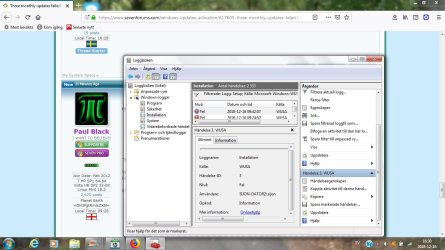
I have tried to make a screenshot as you suggested.
/sijon
 

Attachments

  • WUSA-log.jpg
    WUSA-log.jpg
    115.4 KB · Views: 3

My Computer

Computer type
Laptop
Computer Manufacturer/Model Number
HP
OS
Windows 7 Home Premium 64bit
Antivirus
Avast
Browser
Firefox
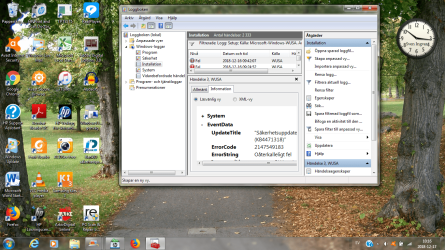
Hi Paul Black,
I have tried to make another screenshot.
/sijon
 

Attachments

  • WUSA-log1.png
    WUSA-log1.png
    444.1 KB · Views: 1

My Computer

Computer type
Laptop
Computer Manufacturer/Model Number
HP
OS
Windows 7 Home Premium 64bit
Antivirus
Avast
Browser
Firefox
Hi Paul Black,
Thank you for all your help with the Windows Update problem.
/sijon
 

My Computer

Computer type
Laptop
Computer Manufacturer/Model Number
HP
OS
Windows 7 Home Premium 64bit
Antivirus
Avast
Browser
Firefox
Hi sijon,

There are a couple of things that we can try.

First, run the Windows Update Troubleshooter from here => Windows Update Troubleshooter.

Obviously select the Download troubleshooter for Windows 7 and Windows 8 option. After the Windows Update Troubleshooter has completed, try running Windows Update again.
 

My Computer

Computer type
Laptop
Computer Manufacturer/Model Number
Fujitsu LIFEBOOK
OS
Win 7 HP SP1 64-bit Vista HB SP2 32-bit Linux Mint 18.3
CPU
Intel(R) Pentium(R) CPU P6200 @ 2.13GHz
Motherboard
FUJITSU FJNBB06
Memory
4.00 GB
Graphics Card(s)
Intel(R) Graphics Media Accelerator HD
Sound Card
[1] Realtek High Definition Audio [2] Intel(R) Display Audio
Screen Resolution
1366 x 768 x 32 bits (4294967296 colors) @ 59 Hz
Hard Drives
TOSHIBA MK5076GSX
Antivirus
AVG FREE
Hi Paul Black,
I ran the Windows Update Troubleshooter and after that I took a screenshot.
Then I ran Windows Update for KB4471318, but the error code is still 8000FFF.
/sijon
 

Attachments

  • WUSA-log2.jpg
    WUSA-log2.jpg
    92.4 KB · Views: 3

My Computer

Computer type
Laptop
Computer Manufacturer/Model Number
HP
OS
Windows 7 Home Premium 64bit
Antivirus
Avast
Browser
Firefox
Hi sijon,

I ran the Windows Update Troubleshooter and after that I took a screenshot.
Then I ran Windows Update for KB4471318, but the error code is still 8000FFF.

I would just like to point out that this is an English speaking forum. I have no idea what it says!
 

My Computer

Computer type
Laptop
Computer Manufacturer/Model Number
Fujitsu LIFEBOOK
OS
Win 7 HP SP1 64-bit Vista HB SP2 32-bit Linux Mint 18.3
CPU
Intel(R) Pentium(R) CPU P6200 @ 2.13GHz
Motherboard
FUJITSU FJNBB06
Memory
4.00 GB
Graphics Card(s)
Intel(R) Graphics Media Accelerator HD
Sound Card
[1] Realtek High Definition Audio [2] Intel(R) Display Audio
Screen Resolution
1366 x 768 x 32 bits (4294967296 colors) @ 59 Hz
Hard Drives
TOSHIBA MK5076GSX
Antivirus
AVG FREE
Since I'm having the same exact same update issue, I'm guessing it says Failed.
 

My Computer

Computer type
PC/Desktop
OS
Windows 7 Home Premium 32-bit
Hi Paul Black and Carmano,
I will try to translate the report from Windows Update Troubleshooter:
It was not possible to fix all the problems automatically. You will find more infrormation below:
Problems found:
Error 0x80070005(2018-12-18-T-04_24_11) in Windows Update Nothing done (X)
Service registration is missing or corrupt Fixed (V)
It was not possible to install the latest updates Fixed (V)


Show more alternatives


Close the Troubleshooter


Close
/sijon
 

My Computer

Computer type
Laptop
Computer Manufacturer/Model Number
HP
OS
Windows 7 Home Premium 64bit
Antivirus
Avast
Browser
Firefox
Hi sijon,

I will try to translate the report from Windows Update Troubleshooter:
It was not possible to fix all the problems automatically. You will find more infrormation below:
Problems found:
Error 0x80070005(2018-12-18-T-04_24_11) in Windows Update Nothing done (X)
Service registration is missing or corrupt Fixed (V)
It was not possible to install the latest updates Fixed (V)

Show more alternatives

Close the Troubleshooter

Close

OK, thanks for the translation.

[1] Please download and run Malwarebytes [FREE] from here => Malwarebytes.

[2] Reset The WU Agent

NOTE: This will not clear the view update history details list [cache].

[1] Download and save the Reset_Reregister_Windows_Update_Components file to your Desktop from here => Reset_Reregister_Windows_Update_Components.bat.

[2] Right-click the Reset_Reregister_Windows_Update_Components file and select Run as administrator.

NOTE: An elevated command prompt window will now open and run the Windows batch file. When it has finished, the elevated command prompt window will automatically close.

[3] Restart the computer for the changes to be applied.
[4] Run WU [Windows Update].

I hope this helps!
 

My Computer

Computer type
Laptop
Computer Manufacturer/Model Number
Fujitsu LIFEBOOK
OS
Win 7 HP SP1 64-bit Vista HB SP2 32-bit Linux Mint 18.3
CPU
Intel(R) Pentium(R) CPU P6200 @ 2.13GHz
Motherboard
FUJITSU FJNBB06
Memory
4.00 GB
Graphics Card(s)
Intel(R) Graphics Media Accelerator HD
Sound Card
[1] Realtek High Definition Audio [2] Intel(R) Display Audio
Screen Resolution
1366 x 768 x 32 bits (4294967296 colors) @ 59 Hz
Hard Drives
TOSHIBA MK5076GSX
Antivirus
AVG FREE
Hi Paul Black,
I have run Malwarebytes
I have done "Reset the WU Agent"
I have restarted the computer
I have run WU
But the error code is still 8000FFF
/sijon
 

My Computer

Computer type
Laptop
Computer Manufacturer/Model Number
HP
OS
Windows 7 Home Premium 64bit
Antivirus
Avast
Browser
Firefox
Back
Top