Thumbnail Cache - Clear and Reset

How to Clear and Reset Thumbnail Cache in Windows


   Information
By default, Windows stores the images for thumbnail previews in cache memory so that it can redisplay the images quickly each time you reopen a folder in Windows Explorer (Vista and Windows 7) or File Explorer (Windows 8).

This tutorial will show you how you to clear and reset the thumbnail cache to force Windows to reload the thumbnail picture views into the cache again as needed as you open folders.

   Note
The thumbnail cache .db files are located in the hidden system folder location below:

C:\Users\User-Name\AppData\Local\Microsoft\Windows\Explorer

You may want to clear the thumbnail cache if the Windows Explorer thumbnail pictures have become corrupted and not displaying properly, or the thumbnail cache file has become to large and you want to clear some hard disk space.


CONTENTS:
  • Option One: To Clear and Reset Thumbnail Cache using Disk Cleanup
  • Option Two: To Clear and Reset Thumbnail Cache using a BAT File


OPTION ONE

To Clear and Reset Thumbnail Cache using Disk Cleanup


1. Open Disk Cleanup.

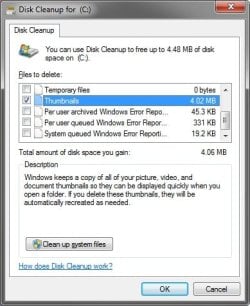
2. Check the Thumbnails box, and click/tap on OK. (see screenshot below)
Clear1.jpg
3. Click/tap on the Delete Files button. (See screenshot below)

Clear2.jpg
4. Disk Cleanup will now clear the thumbnail cache and close.


OPTION TWO

To Clear and Reset Thumbnail Cache using a BAT File


1. Click on the Download button below to download the BAT file below.
Clear_and_Reset_Thumbnail_Cache.bat


Download


2. Save the .bat file to your desktop.

3. Run the .bat file.

4. If prompted, click on Run.
NOTE: If you like, you can stop getting the Run prompt by unblocking the downloaded .bat file.

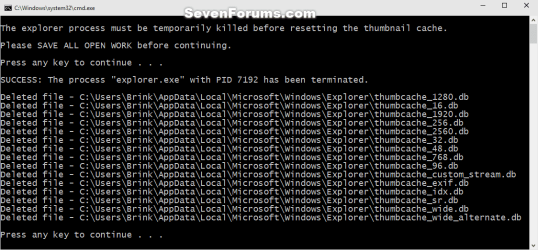
5. Follow the instructions in the command prompt to clear and reset your thumbnail cache.
Reset_thumbnail_cache_command.png


That's it,
Shawn


Attachments

Last edited:
Ok done it, thx guys keep you posted if there's any changes...
 

My Computer

Computer type
PC/Desktop
OS
Windows 7 Ultimate x64
CPU
Intel Core i5-2500K @4.5Ghz
Motherboard
Asus Maximus V GENE
Memory
x2 Kingston KHX1600C9D3/4G
Graphics Card(s)
NVIDIA GeForce GTS 250 - 1024MB
Sound Card
SupremeFX III built-in 8-Channel High Definition Audio
Monitor(s) Displays
Samsung Syncmaster P2270
Screen Resolution
1920x1080
Hard Drives
x1 Seagate Barracuda ST3160811AS
x2 Seagate Barracuda ST380817AS
PSU
Corsair TX750
Case
Cooler Master HAF 922 Side Window Model
Cooling
Stock Intel Cooler + Tuniq TX2
Keyboard
Dell SK-8135
Mouse
Logitech G5
Internet Speed
2 Mbps
Other Info
x2 Xbox 360 Wireless Controller for Windows
Logitech Z-5550
Sennheiser HD555
all started as usual... i check my pictures all fine... was playing, surfing, chattin', then go to pictures folder and thumbnails are rebuilding again, i check the size of the cache and it displays as 6MB usually is 122MB... weird huh?
 
Last edited:

My Computer

Computer type
PC/Desktop
OS
Windows 7 Ultimate x64
CPU
Intel Core i5-2500K @4.5Ghz
Motherboard
Asus Maximus V GENE
Memory
x2 Kingston KHX1600C9D3/4G
Graphics Card(s)
NVIDIA GeForce GTS 250 - 1024MB
Sound Card
SupremeFX III built-in 8-Channel High Definition Audio
Monitor(s) Displays
Samsung Syncmaster P2270
Screen Resolution
1920x1080
Hard Drives
x1 Seagate Barracuda ST3160811AS
x2 Seagate Barracuda ST380817AS
PSU
Corsair TX750
Case
Cooler Master HAF 922 Side Window Model
Cooling
Stock Intel Cooler + Tuniq TX2
Keyboard
Dell SK-8135
Mouse
Logitech G5
Internet Speed
2 Mbps
Other Info
x2 Xbox 360 Wireless Controller for Windows
Logitech Z-5550
Sennheiser HD555
Hey thanks for the tip, It does the work but (I know it's kinda offtopic) How to clear Photoshop Open Dialog Box Thumbnails cache ? as they always show wrong rotated image thumbnails even after these steps mentioned here in this thread !
 

My Computer

Computer type
PC/Desktop
Computer Manufacturer/Model Number
Custom Build
OS
Windows 8.1 Pro x64
CPU
Intel Core i3 (3.0 GHZ)
Motherboard
Asus P7H55-M LX
Memory
4 GB GDDR3
Graphics Card(s)
Sapphire ATI Radeon 7790 HD 1 GB GDDR5
Sound Card
Builtin AMD Hight Defination Audio Controller
Monitor(s) Displays
ASUS MS228H 21.5" Wide LED Monitor
Screen Resolution
1920x1080
Hard Drives
1 TB SATA Seagate
PSU
500W
Case
Orange
Cooling
None
Keyboard
A4TECH
Mouse
Who Cares?
Internet Speed
1 MB Shared Wateen Wireless
Antivirus
Kaspersky Internet Security
Browser
Mozilla Firefox
Hello S.Orangzeb,

You're welcome. I'm not sure about Photoshop though. That subject may be best posted in the Music, Pictures & Video forum area instead.
 

My Computer

Computer type
PC/Desktop
Computer Manufacturer/Model Number
Self built custom
OS
64-bit Windows 11 Pro for Workstations
CPU
Intel i7-8700K OC'd to 5 GHz
Motherboard
ASUS ROG Maximus XI Formula Z390
Memory
64 GB (4x16GB) G.SKILL TridentZ RGB DDR4 3600 MHz
Graphics Card(s)
ASUS ROG-STRIX-GTX1080TI-O11G-GAMING
Sound Card
Integrated
Monitor(s) Displays
2 x Samsung Odyssey G7 27"
Screen Resolution
2560x1440
Hard Drives
1TB Samsung 990 PRO M.2,
4TB Samsung 990 PRO PRO M.2,
TerraMaster F8 SSD Plus NAS
PSU
Seasonic Prime Titanium 850W
Case
Thermaltake Core P3
Cooling
Corsair Hydro H115i
Keyboard
Logitech wireless K800
Mouse
Logitech MX Master 4
Internet Speed
2 Gb/s Download and 100 Mb/s Upload
Antivirus
Malwarebyte Anti-Malware Premium
Browser
Google Chrome
Other Info
Logitech Z625 speaker system,
Logitech BRIO 4K Pro webcam,
HP Color LaserJet Pro MFP M477fdn,
APC SMART-UPS RT 1000 XL - SURT1000XLI,
Galaxy S23 Plus phone

My Computer

Computer type
PC/Desktop
Computer Manufacturer/Model Number
Home Built Desktop By DataTech
OS
Windows 7 Ultimate X64 SP1
CPU
Intel i5-2550K, Differing ~4.4-4.8GHz No built in GPU
Motherboard
ASUS P8Z68-V PRO/GEN3
Memory
16GB G.Skill Sniper 1866MHz @ 2133MHz 2x8GB
Graphics Card(s)
ASUS GTX650TIB-DC2OC-2GD5, (650TI Boost)
Sound Card
Onboard Realtek 5-1
Monitor(s) Displays
Samsung P2570HD
Screen Resolution
1920x1080
Hard Drives
Samsung 840 Pro 256GB SSD for OS, 500GB Seagate Constellation (Enterprise drive) for Data
PSU
Corsair HX650W
Case
Inwin Dragon Rider
Cooling
Hyper 212 EVO w/two Noctua fans, push-pull, @1300 RPM
Keyboard
E-Z Eyes, bright yellow keys with large characters
Mouse
steelseries SENSEI Laser Pro Gaming
Internet Speed
48-51Mbs Mbs down, 11 Mbs up Xfinity Cable
Antivirus
Norton Internet Security 2013
Browser
IE 10, Opera, Pale Moon if needed
Other Info
4 case fans, LG BluRay-RE, ASUS DVD-RW, Mr. Fusion power supply, 1.21 gigawatts.
Hey Gary,

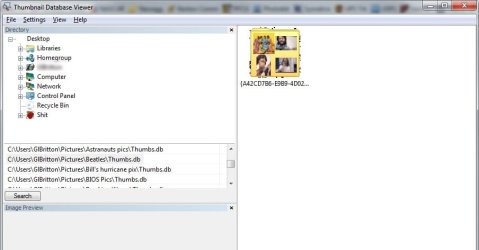
You might see if deleting the individual hidden Thumbs.db files listed in your screenshot may be able to finish them off. :)
 

My Computer

Computer type
PC/Desktop
Computer Manufacturer/Model Number
Self built custom
OS
64-bit Windows 11 Pro for Workstations
CPU
Intel i7-8700K OC'd to 5 GHz
Motherboard
ASUS ROG Maximus XI Formula Z390
Memory
64 GB (4x16GB) G.SKILL TridentZ RGB DDR4 3600 MHz
Graphics Card(s)
ASUS ROG-STRIX-GTX1080TI-O11G-GAMING
Sound Card
Integrated
Monitor(s) Displays
2 x Samsung Odyssey G7 27"
Screen Resolution
2560x1440
Hard Drives
1TB Samsung 990 PRO M.2,
4TB Samsung 990 PRO PRO M.2,
TerraMaster F8 SSD Plus NAS
PSU
Seasonic Prime Titanium 850W
Case
Thermaltake Core P3
Cooling
Corsair Hydro H115i
Keyboard
Logitech wireless K800
Mouse
Logitech MX Master 4
Internet Speed
2 Gb/s Download and 100 Mb/s Upload
Antivirus
Malwarebyte Anti-Malware Premium
Browser
Google Chrome
Other Info
Logitech Z625 speaker system,
Logitech BRIO 4K Pro webcam,
HP Color LaserJet Pro MFP M477fdn,
APC SMART-UPS RT 1000 XL - SURT1000XLI,
Galaxy S23 Plus phone
Well that worked. Do you have any insight why the Disk clean up, and CCleaner didn't root them out?
 

My Computer

Computer type
PC/Desktop
Computer Manufacturer/Model Number
Home Built Desktop By DataTech
OS
Windows 7 Ultimate X64 SP1
CPU
Intel i5-2550K, Differing ~4.4-4.8GHz No built in GPU
Motherboard
ASUS P8Z68-V PRO/GEN3
Memory
16GB G.Skill Sniper 1866MHz @ 2133MHz 2x8GB
Graphics Card(s)
ASUS GTX650TIB-DC2OC-2GD5, (650TI Boost)
Sound Card
Onboard Realtek 5-1
Monitor(s) Displays
Samsung P2570HD
Screen Resolution
1920x1080
Hard Drives
Samsung 840 Pro 256GB SSD for OS, 500GB Seagate Constellation (Enterprise drive) for Data
PSU
Corsair HX650W
Case
Inwin Dragon Rider
Cooling
Hyper 212 EVO w/two Noctua fans, push-pull, @1300 RPM
Keyboard
E-Z Eyes, bright yellow keys with large characters
Mouse
steelseries SENSEI Laser Pro Gaming
Internet Speed
48-51Mbs Mbs down, 11 Mbs up Xfinity Cable
Antivirus
Norton Internet Security 2013
Browser
IE 10, Opera, Pale Moon if needed
Other Info
4 case fans, LG BluRay-RE, ASUS DVD-RW, Mr. Fusion power supply, 1.21 gigawatts.
Great news. :party:

Disk Cleanup only clears the main central thumbs.db cache in the hidden folder below.

C:\Users\User-Name\AppData\Local\Microsoft\Windows\Explorer
 

My Computer

Computer type
PC/Desktop
Computer Manufacturer/Model Number
Self built custom
OS
64-bit Windows 11 Pro for Workstations
CPU
Intel i7-8700K OC'd to 5 GHz
Motherboard
ASUS ROG Maximus XI Formula Z390
Memory
64 GB (4x16GB) G.SKILL TridentZ RGB DDR4 3600 MHz
Graphics Card(s)
ASUS ROG-STRIX-GTX1080TI-O11G-GAMING
Sound Card
Integrated
Monitor(s) Displays
2 x Samsung Odyssey G7 27"
Screen Resolution
2560x1440
Hard Drives
1TB Samsung 990 PRO M.2,
4TB Samsung 990 PRO PRO M.2,
TerraMaster F8 SSD Plus NAS
PSU
Seasonic Prime Titanium 850W
Case
Thermaltake Core P3
Cooling
Corsair Hydro H115i
Keyboard
Logitech wireless K800
Mouse
Logitech MX Master 4
Internet Speed
2 Gb/s Download and 100 Mb/s Upload
Antivirus
Malwarebyte Anti-Malware Premium
Browser
Google Chrome
Other Info
Logitech Z625 speaker system,
Logitech BRIO 4K Pro webcam,
HP Color LaserJet Pro MFP M477fdn,
APC SMART-UPS RT 1000 XL - SURT1000XLI,
Galaxy S23 Plus phone
Ahh, gotcha, thank you! :D
 

My Computer

Computer type
PC/Desktop
Computer Manufacturer/Model Number
Home Built Desktop By DataTech
OS
Windows 7 Ultimate X64 SP1
CPU
Intel i5-2550K, Differing ~4.4-4.8GHz No built in GPU
Motherboard
ASUS P8Z68-V PRO/GEN3
Memory
16GB G.Skill Sniper 1866MHz @ 2133MHz 2x8GB
Graphics Card(s)
ASUS GTX650TIB-DC2OC-2GD5, (650TI Boost)
Sound Card
Onboard Realtek 5-1
Monitor(s) Displays
Samsung P2570HD
Screen Resolution
1920x1080
Hard Drives
Samsung 840 Pro 256GB SSD for OS, 500GB Seagate Constellation (Enterprise drive) for Data
PSU
Corsair HX650W
Case
Inwin Dragon Rider
Cooling
Hyper 212 EVO w/two Noctua fans, push-pull, @1300 RPM
Keyboard
E-Z Eyes, bright yellow keys with large characters
Mouse
steelseries SENSEI Laser Pro Gaming
Internet Speed
48-51Mbs Mbs down, 11 Mbs up Xfinity Cable
Antivirus
Norton Internet Security 2013
Browser
IE 10, Opera, Pale Moon if needed
Other Info
4 case fans, LG BluRay-RE, ASUS DVD-RW, Mr. Fusion power supply, 1.21 gigawatts.
Anytime mate. :)
 

My Computer

Computer type
PC/Desktop
Computer Manufacturer/Model Number
Self built custom
OS
64-bit Windows 11 Pro for Workstations
CPU
Intel i7-8700K OC'd to 5 GHz
Motherboard
ASUS ROG Maximus XI Formula Z390
Memory
64 GB (4x16GB) G.SKILL TridentZ RGB DDR4 3600 MHz
Graphics Card(s)
ASUS ROG-STRIX-GTX1080TI-O11G-GAMING
Sound Card
Integrated
Monitor(s) Displays
2 x Samsung Odyssey G7 27"
Screen Resolution
2560x1440
Hard Drives
1TB Samsung 990 PRO M.2,
4TB Samsung 990 PRO PRO M.2,
TerraMaster F8 SSD Plus NAS
PSU
Seasonic Prime Titanium 850W
Case
Thermaltake Core P3
Cooling
Corsair Hydro H115i
Keyboard
Logitech wireless K800
Mouse
Logitech MX Master 4
Internet Speed
2 Gb/s Download and 100 Mb/s Upload
Antivirus
Malwarebyte Anti-Malware Premium
Browser
Google Chrome
Other Info
Logitech Z625 speaker system,
Logitech BRIO 4K Pro webcam,
HP Color LaserJet Pro MFP M477fdn,
APC SMART-UPS RT 1000 XL - SURT1000XLI,
Galaxy S23 Plus phone
Great tutorial! Thanks a lot.
 

My Computer

Computer type
Laptop
Computer Manufacturer/Model Number
Dell Latitude D630
OS
Windows 7 Ultimate 32bit
CPU
Dual Core T8100 2.10 (2CPU)
Motherboard
Dell
Memory
2gb
Graphics Card(s)
Mobile Intel(R) 965 Express Chipset Family
Monitor(s) Displays
ACER 19 inch
Mouse
Logitech 2$ mouse but it's awesome
Internet Speed
10.0 mb/s
Antivirus
Eset Nod32 6 Full
Browser
Google Chrome
I tried multiple methods but my thumbnails are still totally wrong! Please help :)
 

My Computer

Computer type
PC/Desktop
OS
Win7x64
Hello unko, :)

Please provide more details and screenshots to see what may be wrong.
 

My Computer

Computer type
PC/Desktop
Computer Manufacturer/Model Number
Self built custom
OS
64-bit Windows 11 Pro for Workstations
CPU
Intel i7-8700K OC'd to 5 GHz
Motherboard
ASUS ROG Maximus XI Formula Z390
Memory
64 GB (4x16GB) G.SKILL TridentZ RGB DDR4 3600 MHz
Graphics Card(s)
ASUS ROG-STRIX-GTX1080TI-O11G-GAMING
Sound Card
Integrated
Monitor(s) Displays
2 x Samsung Odyssey G7 27"
Screen Resolution
2560x1440
Hard Drives
1TB Samsung 990 PRO M.2,
4TB Samsung 990 PRO PRO M.2,
TerraMaster F8 SSD Plus NAS
PSU
Seasonic Prime Titanium 850W
Case
Thermaltake Core P3
Cooling
Corsair Hydro H115i
Keyboard
Logitech wireless K800
Mouse
Logitech MX Master 4
Internet Speed
2 Gb/s Download and 100 Mb/s Upload
Antivirus
Malwarebyte Anti-Malware Premium
Browser
Google Chrome
Other Info
Logitech Z625 speaker system,
Logitech BRIO 4K Pro webcam,
HP Color LaserJet Pro MFP M477fdn,
APC SMART-UPS RT 1000 XL - SURT1000XLI,
Galaxy S23 Plus phone
Well some jpeg thumbnail are showing other pics thumbnails.. common bug actually, never solved!
 

My Computer

Computer type
PC/Desktop
OS
Win7x64
If you like, you might test to see if refreshing (F5), renaming the files, or move them to another location and back may toggle it to show the correct thumbnail.
 

My Computer

Computer type
PC/Desktop
Computer Manufacturer/Model Number
Self built custom
OS
64-bit Windows 11 Pro for Workstations
CPU
Intel i7-8700K OC'd to 5 GHz
Motherboard
ASUS ROG Maximus XI Formula Z390
Memory
64 GB (4x16GB) G.SKILL TridentZ RGB DDR4 3600 MHz
Graphics Card(s)
ASUS ROG-STRIX-GTX1080TI-O11G-GAMING
Sound Card
Integrated
Monitor(s) Displays
2 x Samsung Odyssey G7 27"
Screen Resolution
2560x1440
Hard Drives
1TB Samsung 990 PRO M.2,
4TB Samsung 990 PRO PRO M.2,
TerraMaster F8 SSD Plus NAS
PSU
Seasonic Prime Titanium 850W
Case
Thermaltake Core P3
Cooling
Corsair Hydro H115i
Keyboard
Logitech wireless K800
Mouse
Logitech MX Master 4
Internet Speed
2 Gb/s Download and 100 Mb/s Upload
Antivirus
Malwarebyte Anti-Malware Premium
Browser
Google Chrome
Other Info
Logitech Z625 speaker system,
Logitech BRIO 4K Pro webcam,
HP Color LaserJet Pro MFP M477fdn,
APC SMART-UPS RT 1000 XL - SURT1000XLI,
Galaxy S23 Plus phone
Moving it somewhere else and it shows correct thumbnail. Moving it backwards and the issue is back.
 

My Computer

Computer type
PC/Desktop
OS
Win7x64
Any luck with the other options?
 

My Computer

Computer type
PC/Desktop
Computer Manufacturer/Model Number
Self built custom
OS
64-bit Windows 11 Pro for Workstations
CPU
Intel i7-8700K OC'd to 5 GHz
Motherboard
ASUS ROG Maximus XI Formula Z390
Memory
64 GB (4x16GB) G.SKILL TridentZ RGB DDR4 3600 MHz
Graphics Card(s)
ASUS ROG-STRIX-GTX1080TI-O11G-GAMING
Sound Card
Integrated
Monitor(s) Displays
2 x Samsung Odyssey G7 27"
Screen Resolution
2560x1440
Hard Drives
1TB Samsung 990 PRO M.2,
4TB Samsung 990 PRO PRO M.2,
TerraMaster F8 SSD Plus NAS
PSU
Seasonic Prime Titanium 850W
Case
Thermaltake Core P3
Cooling
Corsair Hydro H115i
Keyboard
Logitech wireless K800
Mouse
Logitech MX Master 4
Internet Speed
2 Gb/s Download and 100 Mb/s Upload
Antivirus
Malwarebyte Anti-Malware Premium
Browser
Google Chrome
Other Info
Logitech Z625 speaker system,
Logitech BRIO 4K Pro webcam,
HP Color LaserJet Pro MFP M477fdn,
APC SMART-UPS RT 1000 XL - SURT1000XLI,
Galaxy S23 Plus phone
Am afraid I tried em all already.. also tried a cleaning all called TFC.. Any suggestions welcomed.
 

My Computer

Computer type
PC/Desktop
OS
Win7x64
My Waterfox shortcut on the desktop is still completely black. I tried the batch file, no luck. I loaded Disk Cleanup but the option to clear the thumbnail cache is not there. No luck with CCleaner either.

EDIT
And now, the CCleaner shortcut itself is all black, along with the IObit Uninstaller icon.

EDIT
Each time I create a new shortcut on the desktop, it immediately turns black.
 

My Computer

Computer type
PC/Desktop
Computer Manufacturer/Model Number
Custom build
OS
Windows 7 Professional x64
CPU
Intel Core i7 @ 3.20GHz 3.60GHz
Motherboard
Gigabyte GA-X79-UD3
Memory
32GB (Crucial Hyper)
Graphics Card(s)
EVGA GTX 960 4GB
Hard Drives
Seagate ST375064ONS (Windows 7)
Seagate ST375064ONS (Windows XP [I dual boot])
5 x HGST HUS724020ALE640
Antivirus
Avast
Browser
Firefox
Back
Top