
Thumbnail Cache - Clear and Reset

How to Clear and Reset Thumbnail Cache in Windows


   Information
By default, Windows stores the images for thumbnail previews in cache memory so that it can redisplay the images quickly each time you reopen a folder in Windows Explorer (Vista and Windows 7) or File Explorer (Windows 8).

This tutorial will show you how you to clear and reset the thumbnail cache to force Windows to reload the thumbnail picture views into the cache again as needed as you open folders.

   Note
The thumbnail cache .db files are located in the hidden system folder location below:

C:\Users\User-Name\AppData\Local\Microsoft\Windows\Explorer

You may want to clear the thumbnail cache if the Windows Explorer thumbnail pictures have become corrupted and not displaying properly, or the thumbnail cache file has become to large and you want to clear some hard disk space.


CONTENTS:
  • Option One: To Clear and Reset Thumbnail Cache using Disk Cleanup
  • Option Two: To Clear and Reset Thumbnail Cache using a BAT File


OPTION ONE

To Clear and Reset Thumbnail Cache using Disk Cleanup


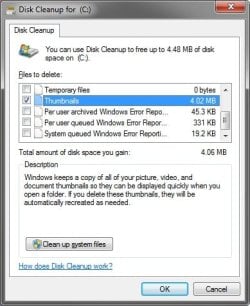
1. Open Disk Cleanup.

2. Check the Thumbnails box, and click/tap on OK. (see screenshot below)
Clear1.jpg
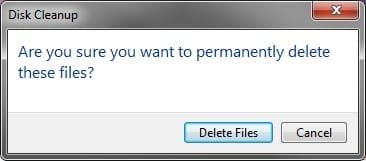
3. Click/tap on the Delete Files button. (See screenshot below)
Clear2.jpg
4. Disk Cleanup will now clear the thumbnail cache and close.


OPTION TWO

To Clear and Reset Thumbnail Cache using a BAT File


1. Click on the Download button below to download the BAT file below.
Clear_and_Reset_Thumbnail_Cache.bat


Download


2. Save the .bat file to your desktop.

3. Run the .bat file.

4. If prompted, click on Run.
NOTE: If you like, you can stop getting the Run prompt by unblocking the downloaded .bat file.

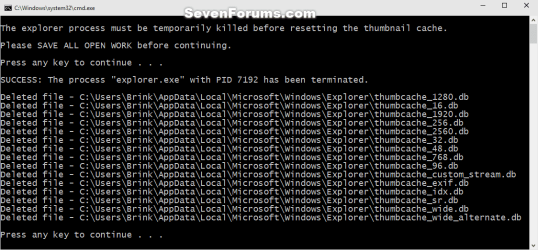
5. Follow the instructions in the command prompt to clear and reset your thumbnail cache.
Reset_thumbnail_cache_command.png


That's it,
Shawn


Attachments

Last edited:
My Waterfox shortcut on the desktop is still completely black. I tried the batch file, no luck. I loaded Disk Cleanup but the option to clear the thumbnail cache is not there. No luck with CCleaner either.

EDIT
And now, the CCleaner shortcut itself is all black, along with the IObit Uninstaller icon.

EDIT
Each time I create a new shortcut on the desktop, it immediately turns black.

Hello Jez2k, :)

Does this affect shortcuts at other locations as well?

Did you change your shortcut arrow overlay icon? If so, it may be causing a black overlay on the shortcut icon if it doesn't like the replacement for the arrow.

:ar: Shortcut Arrow - Change, Remove, or Restore - Windows 7 Help Forums
 
Last edited:

My Computer

Computer type
PC/Desktop
Computer Manufacturer/Model Number
Self built custom
OS
64-bit Windows 11 Pro for Workstations
CPU
Intel i7-8700K OC'd to 5 GHz
Motherboard
ASUS ROG Maximus XI Formula Z390
Memory
64 GB (4x16GB) G.SKILL TridentZ RGB DDR4 3600 MHz
Graphics Card(s)
ASUS ROG-STRIX-GTX1080TI-O11G-GAMING
Sound Card
Integrated
Monitor(s) Displays
2 x Samsung Odyssey G7 27"
Screen Resolution
2560x1440
Hard Drives
1TB Samsung 990 PRO M.2,
4TB Samsung 990 PRO PRO M.2,
TerraMaster F8 SSD Plus NAS
PSU
Seasonic Prime Titanium 850W
Case
Thermaltake Core P3
Cooling
Corsair Hydro H115i
Keyboard
Logitech wireless K800
Mouse
Logitech MX Master 4
Internet Speed
2 Gb/s Download and 100 Mb/s Upload
Antivirus
Malwarebyte Anti-Malware Premium
Browser
Google Chrome
Other Info
Logitech Z625 speaker system,
Logitech BRIO 4K Pro webcam,
HP Color LaserJet Pro MFP M477fdn,
APC SMART-UPS RT 1000 XL - SURT1000XLI,
Galaxy S23 Plus phone
Yet another awesome tutorial. Kudos Brink!

+1
Yup!
Brink's tutorials make me feel like I've got the upper hand on this beastie I call my computer:p
 

My Computer

Computer type
PC/Desktop
Computer Manufacturer/Model Number
Home Build - Acuarius
OS
Triple Boot - Win 10 x64Pro + Win 7 x64 Ultimate + WinXP-mce x1
CPU
AMD FX 8370e
Motherboard
AsRock Fx990 Extreme 9
Memory
Patriot 32GB Viper III DDR3 2133
Graphics Card(s)
Sapphire Radeon VAPOR-X R9 290X 8GB + Asus 5870 [V2]
Sound Card
Realtek ALC 898
Monitor(s) Displays
LCD 1) ASUS PB287Q - LCD 2) HP 2304 - LCD 3) Asus VW266H
Screen Resolution
1) 4k - 2) 1920 x 1200 - 3) 1920 x 1200
Hard Drives
- System C: - 128GB Corsair Force GT SSD
- System D: - 128GB Crucial C-300 SSD
- Seagate 3 TB x2 Hitachi SATA 3 [6Gb/s]

- MediaSonic HF2-SU3S2
- 5 TB backup
PSU
CoolerMaster Silent Pro Gold 1000
Case
Cosmos - Cooler Master 1000
Cooling
CoolerMaster 240M Liquid
Keyboard
Logitec MK-700
Mouse
Logitec MK-700
Internet Speed
DSL - ~ 15 Mb
Antivirus
F-Secure
Browser
Chrome / Opera / EI9
Other Info
I miss my C-64...1541 5 1/4 DD ... and my A-500...
It affects any shortcut in any location, even in a window with view set to details.

Yes I used the shortcut arrow hack reg and I tried the remove reg and the restore reg. No change.

When I try the Vista Shortcut Overlay Manager, it says:

"Unhandled exception has occurred in your application. If you click Continue, the application will ignore this error and attempt to continue. If you click Quit, the application will close immediately.

The system cannot find the file specified."
 

My Computer

Computer type
PC/Desktop
Computer Manufacturer/Model Number
Custom build
OS
Windows 7 Professional x64
CPU
Intel Core i7 @ 3.20GHz 3.60GHz
Motherboard
Gigabyte GA-X79-UD3
Memory
32GB (Crucial Hyper)
Graphics Card(s)
EVGA GTX 960 4GB
Hard Drives
Seagate ST375064ONS (Windows 7)
Seagate ST375064ONS (Windows XP [I dual boot])
5 x HGST HUS724020ALE640
Antivirus
Avast
Browser
Firefox
Jez,

Just to confirm, did you log out and in after restoring the default shortcut arrow using Option 3?
 

My Computer

Computer type
PC/Desktop
Computer Manufacturer/Model Number
Self built custom
OS
64-bit Windows 11 Pro for Workstations
CPU
Intel i7-8700K OC'd to 5 GHz
Motherboard
ASUS ROG Maximus XI Formula Z390
Memory
64 GB (4x16GB) G.SKILL TridentZ RGB DDR4 3600 MHz
Graphics Card(s)
ASUS ROG-STRIX-GTX1080TI-O11G-GAMING
Sound Card
Integrated
Monitor(s) Displays
2 x Samsung Odyssey G7 27"
Screen Resolution
2560x1440
Hard Drives
1TB Samsung 990 PRO M.2,
4TB Samsung 990 PRO PRO M.2,
TerraMaster F8 SSD Plus NAS
PSU
Seasonic Prime Titanium 850W
Case
Thermaltake Core P3
Cooling
Corsair Hydro H115i
Keyboard
Logitech wireless K800
Mouse
Logitech MX Master 4
Internet Speed
2 Gb/s Download and 100 Mb/s Upload
Antivirus
Malwarebyte Anti-Malware Premium
Browser
Google Chrome
Other Info
Logitech Z625 speaker system,
Logitech BRIO 4K Pro webcam,
HP Color LaserJet Pro MFP M477fdn,
APC SMART-UPS RT 1000 XL - SURT1000XLI,
Galaxy S23 Plus phone
Not until you mentioned it. Yes, the shortcuts are back along with the arrows, but any attempt to remove the arrows results in black boxes.
 

My Computer

Computer type
PC/Desktop
Computer Manufacturer/Model Number
Custom build
OS
Windows 7 Professional x64
CPU
Intel Core i7 @ 3.20GHz 3.60GHz
Motherboard
Gigabyte GA-X79-UD3
Memory
32GB (Crucial Hyper)
Graphics Card(s)
EVGA GTX 960 4GB
Hard Drives
Seagate ST375064ONS (Windows 7)
Seagate ST375064ONS (Windows XP [I dual boot])
5 x HGST HUS724020ALE640
Antivirus
Avast
Browser
Firefox
Well, at least we found the problem with the icon.

Did you use the 64-bit version of "Vista Shortcut Overlay Remover"?
 

My Computer

Computer type
PC/Desktop
Computer Manufacturer/Model Number
Self built custom
OS
64-bit Windows 11 Pro for Workstations
CPU
Intel i7-8700K OC'd to 5 GHz
Motherboard
ASUS ROG Maximus XI Formula Z390
Memory
64 GB (4x16GB) G.SKILL TridentZ RGB DDR4 3600 MHz
Graphics Card(s)
ASUS ROG-STRIX-GTX1080TI-O11G-GAMING
Sound Card
Integrated
Monitor(s) Displays
2 x Samsung Odyssey G7 27"
Screen Resolution
2560x1440
Hard Drives
1TB Samsung 990 PRO M.2,
4TB Samsung 990 PRO PRO M.2,
TerraMaster F8 SSD Plus NAS
PSU
Seasonic Prime Titanium 850W
Case
Thermaltake Core P3
Cooling
Corsair Hydro H115i
Keyboard
Logitech wireless K800
Mouse
Logitech MX Master 4
Internet Speed
2 Gb/s Download and 100 Mb/s Upload
Antivirus
Malwarebyte Anti-Malware Premium
Browser
Google Chrome
Other Info
Logitech Z625 speaker system,
Logitech BRIO 4K Pro webcam,
HP Color LaserJet Pro MFP M477fdn,
APC SMART-UPS RT 1000 XL - SURT1000XLI,
Galaxy S23 Plus phone
Ah, that was it. However, I decided to reinstall Windows 7 and the reg file worked.
 

My Computer

Computer type
PC/Desktop
Computer Manufacturer/Model Number
Custom build
OS
Windows 7 Professional x64
CPU
Intel Core i7 @ 3.20GHz 3.60GHz
Motherboard
Gigabyte GA-X79-UD3
Memory
32GB (Crucial Hyper)
Graphics Card(s)
EVGA GTX 960 4GB
Hard Drives
Seagate ST375064ONS (Windows 7)
Seagate ST375064ONS (Windows XP [I dual boot])
5 x HGST HUS724020ALE640
Antivirus
Avast
Browser
Firefox
I'm glad you got it sorted.
 

My Computer

Computer type
PC/Desktop
Computer Manufacturer/Model Number
Self built custom
OS
64-bit Windows 11 Pro for Workstations
CPU
Intel i7-8700K OC'd to 5 GHz
Motherboard
ASUS ROG Maximus XI Formula Z390
Memory
64 GB (4x16GB) G.SKILL TridentZ RGB DDR4 3600 MHz
Graphics Card(s)
ASUS ROG-STRIX-GTX1080TI-O11G-GAMING
Sound Card
Integrated
Monitor(s) Displays
2 x Samsung Odyssey G7 27"
Screen Resolution
2560x1440
Hard Drives
1TB Samsung 990 PRO M.2,
4TB Samsung 990 PRO PRO M.2,
TerraMaster F8 SSD Plus NAS
PSU
Seasonic Prime Titanium 850W
Case
Thermaltake Core P3
Cooling
Corsair Hydro H115i
Keyboard
Logitech wireless K800
Mouse
Logitech MX Master 4
Internet Speed
2 Gb/s Download and 100 Mb/s Upload
Antivirus
Malwarebyte Anti-Malware Premium
Browser
Google Chrome
Other Info
Logitech Z625 speaker system,
Logitech BRIO 4K Pro webcam,
HP Color LaserJet Pro MFP M477fdn,
APC SMART-UPS RT 1000 XL - SURT1000XLI,
Galaxy S23 Plus phone
Shawn, when I run the bat file i get the message "The system cannot find the path specified" I checked the path(s) above and they are the same except for the user name obviosuly.
 

My Computer

Computer type
Laptop
Computer Manufacturer/Model Number
HP
OS
windows 7 pro, service pack 1, 64 bit
CPU
i7-3720QM 2.60 GHz
Antivirus
Avavst
Hello Peytons, :-)

That would indicate the file has already been deleted.

Was that for all files, or just one?
 

My Computer

Computer type
PC/Desktop
Computer Manufacturer/Model Number
Self built custom
OS
64-bit Windows 11 Pro for Workstations
CPU
Intel i7-8700K OC'd to 5 GHz
Motherboard
ASUS ROG Maximus XI Formula Z390
Memory
64 GB (4x16GB) G.SKILL TridentZ RGB DDR4 3600 MHz
Graphics Card(s)
ASUS ROG-STRIX-GTX1080TI-O11G-GAMING
Sound Card
Integrated
Monitor(s) Displays
2 x Samsung Odyssey G7 27"
Screen Resolution
2560x1440
Hard Drives
1TB Samsung 990 PRO M.2,
4TB Samsung 990 PRO PRO M.2,
TerraMaster F8 SSD Plus NAS
PSU
Seasonic Prime Titanium 850W
Case
Thermaltake Core P3
Cooling
Corsair Hydro H115i
Keyboard
Logitech wireless K800
Mouse
Logitech MX Master 4
Internet Speed
2 Gb/s Download and 100 Mb/s Upload
Antivirus
Malwarebyte Anti-Malware Premium
Browser
Google Chrome
Other Info
Logitech Z625 speaker system,
Logitech BRIO 4K Pro webcam,
HP Color LaserJet Pro MFP M477fdn,
APC SMART-UPS RT 1000 XL - SURT1000XLI,
Galaxy S23 Plus phone
Just one message but the files are still there.
 

My Computer

Computer type
Laptop
Computer Manufacturer/Model Number
HP
OS
windows 7 pro, service pack 1, 64 bit
CPU
i7-3720QM 2.60 GHz
Antivirus
Avavst
That would be normal. The files automatically get recreated afterwards for a fresh start.
 

My Computer

Computer type
PC/Desktop
Computer Manufacturer/Model Number
Self built custom
OS
64-bit Windows 11 Pro for Workstations
CPU
Intel i7-8700K OC'd to 5 GHz
Motherboard
ASUS ROG Maximus XI Formula Z390
Memory
64 GB (4x16GB) G.SKILL TridentZ RGB DDR4 3600 MHz
Graphics Card(s)
ASUS ROG-STRIX-GTX1080TI-O11G-GAMING
Sound Card
Integrated
Monitor(s) Displays
2 x Samsung Odyssey G7 27"
Screen Resolution
2560x1440
Hard Drives
1TB Samsung 990 PRO M.2,
4TB Samsung 990 PRO PRO M.2,
TerraMaster F8 SSD Plus NAS
PSU
Seasonic Prime Titanium 850W
Case
Thermaltake Core P3
Cooling
Corsair Hydro H115i
Keyboard
Logitech wireless K800
Mouse
Logitech MX Master 4
Internet Speed
2 Gb/s Download and 100 Mb/s Upload
Antivirus
Malwarebyte Anti-Malware Premium
Browser
Google Chrome
Other Info
Logitech Z625 speaker system,
Logitech BRIO 4K Pro webcam,
HP Color LaserJet Pro MFP M477fdn,
APC SMART-UPS RT 1000 XL - SURT1000XLI,
Galaxy S23 Plus phone
Back
Top