
Thumbnail Cache - Clear and Reset

How to Clear and Reset Thumbnail Cache in Windows


   Information
By default, Windows stores the images for thumbnail previews in cache memory so that it can redisplay the images quickly each time you reopen a folder in Windows Explorer (Vista and Windows 7) or File Explorer (Windows 8).

This tutorial will show you how you to clear and reset the thumbnail cache to force Windows to reload the thumbnail picture views into the cache again as needed as you open folders.

   Note
The thumbnail cache .db files are located in the hidden system folder location below:

C:\Users\User-Name\AppData\Local\Microsoft\Windows\Explorer

You may want to clear the thumbnail cache if the Windows Explorer thumbnail pictures have become corrupted and not displaying properly, or the thumbnail cache file has become to large and you want to clear some hard disk space.


CONTENTS:
  • Option One: To Clear and Reset Thumbnail Cache using Disk Cleanup
  • Option Two: To Clear and Reset Thumbnail Cache using a BAT File


OPTION ONE

To Clear and Reset Thumbnail Cache using Disk Cleanup


1. Open Disk Cleanup.

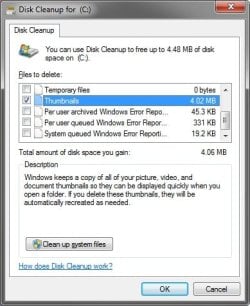
2. Check the Thumbnails box, and click/tap on OK. (see screenshot below)
Clear1.jpg
3. Click/tap on the Delete Files button. (See screenshot below)

Clear2.jpg
4. Disk Cleanup will now clear the thumbnail cache and close.


OPTION TWO

To Clear and Reset Thumbnail Cache using a BAT File


1. Click on the Download button below to download the BAT file below.
Clear_and_Reset_Thumbnail_Cache.bat


Download


2. Save the .bat file to your desktop.

3. Run the .bat file.

4. If prompted, click on Run.
NOTE: If you like, you can stop getting the Run prompt by unblocking the downloaded .bat file.

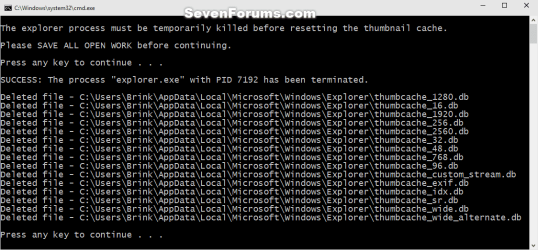
5. Follow the instructions in the command prompt to clear and reset your thumbnail cache.
Reset_thumbnail_cache_command.png


That's it,
Shawn


Attachments

Last edited:
Yet another awesome tutorial. Kudos Brink!
 

My Computer

Computer type
PC/Desktop
Computer Manufacturer/Model Number
Custom Build/Mod
OS
Windows 7 Home Premium x64
CPU
Intel QX9650 Extreme 4.0 GHz
Motherboard
ASUS Rampage Extreme Rev2
Memory
8GB (4x2) Corsair Dominator DDR3
Graphics Card(s)
2x Radeon R390X [8GB]
Sound Card
SupremeFX X-Fi
Monitor(s) Displays
Dell 2408WFP 26" Panel
Screen Resolution
1920x1200
Hard Drives
4x WD 2TB (8TB+ Total)
2x Crucial SSD 128GB (RAID-0)
1x LG Blu-ray read/write
1x Phillips LightScribe DVD read/write
PSU
Corsair HX1000
Case
CoolerMaster - Cosmos S
Cooling
Custom Liquid - 320mm rad w/ 3x 80mm fans, CPU/NB/SB Blocks
Keyboard
Logitech Illuminater Pro
Mouse
Logitech
Internet Speed
Fractional T1 - 125Mbps
Antivirus
ESET Security Suite / Microsoft Security Essentials
Browser
Cyberfox Intel x64
Other Info
OC'd to 5.0GHz @ 44c under full load
You're welcome Captain Zero. Thank you. :)
 

My Computer

Computer type
PC/Desktop
Computer Manufacturer/Model Number
Self built custom
OS
64-bit Windows 11 Pro for Workstations
CPU
Intel i7-8700K OC'd to 5 GHz
Motherboard
ASUS ROG Maximus XI Formula Z390
Memory
64 GB (4x16GB) G.SKILL TridentZ RGB DDR4 3600 MHz
Graphics Card(s)
ASUS ROG-STRIX-GTX1080TI-O11G-GAMING
Sound Card
Integrated
Monitor(s) Displays
2 x Samsung Odyssey G7 27"
Screen Resolution
2560x1440
Hard Drives
1TB Samsung 990 PRO M.2,
4TB Samsung 990 PRO PRO M.2,
TerraMaster F8 SSD Plus NAS
PSU
Seasonic Prime Titanium 850W
Case
Thermaltake Core P3
Cooling
Corsair Hydro H115i
Keyboard
Logitech wireless K800
Mouse
Logitech MX Master 4
Internet Speed
2 Gb/s Download and 100 Mb/s Upload
Antivirus
Malwarebyte Anti-Malware Premium
Browser
Google Chrome
Other Info
Logitech Z625 speaker system,
Logitech BRIO 4K Pro webcam,
HP Color LaserJet Pro MFP M477fdn,
APC SMART-UPS RT 1000 XL - SURT1000XLI,
Galaxy S23 Plus phone
Shawn:

That is nice and simple ... it just doesn't seem to work. I watch the folder where the cache files are stored, they get deleted alright but then they almost immediately reappear (within 5-10 seconds). When I reopen the folder where I was trying to refresh the thumbnails, the old thumbnails (which do not match the actual files that were edited) are still there.

I assume there is some setting that needs to change so that the old thumbnail files do not just get immediately restored and the OS is forced to create new ones as folders get opened. Do you know what change is needed?

Thanks.

Jeff
 
Last edited:

My Computer

Computer Manufacturer/Model Number
Dell 1555 Studio
OS
Win 7 Home Premium
CPU
Core 2 Duo T6600 @ 2.2GHz
Memory
4.00 Gb
Monitor(s) Displays
15"
Hard Drives
500 Gb Main
160 Gb WD extenal USB
Hello Jeff, and welcome to Seven Forums.

You might see if using the free program CCleaner to delete the thumbnail cache in Windows 7 may work better for you instead.

CCleaner.jpg

Hope this helps,
Shawn
 

My Computer

Computer type
PC/Desktop
Computer Manufacturer/Model Number
Self built custom
OS
64-bit Windows 11 Pro for Workstations
CPU
Intel i7-8700K OC'd to 5 GHz
Motherboard
ASUS ROG Maximus XI Formula Z390
Memory
64 GB (4x16GB) G.SKILL TridentZ RGB DDR4 3600 MHz
Graphics Card(s)
ASUS ROG-STRIX-GTX1080TI-O11G-GAMING
Sound Card
Integrated
Monitor(s) Displays
2 x Samsung Odyssey G7 27"
Screen Resolution
2560x1440
Hard Drives
1TB Samsung 990 PRO M.2,
4TB Samsung 990 PRO PRO M.2,
TerraMaster F8 SSD Plus NAS
PSU
Seasonic Prime Titanium 850W
Case
Thermaltake Core P3
Cooling
Corsair Hydro H115i
Keyboard
Logitech wireless K800
Mouse
Logitech MX Master 4
Internet Speed
2 Gb/s Download and 100 Mb/s Upload
Antivirus
Malwarebyte Anti-Malware Premium
Browser
Google Chrome
Other Info
Logitech Z625 speaker system,
Logitech BRIO 4K Pro webcam,
HP Color LaserJet Pro MFP M477fdn,
APC SMART-UPS RT 1000 XL - SURT1000XLI,
Galaxy S23 Plus phone
Shawn:

Thanks for the reply. I downloaded CCleaner and used it just to try to fix the Thumbnail Cache. I don't see any changes to the thumbnails in the folders. They still do not match the picture in the file. Do you have any ideas why these thumbnails will not refresh? Thanks!

Jeff
 

My Computer

Computer Manufacturer/Model Number
Dell 1555 Studio
OS
Win 7 Home Premium
CPU
Core 2 Duo T6600 @ 2.2GHz
Memory
4.00 Gb
Monitor(s) Displays
15"
Hard Drives
500 Gb Main
160 Gb WD extenal USB

My Computer

Computer type
PC/Desktop
Computer Manufacturer/Model Number
Self built custom
OS
64-bit Windows 11 Pro for Workstations
CPU
Intel i7-8700K OC'd to 5 GHz
Motherboard
ASUS ROG Maximus XI Formula Z390
Memory
64 GB (4x16GB) G.SKILL TridentZ RGB DDR4 3600 MHz
Graphics Card(s)
ASUS ROG-STRIX-GTX1080TI-O11G-GAMING
Sound Card
Integrated
Monitor(s) Displays
2 x Samsung Odyssey G7 27"
Screen Resolution
2560x1440
Hard Drives
1TB Samsung 990 PRO M.2,
4TB Samsung 990 PRO PRO M.2,
TerraMaster F8 SSD Plus NAS
PSU
Seasonic Prime Titanium 850W
Case
Thermaltake Core P3
Cooling
Corsair Hydro H115i
Keyboard
Logitech wireless K800
Mouse
Logitech MX Master 4
Internet Speed
2 Gb/s Download and 100 Mb/s Upload
Antivirus
Malwarebyte Anti-Malware Premium
Browser
Google Chrome
Other Info
Logitech Z625 speaker system,
Logitech BRIO 4K Pro webcam,
HP Color LaserJet Pro MFP M477fdn,
APC SMART-UPS RT 1000 XL - SURT1000XLI,
Galaxy S23 Plus phone
Thumbnails still messed up

Shawn:

The rebuild of the icon cache followed by a flushing of the thumbnail files using disk clean didn't make a difference. The thumbnails remain as they were.

When I ran the sfc /scannow command I did get some errors that could not be repaired. The log file is attached (if you have time and the inclination to scan it). the errors appear to be related to printing so I don't think they are relevant to the problem at hand (but I'm not a Window systems guy).

Any ideas?

Jeff
 

Attachments

My Computer

Computer Manufacturer/Model Number
Dell 1555 Studio
OS
Win 7 Home Premium
CPU
Core 2 Duo T6600 @ 2.2GHz
Memory
4.00 Gb
Monitor(s) Displays
15"
Hard Drives
500 Gb Main
160 Gb WD extenal USB
Jeff,

You might see if toggling thumbnail previews off an on may reset it to show properly afterwards.

No, the tcpmon.ini file wouldn't have anything to do with this. However, here is a clean copy of it below to replace your corrupted one with. You would just need to take ownership of your C:\Windows\System32\tcpmon.ini file and "Allow" "Full Control" of it to your user account, then copy and replace it with the new one.
 

Attachments

My Computer

Computer type
PC/Desktop
Computer Manufacturer/Model Number
Self built custom
OS
64-bit Windows 11 Pro for Workstations
CPU
Intel i7-8700K OC'd to 5 GHz
Motherboard
ASUS ROG Maximus XI Formula Z390
Memory
64 GB (4x16GB) G.SKILL TridentZ RGB DDR4 3600 MHz
Graphics Card(s)
ASUS ROG-STRIX-GTX1080TI-O11G-GAMING
Sound Card
Integrated
Monitor(s) Displays
2 x Samsung Odyssey G7 27"
Screen Resolution
2560x1440
Hard Drives
1TB Samsung 990 PRO M.2,
4TB Samsung 990 PRO PRO M.2,
TerraMaster F8 SSD Plus NAS
PSU
Seasonic Prime Titanium 850W
Case
Thermaltake Core P3
Cooling
Corsair Hydro H115i
Keyboard
Logitech wireless K800
Mouse
Logitech MX Master 4
Internet Speed
2 Gb/s Download and 100 Mb/s Upload
Antivirus
Malwarebyte Anti-Malware Premium
Browser
Google Chrome
Other Info
Logitech Z625 speaker system,
Logitech BRIO 4K Pro webcam,
HP Color LaserJet Pro MFP M477fdn,
APC SMART-UPS RT 1000 XL - SURT1000XLI,
Galaxy S23 Plus phone
Shawn:

I believe a co-worker pointed me to the real problem. There is a thumbnail image embedded within the jpeg file that matches the original uncropped image. Flushing the the thumbnail cache will never fix the issue I have because Windows will just reload the original picture from the original, uncropped thumbnail stored within the cropped image. I need to physically go into the jpeg file and figure out how to rewrite the thumbnail to match the current form of the image. So its googling I go ....

I do want to thank you for all of your help. If you do have ideas about where I might find a utility that can automatically rewrite the internal thumbnail file to match the cropped version of the image I'd love to hear them.

Take care.

Jeff
 

My Computer

Computer Manufacturer/Model Number
Dell 1555 Studio
OS
Win 7 Home Premium
CPU
Core 2 Duo T6600 @ 2.2GHz
Memory
4.00 Gb
Monitor(s) Displays
15"
Hard Drives
500 Gb Main
160 Gb WD extenal USB
Jeff, I wish I knew for you. Please post back how it went for you. :)
 

My Computer

Computer type
PC/Desktop
Computer Manufacturer/Model Number
Self built custom
OS
64-bit Windows 11 Pro for Workstations
CPU
Intel i7-8700K OC'd to 5 GHz
Motherboard
ASUS ROG Maximus XI Formula Z390
Memory
64 GB (4x16GB) G.SKILL TridentZ RGB DDR4 3600 MHz
Graphics Card(s)
ASUS ROG-STRIX-GTX1080TI-O11G-GAMING
Sound Card
Integrated
Monitor(s) Displays
2 x Samsung Odyssey G7 27"
Screen Resolution
2560x1440
Hard Drives
1TB Samsung 990 PRO M.2,
4TB Samsung 990 PRO PRO M.2,
TerraMaster F8 SSD Plus NAS
PSU
Seasonic Prime Titanium 850W
Case
Thermaltake Core P3
Cooling
Corsair Hydro H115i
Keyboard
Logitech wireless K800
Mouse
Logitech MX Master 4
Internet Speed
2 Gb/s Download and 100 Mb/s Upload
Antivirus
Malwarebyte Anti-Malware Premium
Browser
Google Chrome
Other Info
Logitech Z625 speaker system,
Logitech BRIO 4K Pro webcam,
HP Color LaserJet Pro MFP M477fdn,
APC SMART-UPS RT 1000 XL - SURT1000XLI,
Galaxy S23 Plus phone
Hey Brink thanks for the tutorial.

I've had this problem from long ago since Vista: from time to time (very random) my thumbnail cache resets and is kinda annoying to reload every photo and video again... is this normal?
thx in advance.
 

My Computer

Computer type
PC/Desktop
OS
Windows 7 Ultimate x64
CPU
Intel Core i5-2500K @4.5Ghz
Motherboard
Asus Maximus V GENE
Memory
x2 Kingston KHX1600C9D3/4G
Graphics Card(s)
NVIDIA GeForce GTS 250 - 1024MB
Sound Card
SupremeFX III built-in 8-Channel High Definition Audio
Monitor(s) Displays
Samsung Syncmaster P2270
Screen Resolution
1920x1080
Hard Drives
x1 Seagate Barracuda ST3160811AS
x2 Seagate Barracuda ST380817AS
PSU
Corsair TX750
Case
Cooler Master HAF 922 Side Window Model
Cooling
Stock Intel Cooler + Tuniq TX2
Keyboard
Dell SK-8135
Mouse
Logitech G5
Internet Speed
2 Mbps
Other Info
x2 Xbox 360 Wireless Controller for Windows
Logitech Z-5550
Sennheiser HD555
Hello Rick,

While there is no limit on the thumbnail cache in Windows 7, I suppose that if it was a very large photo and video collection in that folder it may cause it to choke out and lag on you. As a workaround, you might see if separating some of them into smaller groups of photos and videos in different subfolders (ex: for different categories) may help.
 

My Computer

Computer type
PC/Desktop
Computer Manufacturer/Model Number
Self built custom
OS
64-bit Windows 11 Pro for Workstations
CPU
Intel i7-8700K OC'd to 5 GHz
Motherboard
ASUS ROG Maximus XI Formula Z390
Memory
64 GB (4x16GB) G.SKILL TridentZ RGB DDR4 3600 MHz
Graphics Card(s)
ASUS ROG-STRIX-GTX1080TI-O11G-GAMING
Sound Card
Integrated
Monitor(s) Displays
2 x Samsung Odyssey G7 27"
Screen Resolution
2560x1440
Hard Drives
1TB Samsung 990 PRO M.2,
4TB Samsung 990 PRO PRO M.2,
TerraMaster F8 SSD Plus NAS
PSU
Seasonic Prime Titanium 850W
Case
Thermaltake Core P3
Cooling
Corsair Hydro H115i
Keyboard
Logitech wireless K800
Mouse
Logitech MX Master 4
Internet Speed
2 Gb/s Download and 100 Mb/s Upload
Antivirus
Malwarebyte Anti-Malware Premium
Browser
Google Chrome
Other Info
Logitech Z625 speaker system,
Logitech BRIO 4K Pro webcam,
HP Color LaserJet Pro MFP M477fdn,
APC SMART-UPS RT 1000 XL - SURT1000XLI,
Galaxy S23 Plus phone
Hello Rick,

While there is no limit on the thumbnail cache in Windows 7, I suppose that if it was a very large photo and video collection in that folder it may cause it to choke out and lag on you. As a workaround, you might see if separating some of them into smaller groups of photos and videos in different subfolders (ex: for different categories) may help.

Thanks Brink, ill put them in separate folders and clear the cache just in case... ill keep you update of any changes...
 

My Computer

Computer type
PC/Desktop
OS
Windows 7 Ultimate x64
CPU
Intel Core i5-2500K @4.5Ghz
Motherboard
Asus Maximus V GENE
Memory
x2 Kingston KHX1600C9D3/4G
Graphics Card(s)
NVIDIA GeForce GTS 250 - 1024MB
Sound Card
SupremeFX III built-in 8-Channel High Definition Audio
Monitor(s) Displays
Samsung Syncmaster P2270
Screen Resolution
1920x1080
Hard Drives
x1 Seagate Barracuda ST3160811AS
x2 Seagate Barracuda ST380817AS
PSU
Corsair TX750
Case
Cooler Master HAF 922 Side Window Model
Cooling
Stock Intel Cooler + Tuniq TX2
Keyboard
Dell SK-8135
Mouse
Logitech G5
Internet Speed
2 Mbps
Other Info
x2 Xbox 360 Wireless Controller for Windows
Logitech Z-5550
Sennheiser HD555
Hey Brink, i do as u told me and so far things where good till this morning when i check my pictures folder the thumbnails are rebuilding again, so i went to clean the thumbnails to check the size and it shows only 4MB so i do not clear it and went to videos folder same thing (rebuilding), so after it finish went to disk clean up again to check the size and its bigger so i think if it is a choke out and lag thing (only checking category folders no the actual files, 44 folders inside pictures 4 folders in videos) why to rebuild the whole thing?, what do you think? btw if i need to post this in another section (cause after all this isn't related 'bout ur tut) pls let me know, thx.
 

My Computer

Computer type
PC/Desktop
OS
Windows 7 Ultimate x64
CPU
Intel Core i5-2500K @4.5Ghz
Motherboard
Asus Maximus V GENE
Memory
x2 Kingston KHX1600C9D3/4G
Graphics Card(s)
NVIDIA GeForce GTS 250 - 1024MB
Sound Card
SupremeFX III built-in 8-Channel High Definition Audio
Monitor(s) Displays
Samsung Syncmaster P2270
Screen Resolution
1920x1080
Hard Drives
x1 Seagate Barracuda ST3160811AS
x2 Seagate Barracuda ST380817AS
PSU
Corsair TX750
Case
Cooler Master HAF 922 Side Window Model
Cooling
Stock Intel Cooler + Tuniq TX2
Keyboard
Dell SK-8135
Mouse
Logitech G5
Internet Speed
2 Mbps
Other Info
x2 Xbox 360 Wireless Controller for Windows
Logitech Z-5550
Sennheiser HD555
Last edited:

My Computer

Computer Manufacturer/Model Number
Gateway/NV7923u & NV79C52u Laptops
OS
windows 7 professional & ultimate 64bit laptops
CPU
2.27 boost to 2.53 & 2.53 boost to 2.80
Motherboard
Mobile Intel® HM55 Express Chipset ???
Memory
4GB
Graphics Card(s)
Intel® Graphics Media Accelerator HD
Sound Card
realtek High-definition audio support
Monitor(s) Displays
17.3 " HD 1600 x 900
Hard Drives
hatachi Travelstar 5400 500GB & west digital 500GB
Internet Speed
35MB fios
try the attached:party:

thx pacinitaly, this is like deleting the thumbnail cache but in a .bat right?
ok now i just have to w8 and see if it happens again...
 

My Computer

Computer type
PC/Desktop
OS
Windows 7 Ultimate x64
CPU
Intel Core i5-2500K @4.5Ghz
Motherboard
Asus Maximus V GENE
Memory
x2 Kingston KHX1600C9D3/4G
Graphics Card(s)
NVIDIA GeForce GTS 250 - 1024MB
Sound Card
SupremeFX III built-in 8-Channel High Definition Audio
Monitor(s) Displays
Samsung Syncmaster P2270
Screen Resolution
1920x1080
Hard Drives
x1 Seagate Barracuda ST3160811AS
x2 Seagate Barracuda ST380817AS
PSU
Corsair TX750
Case
Cooler Master HAF 922 Side Window Model
Cooling
Stock Intel Cooler + Tuniq TX2
Keyboard
Dell SK-8135
Mouse
Logitech G5
Internet Speed
2 Mbps
Other Info
x2 Xbox 360 Wireless Controller for Windows
Logitech Z-5550
Sennheiser HD555
they just get re built, but CURRENT
 

My Computer

Computer Manufacturer/Model Number
Gateway/NV7923u & NV79C52u Laptops
OS
windows 7 professional & ultimate 64bit laptops
CPU
2.27 boost to 2.53 & 2.53 boost to 2.80
Motherboard
Mobile Intel® HM55 Express Chipset ???
Memory
4GB
Graphics Card(s)
Intel® Graphics Media Accelerator HD
Sound Card
realtek High-definition audio support
Monitor(s) Displays
17.3 " HD 1600 x 900
Hard Drives
hatachi Travelstar 5400 500GB & west digital 500GB
Internet Speed
35MB fios
thx for the info, i just run it and all seems like before (the thumbnails that where created still there and the ones i haven't checked it yet are rebuilding) do i need to restart the pc?
 

My Computer

Computer type
PC/Desktop
OS
Windows 7 Ultimate x64
CPU
Intel Core i5-2500K @4.5Ghz
Motherboard
Asus Maximus V GENE
Memory
x2 Kingston KHX1600C9D3/4G
Graphics Card(s)
NVIDIA GeForce GTS 250 - 1024MB
Sound Card
SupremeFX III built-in 8-Channel High Definition Audio
Monitor(s) Displays
Samsung Syncmaster P2270
Screen Resolution
1920x1080
Hard Drives
x1 Seagate Barracuda ST3160811AS
x2 Seagate Barracuda ST380817AS
PSU
Corsair TX750
Case
Cooler Master HAF 922 Side Window Model
Cooling
Stock Intel Cooler + Tuniq TX2
Keyboard
Dell SK-8135
Mouse
Logitech G5
Internet Speed
2 Mbps
Other Info
x2 Xbox 360 Wireless Controller for Windows
Logitech Z-5550
Sennheiser HD555

My Computer

Computer type
PC/Desktop
Computer Manufacturer/Model Number
Self built custom
OS
64-bit Windows 11 Pro for Workstations
CPU
Intel i7-8700K OC'd to 5 GHz
Motherboard
ASUS ROG Maximus XI Formula Z390
Memory
64 GB (4x16GB) G.SKILL TridentZ RGB DDR4 3600 MHz
Graphics Card(s)
ASUS ROG-STRIX-GTX1080TI-O11G-GAMING
Sound Card
Integrated
Monitor(s) Displays
2 x Samsung Odyssey G7 27"
Screen Resolution
2560x1440
Hard Drives
1TB Samsung 990 PRO M.2,
4TB Samsung 990 PRO PRO M.2,
TerraMaster F8 SSD Plus NAS
PSU
Seasonic Prime Titanium 850W
Case
Thermaltake Core P3
Cooling
Corsair Hydro H115i
Keyboard
Logitech wireless K800
Mouse
Logitech MX Master 4
Internet Speed
2 Gb/s Download and 100 Mb/s Upload
Antivirus
Malwarebyte Anti-Malware Premium
Browser
Google Chrome
Other Info
Logitech Z625 speaker system,
Logitech BRIO 4K Pro webcam,
HP Color LaserJet Pro MFP M477fdn,
APC SMART-UPS RT 1000 XL - SURT1000XLI,
Galaxy S23 Plus phone
Back
Top