Thumbnail image hangs after dragging - WONT go away :(

Obina Wan

New member
Local time
8:13 PM
Messages
3
Location
Boston, MA
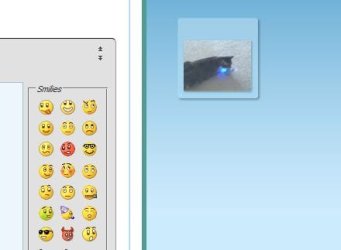
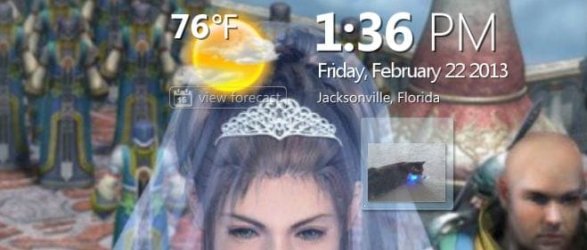
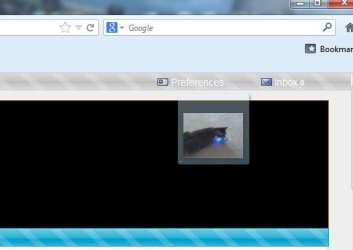
This has happened like twice in the last year besides this. It's annoying. I was dragging a picture from one folder to another. It got there successfully, but a thumbnail version of it just hung around. I've tried closing and reopening things and it won't go away. No matter what I have open it is just THERE. I am not good with words at times and don't really know how to describe it so I included some attachments.

I don't want to have to reboot my PC anytime this happens.
 

Attachments

  • capture_001_22022013_131810.jpg
    capture_001_22022013_131810.jpg
    40.8 KB · Views: 5
  • capture_002_22022013_133605.jpg
    capture_002_22022013_133605.jpg
    11.9 KB · Views: 5
  • capture_003_22022013_133619.jpg
    capture_003_22022013_133619.jpg
    30.5 KB · Views: 6
  • capture_004_22022013_133646.jpg
    capture_004_22022013_133646.jpg
    13.7 KB · Views: 5

My Computer My Computer

At a glance

Windows 8
Computer type
PC/Desktop
OS
Windows 8
Have you tried right clicking on desktop and selecting "refresh"?
 

My Computer My Computer

At a glance

Windows 7 Home Premium (64 bit)Intel I5 2500K 3.3Ghz Stock8Gig Kingston DDRIII HyperX Blue 1333 MhzAMD Sapphire 7870 2GB
Computer type
PC/Desktop
Computer Manufacturer/Model Number
Self Built
OS
Windows 7 Home Premium (64 bit)
CPU
Intel I5 2500K 3.3Ghz Stock
Motherboard
Asus P8H 61-M LE USB 3
Memory
8Gig Kingston DDRIII HyperX Blue 1333 Mhz
Graphics Card(s)
AMD Sapphire 7870 2GB
Sound Card
Creative Fatality Pro
Monitor(s) Displays
27" BENQ LED
Screen Resolution
1920X1080
Hard Drives
1 x OCZ Agility 3 120GB SSD
1 x Seagate 250GB
1 x Western Digital 1000GB
1 x HP 500GB
PSU
700W Coolermaster Stealth Pro etc
Case
Coolermaster Scout
Cooling
Some fans
Keyboard
Some Logitech type.
Mouse
Logitech MX518
Internet Speed
Wireless 8mb
Other Info
Canon Scanner
Epson Printer
Nikon DSLR 3000
Wacom Tablet
I have a similar issue, downloaded files don't appear, when using a shredding program the file image remains. The only fix I have found is a reboot and thing stay normal for only a couple of hours. Also the refresh will work, as mentioned by hybridfan.
 

My Computer My Computer

At a glance

Windows 7 Ultimate X64 SP1Intel i5-2550K, Differing ~4.4-4.8GHz No buil...16GB G.Skill Sniper 1866MHz @ 2133MHz 2x8GBASUS GTX650TIB-DC2OC-2GD5, (650TI Boost)
Computer type
PC/Desktop
Computer Manufacturer/Model Number
Home Built Desktop By DataTech
OS
Windows 7 Ultimate X64 SP1
CPU
Intel i5-2550K, Differing ~4.4-4.8GHz No built in GPU
Motherboard
ASUS P8Z68-V PRO/GEN3
Memory
16GB G.Skill Sniper 1866MHz @ 2133MHz 2x8GB
Graphics Card(s)
ASUS GTX650TIB-DC2OC-2GD5, (650TI Boost)
Sound Card
Onboard Realtek 5-1
Monitor(s) Displays
Samsung P2570HD
Screen Resolution
1920x1080
Hard Drives
Samsung 840 Pro 256GB SSD for OS, 500GB Seagate Constellation (Enterprise drive) for Data
PSU
Corsair HX650W
Case
Inwin Dragon Rider
Cooling
Hyper 212 EVO w/two Noctua fans, push-pull, @1300 RPM
Keyboard
E-Z Eyes, bright yellow keys with large characters
Mouse
steelseries SENSEI Laser Pro Gaming
Internet Speed
48-51Mbs Mbs down, 11 Mbs up Xfinity Cable
Antivirus
Norton Internet Security 2013
Browser
IE 10, Opera, Pale Moon if needed
Other Info
4 case fans, LG BluRay-RE, ASUS DVD-RW, Mr. Fusion power supply, 1.21 gigawatts.
Back
Top