Thumbnail Preview Automatic Resize

esa1234

New member
Local time
9:44 PM
Messages
12
I'm not quite sure how to name this thread, so hopefully my description makes more sense.

I've been using 7 since its official release, and I'm on my third separate installation after reformat. All reformats were as a result of normal toying around. Basically, in each and every installation of 7 x64 I've installed, video/image thumbnail previews consistently behave unreliably.

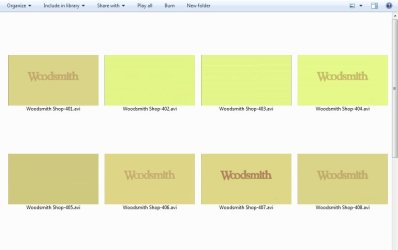
Specifically, under normal operation thumbnails are generated, and then Windows automatically removes the dead space around the previews. For instance, when a series of 16x9 previews are generated, Windows would remove the empty space around each thumbnail.

My problem is that Windows consistently and randomly stops removing the empty space around the previews. One second all my previews will be nicely grouped together with no large spaces of empty white between them. The next second, literally, Windows stops behaving well.

I've searched high and low for anyone else that has seen this problem, but I've either not used the right search terms, or nobody has seen it but me. (Probably the former.)

I wondered if anyone else has seen this quirk, and if so, has a cause been identified?
 

My Computer

OS
Windows 7 Ultimate x64
CPU
i7 920 @ 3.0GHz
Motherboard
Asus P6T6 WS Revolution
Memory
6GB DDR3@1800
Graphics Card(s)
EVGA GTX 285SC
Sound Card
SoundMax/E-Mu1616m
Monitor(s) Displays
HP LP2065-IPS/HPL1940T
Screen Resolution
1600x1200/1280x1024
Hard Drives
6x Western Digital 1TB FALS
3x Western Digital 1.5TB FASS
Intel-LSI SASU8CI
PSU
ABS 1300w
Case
Silverstone TJ-07
Cooling
CNPS9700/5x120mm/2x80mm/1x80mm Slot Fan
Keyboard
MS Sidewinder
Mouse
Logitech G9
Internet Speed
18/4
Other Info
Intel Pro100 Gigabit
Are you able to produce a screenshot?
 

My Computer

Computer type
PC/Desktop
Computer Manufacturer/Model Number
Alienware Aurora ALX R4
OS
Windows 10 Pro (x64)
CPU
Intel Core i7-3930K (3.2GHz - 4.5GHz)
Motherboard
Alienware Aurora-R4 x79
Memory
4x Samsung 4GB PC3-12800 DDR3 (16GB 1600MHz)
Graphics Card(s)
Nvidia Geforce GTX 690
Sound Card
SteelSeries Siberia Elite
Monitor(s) Displays
Dell UltraSharp U3011
Screen Resolution
2560x1600
Hard Drives
Samsung 850 Pro 256 GB, Seagate 1TB Desktop Hybrid HDD, 2x Western Digital 4TB Green HDD
PSU
875W Some Dell PSU <.<
Case
Alienware Aurora ALX
Cooling
Custom Liquid Cooling (EK CPU & GPU blocks) dual EK 480RAD
Keyboard
Logitech G710+ Mechanical
Mouse
Logitech G700s
Internet Speed
Verizon Fios (50 mbps average)
Other Info
Server: Intel NUC D54250WYK: i5-4250U, 16GB, 256 GB mSATA, Windows Server 2012 R2
Hopefully showing screens of PBS programs won't land me in DMCA hell. Let me know if this is a No No.

When Windows does what it should, if the previews aren't "resized" to eliminate empty space, refreshing causes Windows to resize everything properly. For me, when explorer isn't behaving well, hitting F5 does nothing.

Oddly, if I use cntrl+scrl_wheel to resize the thumbs, Windows removes the free space. It doesn't last long, though, because if I hit F5 or exit the folder and return again, the dead space comes back.

To be clear, it is common for me to experience this in one instance, and the very next second everything will work properly. Usually I'll have closed an open window and opened another explorer window, but sometimes it rectifies itself within the same open window.

It has really confused the heck out of me for months, but it isn't a massive deal.
 

Attachments

  • bad_win7.jpg
    bad_win7.jpg
    26.8 KB · Views: 11
  • good_win7.jpg
    good_win7.jpg
    38.8 KB · Views: 10

My Computer

OS
Windows 7 Ultimate x64
CPU
i7 920 @ 3.0GHz
Motherboard
Asus P6T6 WS Revolution
Memory
6GB DDR3@1800
Graphics Card(s)
EVGA GTX 285SC
Sound Card
SoundMax/E-Mu1616m
Monitor(s) Displays
HP LP2065-IPS/HPL1940T
Screen Resolution
1600x1200/1280x1024
Hard Drives
6x Western Digital 1TB FALS
3x Western Digital 1.5TB FASS
Intel-LSI SASU8CI
PSU
ABS 1300w
Case
Silverstone TJ-07
Cooling
CNPS9700/5x120mm/2x80mm/1x80mm Slot Fan
Keyboard
MS Sidewinder
Mouse
Logitech G9
Internet Speed
18/4
Other Info
Intel Pro100 Gigabit
Ah yes. I usually see this when Explorer does not yet know the dimensions of the thumbnails, so it creates a standard box (the biggest is 256x256) around everything. But it doesn't update the display. I usually just scroll the window and that helps.

Btw, your screenshots are covered under fair use. So nothing to worry about.
 

My Computer

Computer type
PC/Desktop
Computer Manufacturer/Model Number
Alienware Aurora ALX R4
OS
Windows 10 Pro (x64)
CPU
Intel Core i7-3930K (3.2GHz - 4.5GHz)
Motherboard
Alienware Aurora-R4 x79
Memory
4x Samsung 4GB PC3-12800 DDR3 (16GB 1600MHz)
Graphics Card(s)
Nvidia Geforce GTX 690
Sound Card
SteelSeries Siberia Elite
Monitor(s) Displays
Dell UltraSharp U3011
Screen Resolution
2560x1600
Hard Drives
Samsung 850 Pro 256 GB, Seagate 1TB Desktop Hybrid HDD, 2x Western Digital 4TB Green HDD
PSU
875W Some Dell PSU <.<
Case
Alienware Aurora ALX
Cooling
Custom Liquid Cooling (EK CPU & GPU blocks) dual EK 480RAD
Keyboard
Logitech G710+ Mechanical
Mouse
Logitech G700s
Internet Speed
Verizon Fios (50 mbps average)
Other Info
Server: Intel NUC D54250WYK: i5-4250U, 16GB, 256 GB mSATA, Windows Server 2012 R2
I figured they'd be fine, and PBS is free anyway.

As for scrolling, yeah, when Windows is doing what it should that does the trick (as does any # of other things).

A lot of the time it doesn't work for me, and no amount of scrolling, refreshing, etc. will get Windows to snap out of its rut. It'll just keep giving me the same largest size thumbnail space indefinitely. Sometimes for hours, sometimes for minutes.

Anyhow....I think I must do something to all my installations of 7 to get this behavior, although I have no idea what that may be. :)
 

My Computer

OS
Windows 7 Ultimate x64
CPU
i7 920 @ 3.0GHz
Motherboard
Asus P6T6 WS Revolution
Memory
6GB DDR3@1800
Graphics Card(s)
EVGA GTX 285SC
Sound Card
SoundMax/E-Mu1616m
Monitor(s) Displays
HP LP2065-IPS/HPL1940T
Screen Resolution
1600x1200/1280x1024
Hard Drives
6x Western Digital 1TB FALS
3x Western Digital 1.5TB FASS
Intel-LSI SASU8CI
PSU
ABS 1300w
Case
Silverstone TJ-07
Cooling
CNPS9700/5x120mm/2x80mm/1x80mm Slot Fan
Keyboard
MS Sidewinder
Mouse
Logitech G9
Internet Speed
18/4
Other Info
Intel Pro100 Gigabit
Back
Top