Thumbnail Previews - Change Border

How to Change Thumbnail Previews Border in Windows 7 and Windows 8

   Information
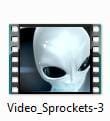
This tutorial will show you how to change the border of thumbnail previews for image and video files to have either a drop shadow border, photo border, video sprockets border, or no border in Windows 7 and Windows 8.

   Note
You will need to click on View or Views, on the Windows Explorer window Menu bar, and have it set to either Medium Icons, Large Icons, or Extra Large Icons to see a thumbnail preview of the file image as the icon.


For more on this, see:
EXAMPLE: Available Thumbnail Preview Image Borders
NOTE: The default border for thumbnails in Windows Explorer is the Photo_Border-2 image below.

0.jpg1.jpg2.jpg3.jpg


OPTION ONE

To Change Thumbnail Borders using a REG File


1. Do step 2, 3, 4 or 5, and/or step 6, 7, 8, or 9 below for what you would like to do.


2. No Border for Images
A) Click/tap on the download button below to download the .reg file below, and go to step 10 below.

No_Border-0_Image.reg


Download


3. Drop Shadow Border for Images
A) Click/tap on the download button below to download the .reg file below, and go to step 10 below.

Drop_Shadow-1_Image.reg


Download


4. Photo Shadow Border for Images
NOTE: This is the default setting for images.
A) Click/tap on the download button below to download the .reg file below, and go to step 10 below.

Photo_Border-2_Image.reg


Download


5. Video Sprockets Border for Images
A) Click/tap on the download button below to download the .reg file below, and go to step 10 below.

Video_Sprockets-3_Image.reg


Download


AND/OR

6. No Border for Videos
A) Click/tap on the download button below to download the .reg file below, and go to step 10 below.

No_Border-0_video.reg


Download


7. Drop Shadow Border for Videos
A) Click/tap on the download button below to download the .reg file below, and go to step 10 below.

Drop_Shadow-1_video.reg


Download


8. Photo Shadow Border for Videos
A) Click/tap on the download button below to download the .reg file below, and go to step 10 below.

Photo_Border-2_video.reg


Download


9. Video Sprockets Border for Videos
NOTE: This is the default setting for images.
A) Click/tap on the download button below to download the .reg file below, and go to step 10 below.

Video_Sprockets-3_video.reg


Download


10. Save the .reg file to your Desktop.

11. Double click/tap on the downloaded .reg file to merge it.

12. If prompted, click/tap on Run, Yes (UAC), Yes, and OK to approve the merge.

13. Log off and log on, or restart the computer to apply.

14. When finished, you can delete the downloaded .reg file if you like.


OPTION TWO

To Change Thumbnail Borders in Registry Editor


1. Press the Windows + R keys to open the Run dialog, type regedit, and click/tap on OK.

2. If prompted by UAC, click on Yes.

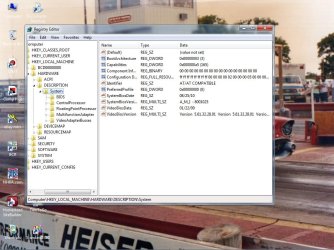
3. In Registry Editor, navigate to the location below for what you want to change. (See screenshot below)

(For image borders)
HKEY_CLASSES_ROOT\SystemFileAssociations\image

(For video borders)
HKEY_CLASSES_ROOT\SystemFileAssociations\video
Reg1.jpg
4. In the right pane of image and/or video, double click/tap on Treatment to modify it. (See screenshot above)

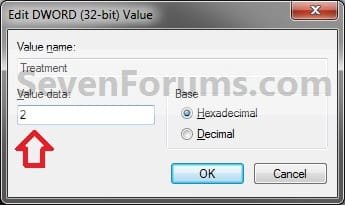
5. Type in the value data number in the table below for the border that you want for all thumbnail images to have for image and/or video files, and click/tap on OK. (See screenshot below table)

   Note
See the example at the top of the tutorial to see what each border looks like.

2 is the default setting for image.
3 is the default setting for video.

Number | Border 0 | No Border
1 | Drop Shadow
2 | Photo
3 | Video Sprockets
Modify.jpg
6. Close regedit.

7. Log off and log on, or restart the computer to apply.
That's it,
Shawn


Attachments

Last edited:
Thanks Shawn, I was just looking for the way to change my borders. :)
 

My Computers

System One System Two

  • Computer type
    Laptop
    Computer Manufacturer/Model Number
    Dell Precision 7510
    OS
    W7PRO
    CPU
    Intel i7-6820HQ @ 2.7GHz
    Memory
    16GB
  • Computer type
    Laptop
    OS
    W7Pro
It´s a interesting tutorial. Thanks Shawn.
 

My Computer

OS
Win 7
You're welcome RA and Moinmoin. :)
 

My Computer

Computer type
PC/Desktop
Computer Manufacturer/Model Number
Self built custom
OS
64-bit Windows 11 Pro for Workstations
CPU
Intel i7-8700K OC'd to 5 GHz
Motherboard
ASUS ROG Maximus XI Formula Z390
Memory
64 GB (4x16GB) G.SKILL TridentZ RGB DDR4 3600 MHz
Graphics Card(s)
ASUS ROG-STRIX-GTX1080TI-O11G-GAMING
Sound Card
Integrated
Monitor(s) Displays
2 x Samsung Odyssey G7 27"
Screen Resolution
2560x1440
Hard Drives
1TB Samsung 990 PRO M.2,
4TB Samsung 990 PRO PRO M.2,
TerraMaster F8 SSD Plus NAS
PSU
Seasonic Prime Titanium 850W
Case
Thermaltake Core P3
Cooling
Corsair Hydro H115i
Keyboard
Logitech wireless K800
Mouse
Logitech MX Master 4
Internet Speed
2 Gb/s Download and 100 Mb/s Upload
Antivirus
Malwarebyte Anti-Malware Premium
Browser
Google Chrome
Other Info
Logitech Z625 speaker system,
Logitech BRIO 4K Pro webcam,
HP Color LaserJet Pro MFP M477fdn,
APC SMART-UPS RT 1000 XL - SURT1000XLI,
Galaxy S23 Plus phone
what about white borders that are used to retain aspect ratio?

right, after i installed this program "thumbnailer", it changed icons to retain aspect ratio, so it adds borders, have a look:

you see on the file selected, you can see that theres a white border created, before i installed that program it wasnt like that, so a registry entry must have been edited, since i already used your tweak to remove the shadows added, there must be another one for these borders to retain aspect ratio, any idea?

the reason i want to remove this so it would be the way it was before (no white borders), because it doesnt look very nice on the desktop, and well i just want to set up my pc to the best i can

thanks in advance
 
Last edited by a moderator:

My Computer

Computer Manufacturer/Model Number
Self Built
OS
windows 7 ultimate 64 bir
CPU
AMD Phenom II X6 1090t black edition 3.2Ghz, OC to 4.0GHz
Motherboard
Gigabyte GA-890GPA-UD3H
Memory
Corsair DOMINATOR GT 2GB DDR3 SDRAM Memory Module x 4 = 8Gb
Graphics Card(s)
Sapphire Ati Amd Radeon HD 6970
Sound Card
Sound Blaster X-Fi Xtreme Audio
Monitor(s) Displays
LG 42px4d, Advent P22W, LG L194WT (dual monitors)
Screen Resolution
1920 x 1080, 1680 x 1050, 1440 x 900
Hard Drives
Seagate Barracuda 1.5 tera byte 7200.11 x 3 = 4.5TB
PSU
Thermaltake Toughpower 1500w
Case
AEROCOOL limited edition Vx-e Pro
Cooling
Spire Thermax Eclipse II (SP984B1-V2) Heatsink
Keyboard
Logitech G15 Wired (Blue), Advent T100 Wireless
Mouse
Logitech G5 Wired Gaming, Advent T100 Wireless, Cyborg Rat 9
Internet Speed
Download 3.29Mb/s Upload 0.46Mb/s
Hello Dareheaven, and welcome to Seven Forums.

Did uninstalling the program restore it back to normal?

If not, then you can do a system restore using a restore point dated before you installed that program to undo it and the changes it made.

Hope this helps,
Shawn
 

My Computer

Computer type
PC/Desktop
Computer Manufacturer/Model Number
Self built custom
OS
64-bit Windows 11 Pro for Workstations
CPU
Intel i7-8700K OC'd to 5 GHz
Motherboard
ASUS ROG Maximus XI Formula Z390
Memory
64 GB (4x16GB) G.SKILL TridentZ RGB DDR4 3600 MHz
Graphics Card(s)
ASUS ROG-STRIX-GTX1080TI-O11G-GAMING
Sound Card
Integrated
Monitor(s) Displays
2 x Samsung Odyssey G7 27"
Screen Resolution
2560x1440
Hard Drives
1TB Samsung 990 PRO M.2,
4TB Samsung 990 PRO PRO M.2,
TerraMaster F8 SSD Plus NAS
PSU
Seasonic Prime Titanium 850W
Case
Thermaltake Core P3
Cooling
Corsair Hydro H115i
Keyboard
Logitech wireless K800
Mouse
Logitech MX Master 4
Internet Speed
2 Gb/s Download and 100 Mb/s Upload
Antivirus
Malwarebyte Anti-Malware Premium
Browser
Google Chrome
Other Info
Logitech Z625 speaker system,
Logitech BRIO 4K Pro webcam,
HP Color LaserJet Pro MFP M477fdn,
APC SMART-UPS RT 1000 XL - SURT1000XLI,
Galaxy S23 Plus phone
yes it does remove everything that happens, but i need that program for its features, i removed the shadows it added to thumbnails but i want to remove the white borders too without uninstalling, im very sure its posible as after all its only a registry edit that was done when installed i believe
 

My Computer

Computer Manufacturer/Model Number
Self Built
OS
windows 7 ultimate 64 bir
CPU
AMD Phenom II X6 1090t black edition 3.2Ghz, OC to 4.0GHz
Motherboard
Gigabyte GA-890GPA-UD3H
Memory
Corsair DOMINATOR GT 2GB DDR3 SDRAM Memory Module x 4 = 8Gb
Graphics Card(s)
Sapphire Ati Amd Radeon HD 6970
Sound Card
Sound Blaster X-Fi Xtreme Audio
Monitor(s) Displays
LG 42px4d, Advent P22W, LG L194WT (dual monitors)
Screen Resolution
1920 x 1080, 1680 x 1050, 1440 x 900
Hard Drives
Seagate Barracuda 1.5 tera byte 7200.11 x 3 = 4.5TB
PSU
Thermaltake Toughpower 1500w
Case
AEROCOOL limited edition Vx-e Pro
Cooling
Spire Thermax Eclipse II (SP984B1-V2) Heatsink
Keyboard
Logitech G15 Wired (Blue), Advent T100 Wireless
Mouse
Logitech G5 Wired Gaming, Advent T100 Wireless, Cyborg Rat 9
Internet Speed
Download 3.29Mb/s Upload 0.46Mb/s
I'm not sure what to say since I'm not familiar with that program. Since it's a program that made the change, double check it's settings to see if it may have an option to change the borders. If it doesn't, then I'm not sure how to undo it other than uninstalling the program the made the change and trying another program that doesn't do this. :(
 

My Computer

Computer type
PC/Desktop
Computer Manufacturer/Model Number
Self built custom
OS
64-bit Windows 11 Pro for Workstations
CPU
Intel i7-8700K OC'd to 5 GHz
Motherboard
ASUS ROG Maximus XI Formula Z390
Memory
64 GB (4x16GB) G.SKILL TridentZ RGB DDR4 3600 MHz
Graphics Card(s)
ASUS ROG-STRIX-GTX1080TI-O11G-GAMING
Sound Card
Integrated
Monitor(s) Displays
2 x Samsung Odyssey G7 27"
Screen Resolution
2560x1440
Hard Drives
1TB Samsung 990 PRO M.2,
4TB Samsung 990 PRO PRO M.2,
TerraMaster F8 SSD Plus NAS
PSU
Seasonic Prime Titanium 850W
Case
Thermaltake Core P3
Cooling
Corsair Hydro H115i
Keyboard
Logitech wireless K800
Mouse
Logitech MX Master 4
Internet Speed
2 Gb/s Download and 100 Mb/s Upload
Antivirus
Malwarebyte Anti-Malware Premium
Browser
Google Chrome
Other Info
Logitech Z625 speaker system,
Logitech BRIO 4K Pro webcam,
HP Color LaserJet Pro MFP M477fdn,
APC SMART-UPS RT 1000 XL - SURT1000XLI,
Galaxy S23 Plus phone
ah shame you dont know, yea i have looked at the program from the outside, all settings posible, nothing to do with the regedit thought so i dont know, however i noticed if i changed the file extension to 3gp for example, the borders go away, so its definatelly file associations that are affected, not all files, but if i change videos to 3gp then the thumbnailer tab in properties of the file goes away, so i dont know

btw brink i read your pc build and since i notice your a pc enthusiast you should look into that program its really good, lets you customize your media thumbnails, for example a windows problem, thumbnails are generated at the beginning of the video, that program however lets you pick exact point, or pick where you want the thumbnail to be generated, i have it set to 50% but for thumbnails that dont come out nice i set a specific point, but the program is a bit buggy, if theres a file that the thumbnail cannot be generated for, windows explorer will crash, but i figured out how to get by this, in folder options tick display as icons, then switch to view in details, in organise open up details pane, switch of display as icons, and go through file by file till windows explorer crashes, when it does go back to that file (with display as icons ticked), and convert that file to mp4 for example, sorts the problem out, so say your like me have thousands of video files, once you find the faulty file, and sorted, then thats done and all good, but yeah i also had to manually use this tip you showed us, removing the droped shadows, as i believe its nicer, and now i think i found a way to get past it in a way, changing the file extension to .3gp for all files, that doesnt affect much only the thumbnailer tab in properties, and since its only a container and has the information which program to be opened with that all good :D

by the way just in case you didnt know, which you propably did, if you want to change all extensions in a folder, say from an .mp4 to .avi do this:

to change multiple extension files without a program, first find the extension you want to change, for example .flv, and you want to change them to .avi, create a blank text document in that same folder, write down

REN *.flv *.avi

just change the .flv part to what ever you want, dont change anything else no space nothing, exactly like that, its case sensitive by the way, make sure in windows explorer you can view all hidden files, extensions and EVERYTHING, rename the .txt file to .cmd, now just double click on that file, delete it when done, you can add several lines of code as you can see above, check all file extensions after, incase ones couldnt be done since there filenames already existed, do those manually.

for multiple lines of code it should look something like this


REN *.wmv *.avi
REN *.MOV *.avi
REN *.mp4 *.avi
REN *.mpg *.avi
REN *.mkv *.avi
REN *.3gp *.avi
REN *.mpeg *.avi
REN *.m4v *.avi
REN *.m4a *.avi


sorry for the long post lol
 

My Computer

Computer Manufacturer/Model Number
Self Built
OS
windows 7 ultimate 64 bir
CPU
AMD Phenom II X6 1090t black edition 3.2Ghz, OC to 4.0GHz
Motherboard
Gigabyte GA-890GPA-UD3H
Memory
Corsair DOMINATOR GT 2GB DDR3 SDRAM Memory Module x 4 = 8Gb
Graphics Card(s)
Sapphire Ati Amd Radeon HD 6970
Sound Card
Sound Blaster X-Fi Xtreme Audio
Monitor(s) Displays
LG 42px4d, Advent P22W, LG L194WT (dual monitors)
Screen Resolution
1920 x 1080, 1680 x 1050, 1440 x 900
Hard Drives
Seagate Barracuda 1.5 tera byte 7200.11 x 3 = 4.5TB
PSU
Thermaltake Toughpower 1500w
Case
AEROCOOL limited edition Vx-e Pro
Cooling
Spire Thermax Eclipse II (SP984B1-V2) Heatsink
Keyboard
Logitech G15 Wired (Blue), Advent T100 Wireless
Mouse
Logitech G5 Wired Gaming, Advent T100 Wireless, Cyborg Rat 9
Internet Speed
Download 3.29Mb/s Upload 0.46Mb/s
Hi,

maybe exists similar fix to change video border for specific video file extension? .mkv file have incorrect.

Capture1.PNG
 

My Computer

OS
Windows 7 Ultimate x64
Hello Tomaskucinskas,

Sorry, but no. This will only change the border for all thumbnail previews instead. :(

You could change the default icon that is used for the .mkv file extension, but you would no longer have a thumbnail preview of it.
 

My Computer

Computer type
PC/Desktop
Computer Manufacturer/Model Number
Self built custom
OS
64-bit Windows 11 Pro for Workstations
CPU
Intel i7-8700K OC'd to 5 GHz
Motherboard
ASUS ROG Maximus XI Formula Z390
Memory
64 GB (4x16GB) G.SKILL TridentZ RGB DDR4 3600 MHz
Graphics Card(s)
ASUS ROG-STRIX-GTX1080TI-O11G-GAMING
Sound Card
Integrated
Monitor(s) Displays
2 x Samsung Odyssey G7 27"
Screen Resolution
2560x1440
Hard Drives
1TB Samsung 990 PRO M.2,
4TB Samsung 990 PRO PRO M.2,
TerraMaster F8 SSD Plus NAS
PSU
Seasonic Prime Titanium 850W
Case
Thermaltake Core P3
Cooling
Corsair Hydro H115i
Keyboard
Logitech wireless K800
Mouse
Logitech MX Master 4
Internet Speed
2 Gb/s Download and 100 Mb/s Upload
Antivirus
Malwarebyte Anti-Malware Premium
Browser
Google Chrome
Other Info
Logitech Z625 speaker system,
Logitech BRIO 4K Pro webcam,
HP Color LaserJet Pro MFP M477fdn,
APC SMART-UPS RT 1000 XL - SURT1000XLI,
Galaxy S23 Plus phone
If someone will have same problem just install: DivX

Capture.PNG
 
Last edited by a moderator:

My Computer

OS
Windows 7 Ultimate x64
I'm trying to get all my video thumbnails to display as sprockets, but for some reason, mp4 files are displayed with just a drop shadow. I went into SystemFileAsssociactions\video and Treatment is already set to 3. Why are my mp4 thumbnails showing up differently? Also, all of my image file thumbnails are displayed with only a drop shadow even though treatment for image is set to 2. Any help would be much appreciated.
 

My Computer

OS
Windows 7 Home Premium 64-bit
Hello FrozenInferno,

How about in the registry location below instead?

HKEY_CLASSES_ROOT\SystemFileAssociations\image
 

My Computer

Computer type
PC/Desktop
Computer Manufacturer/Model Number
Self built custom
OS
64-bit Windows 11 Pro for Workstations
CPU
Intel i7-8700K OC'd to 5 GHz
Motherboard
ASUS ROG Maximus XI Formula Z390
Memory
64 GB (4x16GB) G.SKILL TridentZ RGB DDR4 3600 MHz
Graphics Card(s)
ASUS ROG-STRIX-GTX1080TI-O11G-GAMING
Sound Card
Integrated
Monitor(s) Displays
2 x Samsung Odyssey G7 27"
Screen Resolution
2560x1440
Hard Drives
1TB Samsung 990 PRO M.2,
4TB Samsung 990 PRO PRO M.2,
TerraMaster F8 SSD Plus NAS
PSU
Seasonic Prime Titanium 850W
Case
Thermaltake Core P3
Cooling
Corsair Hydro H115i
Keyboard
Logitech wireless K800
Mouse
Logitech MX Master 4
Internet Speed
2 Gb/s Download and 100 Mb/s Upload
Antivirus
Malwarebyte Anti-Malware Premium
Browser
Google Chrome
Other Info
Logitech Z625 speaker system,
Logitech BRIO 4K Pro webcam,
HP Color LaserJet Pro MFP M477fdn,
APC SMART-UPS RT 1000 XL - SURT1000XLI,
Galaxy S23 Plus phone
Like I said, the image directory didn't seem to have an effect either. Nonetheless, I solved the problem. For any filetypes that for some reason ignored the treatment value set in the image or video directories, I created an identical treatment value in each of the filetypes' personal directories under SystemFileAssociations.
 

My Computer

OS
Windows 7 Home Premium 64-bit
That's great news FrozenInferno. Thank you for posting back with your results.
 

My Computer

Computer type
PC/Desktop
Computer Manufacturer/Model Number
Self built custom
OS
64-bit Windows 11 Pro for Workstations
CPU
Intel i7-8700K OC'd to 5 GHz
Motherboard
ASUS ROG Maximus XI Formula Z390
Memory
64 GB (4x16GB) G.SKILL TridentZ RGB DDR4 3600 MHz
Graphics Card(s)
ASUS ROG-STRIX-GTX1080TI-O11G-GAMING
Sound Card
Integrated
Monitor(s) Displays
2 x Samsung Odyssey G7 27"
Screen Resolution
2560x1440
Hard Drives
1TB Samsung 990 PRO M.2,
4TB Samsung 990 PRO PRO M.2,
TerraMaster F8 SSD Plus NAS
PSU
Seasonic Prime Titanium 850W
Case
Thermaltake Core P3
Cooling
Corsair Hydro H115i
Keyboard
Logitech wireless K800
Mouse
Logitech MX Master 4
Internet Speed
2 Gb/s Download and 100 Mb/s Upload
Antivirus
Malwarebyte Anti-Malware Premium
Browser
Google Chrome
Other Info
Logitech Z625 speaker system,
Logitech BRIO 4K Pro webcam,
HP Color LaserJet Pro MFP M477fdn,
APC SMART-UPS RT 1000 XL - SURT1000XLI,
Galaxy S23 Plus phone
Brink,
Followed your tutorial a few years ago and solved the problem - had to do a fresh install of Windows 7 ( 32 Bit ) recently and now can't get it to work. Now there is even a drop down shadow on the blank image in Paint. Thanks for your help
Twomotor
 

My Computer

OS
Windows 7 Home Premium 32 bit
Hello Twomotor, and welcome to Seven Forums. :)

Which option were you wanting?

Could you post a few screenshots showing this and your registry settings for this to see if it may help reveal what the issue may be?
 

My Computer

Computer type
PC/Desktop
Computer Manufacturer/Model Number
Self built custom
OS
64-bit Windows 11 Pro for Workstations
CPU
Intel i7-8700K OC'd to 5 GHz
Motherboard
ASUS ROG Maximus XI Formula Z390
Memory
64 GB (4x16GB) G.SKILL TridentZ RGB DDR4 3600 MHz
Graphics Card(s)
ASUS ROG-STRIX-GTX1080TI-O11G-GAMING
Sound Card
Integrated
Monitor(s) Displays
2 x Samsung Odyssey G7 27"
Screen Resolution
2560x1440
Hard Drives
1TB Samsung 990 PRO M.2,
4TB Samsung 990 PRO PRO M.2,
TerraMaster F8 SSD Plus NAS
PSU
Seasonic Prime Titanium 850W
Case
Thermaltake Core P3
Cooling
Corsair Hydro H115i
Keyboard
Logitech wireless K800
Mouse
Logitech MX Master 4
Internet Speed
2 Gb/s Download and 100 Mb/s Upload
Antivirus
Malwarebyte Anti-Malware Premium
Browser
Google Chrome
Other Info
Logitech Z625 speaker system,
Logitech BRIO 4K Pro webcam,
HP Color LaserJet Pro MFP M477fdn,
APC SMART-UPS RT 1000 XL - SURT1000XLI,
Galaxy S23 Plus phone
Brink,
Sorry for the slow reply - jumping through this Forums Password hoops. Did a screenshot, looks like a mess, exspanded a lot of stuff looking for "Image".
I am comfortable with the mannual method if you can get me to the right place. Thanks again. Hope I don't screw up the Attachment part.
Twomotor
 

Attachments

  • Regedit Screenshot-1.jpg
    Regedit Screenshot-1.jpg
    237 KB · Views: 186

My Computer

OS
Windows 7 Home Premium 32 bit
You're at the wrong location in the registry. image is at this location below instead.
HKEY_CLASSES_ROOT\SystemFileAssociations\image
Did you restart the computer after merging the downloaded .reg file?
 

My Computer

Computer type
PC/Desktop
Computer Manufacturer/Model Number
Self built custom
OS
64-bit Windows 11 Pro for Workstations
CPU
Intel i7-8700K OC'd to 5 GHz
Motherboard
ASUS ROG Maximus XI Formula Z390
Memory
64 GB (4x16GB) G.SKILL TridentZ RGB DDR4 3600 MHz
Graphics Card(s)
ASUS ROG-STRIX-GTX1080TI-O11G-GAMING
Sound Card
Integrated
Monitor(s) Displays
2 x Samsung Odyssey G7 27"
Screen Resolution
2560x1440
Hard Drives
1TB Samsung 990 PRO M.2,
4TB Samsung 990 PRO PRO M.2,
TerraMaster F8 SSD Plus NAS
PSU
Seasonic Prime Titanium 850W
Case
Thermaltake Core P3
Cooling
Corsair Hydro H115i
Keyboard
Logitech wireless K800
Mouse
Logitech MX Master 4
Internet Speed
2 Gb/s Download and 100 Mb/s Upload
Antivirus
Malwarebyte Anti-Malware Premium
Browser
Google Chrome
Other Info
Logitech Z625 speaker system,
Logitech BRIO 4K Pro webcam,
HP Color LaserJet Pro MFP M477fdn,
APC SMART-UPS RT 1000 XL - SURT1000XLI,
Galaxy S23 Plus phone
Back
Top