Thumbnails and large window

kaschiro

New member
Member
VIP
Local time
4:26 PM
Messages
101
I have 2 questions

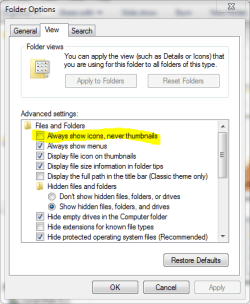
1. how do you make thumbnails in the file, where there is a little box with a generic scene?

2. how do you make a large window at the start of a program? in xp you could right click and it gave you a choice of windows if you wished..I want all windows to open in the large size
Thanks,
Kas
 

My Computer

Computer type
Laptop
Computer Manufacturer/Model Number
dell inspiron 17r n7110
OS
win 7
CPU
intel i5
Motherboard
dell
Memory
6 gig
Just learned a little trick from this forum. If a page opens less than full size, make it full size. Then click on the X, to close, while holding down the alt key. Not 100% but it is a big help.
 

My Computer

Computer type
PC/Desktop
Computer Manufacturer/Model Number
Dell XPS 420
OS
Windows 10, Home Clean Install
CPU
Intel Core2 processsor Q8200(2.33Ghz 1333FSB) Quad Core Tech
Motherboard
Dell
Memory
6 gb
Graphics Card(s)
ATI Radeon 256MB HD3650
Sound Card
Intergrated 7.1 Channel Audio
Monitor(s) Displays
Dell SP2009W 20"
Hard Drives
640 GB Serial ATA Hard drive
Cooling
Fan
Keyboard
Dell USB Keyboard
Mouse
Dell Premium Optical USB
Internet Speed
DSL 2.85
In question 1 are you speaking of icons on the desktop, or am I misunderstanding you?
 

My Computer

Computer type
PC/Desktop
Computer Manufacturer/Model Number
Self build
OS
Windows 10 Home
CPU
Intel Core i5 3550
Motherboard
ASUS P8Z77-V LX (LGA1155)
Memory
Corsair Vengeance DDR3 16GB
Graphics Card(s)
Nvidia GEForce GTX 970 SSC
Monitor(s) Displays
Hanns-G 23.6", Acer 17"
Screen Resolution
1920x1080, 1440x900
Hard Drives
Sandisk SSD 256 GB
WD500GB
WD640GB
Seagage Ultra + 1TB ext.
BWD 800GB
WD 1TB ext
PSU
Antec 650w
Case
Cooler Master Centurion 534
Cooling
COOLER MASTER GeminII S524, 3 120 mm case fans.
Keyboard
Logitech MK300
Mouse
Logitech MK300
Internet Speed
Cable
Antivirus
MSSE, Malwarebytes
Browser
IE 10, Chrome
In question 1 are you speaking of icons on the desktop, or am I misunderstanding you?

They are the icons in the file, sorry I did not make it clearer
Kas
 

My Computer

Computer type
Laptop
Computer Manufacturer/Model Number
dell inspiron 17r n7110
OS
win 7
CPU
intel i5
Motherboard
dell
Memory
6 gig
Just learned a little trick from this forum. If a page opens less than full size, make it full size. Then click on the X, to close, while holding down the alt key. Not 100% but it is a big help.
Thanks for the input...I tried the tip and it did work...where the problem happens is windows mail in the address section, when you select a contact, you cannot see the bottom of the page unless you make a full page at the top...this not a big deal I just thought there might be a way to make a full, I will have to click with my mouse at the full page icon,
Thanks again
Kas
 

My Computer

Computer type
Laptop
Computer Manufacturer/Model Number
dell inspiron 17r n7110
OS
win 7
CPU
intel i5
Motherboard
dell
Memory
6 gig
. how do you make thumbnails in the file, where there is a little box with a generic scene?

Not sure if this is what you are talking about, but this box should be unchecked for thumbnails.
 

Attachments

  • folder options.PNG
    folder options.PNG
    17 KB · Views: 5

My Computer

Computer type
PC/Desktop
Computer Manufacturer/Model Number
Self Built
OS
Win 10 Pro x64
CPU
Intel I5-2500K @3.3GHz
Motherboard
Asrock P67 Extreme4
Memory
16GB G.Skill Ripjaws X (4x4GB)
Graphics Card(s)
EVGA GeForce 750 Ti SC 2GB
Sound Card
ASUS Xonar DG 5.1 Channels 24-bit 96KHz PCI Interface Sound
Monitor(s) Displays
auria eq2367
Screen Resolution
1920 x 1080
Hard Drives
250GB Samsung 850 EVO SSD
1TB WD Blue
1TB Hitachi
PSU
SeaSonic X 650W 80 Plus Gold
Case
Corsair Obsidian 750D
Cooling
Corsair H60, Three 140mm case fans
Keyboard
Logitech Wireless Keyboard K520
Mouse
Logitech Wireless Mouse M310
Internet Speed
Wave Broadband ~ 100 dn 5 up
Antivirus
Windows Defender, Malwarebytes Premium
Browser
Edge, IE11, Chrome
Other Info
Laptop specs: HP g7-1365dx /
CPU: AMD A6-3420M APU with Radeon(tm) HD Graphics /
RAM: Crucial 8Gb (2x4Gb) /
SSD: Crucial M4-CT128M4SSD2 ATA Device/ FW 000F /
GFX: AMD Radeon HD 6520G /
OS: Windows 10 Pro x64
. how do you make thumbnails in the file, where there is a little box with a generic scene?
Not sure if this is what you are talking about, but this box should be unchecked for thumbnails.
OK that is the right one..you did good!!
Kas
 

My Computer

Computer type
Laptop
Computer Manufacturer/Model Number
dell inspiron 17r n7110
OS
win 7
CPU
intel i5
Motherboard
dell
Memory
6 gig

My Computer

Computer type
PC/Desktop
Computer Manufacturer/Model Number
Self Built
OS
Win 10 Pro x64
CPU
Intel I5-2500K @3.3GHz
Motherboard
Asrock P67 Extreme4
Memory
16GB G.Skill Ripjaws X (4x4GB)
Graphics Card(s)
EVGA GeForce 750 Ti SC 2GB
Sound Card
ASUS Xonar DG 5.1 Channels 24-bit 96KHz PCI Interface Sound
Monitor(s) Displays
auria eq2367
Screen Resolution
1920 x 1080
Hard Drives
250GB Samsung 850 EVO SSD
1TB WD Blue
1TB Hitachi
PSU
SeaSonic X 650W 80 Plus Gold
Case
Corsair Obsidian 750D
Cooling
Corsair H60, Three 140mm case fans
Keyboard
Logitech Wireless Keyboard K520
Mouse
Logitech Wireless Mouse M310
Internet Speed
Wave Broadband ~ 100 dn 5 up
Antivirus
Windows Defender, Malwarebytes Premium
Browser
Edge, IE11, Chrome
Other Info
Laptop specs: HP g7-1365dx /
CPU: AMD A6-3420M APU with Radeon(tm) HD Graphics /
RAM: Crucial 8Gb (2x4Gb) /
SSD: Crucial M4-CT128M4SSD2 ATA Device/ FW 000F /
GFX: AMD Radeon HD 6520G /
OS: Windows 10 Pro x64
Back
Top