
Thumbnails and preview messed up

Ekenryd

New member
Local time
2:45 PM
Messages
7
Hello,

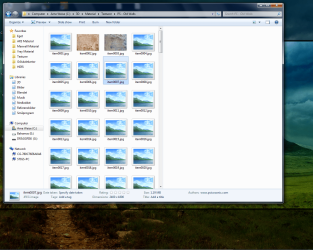
If you look at the attached picture, you see how a folder with pictures looks like when I open it. A few random thumbnails get loaded, but mostly they don´t.

I have tried running disk cleanup and deleted my thumbnail cache but it didn´t help. A few months ago I did however follow a guide which was supposed to stop windows from clearing the thumbnail cache automatically, so that one didn´t have to wait so long when opening a folder with lots of pictures. Could this be what is messing with the thumbs? I can´t remember what the guide made me change though.

Thanks for answers.
 

Attachments
  • win7thumb.png
    win7thumb.png
    228.1 KB · Views: 19

My Computer

OS
Win7
CPU
2600k
Motherboard
Asus p67 pro
Memory
8gb corsair 1333mhz
Graphics Card(s)
HIS radeon 5750
Sound Card
integrated
Monitor(s) Displays
Eizo 2333w
Screen Resolution
1920
Hard Drives
intel 320 series 120gb
samsung f3 500gb
western digital 250gb
PSU
cooler master pro 500w
Case
Antec sonata III
Cooling
noctua c12
Found the solution myself. For future reference:

go to user/xxx/appdata/local/microsoft/windows/ and right click on the folder "explorer". Go to the security tab, advanced and change permissions. Make sure that no delete/rewrite permissions are set to "deny".
 

My Computer

OS
Win7
CPU
2600k
Motherboard
Asus p67 pro
Memory
8gb corsair 1333mhz
Graphics Card(s)
HIS radeon 5750
Sound Card
integrated
Monitor(s) Displays
Eizo 2333w
Screen Resolution
1920
Hard Drives
intel 320 series 120gb
samsung f3 500gb
western digital 250gb
PSU
cooler master pro 500w
Case
Antec sonata III
Cooling
noctua c12
Hmm.. seems like an odd solution.. glad to hear that fixed it for ya though!! :D
 

My Computer

Computer Manufacturer/Model Number
Custom Built
OS
Windows 7 Ultimate
CPU
AMD Athlon II X2 245 2.90Ghz
Motherboard
Some Gigabyte one, dont remember model
Memory
3.00 GB
Graphics Card(s)
8800GTS 512MB
Sound Card
Sound Blaster X-Fi Titanium Fatal1ty
Monitor(s) Displays
Dual 22" widescreen
Hard Drives
250GB internal, 500GB internal
PSU
CORSAIR CMPSU-850TX 850W Power Supply
Case
Thermalkake Tsunami Dream
Cooling
Thermaltake Golden Orb II
Keyboard
Saitek Eclipse 2
Mouse
Logitech MX518
Thanks for returning to post your solution, Ekenryd! We appreciate you taking the time. Glad you got it fixed.

Cheers,

Walker
Windows Outreach Team
 

My Computer

Computer Manufacturer/Model Number
HP Pavilion dm3 (netbook) *** 27" iMac (Dual-Boot)
OS
Windows 7 Home Premium (64-bit) *** Windows XP SP3 (32-bit), OSX 10.6
CPU
AMD Athlon Neo X2 1.6GHz *** Intel Core i7 Quad Core 2.8GHz
Memory
4.00 GB *** 4.00 GB
Graphics Card(s)
ATI Radeon HD 3200, 384MB *** ATI Radeon HD 4850, 1GB
Sound Card
ATI High Definition Audio *** ATI High Definition Audio
Monitor(s) Displays
LG Flatron W2053TX
Screen Resolution
1600 x 900 (monitor), 1266 x 768 (laptop) *** 2560 x 1440
Hard Drives
300 GB SATA (internal), 500 GB HP SimpleSave (external) *** 1 TB SATA (internal), 160 GB LaCie (external)
Mouse
Logitech Cordless Optical Mouse for Notebooks
Internet Speed
Broadband
Back
Top