Solved Thumbnails of transparent images don't show correctly.

Aisanch

New member
Local time
10:05 PM
Messages
2
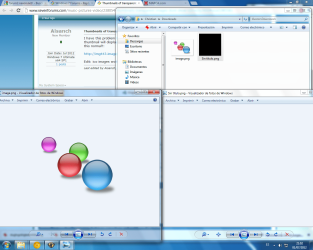
I have this problem for a few hours, If I make a completely transparent image (in photoshop for example) its thumbnail will display a black or white square, but in the picture viewer of windows images are display correctly, is this normal?:

http://img443.imageshack.us/img443/8813/blackv.jpg

Edit: ico images work correctly, but no png or gif.
 
Last edited:

My Computer My Computer

At a glance

Windows 7 Ultimate x64 SP1
OS
Windows 7 Ultimate x64 SP1
Totally transparent appear black, if it's a partial transparency it's fine I suppose it's purposely because otherwise the icon would be invisible and would be annoying
 

Attachments

  • Sin título.png
    Sin título.png
    135.6 KB · Views: 18

My Computer My Computer

At a glance

Windows 7 Ultimate 64-bit SP1Intel Celeron G5302 GB DDR3 Kingston 1333 (1066)POV Nvidia Geforce GT530
Computer Manufacturer/Model Number
Custom
OS
Windows 7 Ultimate 64-bit SP1
CPU
Intel Celeron G530
Motherboard
Gigabyte GA-H61M-S2-B3
Memory
2 GB DDR3 Kingston 1333 (1066)
Graphics Card(s)
POV Nvidia Geforce GT530
Sound Card
Onboard
Monitor(s) Displays
Samsung SyncMaster S19B150
Screen Resolution
1366x768
Hard Drives
Laptop HDD TOSHIBA MK3265GSX
PSU
Generic 500W
Cooling
Stock
Keyboard
Logitech S 510 Wireless
Mouse
IBM MO28UO
Internet Speed
30 mbps
Well..., I had not realized until now that that was normal xD , I was testing a program made for executables and making a few icons to test If they were properly displayed injected into an exe.

Ok, thanks for the help.
 

My Computer My Computer

At a glance

Windows 7 Ultimate x64 SP1
OS
Windows 7 Ultimate x64 SP1
Back
Top