Thumbnails only for files

koocho

New member
Local time
7:54 PM
Messages
7
Hi,

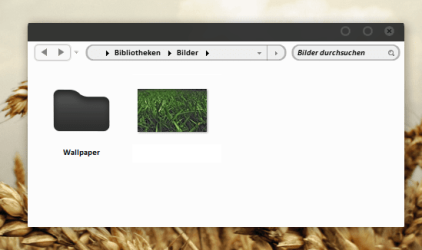
I would like to know if there is a way to show thumbnails only for a few filetypes (e.g. jpeg, avi) but symbols for folders? In best case it should look like in the window in the attachment... any chance?

greets, koocho
 

Attachments

  • anfmc9.png
    anfmc9.png
    28.8 KB · Views: 28

My Computer

OS
Professional x64
You can try this maybe?

IconPackager

It will take some time to fully configure all the icons.
There is no easy one click solution.
 

My Computer

Computer Manufacturer/Model Number
Self Built
OS
Win 7 Ultimate 32bit
CPU
C2D E6600 2.4Ghz
Motherboard
Intel D965WH
Memory
4G Kingston KHX5400D2
Graphics Card(s)
EVGA GTX 570 HD SC (012-P3-1573-KR)
Sound Card
On-Board
Monitor(s) Displays
Samsung 226BW
Screen Resolution
1680 x 1050
Hard Drives
2 x 250 Seagate Barracuda
2 x 500 Seagate Barracuda (Raid1)
PSU
Corsair TX750W
Case
In-Win C589
Cooling
Stock Intel Cooling
I have been wanting to view my psp, pspimage, and .png files and am unable to do that with Windows 7. XP gave me that feature via a utility called Thumbnail Handler. It won't work on Win7, and I've not found a thumbnail handler that will. I hope they get this feature back soon where one can view more than just .jpgs and .gifs.
 

My Computer

Computer Manufacturer/Model Number
Dell Intel Core 2 Duo Processor E7500 Computer
OS
Windows 7
Memory
6GB
I'm not sure how the IconPackager should help me with that Problem. It's only a tool that change the icons that I already did ;) But it can't handle with the library icons, so I changed the icons in imageres.dll manually...

Once again - folders should be shown as a symbol, pictures or videos as a thumbnail - but I think this won't be possible :-/

Thanks anyway, perhaps someone has another idea? :)

EDIT: The window in the attachment IS a shot of my system, just inserted a thumbnail in the picture so that it is easier to understand what I mean ;)
 

My Computer

OS
Professional x64
Back
Top
