
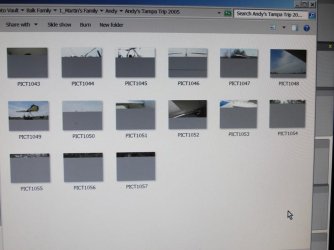
Thumbnails partially showing.

albortz

New member
Local time
7:09 PM
Messages
10
When I download pictures at times it appears that a shade is over part of the picture. I can correct it by rotating the picture. Here is a sample:


I have tried cleaning the thumbnail cache.
 

Attachments
  • thumbnails.jpg
    thumbnails.jpg
    50.4 KB · Views: 5
Last edited:

My Computer

Computer Manufacturer/Model Number
ZT Costco
OS
Windows 7 64bit
Memory
6 gb
Monitor(s) Displays
ViewSonic
Internet Speed
Cable

My Computer

Computer type
PC/Desktop
Computer Manufacturer/Model Number
Lenovo IdeaCenter 450
OS
Windows 10 Pro X64
CPU
Intel Quad Core i7-4770 @ 3.4Ghz
Memory
16.0GB PC3-12800 DDR3 SDRAM 1600 MHz
Graphics Card(s)
Intel Integrated HD Graphics
Sound Card
Realtek HD Audio
Monitor(s) Displays
HP 22" LCD
Screen Resolution
1680 x 1050
Hard Drives
250GB Samsung EVO SATA-3 SSD
2TB Seagate ST2000DM001 SATA-2
1.5TB Seagate ST3150041AS SATA
Keyboard
Dell USB
Mouse
Lenovo USB
Internet Speed
Cable via Road Runner 3MB Upload, 30MB Download
Antivirus
Windows Defender, MBAM Pro, MBAE
Browser
Seamonkey
Other Info
UEFI/GPT
PLDS DVD-RW DH16AERSH
Those look like in-camera corrupted files, not much you can do about :( .

If you still have them in the camera's memory card try and import them again!
 

My Computer

Computer type
PC/Desktop
OS
Windows 10
CPU
Intel Core i5 3570K
Motherboard
Asus P8Z77V-PRO
Memory
16GB 1600Mhz G.Skill
Graphics Card(s)
Gigabyte GTX 970 G1-Gaming
PSU
Seasonic 1000W Platinum
Case
Fractal Design Define R4
Cooling
Noctua NH-D14
Back
Top