- Local time
- 12:10 AM
- Messages
- 892
I am using Thunderbird now.
I have my account settings printed out from screen shots on my current install.
The install I'm attempting to do is 52.9.1 so I can use Mozbackup to retrieve the config.
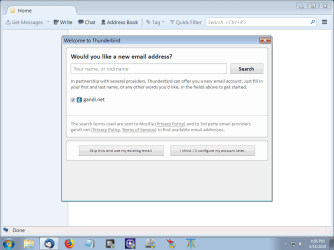
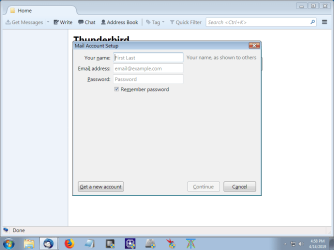
None of this is working. I run the installer. It presents a new account screen. Then when I enter my info for the ISP it goes nowhere. I'll see if I can screen shot it.
New account or present account, I can't get past this. I can't even explain it any better.
So from the Thunderbird .exe installer (and I looked at Mozilla but can never understand anything there) what should come next?
What I'm not seeing is the normal Inbox and such for the Tbird presentation screen at which you select Account settings from the top menu.
I have my account settings printed out from screen shots on my current install.
The install I'm attempting to do is 52.9.1 so I can use Mozbackup to retrieve the config.
None of this is working. I run the installer. It presents a new account screen. Then when I enter my info for the ISP it goes nowhere. I'll see if I can screen shot it.
New account or present account, I can't get past this. I can't even explain it any better.
So from the Thunderbird .exe installer (and I looked at Mozilla but can never understand anything there) what should come next?
What I'm not seeing is the normal Inbox and such for the Tbird presentation screen at which you select Account settings from the top menu.
My Computer
At a glance
Windows 7 x64 UltimateAMD Athlon II x3 4502 GB
- Computer type
- PC/Desktop
- Computer Manufacturer/Model Number
- custom
- OS
- Windows 7 x64 Ultimate
- CPU
- AMD Athlon II x3 450
- Motherboard
- MSI 880GM
- Memory
- 2 GB
- Hard Drives
- various
- Browser
- Firefox, Opera