Solved Time for Windows to be fully functional has slowed

markaz

New member
Power User
VIP
Local time
2:25 AM
Messages
168
Location
Peoria, AZ
I've read a good majority of threads here about slow boot times and slow startup times. Not really sure how to describe what I'm wanting to address other than to describe what's happening.

When restarting I'm pretty satisfied with the time it takes for get through the Welcome screen. It's when the Desktop first appears until Windows is usable that just recently has started taking a good deal of time. The barometer I use is the time it takes from when the Desktop first appears until the context menu opens after right clicking the Desktop, for Security Essentials to become active and the internet connection is made. This now takes upwards of 5 minutes whereas historically took a minute or two at the most.

Is there something, like msconfig details, that I can post that would help with this? Thanks.
 

My Computer My Computer

Computer type
PC/Desktop
Computer Manufacturer/Model Number
Custom
OS
Windows 7 Home Premium x64
CPU
AMD A6-6400K APU
Motherboard
Gigabyte F2A88XM-D3H
Memory
8.0GB DDR3-1600
Graphics Card(s)
Radeon Onboard Graphics
Sound Card
Realtek High Def
Monitor(s) Displays
Acer K242HQL
Screen Resolution
1920x1080
Hard Drives
Samsung 850 EVO SSD 250GB
PSU
Corsair 430W
Case
Silverstone PS-08
Cooling
Enermax fans (120mm-intake, 80mm-exhaust)
Keyboard
Logitech K360
Mouse
Logitech M305 Cordless Optical
Internet Speed
Download 60.19Mbps Upload 6.71Mbps
Antivirus
AVG
Browser
Iron Version 51.0.2700.0 (64-bit)
Last edited:
Establish a completely clean boot by unchecking everything except for MSE in msconfig>Startup and >Services after Hiding all MS Services.

Cull the logs for clues and utilize System resources to check for problems as shown in Troubleshooting Windows 7.

Install Soluto to see a graphical map of your startup, follow suggestions given.
Thanks for the reply, gregrocker. Followed your guidelines and now Windows does start much faster than before. From the time the Desktop appears after restart until there's an internet connection and MSE being active is now around 30 seconds. There are a few hiccups now (especially with the keyboard doing some funcky things) but I can enable those Startup times that affect things like that.


The only "disappoint" is Soluto. Looks like it provides some great info, just don't know how to get things like startup speeds and apps causing any slowdown to work properly. Get the message that Saluto is identifying the files used in Startup but never show results during the data mining. Where's there a good tutorial or instruction on how to get Soluto to perform as it should so that I can utilize its diagnostic knowledge on using Soluto properly?
 

My Computer My Computer

Computer type
PC/Desktop
Computer Manufacturer/Model Number
Custom
OS
Windows 7 Home Premium x64
CPU
AMD A6-6400K APU
Motherboard
Gigabyte F2A88XM-D3H
Memory
8.0GB DDR3-1600
Graphics Card(s)
Radeon Onboard Graphics
Sound Card
Realtek High Def
Monitor(s) Displays
Acer K242HQL
Screen Resolution
1920x1080
Hard Drives
Samsung 850 EVO SSD 250GB
PSU
Corsair 430W
Case
Silverstone PS-08
Cooling
Enermax fans (120mm-intake, 80mm-exhaust)
Keyboard
Logitech K360
Mouse
Logitech M305 Cordless Optical
Internet Speed
Download 60.19Mbps Upload 6.71Mbps
Antivirus
AVG
Browser
Iron Version 51.0.2700.0 (64-bit)
which of the following do I have to re-enable to get the keyboard to function properly again?
config.jpg
 

My Computer My Computer

Computer type
PC/Desktop
Computer Manufacturer/Model Number
Custom
OS
Windows 7 Home Premium x64
CPU
AMD A6-6400K APU
Motherboard
Gigabyte F2A88XM-D3H
Memory
8.0GB DDR3-1600
Graphics Card(s)
Radeon Onboard Graphics
Sound Card
Realtek High Def
Monitor(s) Displays
Acer K242HQL
Screen Resolution
1920x1080
Hard Drives
Samsung 850 EVO SSD 250GB
PSU
Corsair 430W
Case
Silverstone PS-08
Cooling
Enermax fans (120mm-intake, 80mm-exhaust)
Keyboard
Logitech K360
Mouse
Logitech M305 Cordless Optical
Internet Speed
Download 60.19Mbps Upload 6.71Mbps
Antivirus
AVG
Browser
Iron Version 51.0.2700.0 (64-bit)
And here's Soluto gavthering info about the boot/startup. Am I supposed to see a graphical representation of the info gathered? As soon as you can point me in the right direction on how to maximize usage of Soluto I'll mark this thread as solved.
Untitled.jpg
 

My Computer My Computer

Computer type
PC/Desktop
Computer Manufacturer/Model Number
Custom
OS
Windows 7 Home Premium x64
CPU
AMD A6-6400K APU
Motherboard
Gigabyte F2A88XM-D3H
Memory
8.0GB DDR3-1600
Graphics Card(s)
Radeon Onboard Graphics
Sound Card
Realtek High Def
Monitor(s) Displays
Acer K242HQL
Screen Resolution
1920x1080
Hard Drives
Samsung 850 EVO SSD 250GB
PSU
Corsair 430W
Case
Silverstone PS-08
Cooling
Enermax fans (120mm-intake, 80mm-exhaust)
Keyboard
Logitech K360
Mouse
Logitech M305 Cordless Optical
Internet Speed
Download 60.19Mbps Upload 6.71Mbps
Antivirus
AVG
Browser
Iron Version 51.0.2700.0 (64-bit)
Where are the rest of the listings in msconfig? I don't see anything there that you'd need except AVG, although I would not use AVG which bloated up several years ago and never slimmed back down and hence has never been recommended here. The recommendations are in http://www.sevenforums.com/tutorials/220165-troubleshooting-steps-windows-7-a.html

A keyboard should never depend upon a startup program, only its driver. Logitech Setpoint which comes with such devices is bloatware that isn't needed. However if you have a wireless keyboard it may need a wireless utility which cannot be seen there in the cut-off list you provided. We would need to see everything on both Startup and Services tabs. Try the Logitech but it's most likely another wireless listing. I would also try a standard keyboard and mouse to see if it speeds your boot.

As to Soluto click on it's icon in System Tray and it will open a webpage that shows your PC. Click on that PC icon to see a complete Startup audit with each item explained when you highlight it. You'll be given the choice on some items to Disable or Delay them. If you delay them then check in services.msc to make sure it item shows the delay there in case you decide to uninstall Soluto. I don't recommend it for any more than periodic tracing of startup delays since it can itself add to startup delay. Soluto to remove unnecessary apps from the boot : Soluto Support https://support.soluto.com/entries/20769417-How-do-I-remove-unnecessary-apps-from-the-boot
 
Last edited:
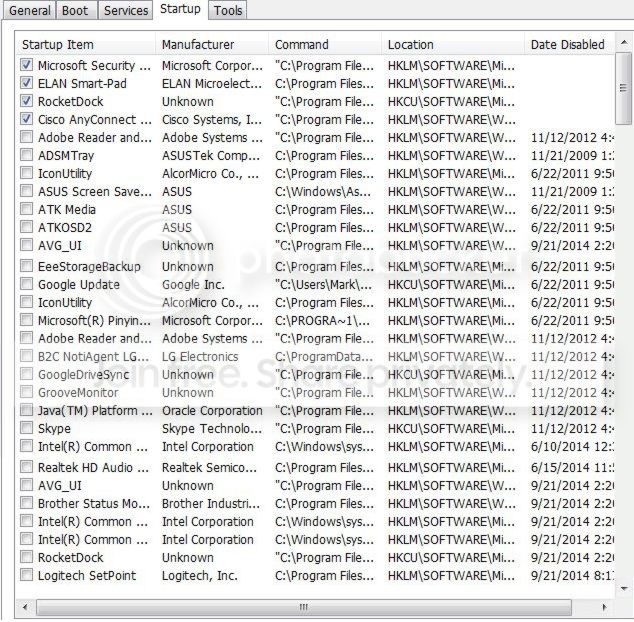
gregrocker - Sorry for late reply. I'm having an issue with Soluto and believe it's because of the unsupported browser that I use. Until I get that worked out here the rest of the Startup items that you requested. Of not, the entry Rocketdock was unchecked along with others, but upon restart it automatically enable itself. You can see down on the list where is was disabled on 9/21 but re-enabled itself.I really don't want to uninstall it because to set it up again would be quite a lengthy process. The Cisco entry I'm leaving alone as it is critical to my home-based business and cannot afford a single foul up. Anyway, here the rest of the Startup items:
config-1.jpg

FYI: it is my intention to uninstall AVG. Far too much size and resource use when MSE works beautifully.
 
Last edited:

My Computer My Computer

Computer type
PC/Desktop
Computer Manufacturer/Model Number
Custom
OS
Windows 7 Home Premium x64
CPU
AMD A6-6400K APU
Motherboard
Gigabyte F2A88XM-D3H
Memory
8.0GB DDR3-1600
Graphics Card(s)
Radeon Onboard Graphics
Sound Card
Realtek High Def
Monitor(s) Displays
Acer K242HQL
Screen Resolution
1920x1080
Hard Drives
Samsung 850 EVO SSD 250GB
PSU
Corsair 430W
Case
Silverstone PS-08
Cooling
Enermax fans (120mm-intake, 80mm-exhaust)
Keyboard
Logitech K360
Mouse
Logitech M305 Cordless Optical
Internet Speed
Download 60.19Mbps Upload 6.71Mbps
Antivirus
AVG
Browser
Iron Version 51.0.2700.0 (64-bit)
I'd uninstall AVG now googling for its removal tool to get it cleanest.

How is the Cisco important? They never are. Win7 manages wireless perfectly and needs no assist. Router software is absolutely not needed and the perfect example of duplicating and interfering with a better feature built into Win7.

What about the Services tab? Many freeloaders lounge there
 
I really apologize for replying so late. Biggest issue is turning out to be the browser version I'm using is unsupported and Soluto won't generate the startup numbers you're wanting to see. Working on that issue right now.

I did uninstall AVG. Don't know why I had it to begin with as I use MSE.

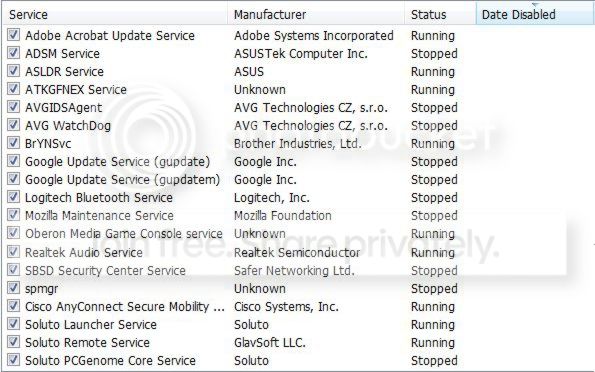
Here's the Services you asked about with all of the Microsoft services hidden. The number of those entries is extremely large. If you want to see that as well I'll put it together. The Cisco entry has to do with the VPN I connect to for work. I've never tried launching the VPN without it being a startup item, but I could.

services.jpg
 

My Computer My Computer

Computer type
PC/Desktop
Computer Manufacturer/Model Number
Custom
OS
Windows 7 Home Premium x64
CPU
AMD A6-6400K APU
Motherboard
Gigabyte F2A88XM-D3H
Memory
8.0GB DDR3-1600
Graphics Card(s)
Radeon Onboard Graphics
Sound Card
Realtek High Def
Monitor(s) Displays
Acer K242HQL
Screen Resolution
1920x1080
Hard Drives
Samsung 850 EVO SSD 250GB
PSU
Corsair 430W
Case
Silverstone PS-08
Cooling
Enermax fans (120mm-intake, 80mm-exhaust)
Keyboard
Logitech K360
Mouse
Logitech M305 Cordless Optical
Internet Speed
Download 60.19Mbps Upload 6.71Mbps
Antivirus
AVG
Browser
Iron Version 51.0.2700.0 (64-bit)
Uncheck them all except for any MSE listing, then check performance and whether anything you need is missing. Probably not. Nothing really needs to start with Windows except your AV, any sync, or gadgets in either msconfig>Startup or >Services. All the rest are freeloaders that sneak in mainly as "Updaters" to spy on you.
 
What can I say gregrocker except THANKS!! From the Desktop appearing until everything was loaded and ready to go was no more than 10 seconds after disabling all those Services.
 

My Computer My Computer

Computer type
PC/Desktop
Computer Manufacturer/Model Number
Custom
OS
Windows 7 Home Premium x64
CPU
AMD A6-6400K APU
Motherboard
Gigabyte F2A88XM-D3H
Memory
8.0GB DDR3-1600
Graphics Card(s)
Radeon Onboard Graphics
Sound Card
Realtek High Def
Monitor(s) Displays
Acer K242HQL
Screen Resolution
1920x1080
Hard Drives
Samsung 850 EVO SSD 250GB
PSU
Corsair 430W
Case
Silverstone PS-08
Cooling
Enermax fans (120mm-intake, 80mm-exhaust)
Keyboard
Logitech K360
Mouse
Logitech M305 Cordless Optical
Internet Speed
Download 60.19Mbps Upload 6.71Mbps
Antivirus
AVG
Browser
Iron Version 51.0.2700.0 (64-bit)
Back
Top