Time Format - Change

How to Change Time Format in Windows 7

   Information
This tutorial will show you how to change the regional time format to how you want it to display in Windows 7.


Here's How: 1. Open the Control Panel (icons view), and click on the Region and Language (Windows 7) or Region (Windows 8) icon.


2. Under the Formats tab, select the format regional language that you want to use. (See screenshot below step 3)

3. Change the time formats to how you want them displayed, and click/tap on the Apply button. (See screenshot below)
NOTE: This will be for how the Short time and Long time will be displayed as. Time_Format-1.jpg
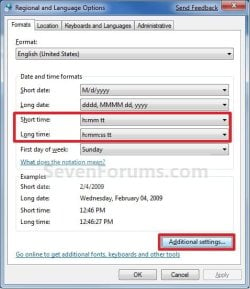
4. Click/tap on the Additional Settings button. (See screenshot above)
NOTE: This will allow you to further customize the time format.

5. Click/tap on the Time tab, and change the time formats to how you want them displayed. (See screenshot below) Time_Format-2.jpg
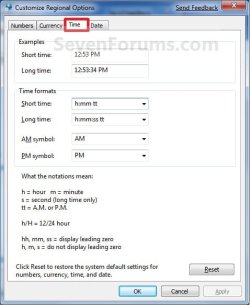
6. When finished, click/tap on OK. (See screenshot above)

7. Click/tap on OK. (See screenshot below step 4)

That's it,
Shawn


Last edited:
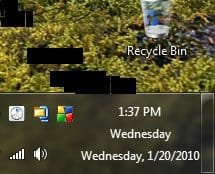
If I include a day of week in long and short formats, and have my taskbar heightened to three rows, the day of week displays twice like so:

12:20pm
Wednesday
Wednesday, 1/20/2010

Here are my short format settings:
dddd, M/d/yyyy

Here are my long format settings:
dddd, M/d/yyyy

I have the both the same due to my email program needing them that way to display the day of week for all messages.

My question is where does the middle day of week (Wednesday, as seen above under 12:20pm) come from?
 

My Computer

OS
7
Nello Nezi, and welcome to Seven Forums.

Set your "Short date" to M/d/yyyy to see if that helps instead. :)
 

My Computer

Computer type
PC/Desktop
Computer Manufacturer/Model Number
Self built custom
OS
64-bit Windows 11 Pro for Workstations
CPU
Intel i7-8700K OC'd to 5 GHz
Motherboard
ASUS ROG Maximus XI Formula Z390
Memory
64 GB (4x16GB) G.SKILL TridentZ RGB DDR4 3600 MHz
Graphics Card(s)
ASUS ROG-STRIX-GTX1080TI-O11G-GAMING
Sound Card
Integrated
Monitor(s) Displays
2 x Samsung Odyssey G7 27"
Screen Resolution
2560x1440
Hard Drives
1TB Samsung 990 PRO M.2,
4TB Samsung 990 PRO PRO M.2,
TerraMaster F8 SSD Plus NAS
PSU
Seasonic Prime Titanium 850W
Case
Thermaltake Core P3
Cooling
Corsair Hydro H115i
Keyboard
Logitech wireless K800
Mouse
Logitech MX Master 4
Internet Speed
2 Gb/s Download and 100 Mb/s Upload
Antivirus
Malwarebyte Anti-Malware Premium
Browser
Google Chrome
Other Info
Logitech Z625 speaker system,
Logitech BRIO 4K Pro webcam,
HP Color LaserJet Pro MFP M477fdn,
APC SMART-UPS RT 1000 XL - SURT1000XLI,
Galaxy S23 Plus phone
That will fix the windows double day display issue but will throw off my thunderbird date format. Do you know where to change the 'middle' day of the week displayed in the windows date and time? See attached image.
 

Attachments

  • Image1.jpg
    Image1.jpg
    10.2 KB · Views: 65,483

My Computer

OS
7
Nezi,

Other than shrinking the height of the taskbar back down until the middle day is no longer displayed, I'm not sure how you can. :(
 

My Computer

Computer type
PC/Desktop
Computer Manufacturer/Model Number
Self built custom
OS
64-bit Windows 11 Pro for Workstations
CPU
Intel i7-8700K OC'd to 5 GHz
Motherboard
ASUS ROG Maximus XI Formula Z390
Memory
64 GB (4x16GB) G.SKILL TridentZ RGB DDR4 3600 MHz
Graphics Card(s)
ASUS ROG-STRIX-GTX1080TI-O11G-GAMING
Sound Card
Integrated
Monitor(s) Displays
2 x Samsung Odyssey G7 27"
Screen Resolution
2560x1440
Hard Drives
1TB Samsung 990 PRO M.2,
4TB Samsung 990 PRO PRO M.2,
TerraMaster F8 SSD Plus NAS
PSU
Seasonic Prime Titanium 850W
Case
Thermaltake Core P3
Cooling
Corsair Hydro H115i
Keyboard
Logitech wireless K800
Mouse
Logitech MX Master 4
Internet Speed
2 Gb/s Download and 100 Mb/s Upload
Antivirus
Malwarebyte Anti-Malware Premium
Browser
Google Chrome
Other Info
Logitech Z625 speaker system,
Logitech BRIO 4K Pro webcam,
HP Color LaserJet Pro MFP M477fdn,
APC SMART-UPS RT 1000 XL - SURT1000XLI,
Galaxy S23 Plus phone
Thanks for that, my machine decided that it would rather use the US time date format, which was annoying

thanks for the quick fix
 

My Computer

Computer type
PC/Desktop
Computer Manufacturer/Model Number
Custom
OS
Windows 7 Professional 64bit
CPU
Intel i7 920 OC 3.8ghz
Motherboard
Asus P6T
Memory
20gb Kingston DDR3
Graphics Card(s)
Gtx 460 1gb x2 SLI
Sound Card
Realtek HD audio inbuilt 7.1 surround
Monitor(s) Displays
SyncMaster 2333
Screen Resolution
1920*1080
Hard Drives
Seagate es2 barracuda 1TB,
Kingston 128gb SSD,
3 WD 2TB green drives ,
PSU
1200 watt
Cooling
Trition 81
You're most welcome thepower99. :)
 

My Computer

Computer type
PC/Desktop
Computer Manufacturer/Model Number
Self built custom
OS
64-bit Windows 11 Pro for Workstations
CPU
Intel i7-8700K OC'd to 5 GHz
Motherboard
ASUS ROG Maximus XI Formula Z390
Memory
64 GB (4x16GB) G.SKILL TridentZ RGB DDR4 3600 MHz
Graphics Card(s)
ASUS ROG-STRIX-GTX1080TI-O11G-GAMING
Sound Card
Integrated
Monitor(s) Displays
2 x Samsung Odyssey G7 27"
Screen Resolution
2560x1440
Hard Drives
1TB Samsung 990 PRO M.2,
4TB Samsung 990 PRO PRO M.2,
TerraMaster F8 SSD Plus NAS
PSU
Seasonic Prime Titanium 850W
Case
Thermaltake Core P3
Cooling
Corsair Hydro H115i
Keyboard
Logitech wireless K800
Mouse
Logitech MX Master 4
Internet Speed
2 Gb/s Download and 100 Mb/s Upload
Antivirus
Malwarebyte Anti-Malware Premium
Browser
Google Chrome
Other Info
Logitech Z625 speaker system,
Logitech BRIO 4K Pro webcam,
HP Color LaserJet Pro MFP M477fdn,
APC SMART-UPS RT 1000 XL - SURT1000XLI,
Galaxy S23 Plus phone
Back
Top