
Solved Tips Display Capture

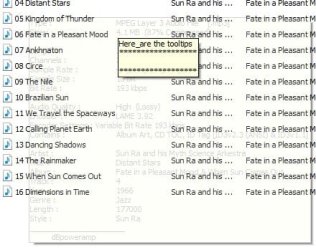
I am not sure why the image is "ghosted" you probably have an "aero" them of some sort installed.

Can you capture it OK? Do you get the PicPickmenu?
 

My Computer

OS
Several, including Windows 7 x64 Ultimate
... also that little tooltips window is following my cursor whereever I go. How do I turn it off?

You now have two green "H" icons in the tray. Right click on the second one, and you get an option menu.
I r/clk and chose Exit. All normal now (and I assume the pgm is no longer running).
 

My Computer

Computer type
PC/Desktop
Computer Manufacturer/Model Number
HP (HP-P6212F)
OS
Microsoft Windows 7 Home Premium 64-bit 7601 Multiprocessor Free Service Pack 1
CPU
Pentium(R) Dual-Core CPU E5300 @ 2.60GHz
Motherboard
PEGATRON CORPORATION Benicia
Memory
6.00 GB
Graphics Card(s)
Intel(R) G33/G31 Express Chipset Family
Sound Card
Realtek High Definition Audio
Monitor(s) Displays
24'' HP WS LCD
Screen Resolution
1920 x 1080 x 32 bits (4294967296 colors) @ 60 Hz
Hard Drives
(1) ATA Hitachi HDT72106 SCSI Disk Device (2) Generic- Compact Flash USB Device (3) Generic- MS/MS-Pro USB Device (4) Generic- SD/MMC USB Device (5) Generic- SM/xD-Picture USB Device (6) Verbatim STORE N GO USB Device
Keyboard
Logitech G510s
Mouse
Logitech Trackball M570
Antivirus
Microsoft Security Essentials / Malwarebytes
Browser
IE / Firefox / Chrome
The script is no longer running, but if you still have a green "H" in the tray, then autohotkey is still running, if you right click on that you will also get an option menu.

Congratulations! You just ran your first script, You could now compile it and you have a stand alone executable program.

This is a very very powerful scripting and programming language. There is practically nothing you can't do with it.

That was only a small demo. Have a look at the autohotkey forums to see what you can do. You can also use the scripts and snippets of scripts from there.

I will still work on adjusting that script so that it captures the tool tip to the clipboard and of course without the little window following the cursor around.

Hope you enjoyed it! :)

Regards....Mike Connor
 

My Computer

OS
Several, including Windows 7 x64 Ultimate
I am not sure why the image is "ghosted" you probably have an "aero" them of some sort installed.

Can you capture it OK? Do you get the PicPickmenu?
What is aero them?

The tool tip display is ok until i do the shift/PrntScrn, that's when it ghosts. yes I draw the rectangle around the desired area and then the PicPick editor appears with my captured image.
 

My Computer

Computer type
PC/Desktop
Computer Manufacturer/Model Number
HP (HP-P6212F)
OS
Microsoft Windows 7 Home Premium 64-bit 7601 Multiprocessor Free Service Pack 1
CPU
Pentium(R) Dual-Core CPU E5300 @ 2.60GHz
Motherboard
PEGATRON CORPORATION Benicia
Memory
6.00 GB
Graphics Card(s)
Intel(R) G33/G31 Express Chipset Family
Sound Card
Realtek High Definition Audio
Monitor(s) Displays
24'' HP WS LCD
Screen Resolution
1920 x 1080 x 32 bits (4294967296 colors) @ 60 Hz
Hard Drives
(1) ATA Hitachi HDT72106 SCSI Disk Device (2) Generic- Compact Flash USB Device (3) Generic- MS/MS-Pro USB Device (4) Generic- SD/MMC USB Device (5) Generic- SM/xD-Picture USB Device (6) Verbatim STORE N GO USB Device
Keyboard
Logitech G510s
Mouse
Logitech Trackball M570
Antivirus
Microsoft Security Essentials / Malwarebytes
Browser
IE / Firefox / Chrome
... You could now compile it and you have a stand alone executable program. ...
Don't know what this means (or how to do this).

Thnx 4 staying w/me so far Mike.
 

My Computer

Computer type
PC/Desktop
Computer Manufacturer/Model Number
HP (HP-P6212F)
OS
Microsoft Windows 7 Home Premium 64-bit 7601 Multiprocessor Free Service Pack 1
CPU
Pentium(R) Dual-Core CPU E5300 @ 2.60GHz
Motherboard
PEGATRON CORPORATION Benicia
Memory
6.00 GB
Graphics Card(s)
Intel(R) G33/G31 Express Chipset Family
Sound Card
Realtek High Definition Audio
Monitor(s) Displays
24'' HP WS LCD
Screen Resolution
1920 x 1080 x 32 bits (4294967296 colors) @ 60 Hz
Hard Drives
(1) ATA Hitachi HDT72106 SCSI Disk Device (2) Generic- Compact Flash USB Device (3) Generic- MS/MS-Pro USB Device (4) Generic- SD/MMC USB Device (5) Generic- SM/xD-Picture USB Device (6) Verbatim STORE N GO USB Device
Keyboard
Logitech G510s
Mouse
Logitech Trackball M570
Antivirus
Microsoft Security Essentials / Malwarebytes
Browser
IE / Firefox / Chrome
There are "themes" in Windows 7, which control how the screen looks etc. Some of them are "aero" themes which use a lot of transparency and other tricks;


You can click on a theme and it will change your whole system to the theme displayed.

You can also customize your theme and save it.

You can get to that screen in a number of ways, but the easiest is just to <Right-Click> on your desktop and choose "Personalise".

Regards....Mike Connor
 

My Computer

OS
Several, including Windows 7 x64 Ultimate
... You could now compile it and you have a stand alone executable program. ...
Don't know what this means (or how to do this).

Thnx 4 staying w/me so far Mike.

It's just the same things you did up to now, but instead of choosing "Run Script" from the menu, you choose "Compile Script", and the script is turned into a stand alone executable program that will run without autohotkey having to be installed.

Regards....Mike Connor
 

My Computer

OS
Several, including Windows 7 x64 Ultimate
It's just the same things you did up to now, but instead of choosing "Run Script" from the menu, you choose "Compile Script", and the script is turned into a stand alone executable program that will run without autohotkey having to be installed.
Oh, like those .exe files that start various applications. Got it.
 

My Computer

Computer type
PC/Desktop
Computer Manufacturer/Model Number
HP (HP-P6212F)
OS
Microsoft Windows 7 Home Premium 64-bit 7601 Multiprocessor Free Service Pack 1
CPU
Pentium(R) Dual-Core CPU E5300 @ 2.60GHz
Motherboard
PEGATRON CORPORATION Benicia
Memory
6.00 GB
Graphics Card(s)
Intel(R) G33/G31 Express Chipset Family
Sound Card
Realtek High Definition Audio
Monitor(s) Displays
24'' HP WS LCD
Screen Resolution
1920 x 1080 x 32 bits (4294967296 colors) @ 60 Hz
Hard Drives
(1) ATA Hitachi HDT72106 SCSI Disk Device (2) Generic- Compact Flash USB Device (3) Generic- MS/MS-Pro USB Device (4) Generic- SD/MMC USB Device (5) Generic- SM/xD-Picture USB Device (6) Verbatim STORE N GO USB Device
Keyboard
Logitech G510s
Mouse
Logitech Trackball M570
Antivirus
Microsoft Security Essentials / Malwarebytes
Browser
IE / Firefox / Chrome
Good. Happy scripting! :)

Regards....Mike Connor
 

My Computer

OS
Several, including Windows 7 x64 Ultimate
There are "themes" in Windows 7, which control how the screen looks etc. Some of them are "aero" themes which use a lot of transparency and other tricks; ...
OK - well, I don't know what 'theme' is being used. When i got this computer I 'set as desktop background' a photo I had, so whatever 'theme' was the default may still be under that image. In any case, it's a shame if something like this renders all our efforts nil. That ghosting is totally unacceptable.
 

My Computer

Computer type
PC/Desktop
Computer Manufacturer/Model Number
HP (HP-P6212F)
OS
Microsoft Windows 7 Home Premium 64-bit 7601 Multiprocessor Free Service Pack 1
CPU
Pentium(R) Dual-Core CPU E5300 @ 2.60GHz
Motherboard
PEGATRON CORPORATION Benicia
Memory
6.00 GB
Graphics Card(s)
Intel(R) G33/G31 Express Chipset Family
Sound Card
Realtek High Definition Audio
Monitor(s) Displays
24'' HP WS LCD
Screen Resolution
1920 x 1080 x 32 bits (4294967296 colors) @ 60 Hz
Hard Drives
(1) ATA Hitachi HDT72106 SCSI Disk Device (2) Generic- Compact Flash USB Device (3) Generic- MS/MS-Pro USB Device (4) Generic- SD/MMC USB Device (5) Generic- SM/xD-Picture USB Device (6) Verbatim STORE N GO USB Device
Keyboard
Logitech G510s
Mouse
Logitech Trackball M570
Antivirus
Microsoft Security Essentials / Malwarebytes
Browser
IE / Firefox / Chrome
No problem, just <Right-Click> on your desktop choose "personalise", and then click on "Windows Classic"

This will set your whole system up automatically in the "Classic" windows style.

You can still use a picture as a background on your desktop if you want. That doesn't affect anything else.

Regards....Mike Connor
 

My Computer

OS
Several, including Windows 7 x64 Ultimate
"Houston, we have a problem."

well Mike, I still have that ghost image problem. I switched the theme to Windows Classic, no go. I even re-booted the computer so it would come up fresh in that Windows Classic mode and ran the script again. No change (image attached).

p.s. I hate the classic theme, has me feeling like I've gone back in time, like the stone age. yuk!

oh well, ... thnx anyways for all the help, you've been super.

cheers, -Marcos
 

Attachments

  • Image 2.jpg
    Image 2.jpg
    32.1 KB · Views: 4

My Computer

Computer type
PC/Desktop
Computer Manufacturer/Model Number
HP (HP-P6212F)
OS
Microsoft Windows 7 Home Premium 64-bit 7601 Multiprocessor Free Service Pack 1
CPU
Pentium(R) Dual-Core CPU E5300 @ 2.60GHz
Motherboard
PEGATRON CORPORATION Benicia
Memory
6.00 GB
Graphics Card(s)
Intel(R) G33/G31 Express Chipset Family
Sound Card
Realtek High Definition Audio
Monitor(s) Displays
24'' HP WS LCD
Screen Resolution
1920 x 1080 x 32 bits (4294967296 colors) @ 60 Hz
Hard Drives
(1) ATA Hitachi HDT72106 SCSI Disk Device (2) Generic- Compact Flash USB Device (3) Generic- MS/MS-Pro USB Device (4) Generic- SD/MMC USB Device (5) Generic- SM/xD-Picture USB Device (6) Verbatim STORE N GO USB Device
Keyboard
Logitech G510s
Mouse
Logitech Trackball M570
Antivirus
Microsoft Security Essentials / Malwarebytes
Browser
IE / Firefox / Chrome
That's a bit odd. No idea why it should "ghost" like that.

You can choose any theme you like! :) I just thought the classic theme would be less likely to cause problems.

My pleasure.

Regards....Mike Connor
 

My Computer

OS
Several, including Windows 7 x64 Ultimate
"Houston, problem resolved!"

Being that one of my mantras is "never say die", I have discovered the cause of my ghost imaging. Your initial instructions require a slight modification. The solution, for me at least, is the step when pressing shift/print-screen, DO NOT release. These keys must remain depressed as the mouse is used to mark the area of capture.

p.s. Mike, looking forward to that additional code - thnx again.

Happy New Year All!
 

My Computer

Computer type
PC/Desktop
Computer Manufacturer/Model Number
HP (HP-P6212F)
OS
Microsoft Windows 7 Home Premium 64-bit 7601 Multiprocessor Free Service Pack 1
CPU
Pentium(R) Dual-Core CPU E5300 @ 2.60GHz
Motherboard
PEGATRON CORPORATION Benicia
Memory
6.00 GB
Graphics Card(s)
Intel(R) G33/G31 Express Chipset Family
Sound Card
Realtek High Definition Audio
Monitor(s) Displays
24'' HP WS LCD
Screen Resolution
1920 x 1080 x 32 bits (4294967296 colors) @ 60 Hz
Hard Drives
(1) ATA Hitachi HDT72106 SCSI Disk Device (2) Generic- Compact Flash USB Device (3) Generic- MS/MS-Pro USB Device (4) Generic- SD/MMC USB Device (5) Generic- SM/xD-Picture USB Device (6) Verbatim STORE N GO USB Device
Keyboard
Logitech G510s
Mouse
Logitech Trackball M570
Antivirus
Microsoft Security Essentials / Malwarebytes
Browser
IE / Firefox / Chrome
Ooops! Mine works automatically without having to hold the keys.

Glad to hear you got it going.

Regards....Mike Connor
 

My Computer

OS
Several, including Windows 7 x64 Ultimate
Ooops! Mine works automatically without having to hold the keys.

Glad to hear you got it going.

Regards....Mike Connor
oh man! :cry: ... wished mine would work like that - laters
 

My Computer

Computer type
PC/Desktop
Computer Manufacturer/Model Number
HP (HP-P6212F)
OS
Microsoft Windows 7 Home Premium 64-bit 7601 Multiprocessor Free Service Pack 1
CPU
Pentium(R) Dual-Core CPU E5300 @ 2.60GHz
Motherboard
PEGATRON CORPORATION Benicia
Memory
6.00 GB
Graphics Card(s)
Intel(R) G33/G31 Express Chipset Family
Sound Card
Realtek High Definition Audio
Monitor(s) Displays
24'' HP WS LCD
Screen Resolution
1920 x 1080 x 32 bits (4294967296 colors) @ 60 Hz
Hard Drives
(1) ATA Hitachi HDT72106 SCSI Disk Device (2) Generic- Compact Flash USB Device (3) Generic- MS/MS-Pro USB Device (4) Generic- SD/MMC USB Device (5) Generic- SM/xD-Picture USB Device (6) Verbatim STORE N GO USB Device
Keyboard
Logitech G510s
Mouse
Logitech Trackball M570
Antivirus
Microsoft Security Essentials / Malwarebytes
Browser
IE / Firefox / Chrome
Back
Top