
Solved Title bar and active window colors

pivo11

New member
Member
Local time
10:51 PM
Messages
46
G'day,
Why is it that when I set my "window color and appearance" colors in a Windows 7 Basic theme they don't change? The desktop color is fine but the borders and title bars take on a color that has nothing to do with what I set. No matter what I do, I can't can't get this feature to work. It states in the pop-up window that "colors and sizes selected here apply only if you have selected a Windows Basic theme..." Well, I did that and clicked "apply" and they didn't apply. I'm brand new to Win 7 so I suppose I'm doing something wrong. All help will be greatly appreciated. Thanks up front.

Cheers,
Fritz
 

My Computer

Computer type
PC/Desktop
OS
Microsoft Windows 7 Professional 64-bit 7601 Multiprocessor Free Service Pack 1
CPU
Intel(R) Core(TM) i7-4790K CPU @ 4.00GHz
Motherboard
ASUSTeK COMPUTER INC. Z97-P
Memory
24.00 GB
Graphics Card(s)
NVIDIA GeForce GTX 960
Sound Card
(1) High Definition Audio Device (2) Sound Blaster Z (3)
Screen Resolution
1920 x 1080 x 32 bits (4294967296 colors) @ 60 Hz
Hard Drives
(1) Samsung SSD 850 EVO 1TB SCSI Disk Device (2) Samsung SSD 850 EVO 500G SCSI Disk Device (3) Generic- Compact Flash USB Device (4) Generic- MS/MS-Pro USB Device (5) Generic- SD/MMC USB Device (6) Generic- SM/xD-Picture USB Device
Window Color and Appearance has little or no affect on Windows 7 basic theme it will work on Windows Classic theme.
The only way to change the color on a Windows 7 basic theme is to find a custom theme where the theme maker has done the basic part of the theme to.
It sounds confusing but the basic theme is based off the aero.msstyles which is the default aero theme.
I hope this helps understand it.
If you need more info let me know.
Jerry
 

My Computer

Computer type
Laptop
Computer Manufacturer/Model Number
Sager NP9170
OS
Win 7 Pro x64 / Win 10 Pro
CPU
Intel(R) Core(TM) i7-3630QM CPU @ 2.40GHz
Motherboard
CLEVO P170EM
Memory
12 GB
Graphics Card(s)
(1) Intel(R) HD Graphics 4000 (2) NVIDIA GeForce GTX 675M
Sound Card
(1) Realtek High Definition Audio (2) Intel(R) Display Aud
Monitor(s) Displays
17.3
Screen Resolution
1920x1080
Hard Drives
(1) Samsung 860 EVO 500GB(OS) (1) Samsung 860 EVO 500GB(Data)
Keyboard
Backlite
Antivirus
MSE, Malwarebytes Pro
Browser
Firefox
Other Info
DESKTOP: Custom-built.
OS: Win 10 Pro x64.
CASE: Rosewill R5.
CPU: Intel I5 4670K CPU @ 3.40GHz.
CPU COOLER: Cool Master Hyper 212 EVO.
MOTHERBOARD: Asus Z87-A.
MEMORY: Kingston HyperX 2x4 GB.
GPU: Nvidia Geforce 650 TI.
PSU: Corsair TX750.
DRIVES: (1) Samsung 840 120 GB SSD (2) Western Digital blue 500 GB 7200 RPM.
Why are you not using Aero to begin with?
 

My Computer

Computer type
PC/Desktop
Computer Manufacturer/Model Number
Alienware Aurora ALX R4
OS
Windows 10 Pro (x64)
CPU
Intel Core i7-3930K (3.2GHz - 4.5GHz)
Motherboard
Alienware Aurora-R4 x79
Memory
4x Samsung 4GB PC3-12800 DDR3 (16GB 1600MHz)
Graphics Card(s)
Nvidia Geforce GTX 690
Sound Card
SteelSeries Siberia Elite
Monitor(s) Displays
Dell UltraSharp U3011
Screen Resolution
2560x1600
Hard Drives
Samsung 850 Pro 256 GB, Seagate 1TB Desktop Hybrid HDD, 2x Western Digital 4TB Green HDD
PSU
875W Some Dell PSU <.<
Case
Alienware Aurora ALX
Cooling
Custom Liquid Cooling (EK CPU & GPU blocks) dual EK 480RAD
Keyboard
Logitech G710+ Mechanical
Mouse
Logitech G700s
Internet Speed
Verizon Fios (50 mbps average)
Other Info
Server: Intel NUC D54250WYK: i5-4250U, 16GB, 256 GB mSATA, Windows Server 2012 R2
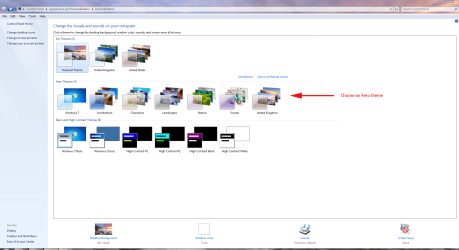
What version of Windows Seven are you using? You need Home Premium upwards.

Aero1.PNG


Aero2.PNG
 

My Computer

Computer Manufacturer/Model Number
HP Pavilion Elite 495UK
OS
Windows 7 Ultimate SP1 64-Bit
CPU
Intel Core i7 870 @ 2.93GHz
Motherboard
MSI 2A9C (CPU1)
Memory
8Gb Dual-Channel DDR3 @ 664MHz
Graphics Card(s)
nVidia GeForce GTX 460 1024MB dedicated RAM
Sound Card
Realtek HD Audio
Monitor(s) Displays
HP2310i
Screen Resolution
1920 x 1080
Hard Drives
1x1954GB Hitachi HDS22020ALA 330 (RAID), 1x1954GB Hitachi External for backup and storage
PSU
460W
Case
HP Elite
Cooling
Air cooled
Keyboard
Logitech K750 solar-powered keyboard
Mouse
Logitech Wireless M180 mouse
Internet Speed
2Mb
Other Info
Pure Avanti Flow Internet Radio with iPod Dock, 64Gb iPod, HP USB Speakers, Sony MDR-V500 Headphones, Sony Vaio F-Series Laptop
Again, what version of Windows are you using? Please fill in your system specs to better help you...
 

My Computer

Computer Manufacturer/Model Number
HP Pavilion dv6-2020ev
OS
Ubuntu 12.10
CPU
Intel Core i7 720QM
Motherboard
Its a HP secret...
Memory
4GB RAM
Graphics Card(s)
NVIDIA GeForce 230M
Sound Card
IDT
Screen Resolution
1366x768
Hard Drives
500 GB
Mouse
HP
Internet Speed
4 Mbps
Thanks for the replys, gents. I'm using Win 7 Home Premium 64bit and I don't use Aero because 1) It screws up some of my Flight Simulator airplanes and 2) I don't like it.

Window Color and Appearance has little or no affect on Windows 7 basic theme it will work on Windows Classic theme.
The only way to change the color on a Windows 7 basic theme is to find a custom theme where the theme maker has done the basic part of the theme to.

Thanks, Jerry, from all else that I can find about it, you're right. It should say so in the pop-up, though, I think, rather than saying the reverse. Poor show, my view.

Thanks, again.

Cheers,
Fritz
 

My Computer

Computer type
PC/Desktop
OS
Microsoft Windows 7 Professional 64-bit 7601 Multiprocessor Free Service Pack 1
CPU
Intel(R) Core(TM) i7-4790K CPU @ 4.00GHz
Motherboard
ASUSTeK COMPUTER INC. Z97-P
Memory
24.00 GB
Graphics Card(s)
NVIDIA GeForce GTX 960
Sound Card
(1) High Definition Audio Device (2) Sound Blaster Z (3)
Screen Resolution
1920 x 1080 x 32 bits (4294967296 colors) @ 60 Hz
Hard Drives
(1) Samsung SSD 850 EVO 1TB SCSI Disk Device (2) Samsung SSD 850 EVO 500G SCSI Disk Device (3) Generic- Compact Flash USB Device (4) Generic- MS/MS-Pro USB Device (5) Generic- SD/MMC USB Device (6) Generic- SM/xD-Picture USB Device
You do know that you can enable Aero, then open Properties for the Flight Simulator shortcut, open the compatibility tab and tick the check box 'Disable Desktop Composition', which will disable Aero automatically when running the game, and re-enable it when you close the game.
 

My Computer

Computer Manufacturer/Model Number
HP Pavilion dv6-2020ev
OS
Ubuntu 12.10
CPU
Intel Core i7 720QM
Motherboard
Its a HP secret...
Memory
4GB RAM
Graphics Card(s)
NVIDIA GeForce 230M
Sound Card
IDT
Screen Resolution
1366x768
Hard Drives
500 GB
Mouse
HP
Internet Speed
4 Mbps
Thanks for the replys, gents. I'm using Win 7 Home Premium 64bit and I don't use Aero because 1) It screws up some of my Flight Simulator airplanes and 2) I don't like it.

Window Color and Appearance has little or no affect on Windows 7 basic theme it will work on Windows Classic theme.
The only way to change the color on a Windows 7 basic theme is to find a custom theme where the theme maker has done the basic part of the theme to.
Thanks, Jerry, from all else that I can find about it, you're right. It should say so in the pop-up, though, I think, rather than saying the reverse. Poor show, my view.

Thanks, again.

Cheers,
Fritz
You're Welcome Fritz yes it can be confusing others have asked the same question.
Jerry
 

My Computer

Computer type
Laptop
Computer Manufacturer/Model Number
Sager NP9170
OS
Win 7 Pro x64 / Win 10 Pro
CPU
Intel(R) Core(TM) i7-3630QM CPU @ 2.40GHz
Motherboard
CLEVO P170EM
Memory
12 GB
Graphics Card(s)
(1) Intel(R) HD Graphics 4000 (2) NVIDIA GeForce GTX 675M
Sound Card
(1) Realtek High Definition Audio (2) Intel(R) Display Aud
Monitor(s) Displays
17.3
Screen Resolution
1920x1080
Hard Drives
(1) Samsung 860 EVO 500GB(OS) (1) Samsung 860 EVO 500GB(Data)
Keyboard
Backlite
Antivirus
MSE, Malwarebytes Pro
Browser
Firefox
Other Info
DESKTOP: Custom-built.
OS: Win 10 Pro x64.
CASE: Rosewill R5.
CPU: Intel I5 4670K CPU @ 3.40GHz.
CPU COOLER: Cool Master Hyper 212 EVO.
MOTHERBOARD: Asus Z87-A.
MEMORY: Kingston HyperX 2x4 GB.
GPU: Nvidia Geforce 650 TI.
PSU: Corsair TX750.
DRIVES: (1) Samsung 840 120 GB SSD (2) Western Digital blue 500 GB 7200 RPM.
You do know that you can enable Aero, then open Properties for the Flight Simulator shortcut, open the compatibility tab and tick the check box 'Disable Desktop Composition', which will disable Aero automatically when running the game, and re-enable it when you close the game.

Yes, thanks, Slasher, I do know that. I still don't like Aero, though.

Cheers,
Fritz
 

My Computer

Computer type
PC/Desktop
OS
Microsoft Windows 7 Professional 64-bit 7601 Multiprocessor Free Service Pack 1
CPU
Intel(R) Core(TM) i7-4790K CPU @ 4.00GHz
Motherboard
ASUSTeK COMPUTER INC. Z97-P
Memory
24.00 GB
Graphics Card(s)
NVIDIA GeForce GTX 960
Sound Card
(1) High Definition Audio Device (2) Sound Blaster Z (3)
Screen Resolution
1920 x 1080 x 32 bits (4294967296 colors) @ 60 Hz
Hard Drives
(1) Samsung SSD 850 EVO 1TB SCSI Disk Device (2) Samsung SSD 850 EVO 500G SCSI Disk Device (3) Generic- Compact Flash USB Device (4) Generic- MS/MS-Pro USB Device (5) Generic- SD/MMC USB Device (6) Generic- SM/xD-Picture USB Device
Oh well, your choice!
 

My Computer

Computer Manufacturer/Model Number
HP Pavilion dv6-2020ev
OS
Ubuntu 12.10
CPU
Intel Core i7 720QM
Motherboard
Its a HP secret...
Memory
4GB RAM
Graphics Card(s)
NVIDIA GeForce 230M
Sound Card
IDT
Screen Resolution
1366x768
Hard Drives
500 GB
Mouse
HP
Internet Speed
4 Mbps
Back
Top