TLS 1.0 and TLS 1.1 support will be discontinued on September 24, 2020

Brink

Administrator
Staff member
Local time
6:29 PM
Messages
74,951
Location
Oklahoma
Microsoft builds and supports a variety of software products for Linux systems and makes them available via package repositories on packages.microsoft.com. To support modern security standards, packages.microsoft.com will discontinue support for package downloads over Transport Layer Security (TLS) 1.0 and 1.1 protocols as of September 24, 2020. This means that any connection using these protocols will no longer work as expected, and no support will be provided. In order to continue to access packages from packages.microsoft.com after that date, organizations will need to enable TLS 1.2 (or a later version). Where possible, Microsoft recommends that organizations remove all TLS 1.0 and 1.1 dependencies in their environments and disable TLS 1.0/1.1 at the operating system level.


Source:
See also: TLS 1.0 and TLS 1.1 soon to be disabled by default in Microsoft Edge
 

My Computer My Computer

At a glance

64-bit Windows 11 Pro for WorkstationsIntel i7-8700K OC'd to 5 GHz64 GB (4x16GB) G.SKILL TridentZ RGB DDR4 3600...ASUS ROG-STRIX-GTX1080TI-O11G-GAMING
Computer type
PC/Desktop
Computer Manufacturer/Model Number
Self built custom
OS
64-bit Windows 11 Pro for Workstations
CPU
Intel i7-8700K OC'd to 5 GHz
Motherboard
ASUS ROG Maximus XI Formula Z390
Memory
64 GB (4x16GB) G.SKILL TridentZ RGB DDR4 3600 MHz
Graphics Card(s)
ASUS ROG-STRIX-GTX1080TI-O11G-GAMING
Sound Card
Integrated
Monitor(s) Displays
2 x Samsung Odyssey G7 27"
Screen Resolution
2560x1440
Hard Drives
1TB Samsung 990 PRO M.2,
4TB Samsung 990 PRO PRO M.2,
TerraMaster F8 SSD Plus NAS
PSU
Seasonic Prime Titanium 850W
Case
Thermaltake Core P3
Cooling
Corsair Hydro H115i
Keyboard
Logitech wireless K800
Mouse
Logitech MX Master 4
Internet Speed
2 Gb/s Download and 100 Mb/s Upload
Antivirus
Malwarebyte Anti-Malware Premium
Browser
Google Chrome
Other Info
Logitech Z625 speaker system,
Logitech BRIO 4K Pro webcam,
HP Color LaserJet Pro MFP M477fdn,
APC SMART-UPS RT 1000 XL - SURT1000XLI,
Galaxy S23 Plus phone
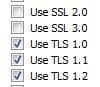
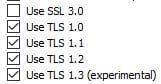
This is what I currently have selected in Internet Explorer 11.0.205
The left image is in Windows 7 and the right image is in Windows 10.

I went through the settings in Mozilla Firefox 80.0 and can't find any TLS settings.

I haven't yet tried using Microsoft Edge in either operating system.
 

Attachments

  • Capture.JPG
    Capture.JPG
    9.2 KB · Views: 19
  • Capture2.JPG
    Capture2.JPG
    10.7 KB · Views: 16
Last edited:

My Computer My Computer

At a glance

Windows 7 Professional SP1 64-bitIntel Core i7-4790 3.60 GHz32 GB DDR3-1600 MHzIntegrated Intel HD Graphics 4600
Computer type
PC/Desktop
Computer Manufacturer/Model Number
Dell OptiPlex 9020
OS
Windows 7 Professional SP1 64-bit
CPU
Intel Core i7-4790 3.60 GHz
Memory
32 GB DDR3-1600 MHz
Graphics Card(s)
Integrated Intel HD Graphics 4600
Monitor(s) Displays
Viewsonic 32" LCD
Hard Drives
Kingston SATA 3 240 GB SSD
Internet Speed
Spectrum Internet 1000 Mbps
Firefox lacks customization unlike something like Pale Moon with the Pale Moon Commander add-on.

At any rate, the pref can be set and changed, but I don't recommend it simply because some websites may still use the old TLS versions and I'm sure what Firefox has there by default has its purpose. Also, the security.tls.version.min pref will allow you to already enter a website that uses an old and outdated TLS version.

To see your TLS settings in Firefox type, about:config in the address bar, hit enter. Accept the warning and do in fact heed its advice.

Above in the search box in about:config search for TLS. The options you're looking for may be at the very bottom.

4 must mean TLS 1.3. Security.tls.version.* - MozillaZine Knowledge Base

Behavior for security.tls.version.fallback, max and min | Firefox Support Forum | Mozilla Support

enable-deprecated allows enabling protocols lower than locked min . Issue #541 . mozilla/policy-templates . GitHub

If you are a power user like I am and modify about:config, it would be wise to backup the Firefox profile or just the pref.js file in the profile folder. pref.js is where all of about:config settings are saved. It can be opened with Notepad ++ and I've used compare and contrast programs like Diffmerge to find out what prefs are different from an old pref.js file to the next. This is how I found an issue with a Pale Moon (Also available in Firefox and Chrome) extension called, I-dont-care-about-cookies and submitted my findings to the Dev who happily corrected the issue.

To find the pref.js file in a hurry use the program Everything.exe and search for it. If you have Thunderbird, portable Firefox, portable Thunderbird, or another Firefox derivative installed, more than one pref.js file will show up. So make sure you know how to deduce which version you're after.

Downloads - voidtools
 

My Computer My Computer

At a glance

Windows 7 Ultimate x64
Computer type
PC/Desktop
OS
Windows 7 Ultimate x64
Addendum:

With the Internet Options in the Windows control panel, I have had an error with a program installer for an add-on in Flight Simulator X. The paid-for add-on for FSX used a wrapper program to buy the product and get the serial number. Well, this wrapper program to install the add-on used an older version of TLS that wasn't enabled in the Internet Options under the Windows control panel. So once I enabled it I was then able to buy my add-on for FSX. Why they supported an older TLS version I don't know. That wrapper (which was old as ancient Rome) has now been replaced with something called, 'The Flight1 Agent.' Just another PITA if you ask me. And despite all this crap, add-ons from Flight1 often end up on file sharing websites, but us legit users have to suffer the consequences with convoluted rigamarole that can cause issues and irritation, and in my case, a possible fist through the monitor. LOL I mean, you just want to buy the damn thing! Not go through a bunch of crap!

PS: The encryption settings in Internet Options can be found at the bottom under the Advanced tab. Th9is is where Internet Explorer gets its settings as you have found.But it encompasses the whole of the computer as well. And I think TLS settings can be defined in Group Policy (only available in certain Windows versions). In Windows server IIS I'm sure that's the case. And I know for a fact this website runs in a Windows server. HEHE.
 

My Computer My Computer

At a glance

Windows 7 Ultimate x64
Computer type
PC/Desktop
OS
Windows 7 Ultimate x64
Back
Top