
Solved .tmp file on desktop

robert808

New member
Member
Local time
5:48 AM
Messages
85
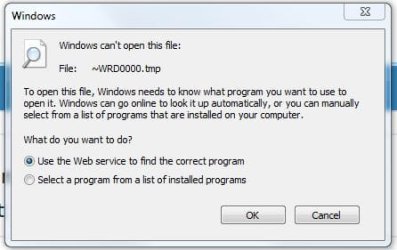
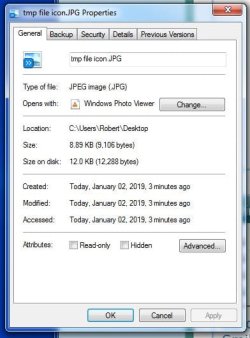
I found a tmp file on my desktop. it will not delete. what could it be and how to get rid of it? See attachments.
 

Attachments

  • tmp file icon.JPG
    tmp file icon.JPG
    8.5 KB · Views: 17
  • unable to open advisory.JPG
    unable to open advisory.JPG
    25.7 KB · Views: 17
  • file properties.JPG
    file properties.JPG
    37.5 KB · Views: 18

My Computer

Computer type
PC/Desktop
Computer Manufacturer/Model Number
Dell XPS One 2710
OS
windows 7 home premium 64 bit SP1
CPU
Intel Core i7 3770S @ 3.10GHz
Motherboard
Dell 02XMCT (CPU 1)
Memory
DDR3 16384 MBytes
Graphics Card(s)
Intel(R) HD Graphics 4000, NVIDIA GeForce GT 640M
Sound Card
Realtek High Definition Audio
Monitor(s) Displays
XPS One 2710 on Intel HD Graphics 4000 27"
Screen Resolution
2560x1440@59Hz
Hard Drives
1863GB
Case
All-in-One
Keyboard
Changed to old multimedia wireless set I had on XP machine
Internet Speed
1 Gb
Antivirus
Norton 360
Browser
IE, Chrome & Firefox
Other Info
A little worried about CPU temp that gets up to 180 F when watching TV via Media Center. 140-150 F normally.
Hi robert808,

I found a tmp file on my desktop. it will not delete. what could it be and how to get rid of it?

It sounds as if the .tmp file is active, hence why you can't delete it!
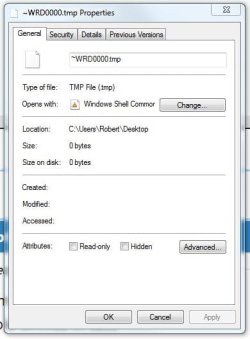
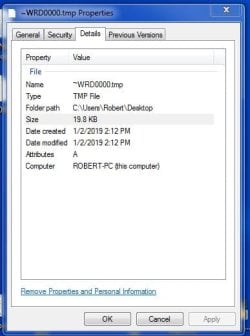
What does it say in the Details tab?
Have you looked in the Task Manager to see if there is anything running that could be causing this?
 

My Computer

Computer type
Laptop
Computer Manufacturer/Model Number
Fujitsu LIFEBOOK
OS
Win 7 HP SP1 64-bit Vista HB SP2 32-bit Linux Mint 18.3
CPU
Intel(R) Pentium(R) CPU P6200 @ 2.13GHz
Motherboard
FUJITSU FJNBB06
Memory
4.00 GB
Graphics Card(s)
Intel(R) Graphics Media Accelerator HD
Sound Card
[1] Realtek High Definition Audio [2] Intel(R) Display Audio
Screen Resolution
1366 x 768 x 32 bits (4294967296 colors) @ 59 Hz
Hard Drives
TOSHIBA MK5076GSX
Antivirus
AVG FREE
Clip of Properties is attached. Task Manager has nothing other than what is always there.
 

Attachments

  • tmp properties clip.JPG
    tmp properties clip.JPG
    30.7 KB · Views: 13

My Computer

Computer type
PC/Desktop
Computer Manufacturer/Model Number
Dell XPS One 2710
OS
windows 7 home premium 64 bit SP1
CPU
Intel Core i7 3770S @ 3.10GHz
Motherboard
Dell 02XMCT (CPU 1)
Memory
DDR3 16384 MBytes
Graphics Card(s)
Intel(R) HD Graphics 4000, NVIDIA GeForce GT 640M
Sound Card
Realtek High Definition Audio
Monitor(s) Displays
XPS One 2710 on Intel HD Graphics 4000 27"
Screen Resolution
2560x1440@59Hz
Hard Drives
1863GB
Case
All-in-One
Keyboard
Changed to old multimedia wireless set I had on XP machine
Internet Speed
1 Gb
Antivirus
Norton 360
Browser
IE, Chrome & Firefox
Other Info
A little worried about CPU temp that gets up to 180 F when watching TV via Media Center. 140-150 F normally.

My Computer

Computer type
Laptop
Computer Manufacturer/Model Number
Fujitsu LIFEBOOK
OS
Win 7 HP SP1 64-bit Vista HB SP2 32-bit Linux Mint 18.3
CPU
Intel(R) Pentium(R) CPU P6200 @ 2.13GHz
Motherboard
FUJITSU FJNBB06
Memory
4.00 GB
Graphics Card(s)
Intel(R) Graphics Media Accelerator HD
Sound Card
[1] Realtek High Definition Audio [2] Intel(R) Display Audio
Screen Resolution
1366 x 768 x 32 bits (4294967296 colors) @ 59 Hz
Hard Drives
TOSHIBA MK5076GSX
Antivirus
AVG FREE
Details give no clue. Details attached.
 

Attachments

  • Details.JPG
    Details.JPG
    32.3 KB · Views: 11

My Computer

Computer type
PC/Desktop
Computer Manufacturer/Model Number
Dell XPS One 2710
OS
windows 7 home premium 64 bit SP1
CPU
Intel Core i7 3770S @ 3.10GHz
Motherboard
Dell 02XMCT (CPU 1)
Memory
DDR3 16384 MBytes
Graphics Card(s)
Intel(R) HD Graphics 4000, NVIDIA GeForce GT 640M
Sound Card
Realtek High Definition Audio
Monitor(s) Displays
XPS One 2710 on Intel HD Graphics 4000 27"
Screen Resolution
2560x1440@59Hz
Hard Drives
1863GB
Case
All-in-One
Keyboard
Changed to old multimedia wireless set I had on XP machine
Internet Speed
1 Gb
Antivirus
Norton 360
Browser
IE, Chrome & Firefox
Other Info
A little worried about CPU temp that gets up to 180 F when watching TV via Media Center. 140-150 F normally.
Robert808. Open Computer & left click mouse on Local Disc (C), when that opens click on Users, then Robert, then Desktop & see if that temp file is listed, which it should be, now Right Click mouse on it & see if the menu that appears has Open File Location, if it does see where it is located as that might help you work out what it is.
 

My Computer

Computer type
PC/Desktop
Computer Manufacturer/Model Number
Self built using existing case
OS
Windows 7 Home Premium 64 bit sp1
CPU
Intel i5 3570 3.4Ghz Ivy Bridge SKT 1155 quad core
Motherboard
Gigabyte Z77-HD3 SKT 1155 2xSata 3, 4x USB 3.0
Memory
G-Skill Rip Jaws 16Gb (8x2) DDR3 -1600 PC3 12800 CL 10 red
Graphics Card(s)
Gigabyte NVIDIA GT610 1Gb DDR3 810/1200 PCI-E 2.0 Silent
Sound Card
NVIDIA High Definition & Realtech High Definition Audio
Monitor(s) Displays
2 x Philips 226V4L 16:9 aspect ratio
Screen Resolution
1920 x 1080 HD
Hard Drives
Samsung 840 Pro 256gb SSD, SATA 3.
Hitachi Touro Portable 1tb, USB 3.0 HDD used for image b/ups.
PSU
Corsair VS450
Case
Codeng
Cooling
PSU fan & CPU fan
Keyboard
Logitech
Mouse
Logitech Wireless trackball M570
Internet Speed
Wireless 3G. 3mg down & 550kb up.
Antivirus
Bitdefender Internet Security 2020
Browser
Opera (Current Version) & Firefox
Other Info
MS Office 2013 Pro. Davis weather station software. MGE Nova 600 avr UPS.
tmp file

I tried your last suggestion. It didn't show in the list. The tried and true restart got rid of it. Thanks for your help.
 

My Computer

Computer type
PC/Desktop
Computer Manufacturer/Model Number
Dell XPS One 2710
OS
windows 7 home premium 64 bit SP1
CPU
Intel Core i7 3770S @ 3.10GHz
Motherboard
Dell 02XMCT (CPU 1)
Memory
DDR3 16384 MBytes
Graphics Card(s)
Intel(R) HD Graphics 4000, NVIDIA GeForce GT 640M
Sound Card
Realtek High Definition Audio
Monitor(s) Displays
XPS One 2710 on Intel HD Graphics 4000 27"
Screen Resolution
2560x1440@59Hz
Hard Drives
1863GB
Case
All-in-One
Keyboard
Changed to old multimedia wireless set I had on XP machine
Internet Speed
1 Gb
Antivirus
Norton 360
Browser
IE, Chrome & Firefox
Other Info
A little worried about CPU temp that gets up to 180 F when watching TV via Media Center. 140-150 F normally.
Thanks for getting back & glad to hear you have fixed it.
 

My Computer

Computer type
PC/Desktop
Computer Manufacturer/Model Number
Self built using existing case
OS
Windows 7 Home Premium 64 bit sp1
CPU
Intel i5 3570 3.4Ghz Ivy Bridge SKT 1155 quad core
Motherboard
Gigabyte Z77-HD3 SKT 1155 2xSata 3, 4x USB 3.0
Memory
G-Skill Rip Jaws 16Gb (8x2) DDR3 -1600 PC3 12800 CL 10 red
Graphics Card(s)
Gigabyte NVIDIA GT610 1Gb DDR3 810/1200 PCI-E 2.0 Silent
Sound Card
NVIDIA High Definition & Realtech High Definition Audio
Monitor(s) Displays
2 x Philips 226V4L 16:9 aspect ratio
Screen Resolution
1920 x 1080 HD
Hard Drives
Samsung 840 Pro 256gb SSD, SATA 3.
Hitachi Touro Portable 1tb, USB 3.0 HDD used for image b/ups.
PSU
Corsair VS450
Case
Codeng
Cooling
PSU fan & CPU fan
Keyboard
Logitech
Mouse
Logitech Wireless trackball M570
Internet Speed
Wireless 3G. 3mg down & 550kb up.
Antivirus
Bitdefender Internet Security 2020
Browser
Opera (Current Version) & Firefox
Other Info
MS Office 2013 Pro. Davis weather station software. MGE Nova 600 avr UPS.
Hi robert808,

I tried your last suggestion. It didn't show in the list. The tried and true restart got rid of it. Thanks for your help.
Thanks for letting us know! :thumbsup:
 

My Computer

Computer type
Laptop
Computer Manufacturer/Model Number
Fujitsu LIFEBOOK
OS
Win 7 HP SP1 64-bit Vista HB SP2 32-bit Linux Mint 18.3
CPU
Intel(R) Pentium(R) CPU P6200 @ 2.13GHz
Motherboard
FUJITSU FJNBB06
Memory
4.00 GB
Graphics Card(s)
Intel(R) Graphics Media Accelerator HD
Sound Card
[1] Realtek High Definition Audio [2] Intel(R) Display Audio
Screen Resolution
1366 x 768 x 32 bits (4294967296 colors) @ 59 Hz
Hard Drives
TOSHIBA MK5076GSX
Antivirus
AVG FREE
Back
Top