TMP folder not being created in RamDisk

blinkydamo

New member
Local time
11:02 PM
Messages
2
Hi guys,

I have just installed a 512mb ramdisk and have setup the system variables for "Temp" and "Tmp" to z:\Temp and z:\Tmp. I have also set the user variable to the same and the cache for Firefox to z:\cache.

When I boot up the ramdisk is working and the "Temp" folder is created without problem, however the "Tmp" folder is not being created.

This is causing me to have problems when running programs from within compress archives. When I run the program it errors stating the file cannot be created. If however I manually create the "Tmp" folder in the ramdisk and run the same file from within the archive it works without error.

Is there a way to get Windows to create the "Tmp" folder when it boots so that I don't have to manually create it everytime. Or have a configured something incorrectly.

Cheers in advance,

Blinky
 

My Computer

Computer type
PC/Desktop
Computer Manufacturer/Model Number
Custom Build
OS
Windows 7 Ultimate 32bit and 64bit
CPU
Q6600
Graphics Card(s)
GTX 560 TI
Work around, I've created a batch file to create the directory on boot. Anyone know the correct way to do it?
 

My Computer

Computer type
PC/Desktop
Computer Manufacturer/Model Number
Custom Build
OS
Windows 7 Ultimate 32bit and 64bit
CPU
Q6600
Graphics Card(s)
GTX 560 TI
Does windows normally create a \tmp file? I'm only aware of \temp. Sounds like what you've done is the way to go.
 

My Computer

Computer type
PC/Desktop
Computer Manufacturer/Model Number
Lenovo IdeaCenter 450
OS
Windows 10 Pro X64
CPU
Intel Quad Core i7-4770 @ 3.4Ghz
Memory
16.0GB PC3-12800 DDR3 SDRAM 1600 MHz
Graphics Card(s)
Intel Integrated HD Graphics
Sound Card
Realtek HD Audio
Monitor(s) Displays
HP 22" LCD
Screen Resolution
1680 x 1050
Hard Drives
250GB Samsung EVO SATA-3 SSD
2TB Seagate ST2000DM001 SATA-2
1.5TB Seagate ST3150041AS SATA
Keyboard
Dell USB
Mouse
Lenovo USB
Internet Speed
Cable via Road Runner 3MB Upload, 30MB Download
Antivirus
Windows Defender, MBAM Pro, MBAE
Browser
Seamonkey
Other Info
UEFI/GPT
PLDS DVD-RW DH16AERSH
Batch File

I use the batch file method on my XP install (Page File and Temp folders on a RAM disc).

Does windows normally create a \tmp file? I'm only aware of \temp. Sounds like what you've done is the way to go.

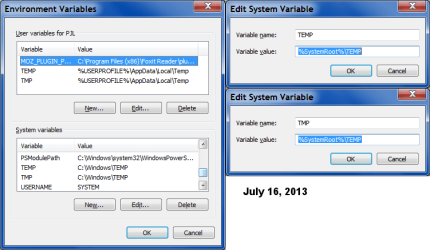
This is what my (default) W7 Environment Variables looked like:
Windows TEMP File Locations (Default) W7.png
 
Last edited:

My Computer

Computer type
PC/Desktop
Computer Manufacturer/Model Number
n/a
OS
W7 Ultimate SP1, LM19.2 MATE, W10 Home 1703, W10 Pro 1703 VM, #All 64 bit
CPU
AMD Phenom II x6 1100T, 3.3 GHz
Motherboard
ASUS M4A88T-M/USB3 (AM3)
Memory
12GB DDR3 1333 G-Skill (4GB x 2), G-Skill (2GB x 2)
Graphics Card(s)
NVIDIA GeForce GTX 660
Sound Card
Realtek?
Monitor(s) Displays
Samsung S23B350
Screen Resolution
1920x1080
Hard Drives
WD Green 2TB (SATA), WD Green 3TB (SATA), WD Blue 4TB (SATA), WD Blue 6TB (SATA)
PSU
Cooler Master
Case
Antec GX300 Tower
Cooling
3x Antec TRICOOL 120mm Fans
Mouse
Wired Optical
Internet Speed
DSL
Antivirus
Avast
Browser
Pale Moon (64 bit)
Other Info
2018-12-27 Upgraded HDDs
2015-12-10 Upgraded case, graphics card, storage
2015-08-15 Upgraded motherboard & RAM
2015-07-15 Upgraded LM17.1 to LM17.2
Yes, but they both point to the same place, \temp, not \tmp.
 

My Computer

Computer type
PC/Desktop
Computer Manufacturer/Model Number
Lenovo IdeaCenter 450
OS
Windows 10 Pro X64
CPU
Intel Quad Core i7-4770 @ 3.4Ghz
Memory
16.0GB PC3-12800 DDR3 SDRAM 1600 MHz
Graphics Card(s)
Intel Integrated HD Graphics
Sound Card
Realtek HD Audio
Monitor(s) Displays
HP 22" LCD
Screen Resolution
1680 x 1050
Hard Drives
250GB Samsung EVO SATA-3 SSD
2TB Seagate ST2000DM001 SATA-2
1.5TB Seagate ST3150041AS SATA
Keyboard
Dell USB
Mouse
Lenovo USB
Internet Speed
Cable via Road Runner 3MB Upload, 30MB Download
Antivirus
Windows Defender, MBAM Pro, MBAE
Browser
Seamonkey
Other Info
UEFI/GPT
PLDS DVD-RW DH16AERSH
This is a RAMDISK, so it resets itself on reboot right?
If that's the case, then there's only one way to do it, but you'll need to be working with the boot.wim file if it is windows 7 RAMDISK, if it's linux or XP, i have no idea how to do it, just tell me and i'll tell what tools to get if it's a win 7 one :)
 

My Computer

Computer type
PC/Desktop
OS
.
If the batch file is working, why not keep using it?

Did you remember to adjust the System and User Environment variables?

Remember to keep notes/screenshots of the changes you have made and any scripts you've created.
I have a "Configuration" folder where I store all of that info.
It's on my "Documents" partition, which I back up every month (before the Patch Tuesday updates).

Yes, but they both point to the same place, \temp, not \tmp.

Agreed.
It's just a convenience/redirection label.
 

My Computer

Computer type
PC/Desktop
Computer Manufacturer/Model Number
n/a
OS
W7 Ultimate SP1, LM19.2 MATE, W10 Home 1703, W10 Pro 1703 VM, #All 64 bit
CPU
AMD Phenom II x6 1100T, 3.3 GHz
Motherboard
ASUS M4A88T-M/USB3 (AM3)
Memory
12GB DDR3 1333 G-Skill (4GB x 2), G-Skill (2GB x 2)
Graphics Card(s)
NVIDIA GeForce GTX 660
Sound Card
Realtek?
Monitor(s) Displays
Samsung S23B350
Screen Resolution
1920x1080
Hard Drives
WD Green 2TB (SATA), WD Green 3TB (SATA), WD Blue 4TB (SATA), WD Blue 6TB (SATA)
PSU
Cooler Master
Case
Antec GX300 Tower
Cooling
3x Antec TRICOOL 120mm Fans
Mouse
Wired Optical
Internet Speed
DSL
Antivirus
Avast
Browser
Pale Moon (64 bit)
Other Info
2018-12-27 Upgraded HDDs
2015-12-10 Upgraded case, graphics card, storage
2015-08-15 Upgraded motherboard & RAM
2015-07-15 Upgraded LM17.1 to LM17.2
Back
Top