To shrink existing C drive on a new (unused) laptop

bawldiggle

GrayGhost2 ret.
Pro User
VIP
Local time
10:39 AM
Messages
895
Location
Australia
I want to shrink C partition on my new Lenovo laptop, to make space for two extra partitions.
- one for temporary downloads and the other for a possible virtual drive for testing
- the Lenovo is to replace an (ailing/unstable) 7 year old Toshiba

I have a bootable MiniTools (on DVD) to shrink the Lenovo C partition (with Windows OS inactive)
- I believe this is the only way normally unmovable files can be "relocated/moved" during the resize/shrink process

So far (out of the box) the Lenovo has not been used other than to register the OS with MS.
- no apps nor AV etc have been installed, it is a very clean machine.
- the default AV (Norton) has been uninstalled, but no defragging yet
Greg Rocker suggested Piriform's Defraggler. I would prefer a portable defragger at this point
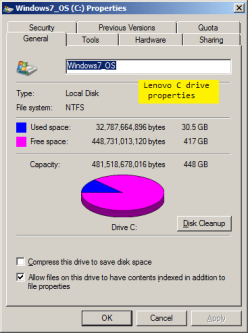
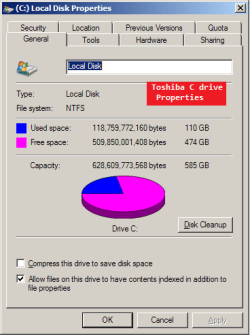
Current usage on my old Toshiba is 111GB approx 20% of the usable C:\ drive space (images at end of this post)

My plan is to use unallocated space on the Lenovo for one or two other partitions
1. Downloads
2. Virtual drive for testing ( not sure whether SandBoxie in C: or a separate virtual drive/partition)

I think 100GB for C on the Lenovo would be more than ample because I now use an external USB HDD for data.
- I do use hibernation occasionally so adequate space would be required for that
- is my target of 100GB enough (on the Lenovo) for OS, apps, AV, hibernation etc ?

This is my first foray into partitioning the OS drive
- I have partitioned data drives in the past using installed MiniTools

Any comments about my planned sizing (or anything else) would be appreciated, thank you :)

LENOVO DETAILS:
- the PC to be resized

Win7 PRO x64

Lenovo Partitions.png
Lenovo C props.png

OLD TOSHIBA CURRENT USAGE:
- for reference only

Win7 Home Premium x86
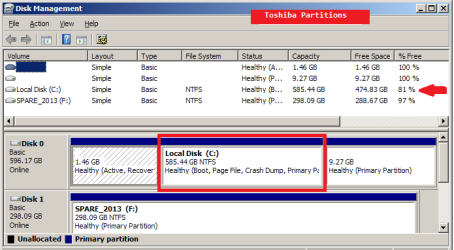
Toshiba Partitions.png
Toshiba Properties.png
 

My Computer My Computer

At a glance

XP Pro (x86) | 7 HP (x86) & (x64) | 7 Pro (x64)
Computer type
PC/Desktop
Computer Manufacturer/Model Number
Toshiba, Lenovo (laptops) + 4 rigs
OS
XP Pro (x86) | 7 HP (x86) & (x64) | 7 Pro (x64)
You seem to be on top of things. No comments required.
 

My Computer My Computer

At a glance

Vista, Windows7, Mint Mate, Zorin, Windows 8from 1.6GHz Duo to i7
Computer Manufacturer/Model Number
HP, Dell, Gateway, Toshiba - 4 laptops and 2 desktops
OS
Vista, Windows7, Mint Mate, Zorin, Windows 8
CPU
from 1.6GHz Duo to i7
Monitor(s) Displays
2x HP w2207
Hard Drives
5x HDD, 7x SSD, 12x Externals
Keyboard
with trackball - no mices
Mouse
Trackball mice
Internet Speed
DSL 6000
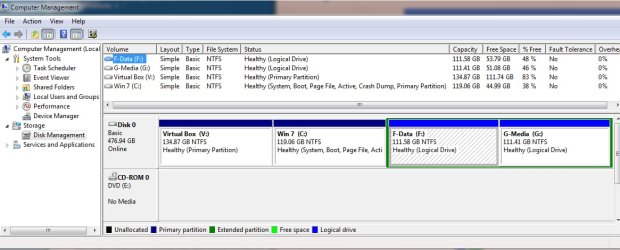
100GB for C as you describe it is more then enough. I also partition my drive for OS vs Data vs Virtual Machine (see below). I'm running Win 7 x32 without hibernation. Many, many programs installed (including Virtual Box). And still lots of free space (over 25 GB after you adjust for my 119GB allocation vs 100GB)

I also keep a "Media" partition - basically it's a partition I don't bother to backup (saves backup time and space) - It contains files I've copied or downloaded from elsewhere or are otherwise just unimportant to backup.

I'm curious why you keep your data on a USB drive? Is it an encrypted drive??

Also curious why you want a partition just for downloads??

Also, just personal preference, but since I image my disk periodically I've chosen to remove the Recovery Partition and reclaim its space. On the couple occasions when OS was corrupted, i restored the C partition from backup. Pretty quick recovery from a image of C vs. the recovery partition (Though i still keep a backup image of original disk with the recovery partition - just in case :) )
 

Attachments

  • 2016-02-02_205017.jpg
    2016-02-02_205017.jpg
    80.9 KB · Views: 0

My Computer My Computer

At a glance

Desk 1: Win 7 Pro x32; Desk 2: Windows 10 x64
Computer type
PC/Desktop
Computer Manufacturer/Model Number
Dell Optiplex 360 and Optiplex 755
OS
Desk 1: Win 7 Pro x32; Desk 2: Windows 10 x64
Hard Drives
500GB Crucial SSD in both Desktops
Other Info
Buffalo 6TB NAS, Raid 1
ComputerGeek

As you have probaly guessed IT is not my strong point. :o
- a semi-retired consulting engineer

Your structure is very similar to my plans.
- downloads partition as a transition area, the same as your "Media" partition.

I'm curious why you keep your data on a USB drive? Is it an encrypted drive??
I know nothing about encrypted drives :o
... also ...
The external data drive is moved between multiple PCs, it holds AutoCad snippets, PC maintenance tips (and my VBA coding library). My memory is not as good as it used to be (a stroke last September wiped out a few brain cells), as an extreme user of TXT files FileSearchEX does a good job of finding file contents.
Vastly superior to trying to use a data-base and FSex has been the best contents finder (RegX searches) I have found.
4,700 TXT files at last rough count.

Imaging is my next project, hopefully this week.
- since Windows-3, PC maintenance was not a priority at all until about 3 years ago, when I had to start from a zero knowledge base. Win-7 was not an easy experience to start with.

I see you are using VirtualBox in a partition (Windows OS virtual drive ?)
- your layout is very similar to my plans

I would like to use Linux for browsing and email, but not dual boot, a pain to be rebooting between Windows and Linux. (I think ?) VirtualBox (? no experience yet)

The Lenovo is my first new laptop in 6 years
- 3 new off line machines in that time, always entrusted to paid gurus :rolleyes:

~~ just personal preference, but since I image my disk periodically I've chosen to remove the Recovery Partition and reclaim its space. On the couple occasions when OS was corrupted, i restored the C partition from backup. Pretty quick recovery from a image of C vs. the recovery partition (Though i still keep a backup image of original disk with the recovery partition - just in case )
My plans also, learning how-to is the challenge.

Today I hope to shrink C: to 100GB using bootable MiniTool (already have ISO downloaded), if unmoveable OS files are not hogging space and limit the "shrink" process.
Defragging C: from a bootable drive is part of the plan but so far I cannot find one. GregRocker in 2009 was recommending Puran to defrag OS before boot, but lately he was touting the virtues of Defraggler. Now Greg is "Account Closed" so is not available for confirmation.

I am way out my league with defragging the OS, but I do use Mint on a stick to recover files from dead OS on other machines.

As a nervous-nellie I don't want to screw up the Lenovo. SevenForums is my lifeline :grouphug:

Thank you for your encouraging post :)
 

My Computer My Computer

At a glance

XP Pro (x86) | 7 HP (x86) & (x64) | 7 Pro (x64)
Computer type
PC/Desktop
Computer Manufacturer/Model Number
Toshiba, Lenovo (laptops) + 4 rigs
OS
XP Pro (x86) | 7 HP (x86) & (x64) | 7 Pro (x64)
A couple more commnets:

What is your backup plan? How are you going to backup all your important data you keep on that USB stick? (USB stick not always reliable and can be misplaced)
> Rely on making manual copies from time-to-time?
> Are the different PCs yours you move between yours? If so consider, keeping a folder on the PCs synced with each other an up in the cloud
> Does it make sense to keep USB stick backup in the cloud so its content is always within reach as you move place to place?
 

My Computer My Computer

At a glance

Desk 1: Win 7 Pro x32; Desk 2: Windows 10 x64
Computer type
PC/Desktop
Computer Manufacturer/Model Number
Dell Optiplex 360 and Optiplex 755
OS
Desk 1: Win 7 Pro x32; Desk 2: Windows 10 x64
Hard Drives
500GB Crucial SSD in both Desktops
Other Info
Buffalo 6TB NAS, Raid 1
Back
Top