How to shrink existing partition in Win XP so I can dualboot XP with 7

paparazzo79

New member
Member
Local time
12:57 AM
Messages
95
Hi guys.
Merry X-mas and Happy Ney Year to everyone.God bless you.
Anyway I got myself this old retro Sony Vaio P edition mini netbook with only 1GB of RAM and Win XP preinstalled
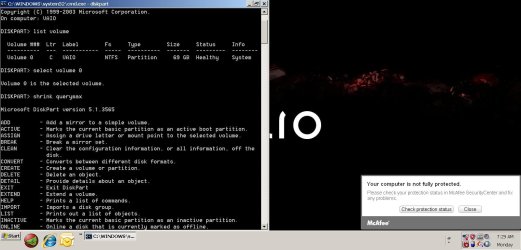
Since most of the apps are no longer supported I wanna install Win 7 alongside XP (dualboot), but I am unable to resize partition with diskpart,
Could anyone guide me which is the easiest and safest way to resize partition (keep current data intact)?
I see many of the programs do that but out of your experience which one to try and guide please?
 

Attachments

  • xp partitions.JPG
    xp partitions.JPG
    95.2 KB · Views: 1
  • shrink.JPG
    shrink.JPG
    102.2 KB · Views: 1

My Computer My Computer

At a glance

Windows 7 Ultimate 32bitamd athlon 64 3600+ X2Ati Radeon 3650 HD
OS
Windows 7 Ultimate 32bit
CPU
amd athlon 64 3600+ X2
Motherboard
Biostar NF520-TE
Graphics Card(s)
Ati Radeon 3650 HD
Monitor(s) Displays
Philips 227EL
diskpart
select vol c
shrink desired=20000
exit

The commands above will shrink the C: partition in 20G and leave it as unallocated space .

Boot from Win 7 installation drive and select the unallocated space to install on.
 

My Computers My Computers

  • At a glance

    Windows 7 HP 64i5 6600K - 800MHz to 4200MHz4+4G GSkill DDR4 3000IG - Intel 530
    Computer type
    PC/Desktop
    Computer Manufacturer/Model Number
    custom build
    OS
    Windows 7 HP 64
    CPU
    i5 6600K - 800MHz to 4200MHz
    Motherboard
    GA-Z170-HD3P
    Memory
    4+4G GSkill DDR4 3000
    Graphics Card(s)
    IG - Intel 530
    Monitor(s) Displays
    Samsung 226BW
    Screen Resolution
    1680x1050
    Hard Drives
    (1) -1 SM951 – 128GB M.2 AHCI PCIe SSD drive for Windows 7 and Lubuntu
    (2) -1 WD SATA 3 - 1T for Data
    (3) -1 WD SATA 3 - 1T for backup
    PSU
    Thermaltake 450W TR2 gold
    Keyboard
    Old and good Chicony mechanical keyboard
    Mouse
    Logitech mX performance - 9 buttons (had to disable some)
    Internet Speed
    500Mb/s
    Browser
    Firefox 64
    Other Info
    TinyWall firewall
  • At a glance

    Windows 7 Proi7-4500U 800MHz to 3.0GHz(4+4)G DDR3 1600IG intel 4400 + NVIDIA GeForce GT 745M
    Computer type
    Laptop
    System Manufacturer/Model Number
    Asus Q550LF
    OS
    Windows 7 Pro
    CPU
    i7-4500U 800MHz to 3.0GHz
    Motherboard
    Asus Q550LF
    Memory
    (4+4)G DDR3 1600
    Graphics Card(s)
    IG intel 4400 + NVIDIA GeForce GT 745M
    Sound Card
    Realtek
    Monitor(s) Displays
    LG Display LP156WF4-SPH1
    Screen Resolution
    1920 x 1080
    Hard Drives
    BX500 120G SSD for Windows and programs +
    1T HDD for data
    Internet Speed
    500 Mb/s
    Browser
    Firefox
    Other Info
    TinyWall firewall
You might not be able to resize from within Windows. You might have to boot into the windows 7 installation disk and launch command prompt from there.
 

My Computers My Computers

  • At a glance

    Windows 7 pro/Windows 10 ProIntel i7 860 Quad core 2.8 ghz8 gbATI Radeon HD 5770 1 gb ram
    Computer type
    PC/Desktop
    Computer Manufacturer/Model Number
    HP Pavillion Elite HPE-250f
    OS
    Windows 7 pro/Windows 10 Pro
    CPU
    Intel i7 860 Quad core 2.8 ghz
    Memory
    8 gb
    Graphics Card(s)
    ATI Radeon HD 5770 1 gb ram
    Monitor(s) Displays
    Alienware 25 AW2521HF & Viewsonic
    Screen Resolution
    1920 x1080 & 1680x1050
    Hard Drives
    WD blue 1 tb & 500 gb.
    Browser
    FF of course.
    Other Info
    https://www.bestbuy.com/site/hp-pavilion-elite-desktop-intel-core-i7-processor-8gb-memory-1tb-hard-drive/9921493.p?skuId=9921493
  • At a glance

    Windows 2012 R2 Data center/Linux Minti3 9100 3.6GHz, 8M cache, 4C/4T8GB 2666MT/s DDR4 ECC UDIMM
    Computer type
    PC/Desktop
    System Manufacturer/Model Number
    Dell Poweredge T140
    OS
    Windows 2012 R2 Data center/Linux Mint
    CPU
    i3 9100 3.6GHz, 8M cache, 4C/4T
    Memory
    8GB 2666MT/s DDR4 ECC UDIMM
    Monitor(s) Displays
    Viewsonic
    Screen Resolution
    1680x1050
    Hard Drives
    1 TB & 750 GB
    Other Info
    https://www.dell.com/en-us/work/shop/productdetailstxn/poweredge-t140?~ck=bt
I did try this setup last weekend just for curiosity.
It's doable.

1. Install Windows XP 1st.
2. download and run epm (EaseUS Free Partition Manager for Windows), to partition XP OS disk. in my test, 40GB was allocated for OS Windows 7 install.
3. Install Windows 7. when done, PC start menu, 1st choice is "Previous Windows" (i.e. XP. obviously Windows 7 cannot tell XP, names it this way). 2nd/default choice is Windows 7.

It's pretty easy and straight. no issues except activation (either XP or 7).
in XP Mode, I can read OE (Outlook Express) email. but no way to access any GPT disks. they are under "GPT Protection".
in Windows 7 mode, can access all disks, MBR and GPT, including SSD on NVMe slot.


Now, how to backup this dual setup?
 

My Computers My Computers

  • At a glance

    Windows 7 Pro 64-bitI7-970032 GB
    Computer type
    PC/Desktop
    Computer Manufacturer/Model Number
    HP Elite 800 G5
    OS
    Windows 7 Pro 64-bit
    CPU
    I7-9700
    Memory
    32 GB
  • At a glance

    Windows 7 Pro 64-bit
    Computer type
    Laptop
    System Manufacturer/Model Number
    ASUS UX305C
    OS
    Windows 7 Pro 64-bit
Back
Top