To use or not to use BOOTSECT.EXE ?

514cubic

New member
Local time
1:00 AM
Messages
5
'Hope you can help me with this one. To use or not to use BOOTSECT.EXE?

I have Windows 7 Pro installed on a brand new 1 TB HDD. My homemade server/ workstation works flawlessly it seems but for one important detail: it boots to the black and white screen of the "Windows boot manager". Only when I pick the choice of Windows 7 and press Enter do I finally get to go to Windows heaven.

The system itself contains another HDD which previously had Windows XP Pro on it before I wiped it out, leaving only the invisible \boot directory. Maybe is it this unknown directory left after I erased everything else that caused the problem.

At first, BCDEDIT would yield information of the kind:

Windows Boot Manager
--------------------
identifier: {bootmgr}
device: partition=X:

Windows Legacy OS Loader
------------------------
identifier: {ntldr}
device: partition=X:

Windows Boot Loader
-------------------
identifier: {current}
device: partition=C:

Then I used "Windows Recovery Environment" booting from the DVD of Windows and BCDEDIT gives this:

Windows Boot Manager
--------------------
identifier: {bootmgr}
device: partition=X:

Windows Boot Loader
-------------------
identifier: {current}
device: partition=C:

Windows Boot Loader
-------------------
identifier: {long series of alphanumeric}
device: ramdisk=[C:]\Recovery\ same long series of alphanumeric \Winre.wim
 
In the Boot Configuration Data, rather noticeable is the fact that the "Windows Legacy OS Loader" is gone after using "Windows Recovery Environment" and that "Windows Boot Loader" has now two entries instead of a single one. But I am still booting to the same black and white screen of the "Windows boot manager", where the choice of the Legacy OS has been replaced by Windows Recovery.

The problem remains, it's just not booting directly to Windows 7.

Is this a case where BOOTSECT.EXE should be used or has been used already by Windows Recovery without me knowing? I searched my HDD and couldn't find BOOTSECT.EXE anywhere, and yet it is there in the \boot directory of the Windows 7 DVD.

So, should I use BOOTSECT.EXE?
 

My Computer My Computer

Computer Manufacturer/Model Number
Home maid
OS
Windows 7 Pro 32 bits
CPU
2 X AMD Opteron
Motherboard
Tyan Tiger
Memory
2 Gig
Graphics Card(s)
ATI Radeon
Sound Card
Soundblaster
Monitor(s) Displays
LG
Hard Drives
4 X SATA
2 X IDE
PSU
Antec
Case
Antec
Cooling
Air
Hello 514cubic, welcome to Seven Forums!


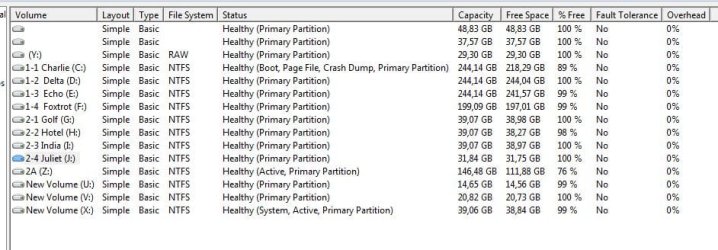
Before we make any specific recommendations will you please post a snip/screen-shot of the entire disk management drive map with a full description as to which drive/partition is which, so we can see what you have going on as there may be a fairly simple way to resolve the situation.

In the Windows start menu right click computer and click manage, in the left pane of the "Computer Management" window that opens click disk management and post a snip of that.


How to Upload and Post a Screenshot and File in Seven Forums
 

My Computer My Computer

Computer Manufacturer/Model Number
* BFK Customs *
OS
W 7 64-bit Ultimate
CPU
Intel Q9550 Yorkfield
Motherboard
ASUS P5Q Pro
Memory
8GB Dominator 8500C5D
Graphics Card(s)
ATI : XFX 5870
Sound Card
Realtek HD Audio 7-1
Monitor(s) Displays
1x 47" LCD HDMI & 3x 26" LCD HDMI
Screen Resolution
1920x1080P & 1920x1200
Hard Drives
1x 80GB Intel X25-M G2 SSD : 1x 500GB & 1x 640GB WD Caviar Black(s)
PSU
Corsair 620HX
Case
Cooler Master RC-690
Cooling
Tuniq Tower 120, 2x 140mm and 3x 120mm case fans
Keyboard
Microsoft 500
Mouse
Razer Diamondback 3G
Internet Speed
14 Mb/s
Other Info
1x Koutech 3Gb/s SATA HDD Hot Swap Rack
I appreciate such a swift move but the snipping will have to wait until tomorrow since I must take some well deserved rest and also since my Tyan machine is now off ( the problematic one )
 

My Computer My Computer

Computer Manufacturer/Model Number
Home maid
OS
Windows 7 Pro 32 bits
CPU
2 X AMD Opteron
Motherboard
Tyan Tiger
Memory
2 Gig
Graphics Card(s)
ATI Radeon
Sound Card
Soundblaster
Monitor(s) Displays
LG
Hard Drives
4 X SATA
2 X IDE
PSU
Antec
Case
Antec
Cooling
Air
Just post back to this same thread when you're able.
 

My Computer My Computer

Computer Manufacturer/Model Number
* BFK Customs *
OS
W 7 64-bit Ultimate
CPU
Intel Q9550 Yorkfield
Motherboard
ASUS P5Q Pro
Memory
8GB Dominator 8500C5D
Graphics Card(s)
ATI : XFX 5870
Sound Card
Realtek HD Audio 7-1
Monitor(s) Displays
1x 47" LCD HDMI & 3x 26" LCD HDMI
Screen Resolution
1920x1080P & 1920x1200
Hard Drives
1x 80GB Intel X25-M G2 SSD : 1x 500GB & 1x 640GB WD Caviar Black(s)
PSU
Corsair 620HX
Case
Cooler Master RC-690
Cooling
Tuniq Tower 120, 2x 140mm and 3x 120mm case fans
Keyboard
Microsoft 500
Mouse
Razer Diamondback 3G
Internet Speed
14 Mb/s
Other Info
1x Koutech 3Gb/s SATA HDD Hot Swap Rack
Here is the snip

DISKMNGT.JPG

Here is the result for the snip of Disk Management.

Note also that now upon booting to the Windows Boot Manager in black and white, the two choices offered to me are Windows 7 and "Ramdisk Options" about which I have next to no idea what to do with! Probably the result of "Windows Recovery Environment".
 

My Computer My Computer

Computer Manufacturer/Model Number
Home maid
OS
Windows 7 Pro 32 bits
CPU
2 X AMD Opteron
Motherboard
Tyan Tiger
Memory
2 Gig
Graphics Card(s)
ATI Radeon
Sound Card
Soundblaster
Monitor(s) Displays
LG
Hard Drives
4 X SATA
2 X IDE
PSU
Antec
Case
Antec
Cooling
Air
The Boot Configuration Data before and after Windows Recovery

Here is another view at the problematic boot process from the angle of the Boot Configuration Data provided by the command line BCDEDIT.EXE

Notice the use of the Courier New font instead of the Verdana. It makes the alignement of the columns of Boot Configuration Data more readable.


The before view:
Windows Boot Manager
--------------------
identifier {bootmgr}
device partition=X:
description Windows Boot Manager
locale en-US
inherit {globalsettings}
default {current}
resumeobject {f6e71c5e-098f-11df-bd80-87cb9f1d1ef5}
displayorder {ntldr}
{current}
toolsdisplayorder {memdiag}
timeout 30
Windows Legacy OS Loader
------------------------
identifier {ntldr}
device partition=X:
path \ntldr
description Earlier Version of Windows
Windows Boot Loader
-------------------
identifier {current}
device partition=C:
path \Windows\system32\winload.exe
description Windows 7
locale en-US
inherit {bootloadersettings}
recoverysequence {f6e71c60-098f-11df-bd80-87cb9f1d1ef5}
recoveryenabled Yes
osdevice partition=C:
systemroot \Windows
resumeobject {f6e71c5e-098f-11df-bd80-87cb9f1d1ef5}
nx OptIn

==================================
++++++++++++++++++++++++++++++++++
==================================

The after view:
Windows Boot Manager
--------------------
identifier {bootmgr}
device partition=X:
description Windows Boot Manager
locale en-US
inherit {globalsettings}
default {current}
resumeobject {f6e71c5e-098f-11df-bd80-87cb9f1d1ef5}
displayorder {current}
{f6e71c60-098f-11df-bd80-87cb9f1d1ef5}
toolsdisplayorder {memdiag}
timeout 40
Windows Boot Loader
-------------------
identifier {current}
device partition=C:
path \Windows\system32\winload.exe
description Windows 7 Opteron
locale en-US
inherit {bootloadersettings}
recoverysequence {f6e71c60-098f-11df-bd80-87cb9f1d1ef5}
recoveryenabled Yes
bootdebug No
osdevice partition=C:
systemroot \Windows
resumeobject {f6e71c5e-098f-11df-bd80-87cb9f1d1ef5}
nx OptIn
pae ForceDisable
custom:26000026 No
vga No
quietboot No
sos No
debug No
Windows Boot Loader
-------------------
identifier {f6e71c60-098f-11df-bd80-87cb9f1d1ef5}
device ramdisk=[C:]\Recovery\f6e71c60-098f-11df-bd80-87cb9f1d1ef5\Winre.wim,{f6e71c61-098f-11df-bd80-87cb9f1d1ef5}
path \windows\system32\winload.exe
description Windows Recovery Environment
inherit {bootloadersettings}
osdevice ramdisk=[C:]\Recovery\f6e71c60-098f-11df-bd80-87cb9f1d1ef5\Winre.wim,{f6e71c61-098f-11df-bd80-87cb9f1d1ef5}
systemroot \windows
nx OptIn
winpe Yes
 

Attachments

Last edited:

My Computer My Computer

Computer Manufacturer/Model Number
Home maid
OS
Windows 7 Pro 32 bits
CPU
2 X AMD Opteron
Motherboard
Tyan Tiger
Memory
2 Gig
Graphics Card(s)
ATI Radeon
Sound Card
Soundblaster
Monitor(s) Displays
LG
Hard Drives
4 X SATA
2 X IDE
PSU
Antec
Case
Antec
Cooling
Air
Mmmmm.... What happened to the courier new alignment?

It all looked sooooo much more neat in the window for writing the post when the Courier New font was used instead of Verdana. Now all the alignment is gone!

Sorry for the mishmash of GUI or Globally Unique Identifiers and their hexadecimal mysteries!
 
Last edited:

My Computer My Computer

Computer Manufacturer/Model Number
Home maid
OS
Windows 7 Pro 32 bits
CPU
2 X AMD Opteron
Motherboard
Tyan Tiger
Memory
2 Gig
Graphics Card(s)
ATI Radeon
Sound Card
Soundblaster
Monitor(s) Displays
LG
Hard Drives
4 X SATA
2 X IDE
PSU
Antec
Case
Antec
Cooling
Air
Back
Top