Too many services (?)

Gil

Sleep Guru
Member
VIP
Local time
12:07 AM
Messages
109
Location
Sydney
Hi all.
This is a scree capture of my running services (including windows) right from the moment I logged in.
Is it ok that windows media center network sharing is taking huge amount of RAM?


Uploaded with ImageShack.us
 

My Computer

Computer type
PC/Desktop
OS
Windows 7 x64
CPU
Core i7 3770K @ 4.5Ghz
Motherboard
Asus P8Z77-V-Deluxe
Memory
4x4 Corsair Vengence 1600
Graphics Card(s)
Sepphire HD 6970
Hard Drives
Intel 520 SSD 240GB
PSU
Thermaltake 750W
Case
Antec P2
Cooling
Corsair H100i
Keyboard
Razer blackwidow 2012
Mouse
Roccat Kone XTD
Antivirus
Bitdefender
Browser
Chrome
Your system seems fine to me. I like to think of myself as keeping a relatively clean system, and I have more than that running.
 

My Computer

Computer Manufacturer/Model Number
Custom
OS
Windows 7 Professional x64
CPU
Intel i7 2600K OC'd @ 4620 MHz
Motherboard
Asus P8Z68-V Pro
Memory
16GB GSkill Sniper 2133 Mhz (4x4GB)
Graphics Card(s)
EVGA GeForce GTX 480 SuperClocked+
Sound Card
Realtek High Definition Audio
Monitor(s) Displays
2x Acer S273HLbmii 27"
Screen Resolution
2 x 1920x1080
Hard Drives
64GB Crucial M4 SSD

Storage: Hitachi 1TB 5400RPM, Samsung 1.5TB 5400RPM
PSU
Corsair HW Series 750w (modular)
Case
Cooler Master HAF 932 Advanced Blue Edition
Cooling
CM Hyper 212+ CPU cooler, 3x 230mm + 1x 140mm case fans
Keyboard
Logitech MK320 (wireless)
Mouse
Logitech MK320 (wireless)
Internet Speed
30 Mb/s : 2 Mb/s
Windows Media Center does use a lot of RAM. However, Win 7 manages RAM well and if that RAM is needed by another application, Win 7 will take care of it. Win 7 uses the available RAM and that is a good thing. You don't have to worry about the system bogging down.
 

My Computer

Computer Manufacturer/Model Number
Home built
OS
Windows 7 Ultimate 32 bit
CPU
Intel(R) Pentium(R) 4 CPU 3.00GHz
Motherboard
ASUS P4P800-VM Motherboard Chipset: Intel 865G + ICH5
Memory
2.50 GB RAM
Graphics Card(s)
NVIDIA GeForce 7600 GS
Sound Card
SoundMax Integrated Digital Audio (Chip)
Monitor(s) Displays
ViewSonic VX 1962 wm
Screen Resolution
1680 X 1050
Hard Drives
Seagate Barracuda 7200.10 80 GB
ST380215A ATA Device 18.6 GB
Western Digital "My Book" external hard drive 750 GB
Cooling
Fan based
Keyboard
Microsoft Comfort Curve Keyboard 2000 v10 USB
Mouse
Logitec optic USB
Internet Speed
3.01 Mb/s download 0.64 Mb/s upload
1) WMP can share media between different computers on the same network, and with XBox 360 as well. For this to work, there’s a network sharing service that shares the library even if Media Player isn’t open, so if you use this feature you should not disable it.

To disable media sharing open up WMP, then click on the arrow under “Library” and choose the “Media Sharing” option. In the Media Sharing dialog box that opens up, uncheck both boxes. Hit OK and Yes at the prompt.

Also, stop and disable the service in Services.msc. Double click on WMP network sharing service, click on "Stop" to stop the service and change the startup type to Disabled.

2) 50-60 services are no big deal. I would say you have a pretty clean setup.
 

My Computer

Computer Manufacturer/Model Number
Too many to describe...
OS
Windows 7 x64 pro/ Windows 7 x86 Pro/ XP SP3 x86
Mine has 64 running and I have stripped my system quite a bit. I have about 10 processes being split between built in functions like hotkeys on the keyboard, and my printer...so yeah yours seems fine to me.
 

My Computer

Computer Manufacturer/Model Number
Toshiba A505-S6960
OS
Windows 7 Home Premium x64
CPU
Intel Core 2 Duo T6500 / 2.1 GHz
Memory
4.0GB Dual-Channel DDR2 @ 398MHz (6-6-6-18)
Graphics Card(s)
Onboard - Intel GMA 4500MHD 128MB
Sound Card
Onboard
If you guys say that it's pretty clean system with all these services, then why my computer is so slow after a boot and the HDD seems to work for very long period after boot. It takes me about 2 minutes after I click on Outlook 2007 to work on it.
 

My Computer

Computer type
PC/Desktop
OS
Windows 7 x64
CPU
Core i7 3770K @ 4.5Ghz
Motherboard
Asus P8Z77-V-Deluxe
Memory
4x4 Corsair Vengence 1600
Graphics Card(s)
Sepphire HD 6970
Hard Drives
Intel 520 SSD 240GB
PSU
Thermaltake 750W
Case
Antec P2
Cooling
Corsair H100i
Keyboard
Razer blackwidow 2012
Mouse
Roccat Kone XTD
Antivirus
Bitdefender
Browser
Chrome
If your system is slow after bootup, it has do with the items configured to start at boot. Go to MSCONFIG, then click on "Startup" tab. Disable everything except your antivirus, reboot. Does that help?
 

My Computer

Computer Manufacturer/Model Number
Too many to describe...
OS
Windows 7 x64 pro/ Windows 7 x86 Pro/ XP SP3 x86
I have the Realtek HD audio manager
Microsoft Security Essentials
Microsoft sidebar
Microsoft Stickynotes.

For my rig, this is not much for startup items.
 

My Computer

Computer type
PC/Desktop
OS
Windows 7 x64
CPU
Core i7 3770K @ 4.5Ghz
Motherboard
Asus P8Z77-V-Deluxe
Memory
4x4 Corsair Vengence 1600
Graphics Card(s)
Sepphire HD 6970
Hard Drives
Intel 520 SSD 240GB
PSU
Thermaltake 750W
Case
Antec P2
Cooling
Corsair H100i
Keyboard
Razer blackwidow 2012
Mouse
Roccat Kone XTD
Antivirus
Bitdefender
Browser
Chrome
You could eliminate Realtech HD audio manager from startup and open it when you need it. The same for Sticky notes.
 

My Computer

Computer Manufacturer/Model Number
Home built
OS
Windows 7 Ultimate 32 bit
CPU
Intel(R) Pentium(R) 4 CPU 3.00GHz
Motherboard
ASUS P4P800-VM Motherboard Chipset: Intel 865G + ICH5
Memory
2.50 GB RAM
Graphics Card(s)
NVIDIA GeForce 7600 GS
Sound Card
SoundMax Integrated Digital Audio (Chip)
Monitor(s) Displays
ViewSonic VX 1962 wm
Screen Resolution
1680 X 1050
Hard Drives
Seagate Barracuda 7200.10 80 GB
ST380215A ATA Device 18.6 GB
Western Digital "My Book" external hard drive 750 GB
Cooling
Fan based
Keyboard
Microsoft Comfort Curve Keyboard 2000 v10 USB
Mouse
Logitec optic USB
Internet Speed
3.01 Mb/s download 0.64 Mb/s upload
You could eliminate Realtech HD audio manager from startup and open it when you need it. The same for Sticky notes.

What exactly the realtek manager does?

If I do so for sticky notes, then I'll loose all the things I wrote on them, wouldn't I?
 

My Computer

Computer type
PC/Desktop
OS
Windows 7 x64
CPU
Core i7 3770K @ 4.5Ghz
Motherboard
Asus P8Z77-V-Deluxe
Memory
4x4 Corsair Vengence 1600
Graphics Card(s)
Sepphire HD 6970
Hard Drives
Intel 520 SSD 240GB
PSU
Thermaltake 750W
Case
Antec P2
Cooling
Corsair H100i
Keyboard
Razer blackwidow 2012
Mouse
Roccat Kone XTD
Antivirus
Bitdefender
Browser
Chrome
The culprit must be Realtek HD audio manager.
Uncheck it and check the response.
I had the same issue and unchecking fixed it.
 

My Computer

Computer Manufacturer/Model Number
MacBook Pro
OS
Lion
CPU
i5
Memory
4GB
Graphics Card(s)
Intel
Screen Resolution
1200x800
Hard Drives
Seagate FreeAgent GO 250GB Ext. HDD
ok I'll try it.
thanks
 

My Computer

Computer type
PC/Desktop
OS
Windows 7 x64
CPU
Core i7 3770K @ 4.5Ghz
Motherboard
Asus P8Z77-V-Deluxe
Memory
4x4 Corsair Vengence 1600
Graphics Card(s)
Sepphire HD 6970
Hard Drives
Intel 520 SSD 240GB
PSU
Thermaltake 750W
Case
Antec P2
Cooling
Corsair H100i
Keyboard
Razer blackwidow 2012
Mouse
Roccat Kone XTD
Antivirus
Bitdefender
Browser
Chrome
You are welcome. Do post ur results. All the best.
 

My Computer

Computer Manufacturer/Model Number
MacBook Pro
OS
Lion
CPU
i5
Memory
4GB
Graphics Card(s)
Intel
Screen Resolution
1200x800
Hard Drives
Seagate FreeAgent GO 250GB Ext. HDD
You could eliminate Realtech HD audio manager from startup and open it when you need it. The same for Sticky notes.

What exactly the realtek manager does?

If I do so for sticky notes, then I'll loose all the things I wrote on them, wouldn't I?

Retek manager is a console for managing your audio settings. It definitely does not have to load at startup nor run all of the time.

Your sticky notes should still be there if you disable it at startup; you would just need to start it manually.
 

My Computer

Computer Manufacturer/Model Number
Home built
OS
Windows 7 Ultimate 32 bit
CPU
Intel(R) Pentium(R) 4 CPU 3.00GHz
Motherboard
ASUS P4P800-VM Motherboard Chipset: Intel 865G + ICH5
Memory
2.50 GB RAM
Graphics Card(s)
NVIDIA GeForce 7600 GS
Sound Card
SoundMax Integrated Digital Audio (Chip)
Monitor(s) Displays
ViewSonic VX 1962 wm
Screen Resolution
1680 X 1050
Hard Drives
Seagate Barracuda 7200.10 80 GB
ST380215A ATA Device 18.6 GB
Western Digital "My Book" external hard drive 750 GB
Cooling
Fan based
Keyboard
Microsoft Comfort Curve Keyboard 2000 v10 USB
Mouse
Logitec optic USB
Internet Speed
3.01 Mb/s download 0.64 Mb/s upload
Realtek HD Control Panel is used to configure the onboard Realtek HD sound on your motherboard, ie when you plug in speakers, you use the Realtek HD Audio Control panel to configure the onboard sound. But you can configure speaker settings from the windows sound control panel also. Disabling the startup entry shouldnt have any effect on your sound.

Also, for sticky notes, they are saved in a file called stickynotes.snt located in C:\Users\<UserName>\AppData\Roaming\Microsoft\Sticky Notes (Its a hidden file). All your notes are there in a single file (unless you delete any note).
 

My Computer

Computer Manufacturer/Model Number
Too many to describe...
OS
Windows 7 x64 pro/ Windows 7 x86 Pro/ XP SP3 x86
Realtek HD Control Panel is used to configure the onboard Realtek HD sound on your motherboard, ie when you plug in speakers, you use the Realtek HD Audio Control panel to configure the onboard sound. But you can configure speaker settings from the windows sound control panel also. Disabling the startup entry shouldnt have any effect on your sound.

Also, for sticky notes, they are saved in a file called stickynotes.snt located in C:\Users\<UserName>\AppData\Roaming\Microsoft\Sticky Notes (Its a hidden file). All your notes are there in a single file (unless you delete any note).

Thanks for the tip.

So for the realtek, if I want to plugin my headphones, I will have to manually set the the sound to work only for the headphones? or it will play the sound on speakers as well?
 

My Computer

Computer type
PC/Desktop
OS
Windows 7 x64
CPU
Core i7 3770K @ 4.5Ghz
Motherboard
Asus P8Z77-V-Deluxe
Memory
4x4 Corsair Vengence 1600
Graphics Card(s)
Sepphire HD 6970
Hard Drives
Intel 520 SSD 240GB
PSU
Thermaltake 750W
Case
Antec P2
Cooling
Corsair H100i
Keyboard
Razer blackwidow 2012
Mouse
Roccat Kone XTD
Antivirus
Bitdefender
Browser
Chrome
You can create a shortcut to Realtek on your desktop. When you need the console, click on the shortcut to open it. You may already have a shortcut to it in Start>Programs.
 

My Computer

Computer Manufacturer/Model Number
Home built
OS
Windows 7 Ultimate 32 bit
CPU
Intel(R) Pentium(R) 4 CPU 3.00GHz
Motherboard
ASUS P4P800-VM Motherboard Chipset: Intel 865G + ICH5
Memory
2.50 GB RAM
Graphics Card(s)
NVIDIA GeForce 7600 GS
Sound Card
SoundMax Integrated Digital Audio (Chip)
Monitor(s) Displays
ViewSonic VX 1962 wm
Screen Resolution
1680 X 1050
Hard Drives
Seagate Barracuda 7200.10 80 GB
ST380215A ATA Device 18.6 GB
Western Digital "My Book" external hard drive 750 GB
Cooling
Fan based
Keyboard
Microsoft Comfort Curve Keyboard 2000 v10 USB
Mouse
Logitec optic USB
Internet Speed
3.01 Mb/s download 0.64 Mb/s upload
Realtek HD Control Panel is used to configure the onboard Realtek HD sound on your motherboard, ie when you plug in speakers, you use the Realtek HD Audio Control panel to configure the onboard sound. But you can configure speaker settings from the windows sound control panel also. Disabling the startup entry shouldnt have any effect on your sound.

Also, for sticky notes, they are saved in a file called stickynotes.snt located in C:\Users\<UserName>\AppData\Roaming\Microsoft\Sticky Notes (Its a hidden file). All your notes are there in a single file (unless you delete any note).

Thanks for the tip.

So for the realtek, if I want to plugin my headphones, I will have to manually set the the sound to work only for the headphones? or it will play the sound on speakers as well?
No no..we are talking about configuration. If you connect ur headphone, sound flows from it, ceasing the speakers. But if you want to apply some effects for it like Equaliser, Suuround, Environment settings, you can do it thru the HD Manager of Realtek.
 

My Computer

Computer Manufacturer/Model Number
MacBook Pro
OS
Lion
CPU
i5
Memory
4GB
Graphics Card(s)
Intel
Screen Resolution
1200x800
Hard Drives
Seagate FreeAgent GO 250GB Ext. HDD
ok got it. Thanks for the help. I will post the results tomorrow.
 

My Computer

Computer type
PC/Desktop
OS
Windows 7 x64
CPU
Core i7 3770K @ 4.5Ghz
Motherboard
Asus P8Z77-V-Deluxe
Memory
4x4 Corsair Vengence 1600
Graphics Card(s)
Sepphire HD 6970
Hard Drives
Intel 520 SSD 240GB
PSU
Thermaltake 750W
Case
Antec P2
Cooling
Corsair H100i
Keyboard
Razer blackwidow 2012
Mouse
Roccat Kone XTD
Antivirus
Bitdefender
Browser
Chrome
If you guys say that it's pretty clean system with all these services, then why my computer is so slow after a boot and the HDD seems to work for very long period after boot. It takes me about 2 minutes after I click on Outlook 2007 to work on it.

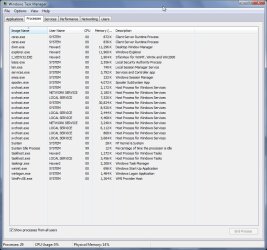
After booting the system I usually have about 28 processes (services) running.
Most functions are instantaneous. I do have to do some things manually, for the most part I find that preferable.

Ap

Taskmgr.jpg
 

My Computer

Computer Manufacturer/Model Number
Assembled in my workshop
OS
Windows 7 Home Premium
CPU
Intel Core 2 Duo @ 3.00gHz
Motherboard
Gigabyte GA-P35-S3G
Memory
4 GB
Graphics Card(s)
ATI Radeon HD 2600 XT
Sound Card
RME 24/96 Card, Realtek Internal Audio PreSonus FireStudio
Monitor(s) Displays
Acer 1917 (x2)
Screen Resolution
1280 x 1024 on both monitors
Hard Drives
Three 250GB Seagate SATA Barracuda 7200rpm
PSU
Rosewill 500-watt
Case
Rosewill mid-tower
Cooling
Noctua NH-U9B (CPU), PwrSupply fan + single large case Fan
Keyboard
Macally w/2/USB ports.
Mouse
Trackman Wheel
Other Info
Event 20/20 bas studio monitors, Yamaha sub.
Rackmount Korg/Roland/Yamaha synthesizers,
Cubase MIDI/audio recording. Sony Soundforge audio/mastering software. CD Architect Mastering. RME & Presonus audio interfaces.
Back
Top