Too much windows services!!!

Frederick930

New member
Local time
4:32 AM
Messages
6
Hey guys, i have a laptop with windows 7 ultimate 32 bit. I keep getting low fps on games, slow load time, etc.
I realize that there's too many windows background service running, there's about 30-40 windows startup program enabled but i dunno which one to disable, i already tried disabling all of them once, but after i did that, the laptop brightness became low and i can't increase it, the aero is disabled, the sound is disabled and cannot be enabled, etc. and so i let the startup programs running again.

Please help! what windows service i can turn off without harming the laptop? like windows updates, windows search index, etc.
 

My Computer

OS
Windows 7 ultimate 32bit.
Post a snip of your startups so that we can have a look. You can get a good view with this program. Make the window large enough so that they all fit.
 

My Computer

Computer Manufacturer/Model Number
HP, Dell, Gateway, Toshiba - 4 laptops and 2 desktops
OS
Vista, Windows7, Mint Mate, Zorin, Windows 8
CPU
from 1.6GHz Duo to i7
Monitor(s) Displays
2x HP w2207
Hard Drives
5x HDD, 7x SSD, 12x Externals
Keyboard
with trackball - no mices
Mouse
Trackball mice
Internet Speed
DSL 6000
U mean the startup programs? well i dunno how to use the program u gave me, but my startup programs (excluding the windows services) are :
-AVG Internet Security
-Intel(R) Common user interface (igfxtray.exe)
-Intel(R) Common user interface (hkcmd.exe)
-Intel(R) Common user interface (igfxpers.exe)
-RocketDock

i dunno why there's 3 of intel user interface, but they came from different directory.
 

My Computer

OS
Windows 7 ultimate 32bit.
StartUp Programs are ok. If they are only these above. User Snipping Tool to create a screnshoot and Upload it here on SF.
Make screnshoot from your processes list in Task Manager,and StartUp tab in System Configuration(Start->Run->msconfig Startup tab)Also and in Services tab,check Hide all Microsoft Services,and post a screnshoot from services list.
 

My Computer

Computer type
PC/Desktop
Computer Manufacturer/Model Number
Custom Build
OS
Windows 10 Pro x64
CPU
Intel Core i5 4440 @Stock
Motherboard
Gigabyte Z97 D3H
Memory
4 x 4GB HyperX Fury DDR3
Graphics Card(s)
Gigabyte GTX 1050Ti O4G
Sound Card
Integrated
Monitor(s) Displays
Dell P2417H
Screen Resolution
1920 x 1080
Hard Drives
Samsung EVO 850 120GB / Toshiba DT01ACA050 1TB 7200prm 32MB
PSU
Riotoro Onyx 750W
Case
NZXT H500 Black-Red
Cooling
Stock CPU + NZXT 120mm + 2x120mm red fans
Keyboard
Modecom Volcano Lanparty
Mouse
Asus ROG Gladius / DeepCool E-Pad Plus
Internet Speed
DOCSIS 50/3 Mbit
Browser
Google Chrome
Other Info
Asus K55VJ(i5 3210M, GT635M / 2GB, 8GB DDR3, 500GB HDD)
there's about 30-40 windows startup program
This is what you said. That is why I was focussing on the startups. But you are apparently talking about running processes. Of those, you actually have very few. 50 to 60 running processes is the norm.

If you post the running processes, we could have a look. But it is unlikely that you can make a lot of gain because most of those processes are probably dormant anyhow. You can see that when you look into the CPU column of the processes tab in task manager.
 

My Computer

Computer Manufacturer/Model Number
HP, Dell, Gateway, Toshiba - 4 laptops and 2 desktops
OS
Vista, Windows7, Mint Mate, Zorin, Windows 8
CPU
from 1.6GHz Duo to i7
Monitor(s) Displays
2x HP w2207
Hard Drives
5x HDD, 7x SSD, 12x Externals
Keyboard
with trackball - no mices
Mouse
Trackball mice
Internet Speed
DSL 6000
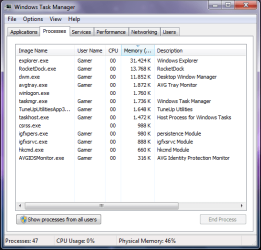
oops, i accidently said startup programs, sorry. The thing that bugged me is the TONS of windows services that ate ALOT of ram. there's around 30-40 windows service running in the background, they use around 300-400mb of ram, and i only have 1gb of ram, which only leaves me around half of my total ram for my apps. all i wanted to do is to get rid some of the windows services without harming my laptop.
Btw i attached the image of the processes running in the background
 

Attachments

  • Task manager.png
    Task manager.png
    19.7 KB · Views: 29

My Computer

OS
Windows 7 ultimate 32bit.
Hmm, sorry to say but those are not all the processes because you did not click the button on the bottom left that says "Show processes from all users".

But from the ones you show there are really only 3 big ones - and those you need (Rocket Dock of course being optional). All the others are really not worth persuing. They are too small.

With 1GB of RAM you are are really underequipped for Win7. I suggest you consider upgrading your RAM. Scan with this site (system scanner tool) and you know what your options are: RAM Memory Upgrade: Dell, Mac, Apple, HP, Compaq. USB drives, SSD at Crucial.com
 

My Computer

Computer Manufacturer/Model Number
HP, Dell, Gateway, Toshiba - 4 laptops and 2 desktops
OS
Vista, Windows7, Mint Mate, Zorin, Windows 8
CPU
from 1.6GHz Duo to i7
Monitor(s) Displays
2x HP w2207
Hard Drives
5x HDD, 7x SSD, 12x Externals
Keyboard
with trackball - no mices
Mouse
Trackball mice
Internet Speed
DSL 6000
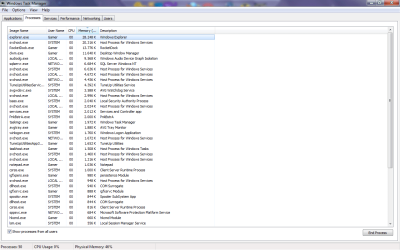
lol, that what my friend told me to when i ask him about this issue, well i'm not gonna waste any money on ram for now, i'm buying a console around june or july, and... i have compaq presario c700, i dunno if i can increase it ram, but my other laptop can. and.. do u know how much does 2gb of ram cost? i want to increase it to 3gb since most of my games are memory hogs, btw here's the screenshot for the processes.
 

Attachments

  • Task manager.png
    Task manager.png
    40 KB · Views: 56

My Computer

OS
Windows 7 ultimate 32bit.
As mentioned already your really at the minimum required.

Windows7 usually wants approx 1GB of RAM just to run. And as whs said, 50-60 process running is totally normal.

Since 1GB is your total RAM, as Windows is already cutting back on resources, youll be limited in what you can do.

With 1GB of RAM, gaming is really not even a option for you, sorry to say. :(


How much it will cost to upgrade will really depend what you have.
 

My Computer

Computer Manufacturer/Model Number
Custom (Self Build)
OS
Windows 7 Home Premium 64bit
CPU
Intel Core i7 2700k
Motherboard
eVGA P67 SLI
Memory
8GB Mushkin Redline Ridgebacks @1866
Graphics Card(s)
EVGA GTX570 SC
Sound Card
XiFi Titanium HD
Monitor(s) Displays
LG W2453V
Screen Resolution
1920x1080
Hard Drives
Intel 320 80GB -- Intel X25-V 40GB --WD Black 1TB x2 -- WD Blue 640GB
PSU
Seasonic x750
Case
Corsair 600T SE White
Cooling
eVGA Superclocked CPU Cooler
Keyboard
Saitek Cyborg
Antivirus
Kaspersky
Browser
IE
Other Info
LG BD/DVD
All I see are those tune up utilities (4.4K). All the other biggies you will need.

If you run the scan from my earlier link, you will know what it costs to upgrade. But again, with 1GB of RAM, you will not see any performance - regardless what you do.
 

My Computer

Computer Manufacturer/Model Number
HP, Dell, Gateway, Toshiba - 4 laptops and 2 desktops
OS
Vista, Windows7, Mint Mate, Zorin, Windows 8
CPU
from 1.6GHz Duo to i7
Monitor(s) Displays
2x HP w2207
Hard Drives
5x HDD, 7x SSD, 12x Externals
Keyboard
with trackball - no mices
Mouse
Trackball mice
Internet Speed
DSL 6000
so there's really nothing i can do apart from increasing the ram? if yes, this thread can now rest in peace... i mean locked :P
 

My Computer

OS
Windows 7 ultimate 32bit.
As mentioned already your really at the minimum required.

Wow, I agree. That is minimum from some I've seen. Mine is sixty which I thought was fairly low.
 

My Computer

Computer Manufacturer/Model Number
Averatec 6130HS-20
OS
Windows 7 Professional 32-bit (6.1, Build 7600)
CPU
Intel(R) Pentium(R) 4 3.00 GHz HT
Memory
2.0 GB
Graphics Card(s)
ATI Mobility Radeon 9600 64MB
Sound Card
Realtek AC'97 Audio
Screen Resolution
1280 x 800
Hard Drives
Seagate 96023A 60GB 7200RPM -
Seagate FreeAgentDesktop 250GB
Cooling
20 Inch Box Fan
Mouse
Targus PAWM10 Wireless Optical Laptop Mouse
I would also consider changing AVG to Avast 6 or MS Security Essentials. AVG bloated up a few years back and never slimmed down so is not recommended by anyone here. Removing it has solved other's problems.

You don't have enough RAM to run RocketDock which is an animated version of the stable Win7 task bar. Save it for when you get enough RAM.

I would uncheck everything in msconfig>Startup except your AV and gadgets. All others are freeloaders on your RAM, CPU and startup time - and can spy on you. You will have no issues if you're not using special graphics or sound settings in those managers. We can help you sort any issues you are confused about, like a useless built-in wireless crapware program which is inferior to Win7 built-in wireless manager.

After several restarts check back in msconfig to see if anything has written itself back into Startup, and if so turn it off in its program Preferences, or uninstall it. Then from the msconfig>Services tab "Hide all MS Services" and see what is running that you didn't start. Uncheck everything and check back to see if anything writes itself back in to turn it off in its Preferences or Uninstall.

These are things you can do in lieu of more RAM for now and will appreciably improve performance. However I do this even on high end installs as it gives perfect performance in hundreds of installs to date.
 
Last edited:
+1 for Winpatrol (which can be removed later or just use the portable version)- post good screenshots for both Startup Programs (advanced mode) and Services, tabs.

+1 for replacing AVG with Avast.

+1 for Greg's suggestions, particularly uninstalling Rocketdock. For a decent alternative that does not run anything in the background see my post here, and if you have any questions or need help post there?

+1 for following Black Viper's guide- be sure to read the advice's thoroughly and be certain any 'Tweaked' changes will not render any features you require as inoperative.

+1 get some more ram.
 

My Computer

Computer type
PC/Desktop
OS
Windows 7
Back
Top